
B173HW01 V0/V5 Driver Kit
5.0Editor score
VGA and HDMI inputs
Seventeen-point-three-inch panel support
40-pin LVDS interface
Panel-specific compatibility
An LCD controller board for a laptop screen can restore a damaged panel, convert a retired display into a standalone monitor, or support a custom electronics project. A useful board must match the panel’s resolution, connector, voltage, backlight system, and supported timing rather than simply fitting physically.
This guide compares ten controller solutions for internal LCD panels of different sizes and interfaces. We considered stated compatibility, display resolution, input options, power requirements, installation guidance, included components, and the practical troubleshooting information supplied for each product.
Each review identifies the configuration that best suits a particular project, while the comparison and buying guide help narrow the field first. Product availability and prices change, so confirm the current listing and full panel specifications before purchasing.
5.0Editor score
5.0Editor score

4.6Editor score
As an Amazon Associate we earn from qualifying purchases.
The table below compares resolution, panel interface, supported screen sizes, and major input or installation features. Use it to identify the board that matches your panel before comparing the detailed reviews.


This controller board is designed specifically for 1366×768 LCD panels using a 30-pin eDP interface. Its 4.4 rating reflects a generally well-targeted solution, and the standout feature is the unusually explicit compatibility boundary: the board supports panels from 11.6 to 15.6 inches but is not intended for 1920×1080 displays.
We may earn a commission when you buy through this link, at no additional cost to you.
The supplied compatibility list includes NT156WHM-N42, B156XTN04.1, LP156WHU-TPA1, N140BGE-E33, B140XTN02.1, N133BGE-E31, and B116XTN02.3. A pre-connected signal cable simplifies panel-side wiring, while the marked Pin 1 orientation helps reduce errors. The board also uses low standby consumption below 0.3 watts.
The principal trade-off is its narrow resolution target. Users expecting a universal controller may be disappointed, but the product is more useful because it plainly explains its limits. A standard 12-volt DC source with at least 2 amperes is required through a 5.5 by 2.1 millimeter connector, and insufficient current can cause flickering, no-signal messages, or repeated restarts.
Choose this board for a 1366×768 internal panel whose model number appears in the supplied list. It is especially appropriate for a repair or DIY display project where a stable 30-pin eDP connection and clear pin alignment guidance are priorities. Confirm resolution, connector count, and panel model before ordering.
A dedicated resolution target is often more valuable than a broadly worded universal claim. The listed panel models and explicit exclusion of 1920×1080 make this a sensible choice when the original laptop panel is known and its replacement board is missing.
The 12-volt, 2-amp minimum recommendation and pre-connected cable simplify setup, but the power adapter remains a critical part of the system. A stable source helps prevent common restart and flicker symptoms that can otherwise be mistaken for a defective board.
We may earn a commission when you buy through this link, at no additional cost to you.
This VSDISPLAY board targets 15.6-inch 1366×768 WLED panels with a 40-pin LVDs interface. It earns a 4.4 rating and stands out for broad support among the LP156WH, B156XW, and related panel families. Unlike a basic laptop-specific replacement, it accepts VGA and DVI video input and includes a speaker audio output.
We may earn a commission when you buy through this link, at no additional cost to you.
Compatibility is the strongest feature. The listed models include LP156WH2 TL, LP156WH3 TL, LP156WH4 TL, LP156WHB TL, BT156GW02, N156B6, B156XTN03, B156XW02, and B156XW04. Installation is described as a connection-and-power process, and the board includes diagnostic guidance for no-signal, white-screen, and black-screen conditions.
The trade-off is the requirement for a separately prepared 12-volt DC adapter rated above 2 amperes. The audio connector uses a 4-pin PH2.0 arrangement for 8-ohm, 2-watt speakers, and the board should be used in an insulated environment. These are specific hardware requirements rather than shortcomings, but they add planning to a build.
This is a strong choice for converting a listed 15.6-inch 1366×768 panel into a freestanding display using common computer outputs. It is less suitable for a 30-pin eDP panel or a 1920×1080 model. Verify the exact panel number, resolution, connector layout, and backlight arrangement before installation.
VGA and DVI inputs make the board less dependent on the original laptop motherboard. That is valuable for a repair bench, media display, or custom monitor where a desktop or mini-PC will provide the video signal.
The extensive model list is useful, but a similarly named panel can still differ in connector pinout or timing. Matching the complete manufacturer part number is safer than relying only on the apparent screen size and resolution.
We may earn a commission when you buy through this link, at no additional cost to you.
This controller is intended for 30-pin eDP WLED panels operating at 1920×1080, covering screen sizes from 11.6 to 17.3 inches. Its 4.0 rating reflects a useful but more specialized option, particularly for builders who want a conventional VGA source and a replacement for a compatible internal laptop panel.
We may earn a commission when you buy through this link, at no additional cost to you.
The supplied model list is extensive. It includes N116HSE variants, N133HSE variants, B140HAN01 series panels, B156HAN01.1 and B156HAN01.2, LP156WF4-SP, N156HGE-EA1, NV156FHM-N31 and NV156FHM-N41, LTN156HL01, and several 17.3-inch N173 and B173 models. That breadth is a major advantage for repair technicians or hobbyists with mixed panel inventories.
Its limitations are equally clear. The board offers VGA rather than DVI, HDMI, or USB video, and the 12-volt power adapter must be prepared separately. The troubleshooting notes distinguish likely causes of black, white, and restarting displays, directing users to inspect cable orientation, resolution, signal source, and available current.
Pick this controller when your exact panel appears in the compatibility list and the source device can output VGA at the required resolution. It is a sensible full-HD repair option for internal screens. If your project needs digital input, choose a board with DVI, HDMI, or USB instead.
The number of explicitly named panel models sets this board apart for repair work involving several common laptops. A complete model-number match provides more confidence than a generic claim based solely on diagonal size.
The symptom-based guidance helps distinguish a signal path issue from power or connection errors. It is particularly helpful for first-time builders because it identifies the areas to inspect before replacing hardware.
We may earn a commission when you buy through this link, at no additional cost to you.
This 30-pin LVDs controller is designed for 17- and 19-inch 1280×1024 displays, with VGA and DVI video inputs plus speaker audio output. Its 4.6 rating is the strongest among the selections carrying a numeric customer rating, making it an appealing budget-oriented choice for larger legacy panels.
We may earn a commission when you buy through this link, at no additional cost to you.
The board supports a broad family of older displays. Listed models include LTM170EU, LTM170EH, LTM170E5, LTM170E6, HSD170ME13, M170EG01, M170EG02, M170EN01, M170EN04, M170EN05, M170EN06, LM170E03, and multiple 19-inch LM190 and M190 series panels. That range makes it useful for reviving displays that may otherwise be discarded.
The main compromise is resolution. It is expressly configured for 1280×1024 rather than modern 1920×1080, so it should not be chosen for a higher-resolution panel even if the connector appears similar. The stated 5-volt LVDs signal requirement, 5-volt jumper, and 12-volt power input above 3 amperes must all be handled correctly.
This board is a good fit for building a dedicated 17- or 19-inch display from a supported panel, especially when the source has VGA or DVI. Its diagnostic LED and troubleshooting notes make troubleshooting more systematic. Confirm the complete panel number and electrical requirements before purchasing.
Older 17- and 19-inch panels remain common in industrial equipment and salvage projects. Supporting a long list of these displays gives the board a useful role where a modern full-HD controller would not match the native timing or interface.
The combination of VGA, DVI, and a 4-pin PH2.0 speaker output keeps the project compact. It also allows a user to send video and audio through one controller rather than assembling separate conversion hardware.
We may earn a commission when you buy through this link, at no additional cost to you.
This VSDISPLAY kit is intended for 21.5- and 23.8-inch 1920×1080 LVDS panels. It has a 4.2 rating and distinguishes itself as a conversion package rather than a bare controller. The box includes a new-version controller board, inverter, 30-pin signal cable, keyboard with cable, and a USB cable for a specified LM238WF5 touch-screen configuration.
We may earn a commission when you buy through this link, at no additional cost to you.
The compatible panel list includes T215HVN01.0, M215HW03 V1 and V2, M215HGE-L23, M215HTN01.1, and LM238WF1 SLE3. VGA and DVI inputs support common source devices, while the speaker connector handles audio. A 12-volt adapter rated above 3 amperes is recommended, although it is not included.
The important restriction is LM215WF3-SLA1, which the product description expressly says will not work. Users should not interpret the broad panel-size range as universal compatibility. The presence of an inverter also requires careful attention to the original backlight arrangement and connector orientation.
This is a strong choice for turning a listed large panel into a freestanding monitor with a straightforward accessory set. It is less attractive for a compact internal repair requiring eDP. Verify the full panel code, connector layout, and inverter requirements before beginning the conversion.
Including the inverter, signal cable, and keyboard reduces the number of separate parts a builder must source. That convenience can be more valuable than a minor feature difference when assembling a complete display from a salvaged panel.
The exclusion of LM215WF3-SLA1 demonstrates why exact model matching matters. Even among panels of the same size and resolution, LVDS pinouts and electrical behavior can differ enough to prevent a board from working.
We may earn a commission when you buy through this link, at no additional cost to you.
This H/D controller supports 1920×1080 panels with a 30-pin eDP interface and carries a 4.1 rating. It is positioned for DIY repairs and monitor projects using common 11.6-, 13.3-, 14-, 15.6-, and 17.3-inch panels, while explicitly excluding the lower 1366×768 resolution.
We may earn a commission when you buy through this link, at no additional cost to you.
Its installation-focused design includes a pre-connected signal cable and a clearly marked Pin 1 on the board. Supported models include B156HAN01.1 and B156HAN01.2, LP156WF4-SP, NV156FHM-N31 and N41, several B140HAN01 variants, N133HSE-EA1 and EB1, N173HCE-E31, and N173HGE-E11. Technical support is offered for unlisted models.
The trade-off is that this is essentially a panel-focused driver board rather than a general-purpose input converter. A 12-volt adapter with at least 2 amperes is recommended, and the included guidance says to use the supplied signal cable instead of an original laptop cable. Matching the native resolution and connector remains mandatory.
This board is appropriate for a technician replacing a failed controller on a listed full-HD eDP panel. It is also useful for a project where the host can provide a compatible eDP signal. For a generic monitor conversion, a board with VGA, DVI, HDMI, or USB input may be more convenient.
The pre-connected lead and visible Pin 1 marker reduce the chance of reversing the panel cable. This is particularly helpful for first-time repairs where a damaged eDP connector would be costly and inconvenient.
A 30-pin connector alone is not enough to establish compatibility. The board must also match the panel’s native timing and resolution, which is why its 1920×1080 restriction is central rather than a minor detail.
We may earn a commission when you buy through this link, at no additional cost to you.
The Taidacent universal LVDS board is presented as a flexible DIY display platform covering stated screen sizes from 10 to 65 inches. It has a 4.0 rating and uses an NT68676 UFG chipset. HDMI, DVI, and VGA inputs are listed, making it appealing for projects in which the source hardware may change.
We may earn a commission when you buy through this link, at no additional cost to you.
The board also provides menu controls for power, menu, volume, and adjustment or exit functions. Its OSD language list includes Simplified Chinese, Traditional Chinese, English, French, German, Italian, Spanish, Portuguese, Japanese, and Korean. These are useful features for a multi-purpose conversion board rather than a bare repair component.
The drawback is that the supplied factual information provides less detail about exact panel compatibility than the more specialized products. A broad size range does not mean every LVDS panel will work. Users must still match resolution, bit depth, channel format, connector pinout, backlight type, and timing. The package is described as a single drive board.
Choose this board when building a general-purpose LVDS controller and you can independently verify the panel’s electrical requirements. It may be especially attractive for experimentation with multiple source types. Before ordering, obtain the panel datasheet and confirm that the seller’s configuration supports the exact resolution and interface.
Having HDMI, DVI, and VGA available on one board makes it easier to reuse a display across different source devices. That flexibility is valuable in a workshop, classroom, or testing environment.
The advertised size range describes a broad potential market, not blanket compatibility. Precise LVDS timing, bit depth, and pinout still need to be established before the board can be expected to display an image reliably.
We may earn a commission when you buy through this link, at no additional cost to you.
This VSDISPLAY board supports 21.5- and 23.8-inch 1920×1080 panels through a 30-pin LVDS interface. Its 5.0 rating makes it one of the highest-rated options in the guide, while USB and H/D input, image rotation, and a useful set of included components distinguish it from a basic repair board.
We may earn a commission when you buy through this link, at no additional cost to you.
Compatible panels include T215HVN01.0, M215HW03 V1 and V2, M215HGE-L23, M215HTN01.1, LM238WF1-SLE3, and LM238WF5-SSA1. The stated USB function supports video, picture, and text playback, and the H/D function supports H/D 1.4. Audio output accommodates either 8-ohm or 4-ohm, 2-watt speakers.
There are still important limits. LM215WF3-SLA1 is expressly excluded, the power adapter is not included, and the 12-volt input should deliver more than 2 amperes. The package includes the controller, inverter board, 30-pin signal cable, and keyboard with cable. Rotation is useful for overhead, kiosk, or portrait-style installations, provided the source and panel arrangement are configured correctly.
This is our leading conversion choice for a compatible large panel because it combines broad input options, a five-star rating, rotation, audio, and a reasonably complete package. It is less relevant to an eDP laptop-panel repair, but excellent for a modern standalone display using a listed LVDS screen.
USB video support expands the board beyond a basic desktop-monitor conversion. It can suit digital signage, information displays, or embedded projects where USB playback is more convenient than repeatedly changing video sources.
The ability to rotate the image 180 degrees can improve the orientation of a panel mounted behind an enclosure or used in a specialized display arrangement. The benefit is meaningful when physical placement, rather than input choice, is the main project constraint.
We may earn a commission when you buy through this link, at no additional cost to you.
This controller is designed for 15.6-inch 1366×768 LCD LED screens using a 40-pin LVDS interface. It supports LP156WH4, LTN156AT17, B156XW02, and LP156WH2, and its standout feature is the combination of HDMI and VGA input for a classic laptop-panel conversion.
We may earn a commission when you buy through this link, at no additional cost to you.
The product description emphasizes stable signal decoding, adjustable brightness, contrast, and color, rapid response to remote-control commands, and support for multiple source devices. These functions make it relevant for a dedicated monitor, display test rig, or embedded installation where analog and digital sources may both be used.
Unlike several competing products, the supplied description does not give a detailed power specification, connector pinout, backlight procedure, or exact jumper settings. It also has no numeric customer rating, so buyers have less visible performance history to evaluate. These limitations make careful seller confirmation important before a build.
The board is a good candidate for a 15.6-inch 1366×768 panel when HDMI and VGA flexibility are priorities and the panel is one of the named models. It is less attractive for complex repair work where precise power and diagnostic guidance is needed. Verify the interface, backlight arrangement, supported timing, and required accessories.
Modern digital and legacy analog connectivity make the board practical for a display that may serve more than one computer. It can reduce the need for adapters and simplifies everyday source changes.
The absence of a stated power requirement or detailed wiring guide is important for a first-time installer. Ask the seller for the board revision, connector arrangement, backlight connection, and supported signal timing before beginning.
We may earn a commission when you buy through this link, at no additional cost to you.
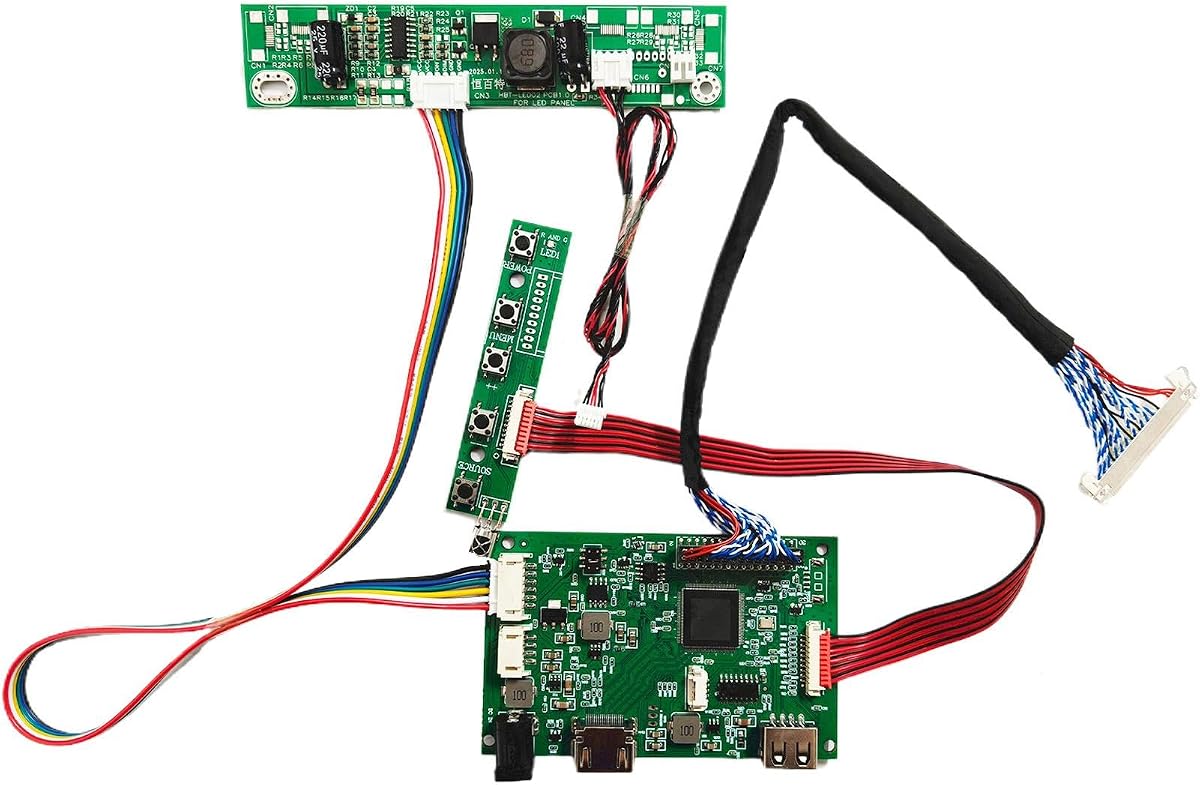
This driver board is purpose-built for B173HW01 V0/V5 and B173HW02 V0/V1 panels, with the listing specifically identifying B173HW02 V.1. It supports 17.3-inch 1920×1080 displays through a 40-pin LVDS interface and accepts VGA and HDMI input. Its 5.0 rating supports its position as a highly targeted premium option.
We may earn a commission when you buy through this link, at no additional cost to you.
The controller converts a host video signal into a format the display can recognize and handles brightness and color adjustment instructions. The description also highlights low-power-mode support and integration with notebook-style power systems, which are useful for a panel salvaged from a laptop or compact portable display.
The trade-off is its narrow focus. This is not a universal 17.3-inch board, and a panel that merely shares the same dimensions and resolution may still have a different interface, timing, or pinout. The supplied information also discusses the importance of matching host output, screen interface, screen model, resolution, and panel type before installation.
Choose this kit when your panel is a specifically listed B173HW01 or B173HW02 revision and you want HDMI and VGA support in a dedicated conversion. It is the premium pick for that specific hardware. If the exact revision cannot be confirmed, choose a more broadly specified LVDS solution instead.
Listing the supported panel revisions in the product name is unusually helpful. A buyer can make a direct comparison with the label on the back of an LCD rather than relying on a vague promise of universal 17.3-inch support.
The stated ability to manage screen voltage, support low-power behavior, and process brightness and color commands makes the kit more than a passive signal adapter. That integration is valuable for portable or battery-conscious projects.
We may earn a commission when you buy through this link, at no additional cost to you.
The safest choice is determined by exact panel compatibility, not screen size or connector appearance alone. Evaluate resolution, interface, timing, backlight requirements, power, input sources, and included accessories before selecting a controller.
Begin with the complete part number printed on the panel label. Manufacturers can release visually identical versions with different backlights, pinouts, timing requirements, and connector arrangements. A board that appears to fit the same laptop size may still fail if the revision is wrong. Several products in this guide list extensive compatible models, which provides a stronger basis for selection than a generic size range. Compare the listing exactly, including suffixes such as V0, V1, V5, and other revision codes.
A controller should match the panel's native resolution because it must decode the incoming timing and generate the signals expected by the LCD. The 1366×768 and 1920×1080 boards in this guide are not interchangeable, even when their physical connectors look similar. The B173HW01/B173HW02 kit is designed for a full-HD 17.3-inch panel, while the 17- and 19-inch VGA/DVI board targets 1280×1024. Check the operating resolution shown in the operating system or service manual and avoid a controller that merely claims to support high-definition output.
Laptop displays may use eDP, LVDS, or another interface, and a 30-pin connector does not automatically mean eDP. The 1366×768 and 1920×1080 30-pin boards in this guide are specifically described as eDP products, while the larger 40-pin boards use LVDs. Connector count, voltage, data lanes, and pin assignments all matter. If the original panel has 40 pins, do not assume a 30-pin board can be adapted, and do not force an unfamiliar cable into a connector that appears similar.
The input requirement depends on the computer or media device that will drive the screen. VGA is common on older boards, DVI offers a convenient digital option, HDMI suits modern source devices, and USB video can simplify media playback. A panel-focused eDP board may be ideal for replacing a damaged laptop controller but inconvenient for a standalone display. The Taidacent board offers several inputs, while the VSDISPLAY USB board adds playback-oriented USB functionality and rotation.
Adequate current is as important as the correct voltage. The listed recommendations range from 12 volts and 2 amps to 12 volts and more than 3 amps. A source with inadequate current can produce repeated restarts, flickering, unstable brightness, or no-signal messages even when the board and panel are compatible. Confirm the barrel dimensions, especially the 5.5 by 2.1 millimeter size repeatedly mentioned in the product data, and use a stable adapter. A controller with a 5-volt jumper or panel-side power requirement also needs careful configuration.
The controller supplies the logic and signal path, but an LCD panel still needs proper backlight power and control. Some listings include an inverter board, while others assume the panel's existing or separately supplied backlight system will be used. A 40-pin LVDS board is not automatically compatible with every WLED panel. Check the original backlight connector, voltage, enable or PWM requirements, and number of lamps. The 21.5- and 23.8-inch kits include an inverter, but the exact supplied inverter must still correspond to the chosen panel.
A complete package can make a conversion much faster. Useful extras include a pre-connected panel signal cable, a 30-pin or 40-pin cable, an inverter, a keyboard with menu controls, and a USB cable for a compatible touch panel. Pre-connected cables are particularly helpful for eDP repairs because the Pin 1 orientation must be correct and connector damage is costly. However, accessories do not compensate for a board that targets the wrong resolution or panel family.
Good troubleshooting information can save considerable time. Boards that describe LED states, no-signal messages, black or white screens, jumper positions, and power-related restarts provide a practical diagnostic sequence. Start with the board alone when instructions permit, then add the panel, signal source, and power in stages. For boards with limited documentation, ask the seller for a wiring diagram, supported timing list, jumper settings, and confirmation of the exact power adapter before assembly.
Before installation, disconnect all power and record the original panel model, resolution, connector orientation, backlight arrangement, and jumper positions. Photograph the existing wiring and compare every label with the controller instructions. Connect the board to the appropriate video source at the correct resolution, and use a grounded power supply that meets the stated voltage and current requirements.
Install the panel cable without force. On eDP boards, align the pre-connected plug with Pin 1 and the red-circle marking on the board. On LVDS boards, confirm the 30-pin or 40-pin orientation and any 3.3-volt or 5-volt jumper setting. Attach the correct backlight or inverter connection, secure the cable so it cannot tug against the panel connector, and avoid pinching the signal cable where it bends.
Power the controller in a controlled sequence. If the product documentation describes a self-check, use it to establish whether the board starts before connecting the panel. Then add the screen and video source, select the panel's native resolution, and adjust brightness, contrast, and audio only after a stable image appears. If a black, white, flickering, or restarting display occurs, power down and check the power source, cable orientation, signal settings, jumper position, and supported resolution before changing components.
No. The controller must match the panel's resolution, interface, connector pinout, timing, and backlight requirements. Screen size alone is not enough, and even two panels of the same size and resolution can use different connectors or revisions. Use the complete part number from the panel label to make a compatibility decision.
A 30-pin eDP board is intended for compatible internal panels using embedded DisplayPort signaling, while a 40-pin LVDs board is intended for compatible legacy or large LCD panels using LVDS signaling. They are not interchangeable because the electrical standards, data-lane arrangement, power requirements, and connector pinouts differ.
The most common causes are incorrect cable orientation, a mismatched resolution, an absent or invalid signal, an incorrectly configured jumper, or insufficient power current. Power everything down before checking connections, verify the source is outputting the panel's native resolution, and test with a stable adapter that meets or exceeds the board's stated current requirement.
The 30-pin 1920×1080 board specifically states that no driver installation is required. Most display controllers operate at the hardware level, but the source computer still needs to output a compatible resolution and refresh rate. Configuration may be needed on the source device even when no special controller driver is necessary.
Not necessarily. A universal board may offer more inputs and a wider stated size range, but exact compatibility still depends on LVDS timing, bit depth, channel configuration, pinout, and backlight requirements. A model-specific board can be safer for repair work when the exact panel revision is known and fully listed.
Use the voltage, connector size, and minimum current stated for the selected board. Products in this guide commonly specify 12-volt DC through a 5.5 by 2.1 millimeter connector, with minimum currents around 2 or 3 amps depending on the model. Higher-quality current within the adapter's safe specification can help prevent flicker and restart loops.
Yes, when the board supports a suitable external input and the panel is listed as compatible. Boards with VGA, DVI, HDMI, or USB are generally more convenient for standalone use than an eDP repair board. You also need the correct backlight hardware, power adapter, enclosure, and appropriate signal source.
The inverter requirements vary by panel and controller package. A 40-pin LVDS panel may require a separate inverter for its WLED backlight, while an eDP board may be designed for a compatible panel and backlight arrangement. Check the packing list carefully and verify that any included inverter supports the chosen panel's lamp configuration and voltage.
The VSDISPLAY USB board is the strongest overall conversion choice among the selections, combining a 5.0 rating with USB and H/D input, rotation, audio, and compatibility with specified 21.5- and 23.8-inch full-HD panels. The B173HW01 V0/V5 kit is the premium pick for a specifically identified 17.3-inch panel, while the 17- and 19-inch 1280×1024 controller stands out as a capable budget conversion for supported legacy displays.
Compatibility should always take priority over convenience. Verify the complete panel model, native resolution, eDP or LVDS interface, connector pinout, backlight arrangement, supported input, and power requirements before buying. A precise model match is especially important for the 30-pin eDP boards, where a visually similar panel may still have an incompatible revision or timing.
Product listings, included accessories, ratings, and prices can change over time. Check the current Amazon listing for the exact board revision, package contents, power specifications, and any updated compatibility notes before purchasing. With those details confirmed, the board best matched to your panel can turn a damaged or unused laptop display into a functional part of a new project.