
DUMOS 52” Reversible Gaming Computer Desk
4.6Editor score
Reversible L-shaped configuration
Three fabric storage drawers
Integrated AC and USB power
A gaming desk for a console setup should balance open play space with organized storage, accessible power, comfortable screen placement, and a sturdy foundation for controllers and displays. The right model can also give your room a more finished look while reducing clutter around the gaming area.
We compared ten gaming desks based on their stated dimensions, storage layouts, integrated electrical features, lighting options, support structures, and suitability for console equipment. The list covers L-shaped stations, straight desks with drawers, standing models, and display-focused designs.
Each recommendation highlights a different strength, including budget value, expansive corner storage, RGB controls, PC showcase placement, or adjustable height. Product details and availability can change, so readers should confirm current specifications, dimensions, and offers before purchasing.
4.6Editor score

4.7Editor score

4.6Editor score
As an Amazon Associate we earn from qualifying purchases.
The comparison below shows how the ten desks differ in footprint, storage, power, lighting, ergonomics, and structural design, making it easier to identify the best fit for a console-centered gaming room.


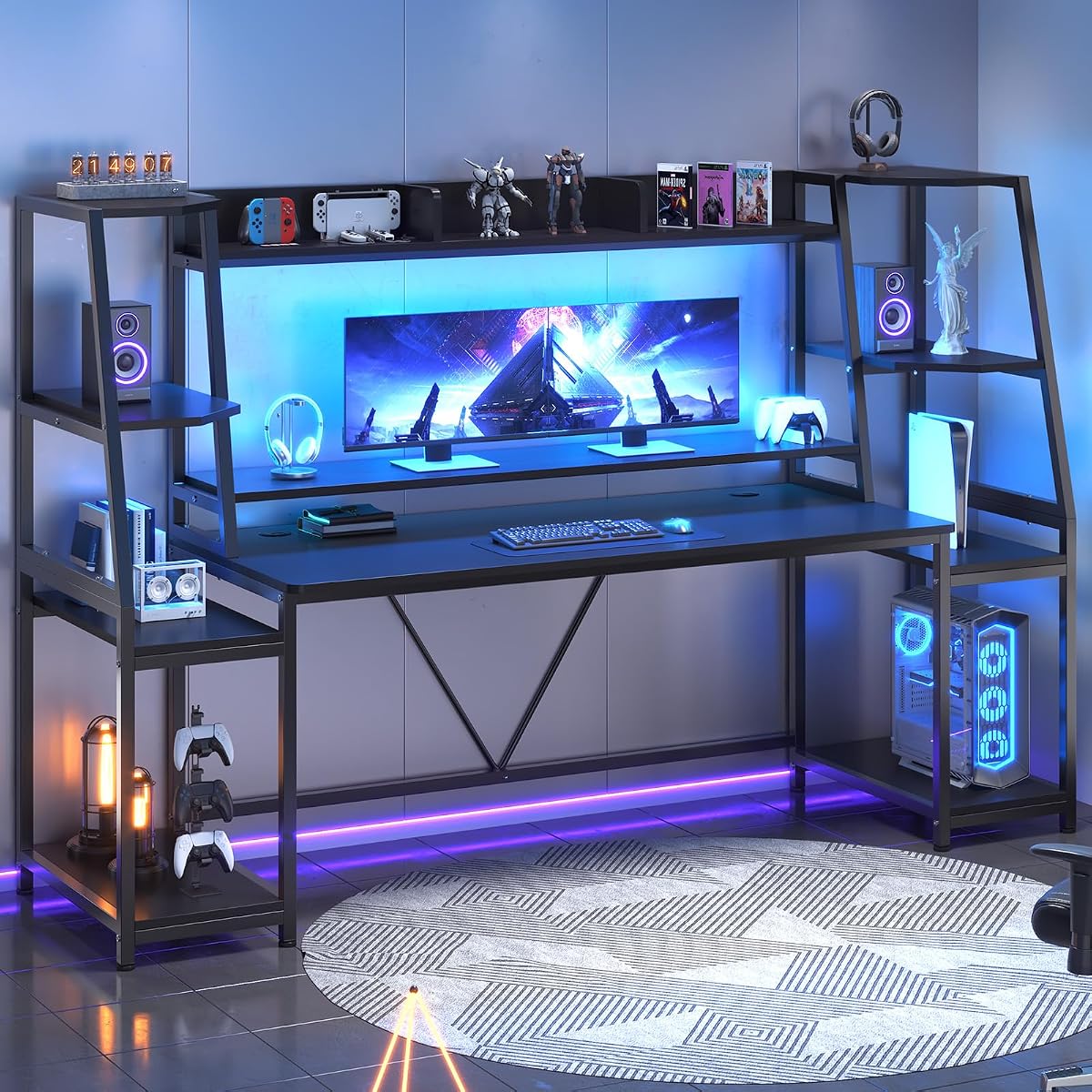


The ODK 53-inch L-shaped gaming desk earns its position as the strongest all-around choice for a console setup because it combines a roomy main work area with numerous places to keep consoles, controllers, cables, and accessories organized. Its 4.7 rating also places it among the strongest-reviewed desks in this guide. The flexible layout makes it particularly appealing when the gaming station needs to work hard without looking crowded.
We may earn a commission when you buy through this link, at no additional cost to you.
Storage is the desk's defining strength. Integrated dual shelves, a CPU stand, an accessory hook, and a tool bag create separate homes for equipment that would otherwise occupy the main surface. The interchangeable side module can be positioned on the left or right, allowing the desk to suit different corners and device arrangements. Three AC outlets and two USB ports also reduce reliance on extension strips and keep frequently used charging connections close to the chair.
The adjustable RGB strip offers ten color presets, eight brightness grades, and ten dynamic modes, with a memory function for retaining preferred settings. That level of control is useful for matching a console room's atmosphere without requiring a separate lighting hub. An X-shaped steel frame supports the desktop, while adjustable foot pads help reduce wobble on uneven flooring. Cable-management channels are another practical detail for maintaining a clean battle station.
The main trade-off is size. A 53-inch L-shaped desk needs enough floor space and room around the chair for comfortable movement. Assembly also involves several labeled components, making careful setup important. Even so, this model offers the best balance of storage, power, lighting, flexibility, and structural support for console players who want a complete workstation rather than a simple tabletop.
The shelves, CPU stand, hook, and tool bag divide equipment into distinct zones, keeping controllers, cables, and smaller accessories within reach while protecting the primary gaming surface.
Three AC outlets, two USB ports, cable channels, and adjustable RGB controls reduce the need for separate charging and lighting accessories around the gaming area.
We may earn a commission when you buy through this link, at no additional cost to you.
The DUMOS 52-inch reversible gaming desk delivers the most convincing mix of useful features for console-focused players who want more than a basic table. Its 4.6 rating reflects a well-rounded design that combines storage, integrated power, app-controlled lighting, and an elevated monitor shelf. The reversible left- and right-hand configuration also helps it adapt to different room layouts.
We may earn a commission when you buy through this link, at no additional cost to you.
Three fabric drawers give controllers, charging cables, and small accessories dedicated storage, while an open shelf can accommodate a console or PC tower. A side hook keeps a headset or bag available without taking up desktop space. The integrated electrical hub includes three AC outlets and two USB ports, allowing a console, display, phone, and peripheral to be connected without spreading separate adapters across the floor.
Lighting is unusually flexible for this category. The RGB strip supports more than 60,000 colors, music and microphone synchronization, timers, and dynamic modes through key or app controls. The monitor shelf raises the display toward eye level and frees some usable space below. Meanwhile, the reinforced metal frame, desktop support of up to 110 pounds, and adjustable foot pads provide a stable foundation for regular play.
The largest caution is that the storage drawers are fabric-based, so unusually heavy or sharply pointed equipment may not be their ideal long-term home. Buyers should also verify the final dimensions and clearance in their room before ordering. Even with those considerations, this desk offers an exceptional balance of organization, atmosphere, and practicality for a console setup.
Drawers, an open equipment shelf, and a side hook make effective use of vertical space while leaving the main desktop available for a controller, keyboard, mouse, or other active gear.
App and key controls provide extensive color, timer, music-sync, and dynamic-mode options, while integrated outlets and USB ports simplify the console-centered connection layout.
We may earn a commission when you buy through this link, at no additional cost to you.
This 63-inch gaming desk is built for setups where the PC is a central visual feature, making it a premium option for console gamers who also maintain a prominent hardware display. Its 4.6 rating reflects a focused design with an elevated PC stand, integrated lighting, and three drawers. The result is more like a display station than a conventional work desk.
We may earn a commission when you buy through this link, at no additional cost to you.
Its defining feature is the elevated platform designed for panoramic tempered-glass PC cases, including compatibility references for cases such as the Lian Li O11 and Hyte Y60. Raising the chassis to eye level exposes internal components and RGB lighting while keeping the tower away from floor dust. The steel frame and thick desktop are intended to provide stability for full-tower builds, which is important when the showcase platform carries substantial hardware.
An RGB strip beneath the monitor shelf helps visually connect the PC lighting with the wider desk. Three built-in drawers provide space for cables, controllers, and accessories, preserving a minimalist surface. A separate side shelf and overhead top board create room for collectibles or speakers without blocking the primary PC view. Although the emphasis is on computer hardware rather than a console shelf, the layout still supports a console-centered battle station.
This is not the most flexible option for every room, and buyers whose interest is purely console-based may prefer more explicit console shelving. Its large 63-inch footprint also calls for careful space planning. For players who want their PC to function as the centerpiece of a coordinated RGB room, however, the elevated presentation and dedicated hardware support make this a standout premium selection.
The elevated stand presents a panoramic case at eye level, making internal components visible while protecting the chassis from floor dust and preserving open space below.
Three drawers contain everyday accessories, while the side display shelf keeps collectibles and speakers visible without intruding on the main hardware view.
We may earn a commission when you buy through this link, at no additional cost to you.
The 51-inch straight gaming desk is a versatile option for console setups that need generous equipment storage but do not require an L-shaped corner configuration. It combines four fabric drawers, a full-size PC tower rack, a headset hook, an elevated monitor shelf, RGB lighting, and power connections in a modern carbon-fiber-textured design.
We may earn a commission when you buy through this link, at no additional cost to you.
The four drawers are a meaningful upgrade over a single storage compartment because controllers, cables, spare batteries, and small adapters can each be separated for easier access. The open rack handles a full-size gaming PC tower, while the raised monitor shelf improves screen placement and opens space underneath. Multiple USB ports and power outlets keep phones, headsets, and console accessories connected near the desk.
RGB lighting offers multiple modes and brightness levels, allowing the atmosphere to be adjusted for gaming, streaming, or general work. The steel frame and durable wood board provide a practical foundation, while adjustable foot pads help the desk remain level on different surfaces. Clearly labeled parts and step-by-step instructions should simplify assembly for buyers assembling it themselves.
A straight desk is easier to position against one wall and may leave more open floor space than an L-shaped model. However, it does not exploit a corner and may feel less expansive in a dedicated gaming room. The fabric drawers should also be kept free from excessive weight. With useful storage and integrated technology, this model is well suited to hybrid console-and-PC setups.
Four drawers, a tower rack, and a headset hook provide separate storage areas, helping protect the main desktop from the clutter that commonly accumulates around a console.
The raised monitor platform supports a more comfortable viewing relationship while recovering usable space below for accessories or a compact keyboard.
We may earn a commission when you buy through this link, at no additional cost to you.
The AODK L-shaped gaming desk is a flexible corner workstation that combines a 53-inch main desktop, built-in power, configurable overhead storage, and adjustable RGB lighting. Its 4.6 rating makes it one of the strongest alternatives for console players who want a corner station but need more flexibility than a fixed layout provides.
We may earn a commission when you buy through this link, at no additional cost to you.
The upper hutch can be fixed on the left or right, making it easier to align the desk with a monitor, console, or nearby wall. It can also be installed in two configurations, either as a display shelf or as a monitor stand. Below, two shelves, a CPU stand, headphone hook, and storage bag give controllers, cables, and compact hardware dedicated locations without consuming the entire work surface.
The electrical hub includes three power outlets and two USB charging ports for a console, display, mobile device, or other accessories. A light strip provides ten static colors, eight brightness levels, and ten dynamic modes with a memory function. That makes it easy to create a consistent atmosphere while keeping the main desk uncluttered. Detailed instructions and labeled components support straightforward assembly.
The obvious limitation is that a 53-inch L-shaped desk occupies a substantial amount of room. The upper rack's two installation choices also require a deliberate decision before assembly. Buyers should verify that the shelving and monitor placement will suit their equipment. For those who do, this desk provides a particularly adaptable and storage-conscious console command center.
The reversible hutch can be installed on either side and configured as either a display shelf or a monitor stand, allowing the desk to follow the room rather than dictate the layout.
Three outlets and two USB ports provide an accessible connection hub for the console, monitor, phone, controller charging, and other frequently used gaming devices.
We may earn a commission when you buy through this link, at no additional cost to you.
The SEDETA 79-inch gaming desk is built for console setups that function as full entertainment and productivity stations. Its 4.7 rating places it alongside the strongest-reviewed products here, while the unusually broad footprint provides room for displays, computers, peripherals, and equipment storage in one connected layout.
We may earn a commission when you buy through this link, at no additional cost to you.
Two large storage shelves can hold a CPU, PC tower, books, speakers, a PS4 or Xbox, gamepads, and other gaming gear. A top hutch provides additional space for figures, books, and plants, while the stated 55-inch section of the desktop can accommodate a keyboard, mouse, and accessories. The listing also notes that the workstation can hold two computers, making it suitable for users with demanding multi-device requirements.
The RGB lighting system offers more than 60,000 colors and 29 flashing modes through app control. Music synchronization and a sensitivity-adjustable microphone allow the lights to react to sound, while a timer function adds scheduling convenience. An integrated monitor shelf places the screen at a more comfortable height relative to the keyboard and mouse, helping reduce head and neck fatigue during extended sessions.
The 79-inch format is the defining consideration. This desk needs a large room and careful placement to avoid making movement around the chair feel restricted. It is therefore most appropriate for dedicated gaming rooms, creative studios, and console enthusiasts who genuinely need the extra capacity. For those buyers, the combination of shelving, lighting, monitor support, and expansive work area is exceptionally complete.
The oversized configuration can accommodate multiple displays, computers, speakers, controllers, and console equipment while preserving a defined place for active play.
App-based color selection, more than 60,000 colors, music synchronization, 29 flashing modes, and timer controls provide extensive atmosphere customization.
We may earn a commission when you buy through this link, at no additional cost to you.
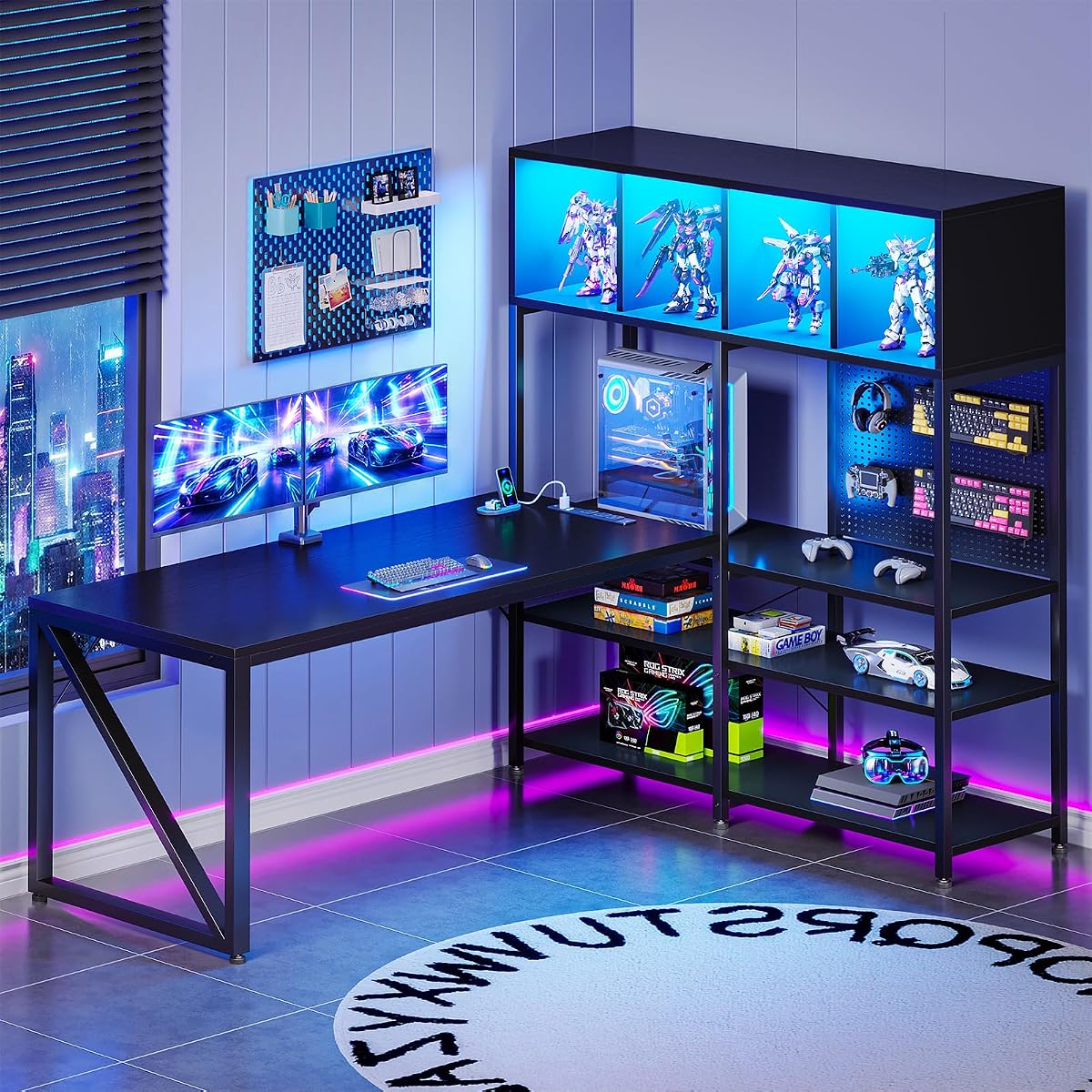
The AODK 63-inch L-shaped desk is a show-oriented console and computer workstation built around display storage, a deep main surface, and roomy corner organization. Its 4.6 rating reflects a substantial and feature-rich design intended for gamers who want their equipment visible and their floor kept open.
We may earn a commission when you buy through this link, at no additional cost to you.
The primary desktop measures 51.18 inches wide by 21.65 inches deep, providing generous room for large mouse pads, a comfortable viewing distance, and dual-monitor layouts. That depth is particularly useful for console gaming because it creates a defined zone for the controller without making the display feel distant. Thick legs and a reinforced steel frame provide added stability for long sessions and everyday use.
A four-compartment display cabinet protects and showcases figures, models, and collectibles. The pegboard provides hanging positions for headphones, controllers, and accessories, keeping them accessible while reducing desk clutter. A dedicated desktop PC tower shelf measures 10.24 inches wide by 23.46 inches high and is intended to fit many mid-tower cases while keeping the floor open and cleaning easier.
Three AC outlets, two USB ports, LED lighting on the platform and desk edge, under-desk shelving, side shelves, and an open legroom design add practical functionality. The major compromise is size: this is a substantial furniture purchase that requires a generous room. For enthusiasts who want a curated display area and extra-deep console surface, though, the organization is exceptionally thorough.
The 21.65-inch depth supports large mouse pads, a comfortable screen distance, and separate zones for the display, keyboard, mouse, and controller.
A four-compartment cabinet, pegboard, side shelves, and PC tower space keep collectibles visible while giving frequently used equipment functional homes.
We may earn a commission when you buy through this link, at no additional cost to you.
The Korfile 66-inch L-shaped desk offers a practical combination of corner space, integrated electrical access, storage, monitor support, and adjustable lighting. Its 4.3 rating is the lowest in this group, but the supplied design details still make it a functional option for console users who value organization and a flexible corner layout.
We may earn a commission when you buy through this link, at no additional cost to you.
Two fabric drawers organize network cords, game consoles, keyboards, and smaller accessories. A sliding CPU shelf keeps the computer accessible while helping free the floor, and a pair of headphone hooks prevents headsets from occupying the main surface. The integrated power station provides three AC outlets and two USB ports, which is a meaningful convenience when a console, display, lamp, phone, tablet, and wired headset all need regular access to power.
The lighting system provides 20 color options, 22 dynamic scenes, and five brightness settings. An integrated long monitor riser raises the display to a more comfortable viewing height while opening space for small accessories below. The entire L-shaped layout is reversible, so it can be adapted to the orientation of the room. A heavy-duty metal frame supports the overall structure.
Fabric drawers and a 4.3 rating warrant slightly more consideration than the top-ranked models, and a 66-inch footprint demands adequate space. Nevertheless, this desk offers a well-balanced package for players who want more visible organization than a plain gaming table without moving into a highly specialized display configuration.
The reversible L-shaped design adapts to different walls and equipment arrangements, helping the large footprint work more efficiently in an available corner.
Drawers, a sliding CPU shelf, and dual headphone hooks give common accessories dedicated locations while keeping the controller and display area clearer.
We may earn a commission when you buy through this link, at no additional cost to you.
The Korfile 47-inch gaming desk is a compact straight workstation that prioritizes storage and monitor placement over an oversized corner footprint. Its 4.4 rating reflects a useful design for bedrooms, dorms, and smaller gaming rooms where five drawers and an elevated screen can provide more function than a basic table.
We may earn a commission when you buy through this link, at no additional cost to you.
Five non-woven fabric drawers create separate compartments for documents, cables, controllers, and office supplies. The installation can be reversed, with four mounting positions: left, right, top, or bottom. This allows the drawer section to suit the desk's orientation and the available wall space, a useful feature for rooms where the desk may need to be repositioned.
A high-rise, full-coverage monitor mount raises the display and can help position it at a more comfortable viewing height. RGB strips offer 22 customizable effects and multiple scene modes. The electrical hub includes three AC outlets and two USB charging ports, keeping console and peripheral connections close at hand. Under the surface, an industrial-grade powder-coated steel frame, high-density scratch-resistant desktop, crossbar support, and adjustable legs provide structural support.
The 47-inch surface is smaller than most L-shaped and large straight models in the guide, so it will not accommodate as many screens or a large amount of visible equipment. Fabric drawers also call for light-to-moderate loads. Even so, this is one of the most space-conscious options and a strong choice for a compact console station where storage is the priority.
Five separately mounted drawers turn a compact straight desk into a practical organizer for accessories, cables, documents, and console essentials.
Left, right, top, and bottom installation options give the storage unit flexibility that can be valuable in bedrooms, dorm rooms, and compact studios.
We may earn a commission when you buy through this link, at no additional cost to you.
The Veken 55-inch electric standing desk is the most distinctive selection in this guide because it prioritizes adjustable working height over integrated lighting and built-in storage. Its 4.5 rating reflects a solid general-purpose gaming surface with a wide desktop, a quiet motor, memory presets, and cable management.
We may earn a commission when you buy through this link, at no additional cost to you.
The desk adjusts from 28.3 to 46.5 inches, allowing console players to alternate between seated play and a standing setup. Memory presets make recurring height changes more convenient, while the motor operates below 52 decibels according to the supplied information. The steel frame is designed to remain stable at full extension, although the listing notes that performance can vary with floor type and load weight.
At 55 inches, the desktop offers enough room for multiple monitors and gaming equipment. Built-in cable management keeps connections tidier, which is especially valuable for a console, display, charging hub, and computer sharing one station. The surface consists of two boards, and the stated assembly time is approximately 10 to 30 minutes with clear instructions.
Unlike most gaming desks in this comparison, it does not include RGB lighting, drawers, a monitor shelf, or integrated outlets. Those omissions make it less attractive for buyers who want an immediately complete battle station. Its advantage is flexibility: the ability to sit or stand can benefit long sessions and changing preferences. For a console setup where height adjustment matters more than built-in gaming features, this is a compelling alternative.
A 28.3-to-46.5-inch adjustment range and memory presets let players change position easily, supporting a more varied routine during long gaming or working sessions.
The 55-inch desktop provides room for multiple screens and accessories, while integrated cable management helps prevent connection clutter from spreading across the setup.
We may earn a commission when you buy through this link, at no additional cost to you.
The right console gaming desk depends on your available space, the equipment you want visible, and how much organization you want built into the frame. These factors help narrow the field before you compare models.
Begin by measuring the wall, corner, doorways, and chair movement area where the desk will live. L-shaped models provide more surface and separate storage zones, but they need a generous corner and may reduce freedom of movement around the seat. Straight desks are easier to place against one wall and often work better in bedrooms, dorms, and compact studios. For any model, leave enough clearance behind the chair to sit or recline without striking the frame or attached equipment.
Consider what must be stored rather than simply counting compartments. Drawers work well for controllers, charging cables, small adapters, and spare accessories. Open shelves can accommodate a console, speakers, or computer tower, while a dedicated CPU shelf keeps the floor clear. Pegboards and hooks are useful for lightweight headsets and accessories that should remain within reach. A display cabinet is worthwhile for collectibles, while a monitor riser adds both screen height and useful space below the display.
A console setup often needs more accessible connections than a simple home-office desk. Integrated three-outlet power stations with two USB ports are common among the featured L-shaped models and can reduce dependence on floor-level extension strips. Look for cable-management channels, trays, or openings that keep cords behind or beneath the desk. Check whether the provided outlets and USB ports match your console, monitor, headset, phone, and charging equipment, and verify whether any additional wall connection is still required.
A monitor shelf or raised platform can place the display closer to eye level, which may improve comfort during extended sessions. Check the shelf's usable width and the amount of clearance below it for a compact keyboard, controller, or other equipment. An extra-deep main desktop can also support a large mouse pad and preserve a comfortable viewing distance. Adjustable feet are useful for leveling the desk on uneven floors, while an open legroom design offers more space for players who prefer a tucked-in chair position.
RGB lighting can visually connect a console setup, but the number of colors matters less than control quality and placement. Look for key or app controls, static presets, dynamic scenes, brightness levels, timers, and memory functions. Music synchronization can add atmosphere during play, although it should remain secondary to visibility and distraction-free comfort. Some desks place lighting under a monitor shelf or along the edge, while others illuminate a CPU platform; choose the placement that complements your equipment rather than one that overwhelms the room.
A gaming desk should remain steady while controllers are used, devices charge, and the user shifts position. Steel frames, crossbars, thick desktops, and reinforced legs provide useful structural support, while adjustable foot pads help correct minor floor unevenness. Elevated PC platforms deserve extra attention because full-tower cases can be heavy and top-heavy. Confirm stated load support and the intended equipment size before placing a tower on an elevated stand. A heavier construction may also increase assembly complexity and make repositioning harder.
Most gaming desks use a fixed height, which keeps the product structurally straightforward and often leaves more room under the top for storage. An electric standing desk adds height flexibility and can support both seated and standing routines, but it usually requires more floor clearance and offers fewer built-in gaming accessories. Memory presets are useful for quickly returning to preferred heights. Consider how often you expect to change position and whether your console, monitor arm, speaker placement, and cable routing will remain stable during adjustment.
L-shaped and display-focused desks often contain more panels, supports, and adjustable modules than compact models. Look for clearly labeled parts, included tools, step-by-step instructions, and support for missing or damaged components. Reversible configurations are especially helpful because they allow some flexibility after assembly, but you may still need to decide on drawer, hutch, or monitor-shelf placement before connecting everything. Allow room to assemble the desk away from walls and keep hardware organized so pieces are not lost during setup.
Position the desk so the console, display, and controller are centered around the player's natural line of sight. Place the main equipment within easy reach, route cables through the desk's channels or openings, and connect frequently used accessories to the integrated outlets and USB ports. Use a monitor shelf or raised platform to improve viewing height, but confirm that the display remains stable and that controllers, charging docks, and speakers do not crowd the active play area.
Organize storage by frequency of use. Keep controllers, charging cables, and a spare battery in the most accessible drawers or shelves, while longer-term accessories can remain in deeper compartments. For fabric drawers, avoid overloading them and lift equipment from the base rather than pulling it by the handle. Console and PC equipment should have adequate ventilation, and a tower should rest securely on its designated stand without blocking airflow.
Dust the desktop, shelves, drawer surfaces, and lighting strips regularly with a soft microfiber cloth. Avoid placing standing water directly on the desk, and use gentle, device-appropriate cleaning products for the console and monitor. Periodically check that feet remain level, shelves are secure, cables are undamaged, and electronic connections are not under strain. For a standing desk, raise it only when connected equipment and accessories are positioned safely.
An L-shaped desk is usually better when you have a dedicated corner and want separate zones for a console, display, controller, and accessories. It provides more usable surface and often includes shelves, hooks, and power controls. A straight desk is easier to place against a wall, requires less floor space, and may be more suitable for a bedroom, dorm, or compact gaming room.
They are convenient but not strictly necessary. Integrated outlets can reduce extension cords and keep charging access close to the chair, especially when a console, display, headset, and phone all need power. If you prefer a separate power strip, choose a desk with good cable-management channels and enough open space beneath the top for routing cords safely.
Many of the featured desks can support both because they include large shelves, open racks, drawers, or elevated tower stands. The best approach is to place the console in an open shelf with ventilation and reserve the dedicated CPU shelf for the computer. Check the shelf dimensions and stated load support before buying, especially for a full-size PC tower.
A standing desk can be practical for players who want to alternate between sitting and standing or who prefer a taller screen position. Memory presets make repeated height changes convenient. However, the console, monitor, speakers, and cables must remain stable while the desk moves, and the desk may offer fewer built-in storage or lighting features than a conventional gaming model.
Leave room for the display, console, controller, charging accessories, and a mouse pad if you use one. The desk should also provide enough legroom for your chair and allow the controller to rest within comfortable reach. Measure the console and display first, then check the desk's dimensions and the distance between its storage features.
Fabric drawers are well suited to controllers, cables, manuals, remotes, and lightweight accessories. They are less appropriate for heavy computer parts, sharp hardware, or items that may tear the fabric. Distributing heavier equipment onto a dedicated shelf or CPU stand helps preserve the drawers and improve overall stability.
The featured gaming desks describe their LED strips as built-in features, with key or app control depending on the model. They still require access to an appropriate power connection, which may be routed through the desk's integrated hub or a separate included connection. Review the assembly instructions before operating the lighting.
A monitor shelf is useful when you want a higher viewing position, more open space below the display, or a place for compact accessories. It can also provide room for a console or controller within the central play area. Confirm that the shelf is wide enough for your display and that the added storage does not interfere with your chair or leg movement.
The ODK 53-inch L-shaped desk is the strongest all-around option, combining reversible storage, integrated power, adjustable RGB lighting, and a stable frame. The DUMOS 52-inch model delivers an equally useful feature set for value-conscious buyers, while the 63-inch PC display desk stands out as the premium showcase choice for visually driven setups.
For a large dedicated room, the SEDETA 79-inch workstation offers exceptional capacity, and the AODK 63-inch model provides an extra-deep surface, display cabinet, and pegboard organization. Compact spaces may be better served by the Korfile 47-inch desk, while players who prioritize sit-stand flexibility can consider the Veken 55-inch electric model.
Before ordering, confirm the desk's complete dimensions, equipment clearances, load ratings, and assembly requirements. Product specifications, colors, features, and offers can change over time, so checking the current listing will help ensure that the selected console gaming desk still fits your room and equipment as intended.