
BESTISAN Active Bookshelf Speakers
4.6Editor score
One hundred-watt maximum output
Nine switchable light effects
Extensive wired and wireless inputs
RGB speakers for PC combine useful desktop audio with customizable lighting that can complement a monitor, gaming keyboard, or illuminated desk. A strong pair should provide balanced sound, intuitive controls, reliable connections, and lighting effects that enhance the setup without distracting from the content.
We compared all ten systems based on the supplied specifications, focusing on driver configuration, output potential, low-frequency treatment, connectivity, lighting controls, physical footprint, and compatibility. The list covers compact two-way speakers, subwoofer systems, soundbars, and feature-rich bookshelf models for different desk needs.
Each pick reveals where it is strongest and where compromises matter. Ratings and product details reflect the supplied listing information, while prices and availability can change, so readers should confirm current specifications and retailer terms before making a final purchasing decision.
4.6Editor score

4.6Editor score
4.2Editor score
As an Amazon Associate we earn from qualifying purchases.
This side-by-side comparison highlights each system's core audio configuration, lighting behavior, connection methods, and practical desktop design, making it easier to identify the model that best matches your computer, gaming style, and available space.


Creative Pebble Pro earns its place near the front of this guide because it balances a compact desktop footprint with unusually broad connectivity. Its 4.2 rating accompanies a feature set that includes RGB lighting, digital amplification, USB-C power and audio, Bluetooth 5.3, a 3.5 mm AUX input, and a headset or microphone connection.
We may earn a commission when you buy through this link, at no additional cost to you.
Audio performance is designed around two all-new digital amplifiers, revised drivers, and BassFlex low-frequency processing. Clear Dialog processing is intended to keep speech intelligible in movies and videos without requiring excessive volume. The speakers can deliver up to 10 watts RMS and 20 watts peak over USB-C, with optional USB PD power raising the maximum to 30 watts RMS and 60 watts peak.
The main limitation is that its three RGB effects do not offer the extensive customization seen on gaming-focused systems. Maximum output also depends on the appropriate USB-C power source, while the adapter needed for the highest power level is not included. Nevertheless, the broad input selection and useful communication port make it adaptable to work, entertainment, and gaming desks.
This is a strong recommendation for someone who wants polished RGB illumination, clear dialogue, and one speaker system that can switch between a gaming PC, phone, and analog source. It is particularly attractive for compact desks where a full-size subwoofer system would be intrusive.
A single USB-C connection handles power and audio, while Bluetooth 5.3 and AUX broaden compatibility. The headset and microphone port also gives the system a useful role in calls, making Pebble Pro more versatile than a basic decorative desktop pair.
BassFlex extends the low-frequency response, while Clear Dialog processing is designed to preserve natural vocals. These features make the speakers a practical choice when movies, streamed video, and spoken content share the same desktop.
We may earn a commission when you buy through this link, at no additional cost to you.
The Nylavee 2.1 system stands out as the most convincing dedicated gaming speaker package in the list. Its 4.4 rating reflects a strong overall proposition, while the included subwoofer and claimed 60 watts of peak output give it more authority than the compact two-speaker alternatives.
We may earn a commission when you buy through this link, at no additional cost to you.
The satellite speakers are intended to provide clear mids and crisp highs, with the subwoofer handling deep, punchy low frequencies. This separation can add weight to explosions, engine sounds, and music beats. USB and AUX support makes it straightforward to use as a wired PC system, while Bluetooth 5.4 extends the system to laptops and phones.
Its eight RGB modes and four brightness levels provide more visual variety than many budget systems. The trade-off is physical: a subwoofer, satellites, an external power adapter, and extended cables take more desk and floor space than a compact pair. The rotary control is convenient, although combining power, volume, and mode selection into one knob may take some adjustment for new users.
Choose this system when bass is a major priority and your desk has room for a dedicated subwoofer. It is well suited to gaming PCs, movie watching, and music, especially when a more immersive low-end presentation matters more than a minimal footprint.
The separate subwoofer provides bass that a small satellite pair may struggle to reproduce. Position it under or beside the desk to add impact while leaving the satellites close to the monitor.
Eight dynamic modes and four brightness levels make it easy to coordinate the system with a gaming rig. Extended cabling also gives the subwoofer more freedom than the short leads found on many compact speaker sets.
We may earn a commission when you buy through this link, at no additional cost to you.
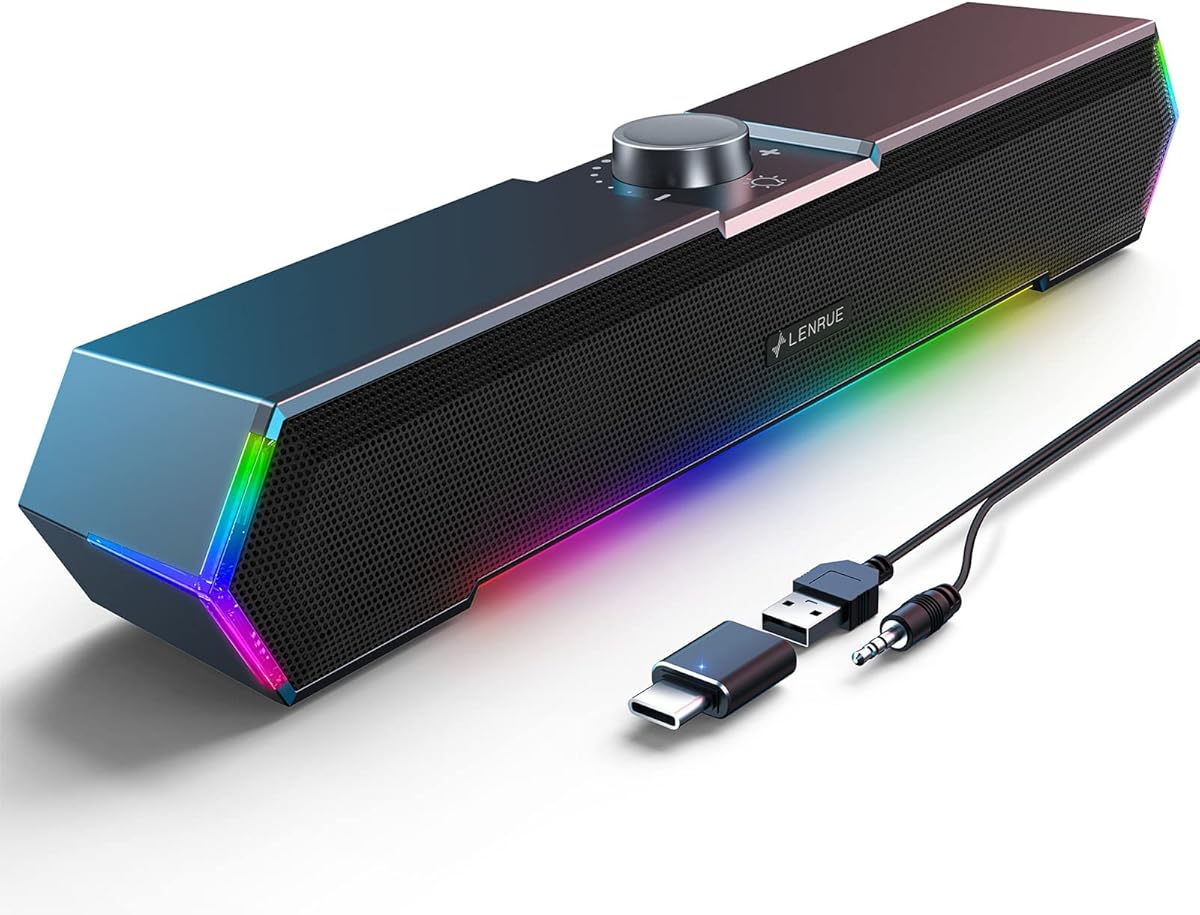
The LENRUE G11 offers a straightforward way to add lighting and stereo sound to a PC without committing to a large gaming system. It carries a 4.2 rating and uses a pair of compact speakers with four amplifier IC horns for its claimed distortion-free, low-noise output.
We may earn a commission when you buy through this link, at no additional cost to you.
Its most recognizable feature is the angular design with touch-controlled lights. A top-mounted volume knob handles level adjustment, while the bundled USB power lead and 3.5 mm audio cable provide a simple wired connection. A Type-C adapter supports compatible computers, and the listed operating systems include major Windows versions, macOS, and Chrome OS.
This is not a feature-rich model. It has no Bluetooth, headphone jack, or microphone input, and it is not intended for TV or headphone use. The lighting is less configurable than systems offering multiple named effects, and the subwoofer-free design naturally emphasizes convenience and compact placement over deep bass.
The G11 is best for users building a colorful work or gaming setup on a limited budget. Its small footprint, bundled connections, and uncomplicated controls make it a sensible choice when the priority is adding RGB character and basic stereo audio without complex setup.
The speakers sit neatly beneath a monitor, making them well suited to compact work areas. Joined cables help reduce visible clutter, while the angled enclosure directs sound toward the listening position.
USB powers the system and the 3.5 mm connection carries audio. With no drivers or companion application required, setup is limited to connecting the cables and adjusting the volume knob.
We may earn a commission when you buy through this link, at no additional cost to you.
The Nylavee Nine-Mode Speakers combine a clean desktop design with a generous lighting palette. Their 4.4 rating reflects a well-rounded package built around two full-range dual-magnet units, a straightforward control knob, and nine touch-controlled lighting options.
We may earn a commission when you buy through this link, at no additional cost to you.
Sound is designed to remain crisp and relatively distortion-free, while specially shaped rear speaker ports create vibration energy intended to improve bass concentration and richness. The lighting includes one breathing mode and eight solid colors, allowing the appearance to move from energetic to deliberately understated.
The system is entirely wired. USB supplies power, while a 3.5 mm audio cable carries sound from PCs, laptops, phones, or tablets. That makes it broadly compatible but means it cannot stream wirelessly from a computer. Another point to consider is that the USB cable is only for power, a detail that can confuse buyers expecting digital audio over USB.
This Nylavee model suits users who want multiple RGB choices, physical controls, and strong compatibility without installing a subwoofer. It is a practical all-rounder for a home office, study desk, or gaming setup where a clean pair of wired speakers is preferred.
Eight solid colors and a breathing effect provide more visual control than a single fixed glow. Touch operation makes it easy to change the appearance without navigating desktop software.
A single knob handles power and volume, so users do not need to open computer settings for basic adjustments. The wired design also avoids pairing delays and wireless codec concerns.
We may earn a commission when you buy through this link, at no additional cost to you.
The Nylavee Plug-and-Play RGB model earns a 4.5 rating and offers one of the strongest balances of audio design, lighting, and placement flexibility in the guide. Its dual full-range drivers are supported by dual passive radiators intended to add warmth and body to the overall presentation.
We may earn a commission when you buy through this link, at no additional cost to you.
Nine lighting modes include a breathing pattern and eight solid colors. Users can therefore create either a subtle matching accent or a more animated display for gaming and streaming. The slim enclosure can stand vertically beside a monitor or lie horizontally below it, making it easier to accommodate different monitor stands and desk layouts.
Connection is conventional but dependable: USB for power and a 3.5 mm AUX cable for audio. It works with desktop PCs, laptops, monitors, PS5, Xbox, and other compatible devices without drivers. The 4.5-foot cable provides more placement freedom than a very short fixed lead, although users still need access to both connections.
This is a strong recommendation for buyers who want flexible orientation, useful passive-radiator bass support, and understated RGB lighting. It fits particularly well in clean dual-monitor setups where every centimeter of desk space and visual consistency matters.
The same speaker enclosure works in vertical or horizontal positions, allowing the lighting and drivers to suit your monitor arrangement. This flexibility also makes the system easier to accommodate on shelves and compact stands.
Dual passive radiators add warmth and body without requiring a separate floor unit. The result remains simpler to place than a 2.1 system while offering more low-frequency support than a basic desktop pair.
We may earn a commission when you buy through this link, at no additional cost to you.
Edifier Hecate RGB stands out with a 4.6 rating and one of the most complete feature sets in the guide. The system combines 16 watts per channel, two 2.75-inch full-range drivers, dynamic RGB effects, and several connection methods in a relatively compact gaming enclosure.
We may earn a commission when you buy through this link, at no additional cost to you.
Its 32 watts of peak power is accompanied by dedicated Gaming, Movie, and Music EQ modes. Bluetooth 5.1, a USB sound-card connection, and 3.5 mm AUX allow it to serve a gaming PC, PS4, phone, or other compatible source. The control knob can manage volume, source selection, and RGB effects without opening a menu.
The RGB system offers twelve customizable effects that can follow gameplay, while the compact dimensions and 10-degree tilt suit desktop listening. The physical construction includes matte panels, metal laser-engraved knobs, anti-slip pads, and scratch-resistant surfaces. On the other hand, Bluetooth 5.1 is less advanced than the 5.4 implementations found elsewhere in the list.
For gamers who want meaningful sound modes, extensive lighting, and flexible source switching without a large subwoofer, this is one of the strongest all-around choices. It is also useful for music and movies, making it broader than a purely specialized gaming speaker.
Twelve RGB effects can synchronize with gameplay, adding visual feedback without changing the system's basic operation. The control knob allows effect changes to remain within reach on the desk.
Gaming, Movie, and Music modes tailor the output for different content. This makes the system easier to use across work sessions, entertainment, and competitive play without relying on complex desktop software.
We may earn a commission when you buy through this link, at no additional cost to you.
The Razer Leviathan V2 X brings a soundbar format to the RGB speaker category and carries a 4.2 rating. Its compact enclosure is intended to sit beneath a monitor, offering a cleaner desktop appearance than two separated satellite speakers.
We may earn a commission when you buy through this link, at no additional cost to you.
Two full-range drivers and two passive radiators handle the audio, with output stated at up to 90 decibels. USB-C provides both power and digital audio, while Bluetooth 5.0 allows switching to a paired mobile device. Razer Audio App and Synapse support device selection, lighting customization, and other configuration.
The defining advantage is the integration with Razer Chroma. Fourteen lighting zones allow detailed patterns and dynamic in-game effects, making the soundbar particularly attractive inside an established Razer ecosystem. The trade-off is dependence on software for advanced configuration, and the Bluetooth 5.0 implementation is older than several competing systems.
Choose the Leviathan V2 X if you want a single wide desktop unit, direct integration with Razer lighting, and simple USB-C operation. It is especially well suited to gamers who already use compatible peripherals and want audio and lighting to behave as one coordinated setup.
Fourteen lighting zones allow detailed effects that can complement other Razer devices. Synapse and the Razer Audio App provide the controls needed to adjust patterns and choose audio sources.
USB-C carries both power and audio, reducing desktop cable clutter. The low-profile enclosure also leaves more usable space than a conventional pair of separated desktop speakers.
We may earn a commission when you buy through this link, at no additional cost to you.
Bluedee Twenty-Watt Speakers pair a 4.4 rating with a modern connection and control layout. Their internal configuration is more elaborate than many compact models, including two tweeters, two full-range drivers, and two passive radiators within the left and right speaker enclosures.
We may earn a commission when you buy through this link, at no additional cost to you.
Built-in DSP tuning is intended to reduce distortion and smooth harsh high frequencies while supporting crisp vocals, balanced stereo imaging, and enhanced bass. Output reaches 20 watts peak. Bluetooth 5.4 provides a current wireless option, and USB or USB-C offers direct digital connectivity for desktop PCs, laptops, Macs, and tablets.
A multifunction knob handles volume, playback, lighting effects, and connection mode. There are eight selectable lighting effects plus an off setting, allowing the system to move from colorful to discreet. The absence of a subwoofer means it cannot match the low-end scale of the Nylavee 2.1 system, and its peak output is also lower than the leading alternatives.
This is a well-rounded choice for a modern desk where Bluetooth convenience, digital connections, and restrained RGB effects are priorities. It works particularly well for music, videos, and everyday PC use where clear balanced audio matters more than dramatic gaming bass.
The built-in processing smooths harsh highs and helps maintain consistent output. Combined with dedicated tweeters and full-range drivers, it supports clear dialogue and balanced stereo playback for daily multimedia use.
The central control manages volume, playback, source selection, and lighting. This keeps routine adjustments immediate and reduces the need to move between hardware and computer menus.
We may earn a commission when you buy through this link, at no additional cost to you.
BESTISAN Active Bookshelf Speakers represent the premium and most versatile option in this guide. They hold a 4.6 rating and combine a substantial 100-watt maximum output with a broad selection of wired and wireless connections for a PC, television, turntable, phone, or flash drive.
We may earn a commission when you buy through this link, at no additional cost to you.
Each speaker uses a 1.25-inch tweeter and a three-inch bass driver, joining high and low frequencies within traditional bookshelf enclosures. ARC and optical inputs suit televisions, RCA supports turntables, and Bluetooth 5.2 covers compatible mobile devices. A subwoofer output can also connect to an LFE-equipped subwoofer when stronger bass is desired.
Embedded LED tubes sit behind a mirror-visible outer surface, creating a dramatic internal illumination effect. Nine light effects can be selected using the speaker buttons, while the included remote offers additional control with a stated range of 33 feet. One important limitation is that the USB port accepts flash drives rather than carrying audio from a USB cable.
This is the strongest choice for a larger desk, entertainment center, or mixed audio setup that needs more inputs than a basic PC pair. It is less convenient for users wanting a tiny footprint or a conventional USB audio connection, but its output and source flexibility justify considering it when space is available.
ARC, optical, RCA, Bluetooth, USB flash-drive playback, and subwoofer output provide unusual flexibility for PC audio. The speakers can function as the central sound system for both work and home entertainment.
Internal LED tubes illuminate the mirror-visible surface to create a more dimensional effect than a simple front-facing ring. Nine selectable patterns provide both animated and decorative looks.
We may earn a commission when you buy through this link, at no additional cost to you.
The Logitech G560 is a traditional gaming speaker system with a 4.4 rating, pairing two satellite speakers with a dedicated down-firing subwoofer. It is physically larger than the compact and soundbar options in this guide, but that footprint supports a substantial gaming-focused design.
We may earn a commission when you buy through this link, at no additional cost to you.
Its stated peak power reaches 240 watts, while the unique driver arrangement is intended to create a wide soundscape. DTS:X Ultra provides three-dimensional positional audio for supported Windows PCs, helping players perceive directionality in compatible games. The maximum sound pressure level is listed at 97 decibels at 426 B.
LIGHTSYNC illumination reacts to audio in many popular games and projects light from the front and rear of the satellites. Logitech Family Software allows customization of four lighting zones across a large color selection. The limitation is platform compatibility: DTS:X is not supported on Mac OS X, so Windows users receive the feature set for which the system is best known.
Choose the G560 for a dedicated gaming desk where a large subwoofer and emphatic low-frequency output are acceptable. It is less portable and less minimal than the newer two-speaker systems, but it remains a feature-rich option for PC gaming with game-reactive lighting.
DTS:X Ultra renders positional audio from multiple directions, adding useful detail for supported games. This makes the system most compelling on Windows computers where the full feature set is available.
LIGHTSYNC reacts to sounds in supported titles, creating a synchronized visual effect. Four customizable zones give users control over how much illumination appears around the satellite speakers.
We may earn a commission when you buy through this link, at no additional cost to you.
The right RGB PC speaker system depends on sound priorities, available desk space, lighting customization, and the devices you want to connect. Comparing these factors before buying prevents an attractive design from hiding practical incompatibilities.
Two separate speakers are the simplest and most space-conscious option, while a 2.1 system adds a dedicated subwoofer for stronger bass. A soundbar creates a single low-profile unit beneath a monitor, and bookshelf speakers provide larger enclosures with wider input selection. Consider the available footprint first, especially if your monitor has a narrow stand or your desk contains other peripherals.
Look beyond peak wattage and examine the driver arrangement. Full-range drivers support general desktop listening, passive radiators add body to compact systems, tweeters improve high-frequency detail, and a subwoofer creates deeper low-frequency impact. Sound modes can also help, with gaming, movie, and music presets providing useful adjustments for different content.
A USB-C connection that carries both audio and power is among the cleanest desktop arrangements. A 3.5 mm AUX lead is broadly compatible but passes analog audio, while Bluetooth offers convenient wireless use without carrying a USB cable. Some systems also add optical, RCA, or flash-drive inputs. Verify whether the USB port actually accepts audio, because some only provide power or support flash drives.
Lighting ranges from a single fixed accent to breathing effects, multiple solid colors, dynamic game synchronization, and extensive zone control. Consider whether you want a permanent color that matches a desk or an animated display that reacts to games and audio. Software-based systems offer finer control but may require more configuration than touch buttons or a simple hardware knob.
Separate speakers should be positioned with enough distance to create a stereo image, while soundbars need only enough room for their low-profile enclosure. Subwoofers can go under a desk or beside a monitor stand, but their cables and power adapter must still be accommodated. Cable length is especially relevant for wide desks and dual-monitor arrangements.
The best control scheme keeps common actions within reach. A single knob may combine power, volume, playback, source selection, and lighting changes. Touch controls can provide quick visual changes, while apps support deeper configuration for RGB patterns, EQ modes, device switching, and firmware updates.
Windows compatibility does not guarantee access to every gaming feature. Some positional audio and lighting effects depend on operating-system software, while others are limited to particular platforms. Check Bluetooth support when using macOS, phones, or tablets, and verify that your preferred console or display accepts the supplied wired connection.
Extra inputs, sound modes, and lighting controls can be valuable, but they are not automatically necessary for every setup. A smaller system may be easier to position and quicker to configure. A more elaborate model is worthwhile when you regularly switch among PC gaming, movies, music, calls, and external source components.
Begin by identifying the best physical position for each speaker. Separate pairs work best at roughly ear level and spaced apart enough for stereo separation. Place a soundbar directly below the monitor, and position a subwoofer under the desk or near a wall without blocking ports or restricting airflow.
Connect power using the supplied adapter, then choose the intended audio path. USB-C audio-and-power systems generally need one cable, while 3.5 mm systems require USB power and an AUX audio lead. For Bluetooth, pair the speakers with the intended device and confirm the correct source is selected before changing volume.
Adjust the lighting brightness and effect at a level that remains comfortable during long sessions. If RGB software is used, start with the default profile, test each lighting zone, and avoid rapid effects that may compete with fast-moving gameplay. Clean the enclosure with a soft dry cloth, keep vents unobstructed, and route cables so they do not create a tripping hazard.
RGB lighting does not improve sound quality by itself. It adds visual appeal and may make a gaming setup more immersive, but audio performance depends on the drivers, amplification, enclosure design, processing, and the connection being used. Evaluate the sound specifications separately from the lighting features.
Wired connections are generally more consistent and avoid pairing or wireless delay concerns. Bluetooth is convenient when you want to move between a PC, phone, or tablet without reconnecting cables. For competitive gaming, a direct USB, 3.5 mm, or optical connection may be the most straightforward choice.
A 2.0 system has two main speaker units and handles bass through those enclosures. A 2.1 system adds a dedicated subwoofer, allowing deeper and louder low-frequency output. The additional subwoofer is beneficial for gaming and movies but requires more floor or desk space.
Compatibility depends on the specific model and its available inputs. Systems with 3.5 mm AUX may work with many consoles that support analog audio, while Bluetooth versions can connect to compatible consoles such as PS4. Check the input requirements and supported devices before purchasing.
A subwoofer is not required, but it can make explosions, engines, and other low-frequency effects feel more impactful. Compact speakers with passive radiators may provide enough bass for many users. If you prioritize cinematic sound and have room, a 2.1 system offers a clear low-frequency advantage.
Not necessarily. A USB-C port may provide only power on some computers or may not support the audio profile required by a particular speaker system. Some USB-C speakers also require a separate 3.5 mm audio cable, while others accept digital audio directly through USB-C.
A few solid colors and a breathing effect are sufficient for a coordinated workstation. Gaming-focused systems may offer animated effects, music or game synchronization, and multiple independently controlled zones. Choose deeper customization if lighting is central to your setup rather than a finishing touch.
Place separate speakers symmetrically at or near ear level, with enough space between them to create a stereo image. A soundbar should sit directly beneath the monitor. Keep a subwoofer near a wall or under the desk for stronger bass, while leaving controls, drivers, and ports unobstructed.
The Edifier Hecate RGB is the most balanced all-around recommendation, combining 32 watts of peak output, twelve lighting effects, dedicated sound modes, and multiple connections. The BESTISAN Active Bookshelf Speakers lead for larger systems and extensive source compatibility, while the LENRUE G11 provides a straightforward, budget-conscious route to colorful desktop audio.
Prioritize the factors that affect daily use: driver configuration for sound, subwoofer placement for bass, input compatibility for your devices, and lighting controls for the appearance you want. Compact systems suit smaller desks, 2.1 packages serve gaming and movies, and soundbars work well when a single low-profile unit is the priority.
Ratings, specifications, availability, and retailer terms can change, so verify the current product details and support information before purchasing. Checking the latest compatibility requirements and desk dimensions will help ensure that the chosen RGB speakers fit both your computer setup and your daily routine.