
KUNSLUCK Stand Base
4.7Editor score
Compact space-saving desktop design
Five-point silicone grip system
Broad handheld device compatibility
Open back supports cooling
Discover the best Steam Deck kickstand base options, comparing compatibility, stability, adjustability, portability, cooling, charging, dock fit, and mounting
A useful Steam Deck kickstand base should support the console securely without crowding a desk, blocking essential ports, or interfering with heat dissipation. The right choice depends on whether you prioritize compact storage, hands-free viewing, extended power-bank support, official-dock compatibility, or a protective case that already includes an adjustable stand.
This guide compares ten stands and dock-oriented accessories based on their supplied design details, device compatibility, ratings, adjustability, portability, grip materials, ventilation, and charging options. It covers basic desktop stands, folding magnetic holders, protective-case kickstands, power-bank mounts, official-dock stands, and wall-mounted solutions rather than treating every accessory as a conventional tabletop base.
The list shows how each option fits a different use case: one offers broad device compatibility, some integrate a case and stand, others prioritize adjustable angles or external power, and the final options address docked or mounted setups. Product prices and availability can change, so readers should confirm current details and case fit before purchasing.
4.7Editor score

4.7Editor score

4.4Editor score
The table below compares every product by core design, compatibility, adjustability, portability, and its main functional advantage. Because several products solve different problems, including case protection, power-bank support, official-dock placement, and wall mounting, the best choice depends more on your setup than on rating alone.


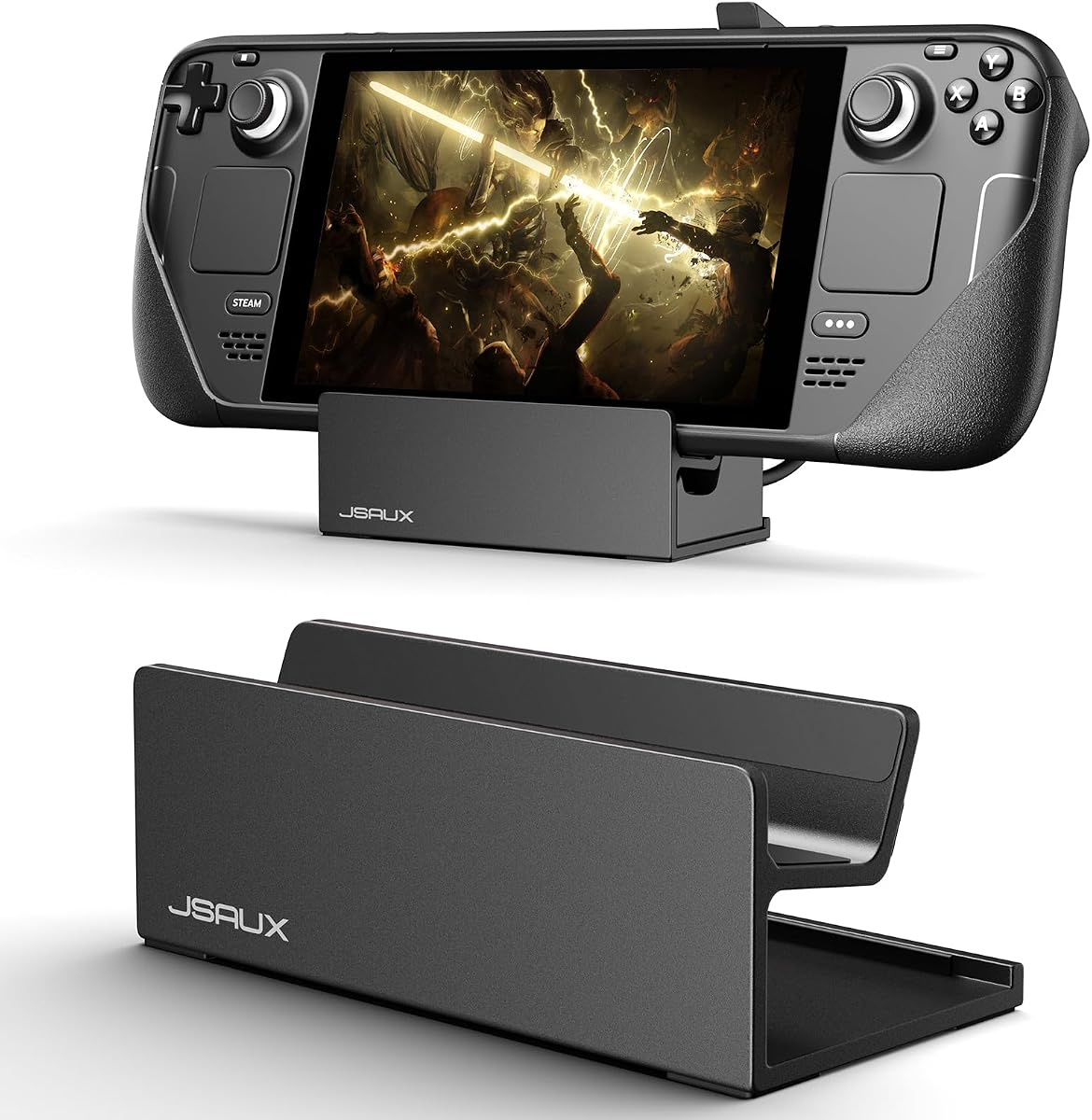

The KUNSLUCK Stand Base is a compact desktop support rated 4.7 out of 5 by customers. Its main appeal is straightforward utility: it holds a Steam Deck, Steam Deck OLED, ROG Ally, Nintendo Switch family device, or smartphone without occupying a large portion of the desk. The open-backed design also distinguishes it from closed shells that can restrict airflow around the console.
We may earn a commission when you buy through this link, at no additional cost to you.
Stability comes from silicone in two locations. A nonslip pad provides the contact area where the device rests, while four additional silicone points on the underside keep the stand itself from sliding. This arrangement is especially helpful for short sessions involving touch controls, because a small forward shift should not send the handheld off-center. The broad rear opening leaves the console's back exposed and supports heat dissipation while it is docked for play or charging.
The most important limitation concerns protective cases. The product information says the stand is not compatible with a protective case that has its own kickstand, and the shell thickness should remain below 1.5 millimeters. It also excludes the ROG Ally X. Those restrictions are reasonable for a minimal stand, but they make case measurements essential before ordering rather than an optional precaution.
This is an excellent choice for someone who wants a small, uncomplicated desktop base without adding bulk to the console. It does not offer angle adjustment, integrated charging, or a more advanced hinge mechanism, yet it covers the basics with useful grip and cooling considerations. For a basic Steam Deck kickstand base, it provides strong everyday value and unusually broad compatibility.
The compact structure is valuable in a bedroom, dormitory, or shared workspace where a full dock and stand combination would consume too much room. It also travels more easily than a larger accessory, although the supplied specifications do not identify it as a folding design.
Leaving the back of the Steam Deck uncovered is beneficial when the console is resting on a stand rather than being held. The open construction supports heat dissipation and allows charging cables to be connected without routing them through a narrow enclosure.
We may earn a commission when you buy through this link, at no additional cost to you.
The JSAUX PC0105 Kickstand Protective Case is rated 4.7 out of 5 and combines two functions that are often purchased separately: a fitted protective shell and an adjustable kickstand. It is intended for Steam Deck and Steam Deck OLED devices, making it a strong option for owners who want one accessory to cover protection, grip, and hands-free tabletop viewing.
We may earn a commission when you buy through this link, at no additional cost to you.
The kickstand offers four positions at 35, 45, 55, and 65 degrees. That range is more useful than a single fixed angle because it lets the user select a lower position for close viewing or a steeper position for touch play, media viewing, or controller-based games. Texturing on both sides adds grip when the console is removed from the stand and carried for handheld use.
Ventilation remains a deliberate part of the design. Openings behind the Steam Deck are intended to help heat escape during longer gaming sessions, while the side texture supports a steadier hold. The fit uses precise cutouts for the device openings, and the product description states that installation and removal are straightforward. That combination makes the case feel like an everyday shell rather than a complicated dock add-on.
There are two compatibility cautions. A protective skin decal may prevent the case from fitting perfectly, and the PC0105 is not compatible with a JSAUX docking station or the official docking station. Buyers should therefore consider whether their gaming setup depends on docking. For users seeking a protective case with a useful built-in kickstand, however, this is a more complete and adaptable solution than a separate fixed-angle base.
Angle selection matters when a stand is used for more than one activity. The 35-degree setting offers a lower presentation, while the higher settings can keep the screen more upright for touch interaction or external-controller play. The available choices make the shell suitable for a flexible daily routine.
A protective shell normally adds another layer around the console, so ventilation is an important counterbalance. The rear openings are designed to preserve airflow and reduce the chance that the case turns a resting position into a heat-retaining enclosure.
We may earn a commission when you buy through this link, at no additional cost to you.
The Antank Foldable Adjustable Magnetic Stand offers a more mechanical approach to supporting a Steam Deck. With a 4.4 out of 5 customer rating, it stands out for a 270-degree adjustment range, folding construction, aluminum alloy body, and the ability to hold either a Steam Deck or a compatible MagSafe iPhone in landscape or portrait orientation.
We may earn a commission when you buy through this link, at no additional cost to you.
Its magnetic back clip attaches to the console while the hinged support provides the physical structure. This is helpful for users who alternate between handheld gaming, controller-assisted play, video viewing, and phone use. Supporting several orientations makes the accessory useful beyond the narrow category of conventional Steam Deck kickstands, while the foldable body reduces the space it occupies in a bag.
The anti-slip silicone pads are intended to keep both the device and stand secure. The product information also states that the magnetic clip leaves the Steam Deck's vents and charging port unobstructed. At 6.69 by 3.86 by 0.7 inches and 0.94 pounds, the stand is portable but not the lightest option. Its construction and adjustment hardware give it a more premium feel than a basic molded desktop support.
The main trade-off is the attached magnetic clip. It adds weight and occupies part of the console's back, which may not suit buyers seeking an extremely minimal setup. Even so, this is the most flexible premium choice in the group for a user who values one adaptable accessory across gaming and everyday viewing. It is particularly persuasive for travel, shared workspaces, and setups where a fixed-angle base would be too restrictive.
Supporting MagSafe iPhones in addition to Steam Deck models broadens the value of the stand. A single folding accessory can serve as a console support, phone stand, portrait media holder, and landscape screen when the user wants a hands-free setup.
The 270-degree movement covers a much wider range of postures than a conventional desktop kickstand. It allows the screen to be repositioned for touch play, relaxed viewing, controller use, or portrait content without replacing the accessory.
We may earn a commission when you buy through this link, at no additional cost to you.
The 2-in-1 Powerbank Holder Charger Stand Base is built for users who want the Steam Deck to remain supported while an external power bank is attached. Its 3.8 out of 5 rating is lower than those of the leading desktop and case options, but the product serves a specific need: combining a power-bank mount and kickstand in one folding accessory.
We may earn a commission when you buy through this link, at no additional cost to you.
A soft adjustable silicone strap holds the power bank against the back of the console. Multiple limiter holes give the user some control over strap length and accommodate many power-bank sizes. Because the contact is soft, the holder is also intended to reduce scratches between the power bank and the Steam Deck. The design claims protection against everyday drops, shocks, bumps, and scratches while the console is being carried with the mount attached.
The stand functions as a kickstand even when no power bank is inserted, making the two-in-one design more useful than a specialized battery cage. A hollowed-out structure supports heat dissipation, and a soft anti-scratch pad creates a more forgiving resting area. Its foldable, palm-size construction also makes it relatively easy to place in a pocket or the original carrying bag.
The trade-off is that its design is less universal than a simple platform. Users need to compare their power bank's dimensions with the strap's supported range, and the device's lower rating suggests that some buyers may find the fit or stability less consistent. Even so, for portable Steam Deck play away from a wall outlet, the added battery support can outweigh the limitations of a conventional fixed stand.
The power-bank mount turns the back of the console into a useful power-supply area. Instead of placing a separate battery on the table and trying to balance the Steam Deck above it, the combined holder keeps the two components together.
Silicone around the power bank and beneath the console reduces direct hard-to-hard contact. The anti-scratch pad is particularly relevant during travel, when the device may be placed in a bag while the holder remains attached.
We may earn a commission when you buy through this link, at no additional cost to you.
The BTG Power Bank Holder focuses on the same practical idea as the earlier 2-in-1 design but carries a stronger 4.5 out of 5 customer rating. It attaches a compatible power bank to the back of a Steam Deck and remains usable as a simple kickstand when a battery is not installed. The result is a compact solution for extending play away from a fixed power source.
We may earn a commission when you buy through this link, at no additional cost to you.
Its adjustable elastic silicone strap includes multiple limiter holes, giving the user several positions for securing the battery. The soft silicone is intended to hold the power bank firmly while reducing scratches. That matters because the battery remains pressed against the console during transport, where repeated movement and contact could otherwise mark the power bank's finish.
The product is simple by design. It does not attempt to be a full protective shell, an elaborate hinge system, or a complete docking station. Instead, it addresses a common gap between a basic kickstand and a more involved power setup. The supplied packing list contains one holder mount, so owners need to bring their own compatible power bank.
Buyers should consider whether a compact battery mount is more valuable than a conventional stand. For the target use case, the answer is often yes. The holder keeps the console and battery together, offers a more comfortable grip while charging, and provides a fallback support mode. Its focused design makes it easier to recommend than a general-purpose accessory to someone who already knows the size and shape of the battery they plan to use.
The multi-hole strap allows the mounting position to be adjusted rather than relying on one fixed point. This gives the user some control over the power bank's position and helps keep the combined unit stable during play.
Because the holder also works as a kickstand without a power bank attached, it can remain in use during normal tabletop gaming. That avoids forcing a user to remove and store the accessory whenever external charging is unnecessary.
We may earn a commission when you buy through this link, at no additional cost to you.
The JSAUX PC0104 ModCase is more ambitious than a conventional kickstand. Rated 4.7 out of 5, it combines a detachable front cover, body shell, metal bracket, and silicone strap into a modular protection system for original LCD and Steam Deck OLED models. The stand is only one element of a broader setup that can be reconfigured as the user's needs change.
We may earn a commission when you buy through this link, at no additional cost to you.
The detachable zinc alloy kickstand provides more substantial support than a thin plastic flap. It slides onto the back of the case and can be removed when lightweight handheld use matters. Behind it, the modular silicone strap offers a place to secure a power bank, USB-C hub, or JSAUX cooling fan. This flexibility allows a single case to serve commuting, docked play, charging, and extended sessions.
Protection extends beyond the rear shell. The removable hard front cover safeguards the OLED screen and thumbsticks from scratches and pressure, while textured edges improve the grip. The construction combines PC-ABS with shock-absorbent TPU, balancing rigid structure around vulnerable areas with softer material at contact points. Cutouts preserve access to buttons, triggers, and the updated OLED power button.
The trade-off is complexity and bulk. This is not the simplest option for a user who only wants a small kickstand, and the front cover can make a bag less spacious. It is also not a full replacement for the official dock; the described system is an accessory platform. For owners who want one adaptable ecosystem instead of several disconnected accessories, the PC0104 offers exceptional versatility and a notably robust removable stand.
The metal bracket separates from the shell, reducing bulk for handheld play and returning the console to a more conventional profile. It is a practical approach for people who alternate between desk gaming and carrying the Deck.
The silicone strap makes it possible to carry selected accessories directly on the console. Power banks, hubs, and compatible cooling fans can be positioned according to the user's immediate needs, making the system especially practical for travel and long sessions.
We may earn a commission when you buy through this link, at no additional cost to you.
The NewQ Portable Steam Deck Dock is a four-in-one connectivity accessory with an integrated hidden stand. Its 4.2 out of 5 rating reflects a broader feature set than a conventional kickstand, including HDMI 2.0 output up to 4K at 60Hz, two USB-A 3.0 ports, and USB-C charging input with up to 101 watts of power delivery.
We may earn a commission when you buy through this link, at no additional cost to you.
The handheld mode is its most relevant stand feature. Some docks interfere with the Steam Deck's grips or make a separate controller necessary, while this product is designed to let the console act as a wired joystick after an HDMI cable is connected. A hidden stand supports the display during use, and the slim back-clip format is intended to keep the overall setup light and portable.
The product weighs 78 grams and takes up little space, making it easier to justify than a full desktop dock for travel or temporary use. Its ports can support a larger monitor, wired peripherals, network equipment, and charging in one package. The 4K at 60Hz specification offers a smooth target for compatible games and media, although actual display performance depends on the game, system settings, and monitor.
This accessory is less suitable for someone who wants a dedicated kickstand and nothing else. It introduces cables, port considerations, and setup complexity in exchange for useful desktop expansion. For a Steam Deck owner who frequently travels but still wants a complete temporary station, the combination of an integrated stand and four ports can deliver more value than purchasing a separate support and portable dock.
Combining the stand and dock means a temporary external-screen setup requires fewer separate accessories. The compact clip format is especially useful when the console is moved between a home display, a friend's television, and a travel setup.
Two USB-A ports allow supported peripherals such as controllers, keyboards, or storage to connect alongside the display. USB-C power input keeps the console charged, while the HDMI output provides the basic bridge to a larger screen.
We may earn a commission when you buy through this link, at no additional cost to you.
The Belly Stand Bracket is designed for a very specific kind of play: reclined gaming on a bed or couch. Instead of placing the Steam Deck on a table or holding it continuously, the bracket rests against the torso and supports the console from below. That positioning can make long sessions more comfortable when a conventional desktop surface is unavailable.
We may earn a commission when you buy through this link, at no additional cost to you.
Its ergonomic purpose is to distribute the console's weight across the torso rather than requiring the user's hands to bear it. The secure fit is intended to keep the Steam Deck in place, while hollow openings allow air to circulate around the device. Those openings are important because a body-positioned stand can otherwise create a warm, enclosed area around the console.
The construction is PLA plastic, and the supplied measurements are 21.5 by 7.1 centimeters, or 8.46 by 2.8 inches. Its compact size and simple setup make it straightforward to carry for home, camping, or travel. The bracket is not trying to imitate the machined adjustability or metal construction of premium desktop stands. Instead, it uses a small, purpose-built foundation for a less conventional gaming posture.
A key consideration is the absence of a customer rating. Because the supplied listing does not provide a numeric score, this review cannot compare its feedback history with the rated products. Buyers should therefore pay close attention to the product dimensions and understand that reclined placement differs from a normal desktop setup. It is a creative answer for couch and bed gaming, but not a general replacement for a desk stand.
The bracket makes the Steam Deck easier to watch when the user is lying back or seated on a couch. Supporting the console against the torso reduces the need to keep both hands raised around it, particularly during slower or strategy-focused play.
Its small footprint and lightweight material make it easy to pack with the console. The straightforward bracket design avoids the complexity of hinges, cables, or a permanent mounting system, which is useful for occasional use.
We may earn a commission when you buy through this link, at no additional cost to you.
The JSAUX Stand for Official Steam Deck Dock is a metal accessory aimed at a recurring problem: a Steam Deck fitted with a protective case may not sit securely in the official dock. Rated 4.5 out of 5, the stand provides a tailored recess and stable base for the official dock while also allowing room for a compatible Steam Deck or ROG Ally setup.
We may earn a commission when you buy through this link, at no additional cost to you.
The high-quality alloy construction gives the product a firmer feel than a generic plastic support. Its frosted surface is described as comfortable to touch, while silicone pads beneath the stand and within the recesses keep the console from shifting. Three recessed sides receive silicone, which also helps protect the Steam Deck from scratches while it is installed.
This is a specialized product rather than a general desktop kickstand. It does not include a dock, and the supplied information explicitly says it is not compatible with third-party docks. Case compatibility is possible when the protective case is less than 2 millimeters thick, but cases with built-in kickstands are excluded. Some rubber shells may need to be squeezed gently into position during installation.
For a user committed to Valve's official dock, these limitations are less troublesome because the stand was designed around that exact hardware. It solves placement stability and scratch concerns while preserving access to the docked console. For anyone using a compact third-party dock or a case with its own kickstand, the same specificity becomes a reason to choose a different product. As an official-dock base, however, it is sturdy, thoughtful, and well matched to its intended setup.
The molded recesses are intended to keep the docked system aligned rather than allowing it to rest loosely. This focused geometry makes the stand more relevant than a flat platform for users who regularly connect the Steam Deck to the official dock.
The alloy body resists flexing while the silicone contact points soften the connection. The combination addresses both stability and surface protection, two concerns that are harder to reconcile in a purely rigid recess.
We may earn a commission when you buy through this link, at no additional cost to you.
The YIBEICO Wall Mount for Steam Deck Dock takes the desktop dock out of the crowded area around the console entirely. With a 4.8 out of 5 customer rating, it is the highest-rated product in this group, and its purpose is immediately clear: securely hold the official Steam Deck dock on a wall, beside a monitor, or near a television.
We may earn a commission when you buy through this link, at no additional cost to you.
A precise-fit design keeps the dock stable while leaving its connections accessible. Reserved space accommodates DisplayPort, HDMI, USB receivers, network cables, and Type-C cables, so the mount does not interfere with the dock's normal functions. This is a major practical advantage over improvised wall placements that can bend cables or block connectors.
Heat dissipation is handled through bottom openings, hollow patterns, and reserved space behind the holder. Together, these features create an airflow path around the dock rather than trapping it against a solid wall. The metal construction and frosted surface treatment are intended to provide durable support and a comfortable finish, matching the clean appearance of a mounted gaming display.
The installation requirement is important. A wall mount is a more permanent and less portable choice than a tabletop base, and it is specifically designed for the official dock rather than third-party dock holders. The console and dock are not included. Even so, for a user who wants a permanently organized gaming station and values clear ports, effective cooling, and reclaimed desk space, this is one of the strongest choices in the guide.
Moving the dock to the wall removes the broad footprint it would otherwise occupy. That recovered space can be used for a keyboard, controller, display, or simply a cleaner work surface, making the arrangement more practical for a permanent setup.
Reserved clearance for common cable types means the dock can remain fully connected after mounting. The open rear and lower ventilation paths also help preserve airflow, which is especially valuable in a fixed installation.
We may earn a commission when you buy through this link, at no additional cost to you.
The best Steam Deck kickstand base depends on how and where the console is used. Consider the protective case, available space, viewing habits, power needs, cooling, docking hardware, and portability before comparing the options in this guide.
Case compatibility is the most important physical check because even a small difference in thickness or rear geometry can change how a console sits. The KUNSLUCK desktop base requires a case under 1.5 millimeters and excludes cases with a built-in kickstand. The JSAUX official-dock stand accepts certain cases under 2 millimeters but likewise does not support a protective case with its own kickstand. A purpose-built kickstand case such as the PC0105 is already shaped around the console, so its fit depends on avoiding conflicting decals and dock systems.
Measure the device, case, controls, and any rear accessory before ordering. Also check whether the case includes a battery, cooling fan, kickstand, or mounting clip. A stand that looks attractive in a product image can still prevent a case from seating correctly, obstruct controls, or press against a protruding component. Confirm the listed exclusions and compare them with the exact case model rather than assuming all slim shells behave identically.
A secure stand should hold the console without creeping during touch input or controller use. The JSAUX PC0105 offers four fixed angles from 35 to 65 degrees, while the Antank stand provides 270 degrees of movement. Fixed angles are simpler and predictable, but a limited set may not suit every activity. A broad hinge is more versatile but adds weight and mechanical complexity. For basic desktop use, the KUNSLUCK base prioritizes grip and low footprint rather than angle selection.
Think about the games as well as the screen. Steeper positions can help with touch controls and vertical content, while a lower angle may feel more natural for conventional games. A stand that supports the device firmly is more important than one that offers many positions but feels wobbly in the preferred setting. Whenever possible, review the adjustment range, contact surfaces, and base footprint together.
A tabletop stand should encourage airflow around the Steam Deck rather than enclosing its back and lower vents. The KUNSLUCK base is explicitly designed not to cover the back, and the PC0105 includes rear openings. The Antank magnetic clip is described as leaving the vents and charging port unobstructed, while the YIBEICO wall mount uses hollow patterns and rear clearance to form an airflow channel. The power-bank mounts also use open or hollow structures, although an attached battery can occupy more of the rear area.
Look for open negative space, vent-aligned cutouts, and enough clearance around the charging cable. Avoid designs that force the console into a narrow sleeve with no path for warm air. If the primary use involves demanding games or long play sessions, ventilation should be treated as a core selection factor rather than a minor feature. Even with a stand, users should follow normal safe operating practices and avoid blocking openings.
A basic kickstand is only part of a longer mobile session. The 2-in-1 Powerbank Holder and BTG Power Bank Holder are designed to secure a compatible power bank on the rear of the Steam Deck while continuing to function as a kickstand. Their adjustable silicone straps and multiple limiter holes help accommodate different battery shapes, while soft contact surfaces are intended to reduce scratches. These products are most relevant to people who regularly play away from an outlet.
Check the holder's supported power-bank dimensions and compare them with the exact battery you own. A power bank is not included, and the cable still needs to connect without creating strain. Owners should also consider the added rear bulk and whether the combined console and battery will remain comfortable during handheld play. If external power is unnecessary, a simpler platform is usually easier to carry and use.
Dock compatibility is a matter of matching the exact ecosystem. The JSAUX official-dock stand is made for Valve's official Steam Deck Dock and does not support third-party docks. It is useful when a slim protective case prevents the console from seating properly in the official dock. The NewQ portable dock instead combines its own hidden stand with HDMI and USB connectivity for temporary external-display setups. The YIBEICO wall mount secures the official dock vertically and frees the desk beneath it.
Decide whether the accessory must support the console directly, carry a battery, hold a dock, or simply create a resting point. These are different jobs with different constraints. A desktop stand cannot be assumed to fit a dock, and a dock cannot automatically be treated as a conventional kickstand. For reliable operation, use the specified hardware generation and check whether the product includes the console, dock, power bank, or mounting hardware.
The most compact stand can still be the wrong choice if it occupies the only clear area beside a display. The KUNSLUCK base emphasizes space saving, and the Antank stand folds for transport. Power-bank holders remain portable because their structure folds or compresses, while the Belly Stand Bracket is designed to eliminate the need for a table during reclined use. By contrast, the YIBEICO wall mount consumes no desk footprint once installed but adds a permanent wall installation.
Measure the intended location before buying. Consider monitor stands, speakers, controllers, charging leads, and the space needed to remove the console from its holder. A larger stand may be more stable but awkward beside a compact display, while a wall mount may solve a crowded desk but be inconvenient in a rented room. The most useful choice is the one that fits the actual environment rather than an idealized setup.
Portable users benefit from folding or compact accessories, but material and weight determine whether an item feels solid or flimsy during travel. The Antank stand uses aluminum alloy and folds down, combining a substantial frame with a 0.94-pound listed weight. The power-bank holders use silicone straps and foldable structures, while the Belly Stand Bracket uses lightweight PLA plastic. The JSAUX official-dock stand emphasizes rigid alloy construction for a fixed desktop environment.
Choose based on how often the console moves. Frequent travelers may accept more weight for better stability, while occasional users may prefer the lightest option. A protective case is still needed if the console will be carried, because a stand alone does not prevent screen or control damage. Assess the entire travel kit together so the support accessory does not make the console awkward to remove from a bag or set down safely.
Stable contact is more important than a decorative finish. Silicone pads help prevent sliding and scratches on the KUNSLUCK base, the Antank magnetic stand, the JSAUX official-dock stand, and the power-bank holders. Frosted metal surfaces on the dock-focused products are intended to balance appearance with a comfortable touch. Cable access also matters: a usable stand should leave the charging port accessible and avoid placing sharp bends in the cable.
Examine how the device enters and leaves the support. Magnetic attachments can be quick, while cases and molded recesses may require more deliberate alignment. Check whether grips contact the screen, thumbsticks, vents, or case edges. A stand that looks stable in one orientation may behave differently in landscape, portrait, or controller-assisted play. The best choice keeps the console secure while leaving controls, cooling openings, and charging access unobstructed.
Before first use, compare the stand with the Steam Deck and any attached case. Confirm that the console seats fully, that controls and ports remain accessible, and that the support surface sits on a level, stable desk. For case-based or dock-specific accessories, check the stated thickness and compatibility exclusions. Assemble wall hardware using appropriate installation methods, and inspect silicone pads, straps, clips, and hinges for looseness or damage.
Place the Steam Deck gently into the stand rather than dropping it into the contact area. Keep the silicone surfaces free of dust, oil, and sticky residue, because contamination can reduce grip. If a power bank is attached, route its cable with a gentle curve and confirm that the strap sits over a solid part of the battery. When adjusting an angle, move through the supported range slowly and avoid forcing the hinge beyond its mechanical limits.
Clean the accessory according to its materials. Silicone pads and elastic straps can generally be wiped with a soft, slightly damp cloth, while metal surfaces may also tolerate careful dry or lightly damp wiping. Do not immerse the product, flood its openings, or use harsh solvents that could damage coatings, plastic, or adhesives. Check the attachment points periodically, especially after travel, and replace a stretched strap or loose mount rather than relying on excessive force.
No. Compatibility depends on the product, and the supplied information differs across the list. The KUNSLUCK base, JSAUX PC0105, Antank stand, and NewQ dock explicitly support both Steam Deck and Steam Deck OLED, while the PC0104 ModCase is described as fitting original LCD and OLED models. Always check the exact device and case combination before ordering.
It depends on the design and case thickness. The KUNSLUCK base requires a case under 1.5 millimeters and does not support a case with a kickstand. The JSAUX official-dock stand permits certain cases under 2 millimeters but also excludes kickstand cases. Integrated kickstand cases are built to fit the console more closely, so they can be a safer starting point for protected devices.
The Belly Stand Bracket is specifically designed for reclined play. It supports the console against the torso so the user does not have to hold it continuously, and its openings are intended to permit airflow. A conventional desktop stand works best on a firm level surface and is less convenient when the console must rest above the user's body.
It is useful when the console will be used away from a reliable outlet. The 2-in-1 Powerbank Holder and BTG Power Bank Holder can secure compatible batteries on the console's back while functioning as kickstands. Confirm battery dimensions, include an appropriate charging cable, and check the added weight and rear bulk before committing to that configuration.
The YIBEICO Wall Mount is designed specifically for the official Steam Deck Dock. It reserves access for common cables and includes ventilation openings and hollow patterns to support airflow. It is not designed for third-party dock holders, and the console and dock are not included. Proper wall installation is also necessary for reliable support.
Prioritize a broad base, nonslip contact points, a secure fit, open ventilation, and unobstructed charging access. Fixed-angle stands are simple and dependable, while adjustable models offer more flexibility but may be heavier. The best choice should keep the console from sliding during touch play without covering its vents or pressing against a case accessory.
It depends on how often you change activities or viewing positions. The JSAUX PC0105 offers four angles for a practical range of touch, media, and controller use, while the Antank stand provides a much broader 270-degree adjustment. If one comfortable angle is sufficient, a simpler fixed stand may be lighter and easier to store.
Yes, provided the selected design leaves the charging port accessible and does not trap the cable in a hinge. The KUNSLUCK base is designed to facilitate charging while leaving the back uncovered, and the Antank clip is described as leaving the charging port unobstructed. Power-bank users must also route the cable gently and confirm that the attached battery does not pull on the connector.
The KUNSLUCK Stand Base is the strongest straightforward desktop option, combining a compact footprint, silicone grip points, open-back cooling, and broad compatibility. The JSAUX PC0105 is the most complete choice for a protected console because it combines a shell with four viewing angles, while the Antank magnetic stand offers the most premium flexibility with wide adjustment, folding construction, aluminum alloy, and multi-device support.
Prioritize the setup you actually have rather than selecting by appearance alone. A user with a particular case needs to check thickness and built-in kickstand clearance, mobile gamers may want a power-bank mount, official-dock owners may need a fitted or wall-mounted solution, and couch players may prefer a torso support. Cooling, cable access, stability, and the intended viewing angle should determine the final choice.
Ratings and product availability can change over time, and the information in this guide is based on the supplied product data rather than personal testing. Before purchasing, verify the latest compatibility details, included components, dimensions, and current price. Taking a few minutes to match the accessory to the console, case, dock, and room can prevent an otherwise good stand from becoming an inconvenient compromise.