
Elgato Stream Deck Mini
4.7Editor score
Six customizable LCD keys
Simple drag-and-drop setup
Multi-action sequences supported
Discover the best streaming decks for Twitch, comparing key counts, audio controls, app integrations, displays, macros, and setup ease for creators.
A streaming deck gives Twitch creators a tactile, visual way to trigger scenes, launch media, adjust audio, and operate production software without memorizing keyboard shortcuts. The best model balances useful controls, dependable software integration, readable displays, and enough capacity for the way you actually stream.
We compared all ten products by their available controls, programmable layouts, supported applications, workflow features, platform compatibility, and usefulness during a live broadcast. The list includes compact six-key options, larger multi-key consoles, knob-equipped studio controllers, and a Stream Deck-compatible webcam for creators who want more control over framing.
Each pick below highlights the product's strongest contribution, along with practical limitations to consider before buying. Product ratings reflect the supplied marketplace feedback, while detailed feature information comes from the listed descriptions. Availability and prices can change, so check the current listing before making a final purchase decision.
4.7Editor score

4.6Editor score

4.8Editor score
This side-by-side comparison highlights the number and type of controls, customization features, workflow capacity, and integrations available across all ten products, from a compact six-key deck to a large 36-key production console.




The VSD M18 Macro Pad is a programmable 18-control keypad built for streamers and desktop power users who want more direct actions than a small shortcut pad can offer. Its 4.4 rating reflects generally positive marketplace feedback, while its distinguishing combination of 15 LCD visual keys and 3 physical buttons gives creators a flexible mix of detailed and familiar controls.
We may earn a commission when you buy through this link, at no additional cost to you.
Its most useful feature is the ability to assign either one action or a multi-step sequence to each key. A streamer can trigger text, launch an application, open a webpage, control media, or change an OBS scene with one press. Operation Follow expands this concept by allowing several macro steps to run in a custom order or simultaneously, which can streamline repetitive transitions, editing tasks, and game combinations.
Each visual key accepts JPG, PNG, and GIF images, allowing a creator to design icons that communicate the purpose of every command at a glance. The outer RGB ring supports automatic cycling and custom tones through firmware upgrades, adding a visible desk accent that can be helpful in a dim streaming environment. Built-in plugins for reminders, clocks, stopwatches, weather, and calendars extend the device beyond scene switching.
The trade-offs are platform-related and practical. The listed system support covers Windows 11 and later and macOS 11.0 and later through USB-C, while native Linux plug-and-play operation is unavailable. Development documents are provided for custom integrations, but creators seeking the smoothest established plugin experience may still prefer an Elgato model. Overall, this is a feature-rich choice for Twitch creators who value macro flexibility, icon customization, and abundant physical controls.
Assign recognizable icons to scene changes, alerts, media launches, and chat shortcuts. The mixed LCD and physical-button layout makes it possible to keep frequently used commands grouped in a position that is easy to reach during a broadcast.
Operation Follow can execute macro steps in a prescribed order or at the same time, reducing the effort involved in opening tools, sending text, and changing software states without requiring advanced programming knowledge.
We may earn a commission when you buy through this link, at no additional cost to you.
The Elgato Stream Deck + is the most balanced streaming deck in this guide because it combines customizable LCD keys, a touch strip, and tactile dials in a compact production controller. Its 4.6 rating indicates strong marketplace satisfaction, and the combination makes it equally useful for switching Twitch scenes, mixing audio, controlling lights, and managing the software surrounding a live broadcast.
We may earn a commission when you buy through this link, at no additional cost to you.
The LCD keys provide visual confirmation after a command is activated, while the dials allow more precise adjustments than a simple button press. Creators can use the touch strip for information that changes during a stream or for additional action pages. The hardware can serve as an audio mixer, studio controller, or general production console, giving it considerably more scope than a conventional shortcut keyboard.
Multi Actions allow several tasks to run together or in a timed sequence. Smart Profiles automatically change the interface when a creator moves among different applications, reducing the need to rebuild a layout for every task. The supplied feature list specifically names Elgato Wave Link, Camera Hub, Control Center, OBS, Twitch, YouTube, Twitter, Discord, Spotify, and Philips Hue among the available integrations.
The Stream Deck App and Store deepen that support with drag-and-drop configuration, plugins, icons, royalty-free music, and sound effects. This ecosystem makes the controller approachable at first, while smart profiles and advanced actions give it room to grow. The only meaningful drawback is that its feature set may feel like more than a new streamer needs, but for a creator who wants a versatile central controller, the Stream Deck + offers the strongest all-around balance in this list.
The tactile dials are well suited to adjusting levels during a live show, while visual key feedback helps prevent accidental changes. Wave Link and related controls make the unit useful for creators who want audio commands to share a familiar interface with scenes and applications.
Smart Profiles let the controller present different actions for different applications or creative sessions. That makes it easier to keep streaming, editing, and communication controls distinct while retaining one physical device.
We may earn a commission when you buy through this link, at no additional cost to you.
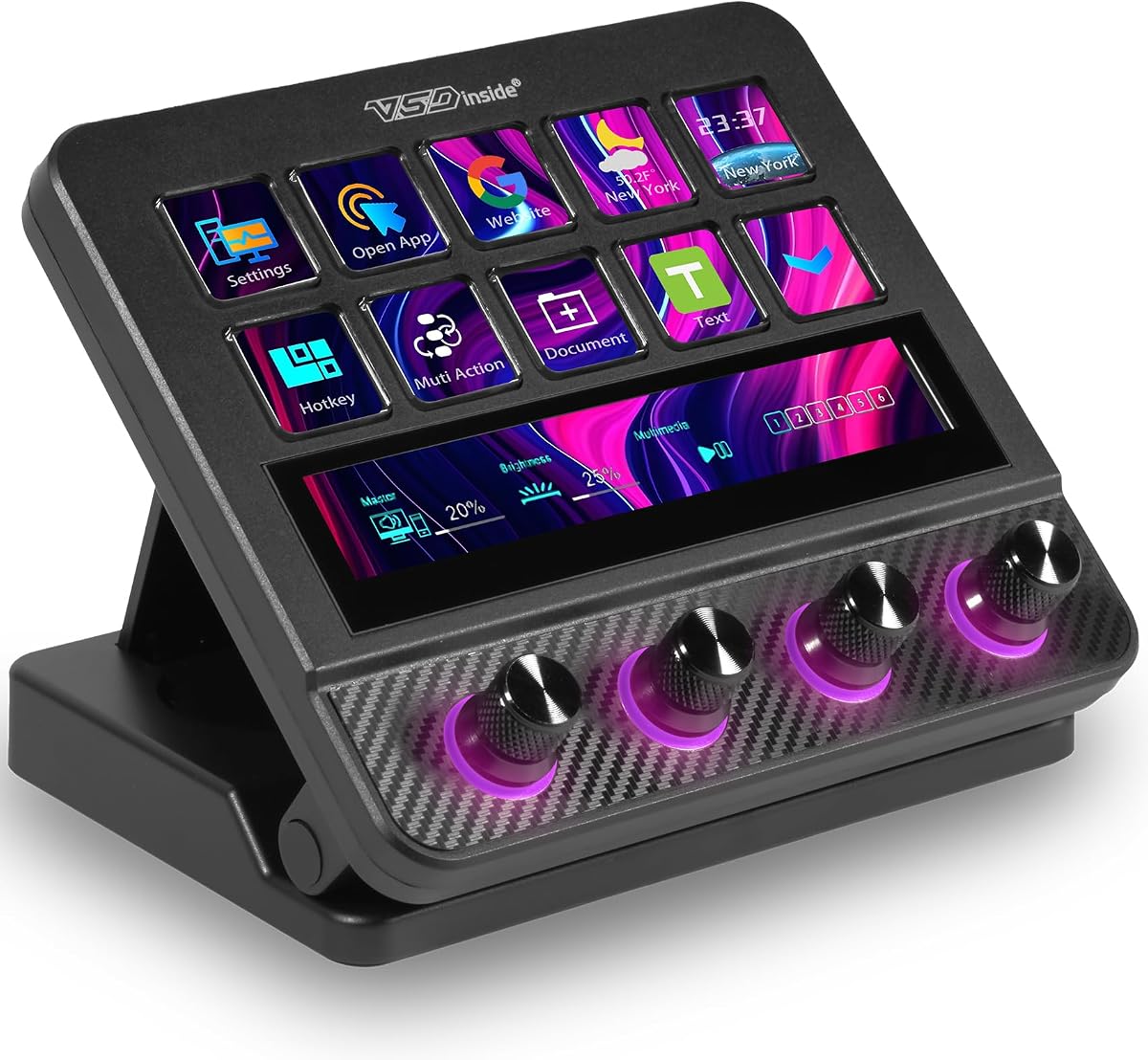
The VSD N4 Pro is a densely equipped streaming controller with 10 LCD keys, 4 RGB knobs, and an interactive touch bar. Its 4.4 rating places it among the stronger-rated products in the roundup, and the combination makes it a compelling option for creators who want scene controls and tactile audio adjustment in the same desktop unit.
We may earn a commission when you buy through this link, at no additional cost to you.
Every LCD key can carry a custom PNG, JPG, or GIF icon, and the controller can hold unlimited independent scene presets for streaming, editing, gaming, and office use. Single commands and chained multi-step operations are supported, allowing a creator to build one-touch routines for editing shortcuts, app launches, web access, and text presets without coding.
Audio functionality is a central selling point, but it needs careful interpretation. The device can act as a USB sound deck and send play, pause, and related control commands to trigger software-based sounds and background audio. It does not contain built-in speakers and therefore is not itself an audio output device. Its broader feature set includes adjustable RGB visuals compatible with GIF, MP4, and MOV files, switchable haptic key feedback, and a passive USB dock for peripherals and storage devices.
The adjustable 60-degree stand is well suited to long sessions, and USB-C plug-and-play operation is listed for Windows 10 and later and macOS 11.0 and later. The large downloadable plugin catalog adds utility, although a creator must download the relevant tools to access its full potential. It is a strong choice for a Twitch workflow that values organized presets, prominent knobs, and visual customization more than a minimal footprint.
Unlimited independent presets let a creator maintain focused layouts for live production, post-production, gaming, and routine office work. Switching to the appropriate set reduces the need to hunt through a single crowded page of commands.
The soundboard features can trigger compatible audio software through USB commands, but the controller does not output sound through built-in speakers. Creators should treat it as a shortcut interface rather than a standalone speaker or mixer.
We may earn a commission when you buy through this link, at no additional cost to you.
The Elgato Stream Deck + XL is the premium control platform in this guide, combining 36 macro keys, 6 multifunction dials, and an expanded touch strip display. Its 4.8 rating is the highest among the listed products, which supports its reputation as a particularly capable option for creators whose Twitch workflow includes scenes, cameras, audio, lighting, editing, and other production tools.
We may earn a commission when you buy through this link, at no additional cost to you.
Thirty-six keys give a streamer room to arrange commands logically rather than crowding many functions onto one page. Multi Actions can automate complete sequences with a single press, while the dials provide precision for changing levels or assigning different functions. The touch strip presents important changing information at a glance and adds pages that can be reached by swiping, which is useful for status details that do not need a permanent key.
The integration list extends beyond streaming software to digital audio workstations, video switchers, and creative applications. Optional accessories such as the Network Dock can expand connectivity, although the basic device already provides ample control capacity. Unlimited custom profiles make it possible to design distinct layouts for individual projects, workflows, and team members, a useful feature for creators who broadcast different formats or share a production setup.
The clear trade-off is size. This is not a compact device for a crowded desk, and the number of controls can feel excessive to someone who only needs a few scene changes. Even so, the combination of the highest rating, extensive controls, precise dials, and flexible profiles makes the XL the premium recommendation for a creator who wants one central command center for a sophisticated streaming setup.
Thirty-six keys allow scenes, media, cameras, lighting, social tools, and editing commands to be separated into a clear visual layout. This reduces the chance of triggering the wrong command when several production elements must be controlled quickly.
Tools such as Action Trigger can turn an individual dial into multiple controls, adding another layer of flexibility. The dials therefore work alongside the LCD keys rather than serving only basic volume adjustment.
We may earn a commission when you buy through this link, at no additional cost to you.
The Insta360 Link 2 Pro is not a traditional button-filled streaming deck, but it adds a valuable layer of control to a Twitch setup through its Stream Deck integration. With a 4.8 rating, the 4K PTZ webcam combines AI tracking, HDR, a large sensor, and directional microphones while allowing a compatible Stream Deck to switch modes, trigger presets, and manage multiple cameras.
We may earn a commission when you buy through this link, at no additional cost to you.
Its physical pan and tilt functions allow the camera to follow a creator or group around the room, while natural bokeh gives the output a more deliberately produced appearance. The dual-microphone system uses directional beamforming to favor the subject's voice and reduce background noise, a valuable feature for creators working in shared or imperfect acoustic environments.
Control options extend beyond the physical Stream Deck relationship. Hand gestures or a smartphone can start AI Tracking, change zoom, switch modes, or activate Whiteboard Mode. Specialized DeskView, Whiteboard, and 4K Portrait modes adapt the camera to different parts of a broadcast, while the free Link Controller software provides advanced desktop adjustments.
The product supports Windows, macOS, Chrome OS, and Linux according to the listed compatibility details, as well as major streaming and meeting applications. However, it is not currently compatible with ARM-based Windows systems or Windows Hello Face Recognition. For a creator who wants a more dynamic camera experience and already uses a Stream Deck, this webcam serves as a compelling complementary control target rather than a replacement for a dedicated scene-switching keypad.
Stream Deck integration lets a creator switch camera modes, trigger saved presets, and control multiple cameras without reaching for the webcam itself. That can make framing changes feel more consistent with scene changes and other production commands.
Directional beamforming focuses microphone pickup toward the speaker and helps reduce background noise. It cannot replace a dedicated broadcast microphone, but it can make the webcam's built-in audio more dependable in a busy room.
We may earn a commission when you buy through this link, at no additional cost to you.
The Elgato Stream Deck Mini is the most approachable deck in the roundup for a creator who wants a small set of reliable visual shortcuts. Its 4.7 rating is among the highest featured here, and the six customizable LCD keys provide a practical way to activate commands without memorizing complicated keyboard combinations.
We may earn a commission when you buy through this link, at no additional cost to you.
Setup centers on a user-friendly drag-and-drop interface. A creator can place commands or sequences directly onto the keys and then personalize the layout. Compatible applications include Zoom, Microsoft Teams, PowerPoint, Excel, Word, Google Suite, Photoshop, Adobe Creative Cloud applications, Spotify, and other common productivity and media tools.
Multi Actions can run several commands at once or in a precisely timed sequence, so the small screen does not limit the deck to simple one-press functions. A six-key layout can hold the most important live controls without becoming hard to navigate, and the LCD displays make it easier to identify the intended command at a glance.
The limitation is obvious: six keys offer less capacity than the larger decks in this list, and there are no dials for precision adjustment. A creator with a complex multi-camera production may eventually want more room, but many streamers can map their most frequent actions across two profiles. For straightforward scene switching, media launches, and application control, the Mini is the strongest budget-oriented recommendation.
A compact six-key layout works best when each key represents a high-frequency action. Keeping the essential scenes, alerts, and media controls visible makes the device easier to use without looking away from the stream for long.
Timed and simultaneous Multi Actions allow each key to perform a larger workflow. This means the Mini can manage a multi-step routine even when its physical layout remains simple and compact.
We may earn a commission when you buy through this link, at no additional cost to you.
The VSD M18 Stream Controller is a programmable keypad with 15 LCD visual keys and 3 physical buttons. It carries a 4.5 rating and closely resembles the other VSD M18 listing in overall concept, giving creators a generous number of macro targets in a desktop-friendly format.
We may earn a commission when you buy through this link, at no additional cost to you.
Each LCD key can display a custom JPG, PNG, or GIF image, including animation, for quick visual recognition. Individual commands and action series are supported, allowing the controller to handle game combinations, application launches, media control, text insertion, and OBS scene changes. Its Operation Follow feature can execute multiple macro operations simultaneously or in a specified sequence.
The surrounding RGB light ring supports automatic color cycling and custom RGB tones, which gives the device a distinctive appearance in a dark setup. Utility plugins for schedule reminders, clocks, stopwatches, weather, and calendars extend its usefulness beyond live production. The supplied description also emphasizes high-grade construction, quality control, software updates, and technical support.
Compatibility is centered on Windows 11 and later and macOS 11.0 and later, connected through USB-C. Common software including OBS, Streamlabs, YouTube, Twitter, Discord, Excel, Word, and Photoshop is supported. The main practical consideration is that its plugin ecosystem is less established than the broader Elgato environment, so a creator heavily dependent on a specific third-party integration should verify compatibility first. Otherwise, it is a flexible and visually engaging macro controller.
Static and animated icons make it possible to distinguish overlapping workflows at a glance. A creator can place related commands together and use color or motion to make high-priority actions more recognizable.
The clock, weather, calendar, reminders, and stopwatch plugins turn the device into a useful desktop controller outside a broadcast. That broader utility makes its 18-control layout easier to justify for frequent computer users.
We may earn a commission when you buy through this link, at no additional cost to you.
The Elgato Stream Deck XL is a 32-key advanced studio controller built for creators who want broad command access without leaving the LCD key grid. Its 4.8 rating ties for the highest in the roundup, reflecting strong feedback for a product that is especially well suited to advanced live-production workflows.
We may earn a commission when you buy through this link, at no additional cost to you.
The large number of customizable LCD keys allows a creator to display scenes, media, cameras, lighting, audio, social actions, and editing commands in an organized layout. Visual feedback confirms when a command has been executed, which is useful during a busy broadcast where a missed input can disrupt the presentation.
The listed integrations include Elgato 4KCU, OBS, Twitch, YouTube, Twitter, Discord, Spotify, Philips Hue, vMix, VoiceMod, and other tools. One-touch operation can change scenes, launch media, switch cameras, adjust lighting, modify audio, or post to social platforms. This makes the XL useful not only for Twitch but also for a creator's editing, communication, and post-production routine.
Compared with the Stream Deck + XL, this model focuses entirely on a large set of visual keys and omits dedicated dials and a touch strip. Some creators may therefore prefer the newer platform for finer continuous adjustment. Nevertheless, the original XL's 32-key capacity, high rating, and broad integration list make it an excellent choice for anyone who prioritizes a visible, high-density command layout.
Thirty-two LCD keys provide enough space to separate major parts of a production into visible groups. The result is easier for a creator to scan quickly than a compact pad with numerous unlabeled shortcuts.
Integrations with lighting, audio, social, and video tools extend the controller into a full production workflow. A creator can use the same physical layout for scene changes, communication actions, and post-stream tasks.
We may earn a commission when you buy through this link, at no additional cost to you.
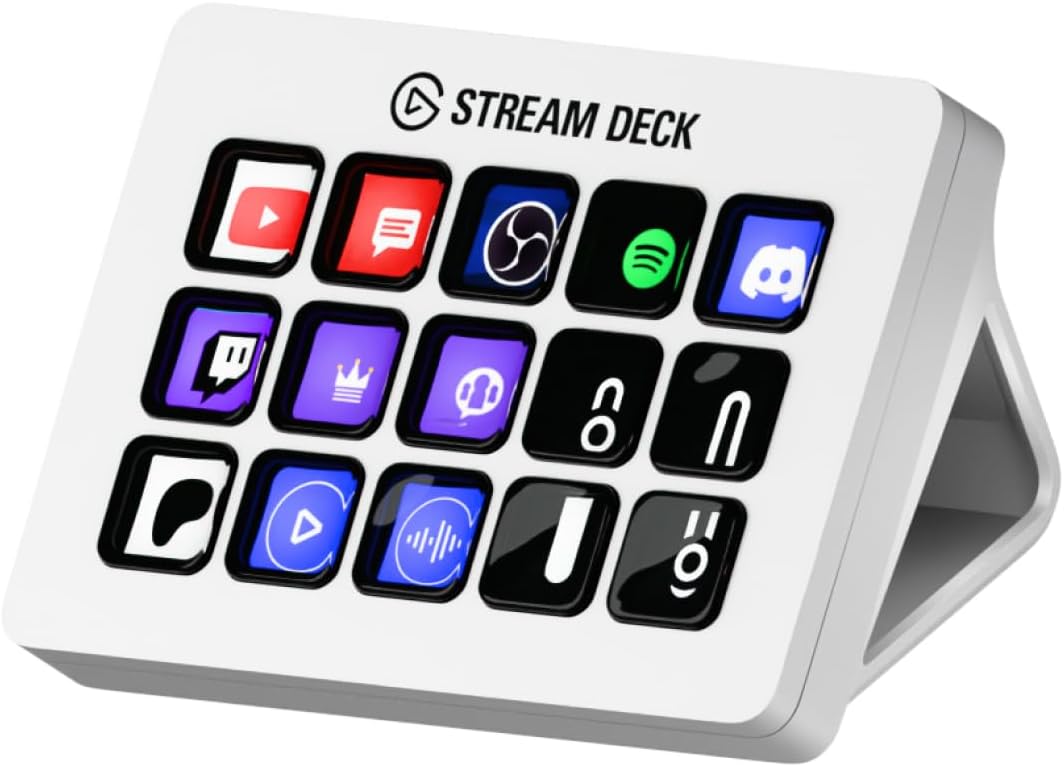
The Elgato Stream Deck MK.2 White offers 15 customizable LCD keys in a traditional studio-controller format. Its 4.8 rating makes it one of the strongest-rated products in the guide, and the moderate layout is especially appealing to creators who want more visible command space than the Mini without the footprint of an XL console.
We may earn a commission when you buy through this link, at no additional cost to you.
Every key can trigger a single action or a collection of actions, giving creators flexibility for both direct scene changes and grouped workflows. Visual feedback shows that a command has been activated, which supports more confident operation during a live stream. The physical arrangement of 15 keys also leaves enough room to group related controls without turning every key into a separate page.
Its plugin support includes Elgato 4KCU, OBS, Twitch, YouTube, Twitter, Discord, Spotify, Philips Hue, and other applications. Hotkey Actions can also streamline film editing, music production, and photography workflows, so the device is not restricted to broadcast use. A creator who moves between recording, editing, and publishing can keep frequently used tools in one place.
The main limitation is that the MK.2 has no rotary dials or touch strip, so continuous adjustments and contextual information must be handled through keys, software, or another device. Its white finish also differentiates it visually from darker studio equipment. Even so, the high rating, familiar 15-key format, and broad integration support make this an excellent general-purpose choice for Twitch and adjacent creative work.
Fifteen keys offer a more generous visual workspace than a compact six-key pad while remaining easier to position than a 32- or 36-key console. This middle ground works well for creators with a focused but nontrivial workflow.
Hotkey actions and platform plugins let the controller serve editing, audio, and photography tasks alongside streaming. The result is a central shortcut surface that can remain useful before, during, and after a broadcast.
We may earn a commission when you buy through this link, at no additional cost to you.
The Elgato Stream Deck + White combines customizable LCD keys, a touch strip, and dials in a light-colored studio enclosure. Its 4.6 rating matches the standard black Stream Deck + in the supplied data, indicating that the finish is a visual alternative rather than a fundamentally different feature set.
We may earn a commission when you buy through this link, at no additional cost to you.
Tactile controls and visual feedback make it easy to confirm that a command has been carried out. The touch strip can provide additional action pages or information, while the dials support precise changes to audio, video, lighting, and other adjustable parameters. Together, these controls make the device more versatile than a simple programmable keypad.
The listed application coverage includes Zoom, Microsoft Teams, PowerPoint, Excel, Word, Google Suite, Photoshop, Adobe Creative Cloud applications, Spotify, and other productivity and media tools. A user-friendly drag-and-drop interface simplifies initial configuration, while multi-action efficiency allows several commands to run at once or in a precisely timed sequence.
The Stream Deck + ecosystem is broad, so a new streamer may not need every control immediately. Even so, the device can begin as a simple scene switcher and grow into an audio mixer or production console as the channel becomes more complex. The clean white finish makes it particularly suitable for a bright desk, and its combination of keys, strip, and dials gives it a well-rounded position for Twitch creators who want both discrete commands and precise adjustment.
LCD keys are ideal for clearly defined commands, while dials suit settings that benefit from gradual adjustment. Using both types together can make an audio mix or lighting change feel more natural than relying exclusively on buttons.
The white enclosure offers the same core control arrangement as the standard Stream Deck + in a brighter aesthetic. It is a practical consideration for creators assembling a coordinated light-colored desk setup.
We may earn a commission when you buy through this link, at no additional cost to you.
The right streaming deck depends on your control habits, production complexity, desk space, software ecosystem, and the kinds of adjustments you need to make without looking away from your stream.
Choose enough controls for your real workflow, but not more than you can scan quickly.
Prioritize clear, customizable displays that let you identify commands at a glance.
Add dials or a touch strip when you need precise, continuous, or context-dependent control.
Check both Twitch and OBS workflows before buying, including your operating system.
Favor profiles and plugins that match your actual applications rather than relying on headline counts.
Choose reliable sequential or simultaneous macros for complicated one-touch production routines.
Balance key capacity with room, reach, and visibility to prevent accidental inputs.
Distinguish software sound triggers from true audio output and mixing hardware.
Begin by installing the manufacturer's control software and connecting the deck over USB. Before configuring your production layout, create a simple list of the actions you use most often, such as starting a stream, changing scenes, playing an alert, muting a microphone, and launching a video. Assign those commands to the most accessible keys first, then save the layout as a profile dedicated to streaming.
Build the remaining pages around your broader workflow. Use distinct icon styles or colors for scene changes, media, sound effects, cameras, lighting, and communication, and keep emergency controls in a consistent location. Test multi-actions at normal broadcast speed, confirm that timed steps do not overlap with other software, and keep a keyboard-based fallback available until every routine has worked reliably during a practice stream.
For care, keep the controller on a stable surface and avoid spills or prolonged exposure to direct heat. Clean the keys and housing with a soft, dry cloth, and do not use harsh liquid cleaners on LCD surfaces. Review the manufacturer's software updates periodically, back up important profiles when the application permits it, and reconnect the USB cable if an action stops responding. Treat the deck as an active production tool, but also inspect the connection and profile whenever a failed command interrupts a broadcast.
A streaming deck is a programmable hardware controller that turns computer actions into physical, labeled commands. It can change OBS scenes, launch media, trigger sound effects, control cameras, adjust audio, or interact with Twitch-related software. Its main benefit is reducing reliance on difficult keyboard shortcuts during a live broadcast.
No, OBS hotkeys can handle many routine tasks on their own. A deck becomes more useful as the number of scenes, applications, and production actions grows, because it provides visible labels, tactile feedback, and one-touch multi-action sequences. A compact six-key model is often enough for a simple channel, while larger consoles suit complex productions.
Yes, the Mini is well suited to creators with a focused workflow. Its six LCD keys can hold essential scene changes, media launches, and multi-action routines, and its drag-and-drop setup keeps configuration approachable. If your production requires more than a few visible commands, however, a 15-key or larger controller will provide more room.
Dials are generally better for continuous adjustments because they offer a tactile sense of position and allow fine changes. Buttons or keys work well for fixed actions such as muting a microphone or toggling a scene. A controller with both types of control is ideal when a Twitch workflow includes frequent audio and scene changes.
Yes, many supported decks can send commands to OBS while also offering Twitch or other platform integrations. The exact functions depend on the software and plugin support, so check whether your desired scene changes, alerts, and media controls work through native actions or keyboard commands. Test the complete sequence in a practice environment before going live.
An LCD streaming deck provides a screen or touch display for each action, making commands easier to identify and customize. A basic macro keypad may use blank or simply labeled buttons and focus on sending programmed shortcuts. Both can automate complex tasks, but an LCD deck generally provides better visual feedback and easier workflow organization.
Many models support both platforms, but compatibility should be verified for the exact product and software version. Some newer controllers list specific minimum operating-system requirements, while certain devices lack native Linux support. Check the current product listing and control software requirements before purchasing, especially if you rely on a less common operating system.
The right number depends on how many distinct tasks must be reachable during a broadcast. Six keys can cover a simple show, while 15 keys provide a useful general-purpose layout. Controllers with 32 or 36 keys suit creators managing numerous scenes, cameras, lighting cues, media, and communication tools. More keys are helpful only when the layout remains clearly organized.
The Elgato Stream Deck + stands out as the most balanced overall recommendation, combining LCD keys, a touch strip, dials, smart profiles, and a mature integration ecosystem. The Elgato Stream Deck + XL is the premium choice for creators who need 36 keys and precise multifunction controls, while the Elgato Stream Deck Mini offers the most straightforward entry point for a focused workflow.
VSD's M18 models provide substantial macro capacity, animated icon options, RGB lighting, and useful desktop utilities, while the N4 Pro appeals to creators who want knobs, extensive presets, and a built-in USB dock. The Insta360 Link 2 Pro is different by design, serving as a Stream Deck-compatible PTZ webcam for creators who want AI tracking and remote camera control as part of their production setup.
Whichever option you choose, prioritize the controls and integrations you will use every week rather than selecting solely by key count or appearance. Build and test a small layout, add complexity gradually, and confirm operating-system and software compatibility. Prices and availability can change, so review the current listing and recent feedback before placing your order.