
Akai Professional LPD8 USB MIDI Pad Controller
4.4Editor score
Eight responsive RGB pads
Eight assignable Q-Link knobs
Four programmable preset slots
Looking for pad controllers for beat making? Compare 10 top models for pads, velocity, connectivity, software integration, portability, and control options.
Pad controllers give beat makers a tactile way to trigger samples, launch clips, perform chords, and shape effects without relying entirely on a mouse and keyboard. A strong model should combine responsive pads, flexible mapping, dependable connectivity, and controls that genuinely improve your workflow.
We compared ten controllers based on pad count and sensitivity, velocity response, assignable controls, DAW integration, power options, portability, bundled software, and suitability for studio or mobile production. The list includes dedicated performance controllers, compact wireless pads, hybrid keyboard models, and Ableton-focused options.
Each review explains who the controller suits, what it does well, and where it falls short. Rankings reflect the supplied ratings and specifications rather than personal testing, while availability and prices can change, so readers should confirm current details before purchasing.
4.4Editor score

4.6Editor score

4.4Editor score
This side-by-side comparison highlights the main differences in pad layout, connectivity, performance features, and DAW support, helping beat makers identify the controller that matches their preferred software and performance style.



The Akai Professional MPD218 combines the feel and layout of a traditional MPC-style beat surface with enough controls to function as a small production centerpiece. Its 4.4 rating reflects a well-regarded balance of responsive performance hardware, useful assignability, and portable construction. The defining feature is the set of 16 thick fat pads, which provide a more substantial playing surface than many compact alternatives.
We may earn a commission when you buy through this link, at no additional cost to you.
Three dedicated pad banks expand the working layout to 48 assignable pads, making it possible to divide sounds by instrument, sample category, or production function. The 18 fully assignable 360-degree potentiometers are particularly valuable because they allow hands-on control over DAW parameters, virtual effects, and instruments. Note repeat and full-level controls add familiar MPC-style performance tools without requiring a larger standalone machine.
There are some compromises for buyers seeking a modern grid controller or wireless workflow. The MPD218 relies on USB for computer connection, and its pads use illumination rather than a full RGB matrix. However, neither limitation undermines its core purpose. Traditional pad layouts remain highly effective for finger drumming, sample triggering, and melodic performance, while the extensive knob bank compensates for the absence of launch buttons and transport controls.
This is the strongest choice for a producer who values a large pad surface, dedicated MPC character, and deep hardware control in a portable format. It is especially useful for Ableton Live, Drum Rack, virtual instruments, and sample-based workflows where an artist wants to move between rhythm triggering and parameter changes. Those who need clip-launching or wireless mobile control may prefer the APC Mini MK2 or one of the Bluetooth-enabled controllers, but the MPD218 is the premium all-around choice here.
The 16 fat pads make finger drumming and sample triggering feel more like a traditional MPC performance than a generic grid controller. Note repeat and velocity-oriented controls add further expression for repeated phrases and dynamically played sounds.
Eighteen assignable potentiometers separate this model from simple eight-pad alternatives. Creators can keep important instrument, mixer, and effect parameters under their fingers without repeatedly reaching for the mouse.
We may earn a commission when you buy through this link, at no additional cost to you.
The PreSonus ATOM is designed around expressive, full-size pads rather than the tiny keys found on many entry-level MIDI controllers. It carries a 4.3 rating and supports a broad range of production and performance tasks, including virtual instruments, loops, samples, and effects. Its 16 pads respond to both velocity and pressure, giving performers a meaningful way to vary dynamics.
We may earn a commission when you buy through this link, at no additional cost to you.
Selectable velocity curves and pressure thresholds let users tune the response to their playing style or sound library. Eight assignable pad banks provide room to organize a larger collection of samples, while 20 assignable buttons and four endless rotary encoders expand the navigation and editing options. MIDI keyboard mode, Note Repeat, and Full Velocity mode support common studio techniques, although their exact behavior can depend on the receiving application.
The main limitation is that four rotary encoders may feel modest for a controller intended for broad production use. Buyers who regularly adjust many mixer and effect parameters may want more immediate rotary control. It is also important to recognize that the included Studio One Artist, Ableton Live Lite, Studio Magic plug-ins, and MVP Loops are tied to their respective software terms and redemption details.
The ATOM is a compelling pick for beat makers who care about pad feel, velocity response, and expressive triggering. It suits Studio One users particularly well, while its broad compatibility also makes it useful with Ableton Live and other MIDI-capable software. For fingertip drumming, sample launches, and instrument performances, the ATOM offers a more expressive pad surface than many similarly compact alternatives.
Pressure sensitivity lets a performer influence sounds beyond simple note-on messages. When mapped appropriately, that additional dimension can add movement and variation to pads that otherwise behave identically.
Studio One Artist and Ableton Live Lite give newcomers a practical route from unboxing to recording. The included plug-in suite and curated loops also provide useful starting material while users learn controller mapping.
We may earn a commission when you buy through this link, at no additional cost to you.
The Akai Professional APC Mini MK2 is one of the most focused choices for Ableton Live users, earning a 4.6 rating among this group. Its 64 RGB pads make clip launching and performance visible, while the pre-mapped integration reduces the amount of configuration required before clips, vocals, loops, and melodic samples can be controlled from the hardware.
We may earn a commission when you buy through this link, at no additional cost to you.
Nine faders provide direct access to the Ableton mixer. Eight are assignable for volume, pan, or device parameters, while the master fader handles overall output. Device mode turns the faders into macro controls, and Drum and Note modes extend the surface into sample performance. The Smart Scale View in Note mode helps users visualize melodic notes, while Drum mode connects closely with Ableton Drum Rack.
Because the controller is heavily centered on Ableton Live, its limitations become clearer outside that ecosystem. It is powered over USB and does not include built-in wireless connectivity. It is also a grid-and-fader controller rather than a traditional finger-drumming pad, so producers who want to mimic the feel of a standalone MPC may need to adjust their expectations.
The APC Mini MK2 is ideal for a creator who arranges Ableton Live sets around clips, loops, and scenes. It is equally persuasive for live performers who want visible clip states and tactile mixer access. Those working primarily in other DAWs should verify mapping requirements, while Ableton users can take advantage of the pre-mapped setup and included Ableton Live Lite right away.
Each of the 64 RGB pads can communicate the state of a clip or scene, reducing the need to watch the computer display. That visual feedback is especially useful during live sets and fast-paced arrangement work.
Eight assignable faders and a master fader make common mixer movements available directly. Creators can adjust levels, panning, or device macros without abandoning the hardware for a mouse-heavy workflow.
We may earn a commission when you buy through this link, at no additional cost to you.
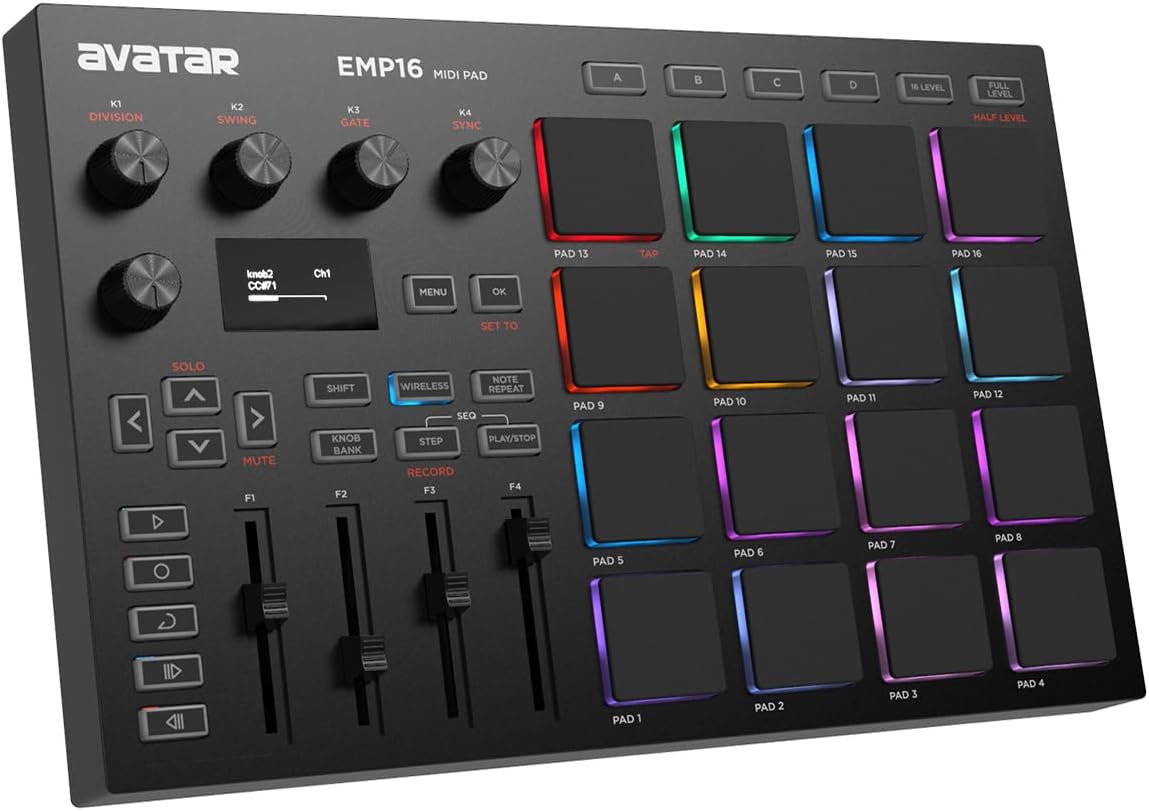
The EMP16 stands out for combining 16 illuminated beat pads with wireless connectivity, a sizable assignable control section, and standard MIDI hardware connections. Its 4.2 rating reflects a versatile package for producers who want to move between laptops, mobile devices, and external MIDI equipment. Bluetooth 5.0 can connect to compatible iOS and Mac systems without a cable or OTG adapter.
We may earn a commission when you buy through this link, at no additional cost to you.
The controller supplies four banks for 64 assignable pads, with 16 customizable lighting colors providing visual organization. Three velocity curves, a threshold control for crosstalk protection, and velocity-level options allow the playing response to be tailored. Four assignable faders, five assignable buttons, and four endless rotary knobs add a meaningful amount of tactile control beyond the pad grid.
An OLED display provides immediate feedback on settings, which is useful for users who do not want to depend on a separate computer editor. Note Repeat, Time Division, Swing, Gate, Sequencer, Clock Synchronization, Transport, and Tap Tempo functions support performance and rhythmic control. USB MIDI and standard MIDI inputs and outputs broaden compatibility, although the separate 1/8-inch-to-MIDI adapter and optional batteries add small setup considerations.
The EMP16 is best suited to mobile creators, live performers, and studio users who want wireless freedom without giving up conventional MIDI output. It can also serve beginners because redeemable Steinberg software options offer an entry point into production. Its feature density may feel excessive for simple sample triggering, but it rewards users who value customization and broad connection options.
Bluetooth MIDI makes it possible to perform away from a computer cable, while USB and standard MIDI ports preserve traditional studio connections. This combination is particularly useful for mobile and hybrid setups.
Repeat, swing, gate, time-division, and synchronization functions cover common live rhythmic needs. The OLED display helps users see the current configuration and make changes without opening a full editor.
We may earn a commission when you buy through this link, at no additional cost to you.
This Mini Wireless MIDI Controller Pad focuses on portable beat making with 16 RGB velocity-sensitive pads, aftertouch, and both Bluetooth and USB MIDI. Its 4.2 rating and travel-oriented design make it a natural fit for creators who work with phones, tablets, laptops, or a DAW in changing locations. A built-in rechargeable battery supports up to 15 hours of continuous use.
We may earn a commission when you buy through this link, at no additional cost to you.
Aftertouch is the most distinctive performance feature. It can add pressure-sensitive variation to notes, samples, and effects when the receiving software and assigned mappings support it. Three pad banks expand the surface to 48 pads, while three assignable buttons provide basic navigation and workflow commands. RGB feedback gives the user a visual indication of pad groups and active assignments.
Customization is handled through PC software or the KuSuite mobile app, where users can adjust pad mappings, MIDI commands, velocity curves, and lighting. Apple device users can obtain KuSuite from the App Store, while Android and Windows users can scan the supplied QR code. This approach is flexible, although it means the controller depends on software configuration rather than offering extensive on-device menus.
The product is best for beginners, mobile musicians, and DJs who prioritize portability over a large hardware control surface. The lightweight enclosure is easy to carry, and wireless operation reduces cable clutter during performances. Users who need extensive mixer control, more buttons, or conventional MIDI output will need a larger model, but for mobile beat creation this controller offers an unusually expressive and flexible package.
Bluetooth MIDI removes the need to remain beside a computer while still allowing the pads to control compatible applications. USB operation is available when a wired connection is more convenient or dependable.
Aftertouch gives compatible sounds an additional layer of pressure response. It can help samples and effects feel more dynamic during a live finger-drumming performance rather than remaining fixed at one intensity.
We may earn a commission when you buy through this link, at no additional cost to you.
The JP-1 combines 16 velocity-sensitive RGB pads with eight assignable knobs and six customizable buttons, giving it more hands-on control than many compact wireless alternatives. Its 5.0 rating is the highest supplied rating in the group, although that figure should be considered alongside the product's more limited operating history. It is designed for beat making, studio recording, DJ performance, and mobile creation.
We may earn a commission when you buy through this link, at no additional cost to you.
Bluetooth MIDI and wired USB operation support everything from Ableton Live and Logic Pro to FL Studio and Cubase. The USB cable is included for charging or wired use, and the setup is described as plug-and-play without complex drivers. Eight knobs can be assigned to tempo, volume, effects, filters, or other parameters, while the six buttons include practical options such as Knob Mode, Full Level, and Shift.
The 16 RGB pads trigger beats, samples, loops, and one-shots with velocity sensitivity, and pad-bank controls expand the range of available assignments. Dedicated Note Repeat functionality adds rhythmic variation. Unlike some competing compact units, the JP-1 does not advertise aftertouch, so expressive control is centered on velocity, RGB feedback, and the physical knobs and buttons.
The JP-1 is a strong option for a producer who wants wireless freedom and meaningful parameter control in a small footprint. Its eight knobs make it particularly appealing for live effect manipulation and broad DAW use. However, buyers seeking maximum reliability should examine software compatibility and read current user feedback, while those who need the largest clip-launching surface may still prefer a 64-pad controller.
A larger knob bank gives this compact controller more practical editing reach than simple three-button designs. Users can assign controls to the parameters they adjust most often during a session.
The rechargeable battery is rated for up to 20 hours of continuous use. That makes the controller suitable for extended rehearsals, performances, and mobile sessions where dependable power matters.
We may earn a commission when you buy through this link, at no additional cost to you.
The Akai Professional MPK Mini IV blends a 25-key MIDI keyboard, eight MPC-style pads, eight rotary knobs, and a full-color screen in one portable controller. Its 4.6 rating makes it one of the strongest-rated products in this guide. It is intended for users who want to perform chords and bass lines, trigger samples, and shape sounds without relying on a separate keyboard.
We may earn a commission when you buy through this link, at no additional cost to you.
The 25 mini velocity-sensitive keys support piano-style input, synth leads, and sample triggering, while the eight velocity- and pressure-sensitive MPC pads add finger-drumming and percussion options. Eight assignable 360-degree knobs provide direct parameter access. A vibrant full-color display and push/turn encoder help users navigate presets, settings, and DAW functions without constantly returning to the computer.
Its performance toolkit includes an arpeggiator with Pattern, Freeze, and Mutate functions, along with Chord and Scale modes. Ableton Live Lite 12, Logic Pro, FL Studio, and other DAW support are included or referenced through pre-mapped controls. The supplied studio instrument collection contains more than 1,000 drums, keys, synths, bass sounds, and effects, while Melodics and Splice trials support learning and sample access.
The MPK Mini IV is the best option for a creator who needs a broader range of melodic and rhythmic input than a pad-only device provides. It is also compelling for traveling producers because USB-C, full-size MIDI Out, and plug-and-play operation simplify setup. Those seeking a traditional full-size piano keyboard may find the mini keys restrictive, but the pads, screen, and knobs make this a remarkably complete compact production controller.
The mini keys cover chords, melodies, and bass lines, while the MPC pads provide an alternative way to trigger sounds and rhythms. Together they reduce the need for a separate keyboard in compact studio setups.
The full-color display and encoder offer a more informative control method than a collection of anonymous buttons. It can present settings and presets while keeping important navigation functions close at hand.
We may earn a commission when you buy through this link, at no additional cost to you.
The KuSuite Mini Wireless Pads offer a highly portable way to control beats, samples, loops, and effects, with a 4.7 rating that places them among the most favorably rated products here. Their 16 RGB pads are velocity-sensitive and support aftertouch, while Bluetooth and USB MIDI connections allow use with compatible phones, tablets, computers, synthesizers, and loop-based software.
We may earn a commission when you buy through this link, at no additional cost to you.
The built-in rechargeable battery provides up to 15 hours of continuous operation, and ECO mode extends standby time for travel or multi-day use. Three pad banks expand the layout to 48 assignable positions. The included three function buttons keep basic commands accessible, although the controller's strongest flexibility comes from the KuSuite desktop software or mobile app.
KuSuite allows users to remap pads, assign MIDI commands, change velocity curves, and customize backlighting. It is listed for iPhone, iPad, and macOS through the App Store, while Android and Windows users receive access through a QR code. This software-centered approach keeps the hardware small, but it also means setup is less immediate for users who prefer dedicated buttons and onboard menus.
This controller is well suited to mobile beat makers, DJs, and beginners who want an inexpensive-feeling portable input surface without giving up expressive pads. Aftertouch can make performance more dynamic, while RGB lighting helps organize sounds during a set. Creators needing many assignable buttons, conventional MIDI ports, or a larger grid may prefer the JP-1, EMP16, or a dedicated Ableton controller.
Pad assignments, MIDI commands, velocity behavior, and lighting can be adjusted through KuSuite. This gives the compact hardware a level of flexibility that would otherwise require a larger physical control surface.
Its slim enclosure, wireless operation, rechargeable battery, and standby mode suit mobile creation. The controller can move easily between a studio desk, rehearsal space, and a live setup.
We may earn a commission when you buy through this link, at no additional cost to you.
The Novation Launchpad Mini MK3 is a compact grid controller built around 64 vibrant RGB pads and close integration with Ableton Live. Its 4.5 rating reflects a well-established approach to clip launching that emphasizes visual feedback and immediate operation. Pads can mirror the state of clips in a session, helping performers see what is queued, playing, or available.
We may earn a commission when you buy through this link, at no additional cost to you.
Launching clips and scenes is the primary function, and dedicated Stop, Solo, and Mute controls make common performance actions tactile. Novation Components provides three Custom Modes for editing mappings and controlling other MIDI-compatible destinations. That flexibility means the device can move beyond a fixed Ableton role, although its most polished experience is within that software.
Unlike controllers with extensive knob arrays, the Launchpad Mini MK3 has no rotary encoders, so deeper parameter editing must occur in the computer application. Its slim enclosure and bus-powered operation are convenient for mobile rigs, but there is also no built-in wireless connection. These are reasonable trade-offs for buyers who prioritize a large visual performance surface over stand-alone editing and cable-free operation.
The Launchpad Mini MK3 is a strong recommendation for Ableton Live users who perform, arrange, or teach using clips and scenes. It also suits live musicians who need a clear visual grid and prefer simple controls over complex parameter banks. For hands-on synthesis editing or melodic keyboard performance, it is less complete, but for launching ideas with speed and clarity, it remains an elegant option.
The RGB grid can reflect Ableton Live clip information directly on the controller. This visual connection makes it easier to understand the session state without constantly looking away from the hardware.
Three custom modes allow users to create alternative mappings rather than being limited to one fixed configuration. This makes the grid useful for personal workflows, additional MIDI destinations, and performance variations.
We may earn a commission when you buy through this link, at no additional cost to you.
The Akai Professional LPD8 provides a practical introduction to tactile beat making with eight responsive RGB-backlit MPC pads and eight assignable Q-Link knobs. Its 4.4 rating reflects a useful balance of compact construction, program controls, and broad software compatibility. The small pad surface can trigger samples, loops, virtual instruments, and other MIDI targets.
We may earn a commission when you buy through this link, at no additional cost to you.
The Q-Link knobs can be mapped to DAW parameters, software instruments, and insert effects, giving the controller more depth than a basic eight-button MIDI pad. Four programmable preset slots allow users to recall different mappings instantly for separate DAWs, instruments, effects, or projects. Presets can be created, edited, loaded, and managed from the computer.
The LPD8 is intentionally streamlined. It has only eight pads, no wireless connection, and no full-size MIDI output, so it is less suitable for large clip grids, elaborate live rigs, or integration with traditional external MIDI equipment. The full-size USB connection, however, makes desktop setup straightforward, and the controller works with popular applications including GarageBand, Logic, Studio One, Cubase, Ableton Live, Pro Tools, FL Studio, and Adobe Audition.
This is the right budget-oriented option for a beginner, mobile producer, or experienced creator who wants compact hands-on control without a large hardware footprint. Its sturdy MPC-inspired build, portable design, eight pads, and eight knobs create a more versatile surface than a simple key controller. Users needing many pads or wireless performance should move up, while those focused on the fundamentals will find the LPD8 easy to justify.
Programmable slots let a producer move between different mappings without rebuilding the controller for every project. Separate recall can be useful for drum triggering, an instrument, mixer functions, or effects.
USB power and driver-free operation minimize setup friction on Mac and PC. The slim enclosure also fits easily into a laptop bag, supporting production away from a permanent studio.
We may earn a commission when you buy through this link, at no additional cost to you.
The most useful controller is the one that matches your DAW, performance style, mobility needs, and level of hands-on control. Evaluate layout, expressiveness, mapping, connectivity, and software support before choosing.
Traditional 16-pad layouts resemble standalone MPC hardware and suit finger drumming, sample triggering, and melodic performance. An eight-pad arrangement is more portable and can still work well for focused drum kits or effect triggers. Larger 64-pad grids are better for Ableton Live clip launching because they resemble a session-view layout and make many clips visible at once. Choose based on how you intend to interact with the DAW rather than on pad quantity alone.
Prioritize a layout that matches your software workflow. A grid controller excels at scenes, while a traditional pad controller better supports physical drumming patterns.
Velocity sensitivity records how hard a pad is struck and gives samples or instruments a wider dynamic range. Pressure sensitivity or aftertouch can add further control, but only when the software and mapped effect can respond to it. Some controllers also provide selectable velocity curves or threshold settings for changing how softly a pad must be struck to register. These options make a controller more adaptable across different sample libraries and playing styles.
Look for velocity curves, pressure thresholds, and aftertouch when expressive dynamics matter. Otherwise, reliable velocity response remains the core requirement.
A controller with pre-mapped Ableton Live functions can save considerable setup time, while broad MIDI compatibility offers flexibility across GarageBand, Logic, Cubase, FL Studio, Studio One, and other applications. Confirm that essential commands can be mapped and whether the supplied software is required. Grid-focused controllers generally emphasize clip launching, whereas MPC-style devices are better suited to notes, samples, and virtual instruments. Some products also include preset storage for switching between workflows.
Favor direct integration for your primary DAW, but confirm assignability for future software changes. Preset recall and multiple mapping modes add long-term flexibility.
Knobs, encoders, faders, and buttons can keep frequently used functions away from the mouse. Eight knobs are useful for instrument and effect parameters, while mixer-style faders suit live volume and pan control. Assignable buttons can handle note repeat, transport, bank changes, and software-specific commands. Larger control surfaces are not automatically better, but a controller with several dedicated controls may be more practical than one that requires every command to be placed on a pad.
Count the controls you will actually use and favor a focused, well-labeled layout. More hardware is helpful only when it maps cleanly to your workflow.
USB MIDI is the standard for desktop production, and full-size USB connectors can make setup easier than adapters. Bluetooth MIDI provides freedom for mobile performance, although compatibility with the intended operating system and application must be checked. Some controllers also include standard MIDI input and output for external hardware. Wired devices are usually straightforward and consistent, whereas wireless controllers require attention to battery life and latency expectations.
Choose USB for dependable desktop work, Bluetooth for mobility, and standard MIDI ports when connecting external gear. Verify all required connection types.
Portable controllers should fit comfortably beside a laptop or inside a small bag without feeling fragile. Wireless units add bulk through their batteries, while USB-powered models often remain thinner and lighter. The MPC-inspired controllers in this guide emphasize robust builds, and the larger grid devices prioritize stability for live performance. The best travel option is usually the smallest surface that still provides the pads and controls required for the intended work.
Balance surface size, weight, and durability against where you will use the controller. A compact, sturdy device is usually more useful than a fragile full-size option.
Bundled DAWs, virtual instruments, plug-ins, loops, and lessons can shorten the path from unboxing to a finished idea. Ableton Live Lite and Studio One Artist are valuable for new users, while large instrument packs provide ready-made sounds for beat production. Some offers include time-limited trials, so examine the terms rather than treating every bundled item as permanent. Setup guides, onboarding material, and clear mapping software also matter for long-term usability.
Use bundled software as a convenient starting point, not the sole reason to choose a controller. Verify editions, expiration terms, operating-system support, and included content.
RGB lighting can show pad groups, track assignments, or active states, reducing visual strain during live work. Banks expand a small pad surface into a larger sound palette, and dedicated bank controls should be easy to reach. Multicolored lighting is especially useful for Ableton-style clip controllers, where a clear grid communicates the session more effectively than numbered pads. For traditional MPC-style use, lighting remains helpful for identifying assigned samples but is less critical than pad feel.
Check that lighting communicates useful information and that bank changes are convenient. Color should clarify your setup, not merely decorate it.
Begin by connecting the controller over USB or pairing it through Bluetooth, then open your DAW and confirm that MIDI input is recognized. Load the supplied mapping or template where applicable, but verify every function before building a full arrangement. Assign a small number of sounds to pads, test velocity and pressure behavior, and learn the bank and note-repeat controls before attempting a live set.
Organize sounds in logical groups such as drums, bass, melodic samples, effects, and clips. Use RGB colors to identify each category and label software mappings to make future sessions easier. Keep essential mixer or effect functions on knobs, faders, or buttons, while reserving pads for the sounds most likely to trigger during performance. Save several useful presets so a change of DAW or project does not require rebuilding the entire layout.
Protect the controller by keeping it away from moisture, excessive heat, and heavy impact. Clean the surface with a soft dry or lightly damp cloth, avoiding excessive liquid around buttons and connectors. Wireless models should be charged before long sessions, while battery-powered devices should use the specified battery type. Store the unit in a padded bag, retract loose cables where applicable, and periodically update its mapping software to preserve compatibility and improve presets.
MIDI pad controllers are especially useful for beat making because they provide tactile triggers for samples, drums, loops, and effects. They can make finger-drumming more expressive and speed up repetitive editing tasks. Their usefulness depends on pad responsiveness, mapping flexibility, and compatibility with the DAW or instrument being controlled.
MPC-style pads are usually arranged in four rows and optimized for finger drumming, samples, and melodic notes. Launchpad-style grids use a larger matrix to represent software clips and scenes visually. MPC-style controllers suit rhythmic performance, while grids suit clip launching and arrangement control in software such as Ableton Live.
Velocity sensitivity is highly desirable because it lets a controller communicate how firmly a sound is triggered. That information can control volume, timbre, filter brightness, and other mapped parameters. A controller with selectable curves can also adapt to different samples, making it easier to maintain consistent response across a large sound library.
Many modern MIDI pad controllers support both USB and Bluetooth MIDI, but compatibility varies by device and operating system. Check whether the controller supports the MIDI implementation used by the phone or tablet and whether an OTG adapter is required. A wired connection may be necessary for some applications even when Bluetooth is advertised.
The Akai APC Mini MK2 is especially attractive because it is pre-mapped for Ableton Live and includes RGB clip-launching pads, assignable faders, and a master fader. The Novation Launchpad Mini MK3 is another strong grid option with detailed visual session integration. The right choice depends on whether you prioritize mixer-style faders or a particularly slim grid layout.
Knobs and faders are useful when you regularly adjust volume, panning, filters, or virtual-instrument parameters during a performance. A basic pad-only controller can work well for fixed sound triggering, but additional controls reduce the need to return to the mouse. Choose a surface with a manageable number of assignable controls rather than the largest possible selection.
Wireless MIDI can provide a smooth cable-free experience when the controller, operating system, and application are compatible and the connection remains stable. For critical live shows, having a USB connection available as a backup is sensible. Test the intended device, software, and power settings during rehearsal before relying on wireless operation.
Beginners should prioritize responsive pads, straightforward computer connectivity, understandable mapping software, and enough bundled material to begin making music. A 16-pad traditional layout is intuitive for drum patterns, while a grid controller is better when the goal is launching Ableton Live clips. Recording quality should be treated separately from the controller, since pads usually send MIDI instructions rather than audio.
The Akai APC Mini MK2 stands out for Ableton Live users who want a large RGB clip grid, mixer faders, and immediate integration. The Akai MPD218 provides the strongest traditional MPC-style experience with 16 fat pads and 18 assignable knobs, while the PreSonus ATOM serves expressive players who value velocity and pressure response.
For mobile and wireless setups, the JP-1, EMP16, and two compact KuSuite-style controllers offer useful alternatives, with the JP-1 providing the largest knob bank and the EMP16 offering the broadest hardware MIDI connections. The Novation Launchpad Mini MK3 is ideal for visual clip performance, the MPK Mini IV adds melodic keys, and the Akai LPD8 covers the essentials in a particularly compact design.
Prioritize compatibility with your main DAW, pad response, the controls you will actually use, and the portability required for your sessions. Ratings and features provide a useful starting point, but current software support and availability should also be checked. Prices change regularly, so compare the latest listings and bundle details before making a final purchase.