
Lenovo WL310
4.5Editor score
Silent mechanical clicks
Three adjustable DPI levels
Receiver-free Bluetooth 5.0
This Quiet Click Mouse guide compares 10 top wireless models for noise reduction, comfort, connectivity, precision, battery life, and portability.
A quiet click mouse helps you work, study, or browse without creating the sharp tapping noise associated with conventional mechanical switches. The right model should combine reduced sound with accurate tracking, a comfortable shape, dependable wireless connectivity, and controls that suit your computer setup.
We compared all ten products using their listed specifications, including silent-switch technology, connection methods, DPI settings, hand support, battery design, compatibility, and portability. The list covers budget, rechargeable, multi-device, compact, and premium options rather than judging only by brand or appearance.
Each review identifies the feature that makes a particular mouse useful and the compromises worth considering. Ratings reflect the published customer feedback supplied with each product, while current prices can change, so shoppers should confirm the latest deal and platform support before purchasing.
4.5Editor score

4.6Editor score

4.4Editor score
The comparison below highlights the defining differences in noise reduction, connectivity, precision, and power management across ten quiet click mice, helping buyers match a model to their desk, travel habits, and devices.



The Lenovo WL310 is a straightforward, budget-oriented answer for anyone who wants a noticeably quieter alternative to a standard office mouse. It carries a 4.5 rating from the supplied customer feedback, and its strongest attraction is the combination of silent clicks, a compact shape, and uncomplicated Bluetooth connectivity. It avoids the clutter of receivers, extra cables, and complicated setup procedures.
We may earn a commission when you buy through this link, at no additional cost to you.
Its three DPI settings—1000, 1200, and 1600—provide enough variation for ordinary office work, browsing, and detailed pointer control without making the adjustment process feel overly technical. The listed Bluetooth 5.0 connection supports Windows PCs, MacBooks, Chromebooks, and Lenovo laptops, while the absence of a USB receiver preserves valuable ports on modern systems. The ergonomic shape is also intended to reduce wrist strain during extended use.
The trade-offs are mostly about functionality beyond basic pointing and clicking. There are no listed side buttons for back-and-forward navigation, no horizontal scroll wheel, and no indication that commands can be reassigned through companion software. It is therefore better suited to someone who values a clean, calm experience than to a power user who depends on a large collection of shortcuts. Its portable gray design, however, makes it particularly easy to move between a home desk, office, and shared workspace.
The WL310 is our best overall budget pick for quiet work, study, and travel. Choose it if you want a wireless mouse that pairs directly over Bluetooth, reduces click distraction, and fits easily into a laptop bag. Users who need multi-device switching, side controls, or a rechargeable battery will find more specialized options elsewhere in this guide.
Because the mouse operates over Bluetooth 5.0 without a USB receiver, setup leaves the computer's USB ports available. That makes it especially convenient with slim laptops, Chromebooks, and other systems where port space is limited.
Silent clicks and an ergonomic, lightweight form make the WL310 practical for libraries, shared offices, and late-night sessions. The adjustable DPI provides extra control without complicating the basic experience.
We may earn a commission when you buy through this link, at no additional cost to you.
The VssoPlor Wireless Mouse is a compact 2.4GHz option aimed at travelers, students, and buyers who want quiet operation without paying for a broad collection of advanced features. Its supplied rating is 4.5, and the product data highlights quiet clicking, a smooth frosted surface, a lightweight form, and a receiver that can be stored inside the mouse.
We may earn a commission when you buy through this link, at no additional cost to you.
Its stable 2.4GHz connection is listed as reaching up to 10 meters, making it appropriate for a larger room, classroom, or desk where the computer may not sit directly beneath the user's hand. Compatibility covers common versions of Windows, Mac OS X, Vista, and XP, as well as desktop PCs and laptops. The receiver-based design offers a familiar plug-and-play experience, although it does require an available USB port.
The main compromise is that the VssoPlor is simpler than the multi-device and productivity-focused alternatives in this list. The specifications do not list adjustable DPI controls, side buttons, Bluetooth pairing, or a rechargeable battery. Instead, it relies on intelligent sleep after five inactive minutes and returns to operation when clicked. That design is easy to understand, but it offers less flexibility for users who alternate between devices or need specialized controls.
This mouse makes the most sense for a minimal setup where portability and reduced clicking noise matter more than advanced features. It is a sensible choice for travel, study, and everyday office use, particularly if you already prefer a 2.4GHz receiver. Buyers seeking USB-C flexibility, a sculpted thumb rest, or multiple paired devices should consider the more specialized quiet mice in this roundup.
The USB receiver can remain in the computer while in use or be stowed inside the mouse during transport. This helps keep the package organized and reduces the chance of leaving a small adapter behind.
The stated 2.4GHz range of up to 10 meters gives the mouse more flexibility than a typical compact travel model. It should suit rooms where the computer is positioned across a desk or near a monitor.
We may earn a commission when you buy through this link, at no additional cost to you.
The wegear Bluetooth Mouse balances everyday comfort with a more generous set of controls, making it a strong choice for productivity-oriented users who still need a genuinely quiet input device. It has a 4.5 supplied rating. Its defining feature is that not only the left and right buttons but also the scroll wheel are described as silent, reducing several common sources of distraction.
We may earn a commission when you buy through this link, at no additional cost to you.
Bluetooth 5.0 and Microsoft Swift Pair support make the mouse convenient to pair with compatible devices, while its sculpted grip is designed to follow the hand's contours during long sessions. Three optical DPI levels—800, 1200, and 1600—cover browsing, document work, and more precise pointer movements. The additional forward and backward buttons improve navigation through webpages, although the supplied information notes that these controls are not recognized on Mac.
Power management is another strength, with a stated battery duration of up to 24 months on one AA battery. The battery itself is not included, and the mouse sleeps after 30 seconds of inactivity before waking when moved. Build durability is also emphasized, with the primary buttons rated for up to three million clicks and the scroll wheel for up to 300,000 cycles. These figures are manufacturer-provided specifications rather than independent test results, but they add useful context to the expected longevity of the design.
The wegear is best for Windows users who want more than a basic two-button mouse without moving into a large productivity mouse. It suits browsing-heavy work, document tasks, and shared environments where both clicks and wheel noise would be distracting. Mac users should account for the lack of side-button support, while anyone prioritizing rechargeable power or instant multi-device switching may prefer a TECKNET model.
Many mice dampen only the primary click noise. This model also describes its scroll wheel as silent, which can make a meaningful difference during frequent document navigation and web browsing.
The ergonomic contour supports longer use, while forward and backward buttons speed up common navigation tasks. The three DPI levels provide enough control for general productivity without turning adjustment into a complex process.
We may earn a commission when you buy through this link, at no additional cost to you.
The Logitech Signature M550 is a refined everyday choice for small-to-medium hands, combining a 4.6 supplied rating with Logitech's SilentTouch technology. It reduces click noise by 90 percent, according to the product information, while retaining a shape designed for long periods of work. It is a quieter, more polished choice than a generic basic mouse without moving into full-size ergonomic territory.
We may earn a commission when you buy through this link, at no additional cost to you.
The SmartWheel is one of the model's most useful features because it switches between line-by-line movement for documents and faster scrolling for lengthy webpages. A contoured body, soft thumb area, and rubber side grips help keep the hand in position. Users can connect through Bluetooth Low Energy or the included Logi Bolt USB receiver, allowing them to choose direct pairing or receiver-based operation according to their computer's available ports.
The M550 supports Windows, macOS, Linux, Chrome OS, iPadOS, and Android, making it one of the most broadly compatible options listed. It also offers up to 24 months of stated battery life on the included AA battery. Some of the plastic parts contain certified post-consumer recycled material, with the listing specifying 65 percent for Graphite plastic and 26 percent for Off-White and Rose plastic. The main limitation is its more streamlined control layout: unlike the M650, it does not highlight customizable side buttons.
The M550 is an excellent recommendation for users with smaller hands who want a quiet mouse, polished ergonomics, and flexible connectivity without a large footprint. It is also a strong option for mixed-platform workspaces. If the ability to remap side buttons is important, the M650 provides the next logical upgrade; otherwise, the M550 delivers an excellent balance of comfort, scrolling, and quiet operation.
The M550 was designed specifically for small-to-medium hands. Its compact proportions, soft thumb area, and rubberized sides create a secure grip without the bulk found in many full-size productivity mice.
The SmartWheel alternates between precise line-by-line movement and rapid scrolling. That versatility makes it effective across word-processing documents, spreadsheets, and long webpages without requiring a separate vertical wheel.
We may earn a commission when you buy through this link, at no additional cost to you.
The TECKNET Multi-Connection Mouse is the most feature-rich model in the roundup, combining a 4.5 supplied rating with three connection methods, a rechargeable battery, two scroll wheels, and six precision levels. It is suited to users who move among desktops, laptops, and MacBooks and want one mouse to cover multiple working styles.
We may earn a commission when you buy through this link, at no additional cost to you.
Dual Bluetooth 5.3 and 5.0 support allows one-click switching between paired devices. A bottom-mounted USB receiver provides instant 2.4GHz connectivity without drivers, and the included cable can activate wired mode while the mouse is powered off. Its DPI settings range from 800 to 4800, with an LED indicator showing the active level. The high-speed main wheel and horizontal side wheel are particularly useful for large spreadsheets, design canvases, and wide webpages.
The built-in rechargeable battery is listed as lasting up to 90 days on a single charge, while the ergonomic contours and silent click technology are intended to reduce both hand strain and workplace noise. Compatibility covers Windows, macOS, Chrome, and Linux, but the side scroll wheel does not work on macOS. Some older documentation may also have compatibility limitations with that control, so buyers should verify their software version if horizontal scrolling is essential.
This TECKNET is the premium choice for a power user who values connection flexibility and specialized navigation. It is less suitable for someone seeking a tiny travel mouse or a completely receiver-free setup, but it offers the most versatile feature set here. The rechargeable design, wired fallback, and adjustable sensitivity make it especially attractive for intensive office workflows.
Two Bluetooth connections, 2.4GHz operation, and wired mode give the mouse more ways to connect than a typical compact model. This is valuable for professionals who regularly move between a laptop, desktop, and another Bluetooth-enabled device.
Six selectable DPI levels cover a broader range than the three-level models in the list. The side wheel adds fast horizontal navigation, although buyers using macOS should verify support before relying on it.
We may earn a commission when you buy through this link, at no additional cost to you.
The TECKNET Three-Device Mouse focuses on a specific productivity advantage: connecting to three computers while keeping a single mouse. It carries a 4.4 supplied rating and supports two Bluetooth 5.3 or 5.0 connections alongside 2.4GHz USB-A connectivity. A dedicated button changes the active device, making it easy to move between a work laptop, personal computer, and another Bluetooth-equipped system.
We may earn a commission when you buy through this link, at no additional cost to you.
Its six DPI levels range from 800 to 4800, with the number of LED blinks indicating the selected setting. The precision metal scroll wheel is designed for smooth scrolling, and a side-mounted wheel supports horizontal movement through spreadsheets, design applications, and broad webpages. The ergonomic form and silent clicks make the model suitable for offices, libraries, and other places where noise and prolonged discomfort are concerns.
The rechargeable battery fully charges in approximately one and a half to two hours and is stated to last around three months with two hours of daily use. The charging cable is included. Compatibility spans Windows, macOS, Chrome, and Linux, but the side buttons are not supported on macOS, and older Microsoft Office versions may not recognize the side wheel. All buttons are also non-programmable, which limits customization.
This TECKNET model is a strong recommendation for anyone who regularly works across three devices and values a clean, fast switch. It is more focused than the multi-connection model because its buttons cannot be customized, yet it delivers a similar core advantage with a compact feature set. It is best for Windows-centric productivity users rather than creative Mac users who require reassignable controls.
Keeping two Bluetooth links and one 2.4GHz receiver connection active allows the mouse to move among three devices without repeated pairing. This is particularly useful for desk setups involving multiple workstations.
The integrated battery can be replenished through the supplied cable and is rated for roughly three months of typical use. That removes the need to keep spare disposable cells on hand.
We may earn a commission when you buy through this link, at no additional cost to you.
The Logitech Signature M650 is the most well-rounded quiet mouse in the guide, earning a 4.6 supplied rating while adding customizable side buttons to an already capable everyday design. Like the M550, it uses SilentTouch technology to reduce clicking noise by 90 percent, but it offers greater control over shortcuts and a broader selection of sizes and handedness options.
We may earn a commission when you buy through this link, at no additional cost to you.
Its SmartWheel shifts between precise line-by-line scrolling and rapid page movement, making it adaptable to documents and long webpages. Users can remap the side buttons through Logitech Options+ on Windows and macOS, assigning common actions such as back, forward, copy, and paste. Bluetooth Low Energy and the Logi Bolt USB receiver provide flexible connection options, while the contoured shape, soft thumb region, and rubber side grips support long working sessions.
The M650 supports Windows, macOS, Linux, ChromeOS, iPadOS, and Android, including a Works with Chromebook certification. It includes an AA battery and is stated to last up to 24 months. Certified post-consumer recycled plastic accounts for 64 percent of the Graphite and Black plastic parts and 26 percent of the Off-White and Rose plastic parts. The trade-off is that advanced button assignment depends on compatible software and operating-system support, so it is less useful for buyers who need everything to work without configuration.
The M650 is our editor's choice because it balances quiet operation, comfort, scrolling versatility, broad compatibility, and genuine customization without becoming an unwieldy productivity mouse. It is an excellent fit for small-to-medium hands and users who want a dependable daily device across several platforms. Those wanting a smaller travel shape can consider the M340, while buyers who need even more controls should examine the premium TECKNET options.
The side buttons can be reassigned with Logitech Options+ on Windows and macOS. That turns two secondary controls into a more useful part of a daily productivity setup instead of leaving them limited to basic navigation.
SilentTouch reduces click noise, while broad operating-system support makes the mouse suitable for mixed personal and professional environments. Bluetooth and receiver options also make it easy to move between different computer arrangements.
We may earn a commission when you buy through this link, at no additional cost to you.
The TECKNET Rechargeable Bluetooth Mouse combines quiet clicks, modern USB-C charging, and broad device switching in a right-handed ergonomic design. It has a 4.4 supplied rating. The built-in 700mAh battery is stated to last up to three months per charge, making it a practical choice for users who would rather not keep spare AA batteries or AA chargers nearby.
We may earn a commission when you buy through this link, at no additional cost to you.
It can pair with up to three devices using Bluetooth 5.0 or 3.0, while a USB-A receiver provides an alternative 2.4GHz connection with a stated range of up to 33 feet. Six DPI settings range from 800 to 4800, with 1600 as the default. A contoured body and integrated thumb rest support a relaxed right-hand grip, and forward and back controls accelerate common webpage navigation.
The left and right buttons are listed as tested for up to six million clicks, giving the design a reassuring durability specification for regular daily use. Compatibility includes Windows, Android, macOS, and iOS, along with laptops, desktops, and tablets. The primary limitation concerns Mac users: the forward and back buttons are not supported there. The sculpted right-handed shape may also feel less natural for users who strongly prefer a symmetrical or left-handed mouse.
This TECKNET is a strong fit for right-handed users who want a rechargeable mouse with modern charging and generous wireless flexibility. It works especially well for travel or hybrid offices where carrying a dedicated charger and a multi-device mouse is desirable. The broad DPI range supports both fast navigation and careful editing, although those needing a symmetrical design should look toward the Logitech M340.
USB-C charging simplifies power management, particularly for people who already carry a USB-C laptop charger. The stated three-month runtime reduces the need for frequent charging sessions.
The integrated thumb rest and shaped body give the palm a defined place to settle. This helps reduce grip pressure during extended browsing, editing, and everyday computer work.
We may earn a commission when you buy through this link, at no additional cost to you.
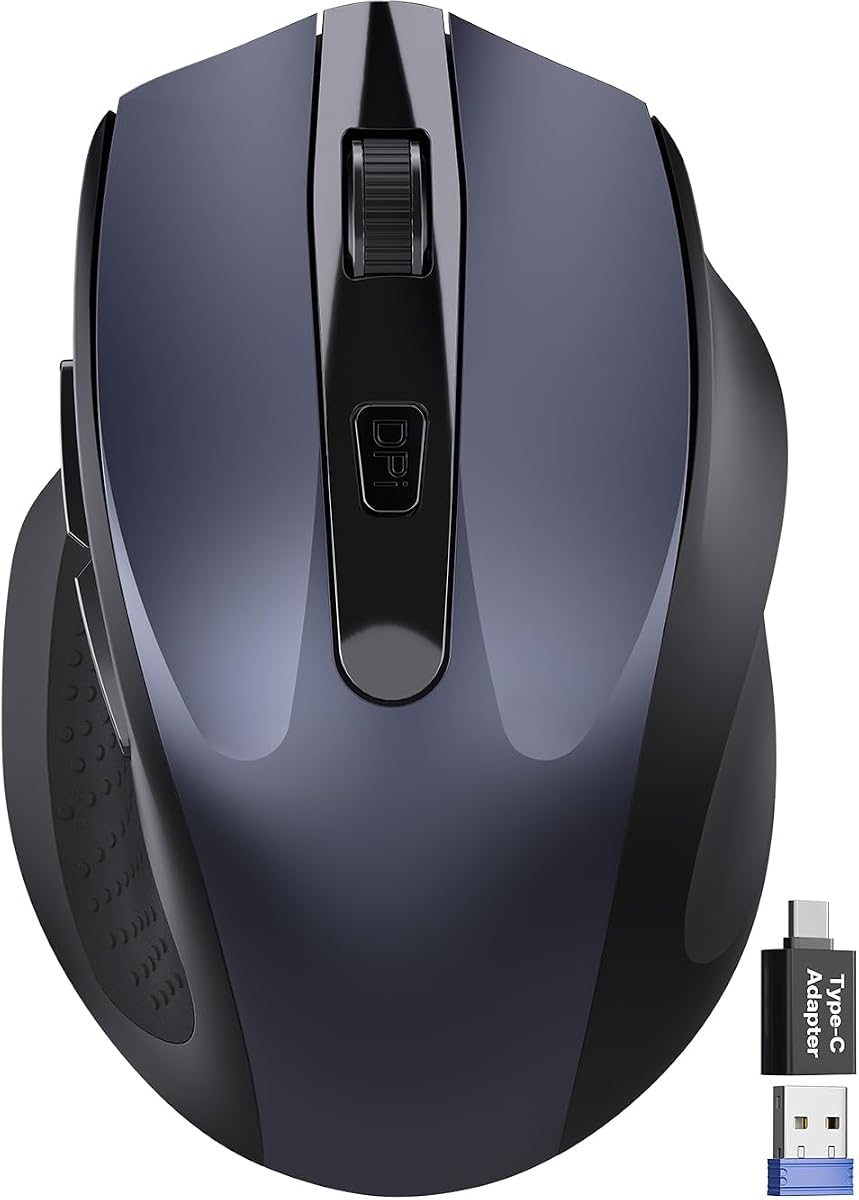
The Travel Wireless Mouse is designed for people who need a small, quiet pointing device that works across many types of equipment. Its supplied rating is 4.4. The package includes a USB-A nano receiver and a USB-C adapter, an unusually helpful combination for a compact 2.4GHz mouse because it reduces the need to carry a separate adapter.
We may earn a commission when you buy through this link, at no additional cost to you.
The asymmetrical body is intended for right-hand use and includes a built-in thumb rest. At 4.09 by 2.68 by 1.49 inches, it is small enough to fit readily into a laptop bag or travel case. Its click design is listed as reducing noise by up to 90 percent, while three DPI levels of 800, 1200, and 1600 cover general navigation and more precise selections. Forward and back buttons support common navigation tasks.
Compatibility extends across Windows, Mac, Linux, Chrome OS, Android, and iOS, including USB-C phones that support OTG. The 2.4GHz connection has a stated range of up to 33 feet. Power management includes a 10-second light sleep, a 10-minute deep sleep, and up to 18 months of stated battery life on one AA battery. The battery is not included, and a receiver must occupy a USB-A port, either directly or through the included adapter.
This is a good recommendation for frequent travelers, students, and hybrid workers who prefer a tiny mouse and need broad connector support. Its no-frills design may feel less refined than a premium full-size model, and direct Bluetooth would be preferable for devices without USB access. Even so, the bundled adapter, quiet clicks, and compact dimensions make it a flexible travel companion.
The compact dimensions make the mouse easy to carry without taking up much room. It is particularly useful for travelers who want a dedicated pointing device instead of relying on a touchscreen or trackpad.
The included USB-C adapter extends compatibility to USB-C laptops and compatible phones. This makes the mouse more adaptable than many other receiver-based compact models.
We may earn a commission when you buy through this link, at no additional cost to you.
The Logitech M340 is a compact, ambidextrous silent mouse designed for portability and straightforward operation. It carries a 4.6 supplied rating. Its slim shape fits into a bag easily, while SilentTouch technology removes 90 percent of click noise according to the product information, creating a quieter alternative for offices, libraries, and shared home workspaces.
We may earn a commission when you buy through this link, at no additional cost to you.
The mouse uses a 2.4GHz USB receiver, which is included, and works up to 10 meters from the computer. The receiver plugs into a USB-A port, so a compatible port is necessary. The package includes a battery, and the M340 is stated to offer up to 18 months of use with an auto-sleep mode. Its minimalist design is made partly from recycled plastic, with the listing stating that plastic parts contain at least 42 percent certified post-consumer recycled material.
Ambidextrous construction is the model's distinguishing advantage. Unlike the right-hand-oriented travel mouse and the contoured Logitech Signature models, the M340 can be used comfortably with either hand. Its color and pattern options also give it more visual personality than a typical basic office mouse. The limitations are equally clear: the listed compatibility is limited to Windows and Chrome OS, and there are no side buttons or adjustable DPI settings mentioned in the supplied data.
The M340 is best for users who want a quiet mouse that is small, simple, and comfortable for either hand. It is especially useful with a Windows or Chrome OS laptop and for travel, where a lightweight mouse is easier to carry than a full-size productivity model. Buyers who need macOS support, Bluetooth, customizable buttons, or broader device compatibility should choose one of the more feature-rich alternatives in this guide.
The symmetrical shape avoids the sculpted right-hand bias found on many ergonomic models. It can be shared, moved between desks, or used comfortably by either hand.
The lightweight, streamlined body and included 2.4GHz receiver make the M340 easy to pack and deploy. Auto-sleep further reduces unnecessary power use when it is not being used.
We may earn a commission when you buy through this link, at no additional cost to you.
A useful quiet mouse should reduce distracting sound without sacrificing control, comfort, or connectivity. The most important factors are the type of silent mechanism, hand fit, operating system, connection method, power strategy, and the controls required for your daily work.
A mouse marketed as quiet may use dampened mechanical switches, a different internal click structure, or specialized button assemblies. Some products quantify the reduction: the Logitech Signature M550, M650, and M340 each claim 90 percent less click noise, while the Travel Wireless Mouse also lists up to 90 percent reduction. These figures are useful comparisons, although they are not necessarily based on identical laboratory methods. You should also consider whether the scroll wheel is silent, because repeated wheel clicks can be as disruptive as primary clicks. The wegear model specifically lists silent left, right, and scroll-wheel buttons, while several other quiet models emphasize the main clicks without making an equivalent claim for the wheel.
A quiet click is only part of a comfortable experience. Shape, weight, thumb placement, and finger reach determine whether a mouse remains comfortable over a long workday. The Logitech Signature M550 is explicitly designed for small-to-medium hands, while the M650 is similarly compact and offers size and handedness options. The TECKNET models and Travel Wireless Mouse use contoured right-handed shapes with integrated thumb support. For left-handed or switch-handed users, the ambidextrous Logitech M340 is the clearest option in this group. Larger ergonomic models may offer more support, but none of the listed products is a full-size vertical or aggressively sculpted ergonomic mouse.
The right connection method affects setup, portability, USB availability, and the number of computers you can use. Bluetooth removes the need for a receiver and is ideal for slim laptops and devices with limited USB ports. The Lenovo WL310 and wegear mouse use Bluetooth, while the Logitech Signature M550 and M650 support both Bluetooth Low Energy and a USB receiver. For users who alternate among computers, the TECKNET Three-Device and Multi-Connection mice can maintain multiple links and switch with a button. A 2.4GHz receiver is simple and dependable, but it occupies a USB-A port unless an adapter is included.
Disposable-battery models are inexpensive to maintain and often advertise impressive total runtimes, but they require you to keep compatible cells available. The Lenovo WL310 relies on its power approach without a receiver, the Logitech Signature M550 and M650 include AA batteries, and the Travel Wireless Mouse uses an AA battery that is not included. Rechargeable options remove recurring battery purchases. The TECKNET models use built-in rechargeable batteries, with charging periods stated around 90 days, roughly three months, or up to three months depending on the model and usage pattern. Check the connector type as well: the TECKNET Rechargeable Bluetooth Mouse uses USB-C, while some wired-capable models use a proprietary cable for charging and wired operation.
A mouse may seem complete with two buttons and a wheel, but daily work often requires faster navigation. The Logitech Signature M550 and M650 use SmartWheel technology to alternate between precise line movement and rapid scrolling. The wegear and TECKNET Rechargeable models add forward and backward buttons, although some controls are not supported on macOS. The M650 permits remapping through Logitech Options+, making its side buttons more useful across different applications. TECKNET's premium models add a horizontal side wheel for spreadsheets and wide design canvases, but that feature has operating-system and software-version limitations. Always confirm that a shortcut button or secondary wheel will work with your preferred application.
DPI determines how far the pointer moves for a given physical movement of the mouse. The Lenovo WL310, wegear mouse, and Travel Wireless Mouse offer three levels, while the Logitech Signature models and all three TECKNET models in the guide offer more control. The TECKNET options extend up to 4800 DPI, with lower settings available for fine positioning. Higher sensitivity is useful for fast movement across large displays, while lower settings can make selections and drawing tasks more manageable. Optical tracking is specified for the models that list DPI settings, and several are described as working across wood, fabric, paper, leather, or resin.
A quiet mouse can be technically excellent yet frustrating if its controls or connection method do not work with your devices. Most of the list supports Windows and macOS, with several also listing Linux, Chrome OS, Android, or iOS. The Logitech M340 is narrower, with supplied compatibility limited to Windows and Chrome OS. The wegear side buttons are not recognized on Mac, and the TECKNET side wheel does not work on macOS. Older Office versions may also lack side-wheel support. Before buying, check not only the operating system but also the applications and software versions in which you intend to use secondary controls.
Compact mice are easier to carry but may provide fewer controls or a smaller hand fit. The Logitech M340, VssoPlor, and Travel Wireless Mouse are especially compact, while the Lenovo WL310 is also designed to be portable. Larger Signature and TECKNET models generally occupy more desk space but offer additional buttons, rechargeable power, or multiple connection options. Consider how often you travel, whether you use a laptop bag with limited space, and whether your desk has room for a full-size productivity mouse. A small footprint is useful on crowded tables, while a sculpted shape can be more comfortable during a full workday at a fixed desk.
Begin by charging a rechargeable model fully, or installing the specified batteries in a disposable-battery model. Turn the mouse on, then choose the connection method that matches your computer: pair through Bluetooth if the device supports it, or insert the supplied 2.4GHz receiver into an available USB-A port. Bluetooth models may require you to open the mouse's pairing mode and select it from the computer's device list. After a successful connection, test the primary buttons, scroll wheel, DPI controls, and any side buttons in your preferred application.
Choose a DPI level that matches the size of your display and the kind of work you perform. Use a lower setting for careful editing, small selections, or design work, and a higher setting for rapid movement across a large monitor. If your mouse includes a smart wheel, test both its precise and fast modes. For horizontal controls, verify that your operating system and application support the side wheel, particularly in older Microsoft Office versions. If programmable buttons are available, assign commands that are meaningful in your everyday applications rather than leaving the defaults untouched.
Treat the mouse as a precision device and clean it gently with a soft, dry cloth. Avoid abrasive pads, compressed air forced into the openings, and liquid cleaners that could affect buttons or internal components. Replace batteries on a regular schedule if the mouse slows, moves unevenly, or the low-battery indicator appears. For a rechargeable model, use the specified cable and avoid leaving the battery depleted for extended periods. When traveling, protect the mouse from impact, and keep any USB receiver in the mouse's storage compartment or a clearly labeled pocket so it is not left behind.
A quiet click mouse uses modified switches, dampening, or a different internal button structure to reduce the sound produced when you press or release the buttons. Reduction varies by design, and a product that quiets the main clicks may not silence the scroll wheel. Compare the manufacturer's noise-reduction claims and look for explicit information about both buttons and wheel operation when possible.
Silent mechanisms do not automatically make a mouse less responsive, but the feel can differ from a standard mechanical switch. Some users prefer the quieter action, while others miss the sharper feedback of conventional clicks. The best way to evaluate the experience is to use the mouse for normal work rather than relying only on its noise-reduction percentage. Pay attention to button travel, cursor consistency, and how the wheel feels.
Many models in this guide support both operating systems, but Bluetooth versions may require different pairing procedures, and secondary buttons may behave differently. The TECKNET side wheel is not supported on macOS, while some forward and back buttons are also limited on Apple systems. The Logitech M340 is listed primarily for Windows and Chrome OS. Check the complete compatibility notes before buying.
Bluetooth keeps USB ports free and works well for travel and devices with limited connectivity. A 2.4GHz receiver is generally straightforward to operate and can be a good choice for desktops or single-computer setups. If you regularly switch among machines, consider a mouse that stores multiple Bluetooth connections or combines Bluetooth with a receiver, such as one of the multi-device TECKNET models.
They can be suitable for casual gaming, general computer use, and titles that do not depend heavily on the audible feedback of mechanical switches. The mice here are primarily designed for productivity, and their silent buttons may feel different from gaming-focused switches. Competitive players should also consider polling performance, sensor specifications, weight, and software support, which are not consistently listed for every model in this guide.
The stated runtimes range considerably because battery capacity, sleep behavior, and usage intensity differ. The products in this guide list durations from around three months for rechargeable models to as much as 24 months for some AA-powered options. Real-world results depend on activity, connection method, and sleep settings, so the highest published figure should be treated as an estimate rather than a guarantee.
That depends on your work. Silent buttons can reduce repeated impact during clicking, while a silent wheel helps most when you scroll through long documents, spreadsheets, or webpages. In a shared office, either may become noticeable. Models that explicitly quiet the entire button set, including the wheel, are worth considering if both types of noise bother you.
First, adjust the double-click speed and pointer speed in your operating system's mouse settings. If the problem continues, check whether a programmable side button has been mapped to double-click and reset it through the relevant software. Sticky or debris around the primary switch can also contribute, and cleaning the mouse or contacting the manufacturer may be necessary if the issue persists.
The Lenovo WL310 stands out as the best budget all-rounder, combining silent clicks, direct Bluetooth pairing, adjustable DPI, and a portable form without unnecessary complexity. The Logitech Signature M650 is the editor's choice for a more complete everyday experience, combining 90 percent click-noise reduction with a SmartWheel, customizable side buttons, multi-platform support, and long stated battery life. For buyers who want a premium productivity tool, the TECKNET Multi-Connection and Three-Device models provide rechargeable power, numerous DPI levels, and convenient switching among computers.
Prioritize the feature that most directly affects your routine. Frequent travelers may value the compact Logitech M340, Travel Wireless Mouse, or VssoPlor, while people with smaller hands should pay close attention to the Signature M550 and M650. Mixed-device users should examine Bluetooth pairing, receiver storage, and device-switching controls. Office workers may also want to confirm side-button support, horizontal scrolling, and application compatibility before making a final decision.
Customer ratings and specifications provide a useful starting point, but they do not replace checking current product details and recent feedback. Prices and promotions can change, as can device compatibility and included accessories, so review the current listing before purchasing. By prioritizing sound reduction alongside fit, connectivity, power management, and the controls you actually use, you can select a quiet click mouse that remains comfortable and productive over time.
