
Honeywell Home X2S Smart Wi-Fi Thermostat
4.4Editor score
Matter certified connectivity
Flexible weekly scheduling
Automatic away mode
C-wire required
Our guide compares 10 smart thermostats for Airbnb vacation rentals, evaluating remote control, scheduling, compatibility, energy features, and ease of daily
A smart thermostat helps vacation-rental hosts control indoor temperatures remotely, automate check-ins, and reduce unnecessary heating or cooling between reservations. The best unit for an Airbnb property balances reliable HVAC compatibility, intuitive guest controls, useful energy features, and secure remote access through a mobile app.
We compared 10 thermostats from Honeywell Home, ecobee, Sensi, and Google Nest based on their documented capabilities, compatibility requirements, app features, scheduling options, occupancy tools, and potential maintenance benefits. The list includes touchscreen, app-driven, voice-enabled, and budget-friendly models for different rental properties.
Each pick reveals which thermostat suits a particular property and host, while the comparison highlights important differences such as C-wire requirements, included installation hardware, room sensors, and occupancy sensing. Product features and availability can change, so verify current specifications, subscription requirements, and rental-policy considerations before buying.
4.4Editor score

4.4Editor score

4.3Editor score
This side-by-side comparison focuses on the features that matter most to short-term rental hosts: remote operation, automation, occupancy detection, HVAC compatibility, installation requirements, and smart-home integration.


The Honeywell Home RTH9585WF1004 combines a bright touchscreen, flexible programming, and remote connectivity in a thermostat designed for easily managed rental comfort. Its customer rating is 4.3 out of 5, and its strongest rental-specific qualities are its clear display, seven-day scheduling, and support for the Honeywell app, Amazon Alexa, and Google Home.
We may earn a commission when you buy through this link, at no additional cost to you.
Flexible programming gives hosts a practical way to balance guest comfort with energy control. The thermostat can also follow utility peak-rate pricing schedules, while demand-response eligibility may provide additional ways to reduce consumption. On-screen fan controls include constant operation, automatic operation, and a circulate setting, giving hosts several ways to manage air distribution during a stay.
The main limitation is its installation requirement. A C-wire is required, and the model does not work with 120-240V electric baseboard heat. It also lacks a room-level occupancy sensor, so hosts seeking a sensor that identifies the room actually in use may find one of the ecobee alternatives more appropriate. Compatibility should be checked before removing the existing thermostat.
This Honeywell is a strong choice for hosts who want an attractive, programmable unit with app access and broad smart-home compatibility. It works particularly well in a rental where each day of the week can have a different occupancy pattern. For smaller or more portable rental units, hosts should confirm wiring and system compatibility before ordering.
Seven-day programming allows hosts to define separate comfort periods for weekdays and weekends, which is useful when guest turnover and local demand patterns differ. The thermostat can also work with utility-related peak-rate schedules, giving property managers another way to manage operating costs.
Honeywell's mobile app, Amazon Alexa, and Google Home support allow a host to check or change the temperature without being at the property. Voice control can be especially useful for remote troubleshooting, provided the host maintains secure account access and communicates capability limits to guests.
We may earn a commission when you buy through this link, at no additional cost to you.
The ecobee Smart Thermostat Premium is the most feature-rich model in this guide, combining a room SmartSensor, radar occupancy detection, an air quality monitor, and a built-in smart speaker. It carries a 4.3-out-of-5 rating and stands out for its ability to target occupied rooms rather than relying only on a hallway temperature reading.
We may earn a commission when you buy through this link, at no additional cost to you.
The included SmartSensor measures which room guests are using and helps the thermostat prioritize comfort there. Radar occupancy detection can also recognize when the home is occupied, preheat or precool before arrival, and adjust the temperature when residents are home or sleeping. For rentals, this can create a more consistent experience without asking guests to manage a complicated schedule.
Its installation package includes a Power Extender Kit for homes without a C-wire, a trim kit, and the other stated installation components, backed by a three-year warranty. ecobee states compatibility with 95% of HVAC systems, but the official compatibility checker remains the appropriate starting point. The built-in speaker, camera viewing, and security-related listening features may involve an ecobee Smart Security subscription, while Siri requires an Apple home hub.
The Premium model is ideal for higher-end rentals, longer stays, or properties where whole-home comfort deserves extra attention. Hosts should account for possible subscription requirements and explain any connected features to guests. Even without using every premium function, the included sensor and occupancy automation make this a capable choice for managing a multi-room Airbnb.
The included SmartSensor gives the system information about the room guests actually occupy. Hosts can use that capability to reduce reliance on a single centrally located reading and improve comfort consistency in bedrooms, living spaces, and other frequently used areas.
The built-in air quality monitor can alert the host when air quality declines, offer improvement tips, and remind the host to change the furnace filter. These features add operational visibility, although remote access still depends on a reliable internet connection and properly configured alerts.
We may earn a commission when you buy through this link, at no additional cost to you.
The ecobee Smart Thermostat Enhanced offers the strongest balance of occupancy automation, installation support, app control, and smart-home compatibility. Its 4.4-out-of-5 rating is among the highest in the group, while its built-in occupancy sensor makes it especially practical for hosts trying to reduce energy use between reservations.
We may earn a commission when you buy through this link, at no additional cost to you.
The thermostat detects when people are home and can preheat or precool the space before their arrival. It learns temperature preferences and schedules, adjusts for humidity, and uses eco+ features that consider routine, weather, and grid activity. The ecobee app gives hosts remote access through a smartphone, tablet, or Apple Watch, plus clear views of settings, system activity, schedules, and energy use.
Installation is made easier by an included Power Extender Kit for homes without a C-wire and a trim kit. ecobee states compatibility with 90% of HVAC systems and supports Amazon Alexa, Google Assistant, Apple HomeKit, and SmartThings. The trade-off is that SmartSensors for room-by-room monitoring are sold separately, making this model less complete than the Premium out of the box.
This is the most versatile recommendation for a broad range of Airbnb properties. It suits hosts who want meaningful automation without paying for every premium feature, and it is particularly useful for rentals with irregular booking patterns because occupancy changes can be handled automatically. Confirm HVAC compatibility, then connect the thermostat to the property's preferred smart-home ecosystem.
Built-in occupancy sensing helps the thermostat distinguish an occupied home from an empty one. That supports pre-arrival comfort preparation and automatic temperature adjustments when the property is vacant, reducing the need for constant manual overrides.
Compatibility with Alexa, Google Assistant, Apple HomeKit, and SmartThings gives hosts flexibility in how they monitor and automate the property. The app also provides a practical troubleshooting view for checking system status and reviewing energy consumption between stays.
We may earn a commission when you buy through this link, at no additional cost to you.
The Sensi Smart Thermostat ST55 takes a familiar approach that can be reassuring for guests: it resembles a traditional wall thermostat and uses physical buttons rather than relying exclusively on a touchscreen. It has a 4.4-out-of-5 rating, and its straightforward setup, remote access, and maintenance reporting make it a practical option for uncomplicated rentals.
We may earn a commission when you buy through this link, at no additional cost to you.
Sensi provides step-by-step app instructions and a built-in installation level, which can simplify self-installation. A common C-wire is not required in most applications, making this model attractive for older properties where wiring changes are inconvenient. Flexible scheduling, remote access, and usage reports can help hosts manage energy use and review HVAC performance.
The thermostat does not have a built-in occupancy sensor, so its automation depends primarily on schedules and remote adjustments. Its restrained design may also appeal less to hosts seeking a premium visual centerpiece. Hosts should still check compatibility with their specific HVAC equipment, particularly in systems with unusual wiring or multi-stage configurations.
The ST55 is well suited to a straightforward rental where ease of use matters more than sophisticated sensing. Guests can operate it without learning a new app, while hosts retain remote scheduling and reporting. It is also a sensible choice for a first smart-thermostat installation where minimizing wiring work is a priority.
The traditional layout and button-based controls reduce the learning curve for visitors who may not regularly use smart-home equipment. That simplicity can help prevent accidental setting changes and keep the focus on maintaining a comfortable indoor temperature.
Usage reports, equipment alerts, and filter-replacement reminders can help hosts identify maintenance needs between stays. These functions are valuable for keeping the HVAC system operating consistently without requiring a visit every time a minor warning appears.
We may earn a commission when you buy through this link, at no additional cost to you.
The Google Nest Thermostat is defined by simplicity. It has a 4.1-out-of-5 rating, a familiar minimalist design, and a Google Home app that makes remote control and schedule editing straightforward. For hosts who want an uncomplicated smart thermostat without a large display, it remains a credible choice.
We may earn a commission when you buy through this link, at no additional cost to you.
A particularly useful rental feature is the automatic reduction of heating or cooling when the home is empty. Hosts can establish an energy-conscious schedule through the Google Home app, while Savings Finder suggests schedule adjustments that may improve efficiency. Remote control from a phone, laptop, or tablet also helps hosts respond to changing reservation conditions.
Nest is designed to work without a C-wire in many homes, although heating-only, cooling-only, zone-controlled, and some heat-pump systems may require a C-wire or another compatible power accessory. The thermostat also lacks a physical temperature dial, so a guest accustomed to a traditional interface may find the circular touchscreen less intuitive.
The Nest Thermostat is a sensible selection for a modern rental already connected to the Google Home ecosystem. It prioritizes a clean appearance, easy schedules, and automatic away behavior over advanced occupancy detection. Checking the online compatibility tool before purchase is especially important for less conventional HVAC installations.
The thermostat can lower its temperature setting when it detects that the home is empty. That makes it easier for hosts to maintain a conservative default without manually changing the schedule every time guests depart.
The compact Snow enclosure blends into many walls and remains less visually dominant than a large touchscreen. It is a good fit for rentals where the thermostat should look unobtrusive in a living room or main bedroom.
We may earn a commission when you buy through this link, at no additional cost to you.
The ecobee Smart Thermostat Essential delivers a clean touchscreen experience and the familiar ecobee app at a more modest tier. Its 4.2-out-of-5 rating reflects a balanced feature set, including remote control, scheduling, energy tracking, and support for several major smart-home platforms.
We may earn a commission when you buy through this link, at no additional cost to you.
Guests can tap the color screen to adjust the temperature, while hosts can use the app to manage the property remotely. Built-in eco+ features include humidity detection, a schedule assistant, and time-of-use preheating or precooling when energy is less expensive. SmartSensor compatibility can be added for more targeted room monitoring.
The Power Extender Kit and trim kit are sold separately, which may complicate installation in a home without a C-wire. ecobee states compatibility with 85% of systems and with common 24 VAC equipment, but the compatibility checker should be used before installation. Unlike the Enhanced and Premium models, this unit does not have a built-in occupancy sensor.
The Essential is appropriate for hosts who prioritize a straightforward touchscreen and app experience but do not need radar-based occupancy detection. It works well for a small or moderate Airbnb and can later be expanded with a room sensor. A host should confirm wiring needs and order any required accessory before the scheduled installation.
The on-device color touchscreen gives guests immediate control, while the app gives hosts a remote view of the property. This combination is useful when a host wants to correct a setting without asking the guest to navigate an unfamiliar mobile interface.
The schedule assistant and time-of-use functions can help hosts plan heating and cooling around more favorable energy periods. Tracking consumption in the app also makes it easier to notice whether automation is having the intended operational effect.
We may earn a commission when you buy through this link, at no additional cost to you.
The Honeywell Home RTH9600WF is a programmable color thermostat with a strong focus on information at a glance. It earns a 4.3-out-of-5 rating and displays indoor and outdoor temperatures, humidity, and daily forecasts. That makes it particularly useful in a rental where hosts and guests appreciate a clear view of changing conditions.
We may earn a commission when you buy through this link, at no additional cost to you.
Remote app access and compatibility with Amazon Alexa, Google Assistant, Microsoft Cortana, and other partners broaden the automation options. The display can be customized to suit the property, while flexible programming offers another way to manage occupied and vacant periods. ENERGY STAR certification and monthly usage reports support more informed efficiency adjustments.
A C-wire is required, and the included package does not include a C-wire power adapter. The unit is not compatible with 120-240V electric baseboard heat. It also lacks a room sensor and automatic room-based targeting, which may limit its appeal for larger properties with uneven temperatures.
This Honeywell model is a good match for hosts who want more visual information than a basic programmable model without moving to a premium smart speaker platform. It is especially effective when the thermostat serves as a central information panel. Confirm C-wire availability and HVAC compatibility before installation to avoid delays.
The home screen presents indoor and outdoor temperature, humidity, and a daily forecast. That information helps guests understand why the system may be running and gives hosts a quick reference when troubleshooting comfort remotely.
Hosts can select a programmed schedule or manage the system through the app and compatible voice assistants. The variety of controls is useful for properties with different weekday and weekend reservation patterns.
We may earn a commission when you buy through this link, at no additional cost to you.
The Honeywell Home T5 focuses on automation that responds to a host's location. It has a 4.2-out-of-5 rating, and its geofence technology can recognize when a smartphone user is away or returning, providing a practical alternative to manually changing an empty rental's temperature.
We may earn a commission when you buy through this link, at no additional cost to you.
Hosts can choose seven-day scheduling or geofence-based control. Home and Away modes make the intended behavior clearer, while ENERGY STAR certification, monthly energy reports, and personalized tips support energy management. Eligible properties may also benefit from utility rebates and demand-response programs that permit controlled temperature adjustments during high-demand periods.
The T5 requires a compatible C-wire power adapter, and it will not work with a heating-only oil furnace unless a C-wire is present. It does not offer a room sensor or detailed in-home air monitoring. The geofence feature also depends on the host's phone location services and smart-home setup, so it should be viewed as an aid rather than an absolute guarantee of an empty-property setting.
The T5 is a sensible choice for hosts who want location-aware automation in a multi-unit or primary-home rental. It works well when arrival and departure times vary, reducing the chance that the thermostat remains in an occupied setting after everyone leaves. Verify wiring and enable the relevant app permissions before relying on geofencing.
Geofencing can use the host's phone location to recognize departure and return, allowing the thermostat to follow an away setting. This may be useful for properties rented frequently by the same host or nearby to the host's home.
ENERGY STAR features and potential demand-response enrollment can help hosts manage consumption during periods of high grid demand. Hosts should review program requirements and local availability before allowing utility-directed temperature adjustments.
We may earn a commission when you buy through this link, at no additional cost to you.
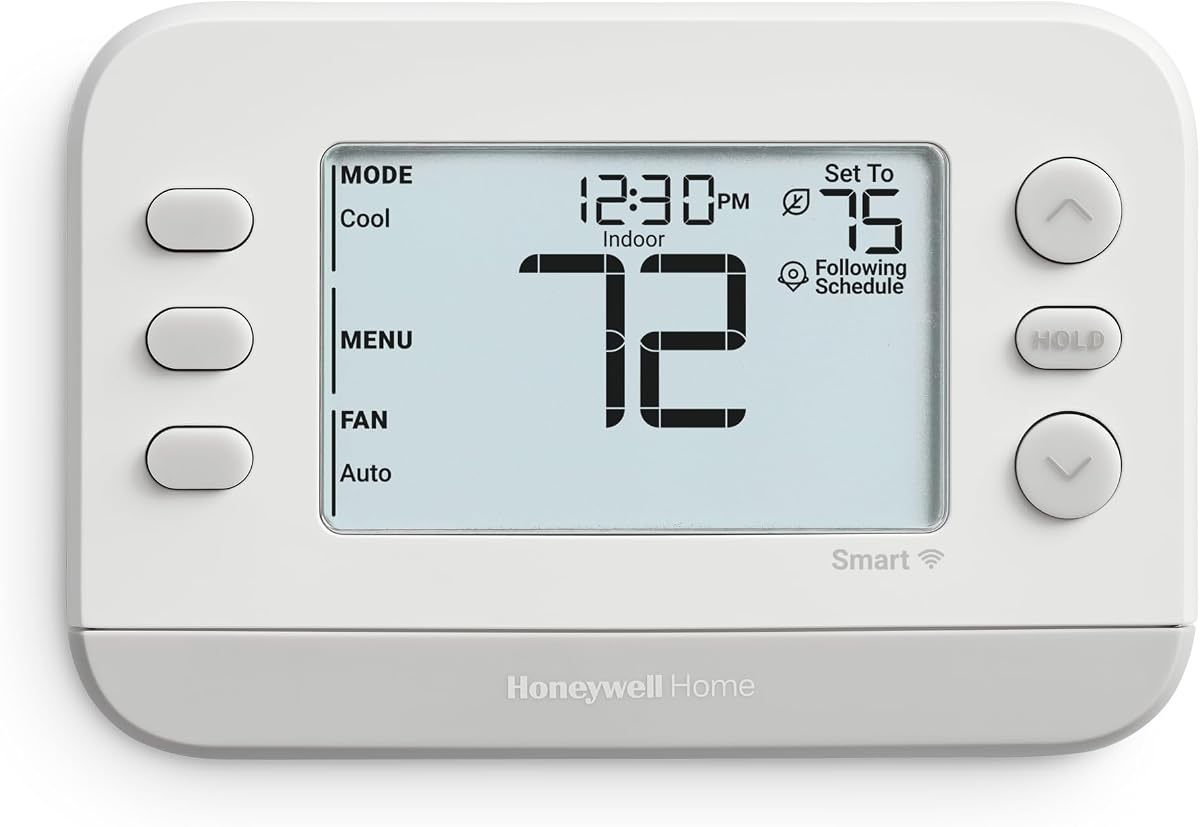
The Honeywell Home X2S White is a straightforward connected thermostat with a strong 4.4-out-of-5 rating. It supports app-based remote control, flexible scheduling, auto-away behavior, and several common smart-home platforms. That combination makes it a practical pick for hosts seeking modern connectivity without a large premium feature set.
We may earn a commission when you buy through this link, at no additional cost to you.
Matter certification can simplify integration with platforms such as Amazon Alexa, Google Assistant, and Apple HomeKit, while the First Alert app provides the primary control interface. Scheduling options include seven-day, 5-1-1, 5-2, weekly, and non-programmable formats. Filter reminders, humidity monitoring, and configurable display settings help hosts maintain the system.
The thermostat requires a C-wire and 24 VAC power, and it does not work with 120-240V electric baseboard heat. It lacks occupancy sensing beyond automatic away behavior, so it cannot determine which room guests occupy. Compatibility supports up to two heat and two cool stages for conventional systems and up to two heat and one cool for heat pumps with electric backup.
The X2S is a strong budget-oriented choice for a standard Airbnb with compatible wiring. It gives hosts remote scheduling, useful maintenance prompts, and broad platform integration without a premium display. It is especially attractive to a host who wants a flexible thermostat that can operate manually, automatically, or through a smart-home routine.
Matter certification helps the thermostat work with supported smart-home platforms and reduces the chance that a host is locked into a single control method. The First Alert app remains useful for direct management, while voice assistants can add hands-free convenience.
Several scheduling formats let a host reflect weekdays, weekends, and weekly routines without creating separate rules for every day. The non-programmable option also provides a simpler path for a property that only needs remote temperature control.
We may earn a commission when you buy through this link, at no additional cost to you.
The Honeywell Home X2S Gray offers the same practical smart-thermostat foundation as the white model in a more discreet color. It has a 4.2-out-of-5 rating, Wi-Fi and app control, Matter certification, and scheduling options that make it easy to manage a rental with mixed occupancy patterns.
We may earn a commission when you buy through this link, at no additional cost to you.
Hosts can connect through the First Alert app and use Amazon Alexa, Google Assistant, or Apple HomeKit. The thermostat offers 5-1-1, 5-2, seven-day, weekly, and non-programmable configurations, along with auto-away functionality. Filter reminders, humidity display, demand-response capability, and rebate opportunities add operational value.
A C-wire is required, and hosts may need a power adapter. The unit has no occupancy sensor, so it cannot prioritize the room where guests are sitting or sleeping. Its gray finish may blend well with darker wall plates or modern interiors, although appearance should not outweigh compatibility.
The gray X2S is a good choice for a straightforward rental where understated appearance, flexible schedules, and broad integration matter more than premium sensing. Its two-year warranty and maintenance prompts help hosts keep the property in good working order. Confirm the system's wiring and stage configuration before installation.
The gray finish is designed to blend into a range of contemporary interiors without drawing as much attention as a large color display. That makes it useful in bedrooms and visible living areas where visual restraint is preferred.
Filter reminders and humidity display can help hosts identify maintenance needs when the property is empty. These small features support more consistent care without requiring a host to inspect the system in person after every reservation.
We may earn a commission when you buy through this link, at no additional cost to you.
The right rental thermostat depends on the property's HVAC configuration, guest expectations, internet service, and the host's preferred automation approach. The following factors help narrow the field before installation.
Start with the equipment in the rental rather than the thermostat's appearance. A smart thermostat may support gas, oil, or electric forced-air systems, heat pumps, boilers, hot-water heat, steam, or conventional staging differently. Some models exclude heating-only systems, unusual zone controls, or 120-240V electric baseboard heat. Use the manufacturer's compatibility checker and compare its results with the equipment label at the indoor unit before ordering.
Bottom line: verify the exact HVAC configuration first, because a feature-rich thermostat is useless if it cannot safely control the property's equipment.
A C-wire provides continuous power for Wi-Fi, displays, and advanced functions, but not every rental has one. Sensi and Google Nest are designed to work without a C-wire in many homes, while the Honeywell models in this list require it. The ecobee Premium and Enhanced include a Power Extender Kit, whereas the Essential's kit is sold separately. Heating-only, cooling-only, zone-controlled, and some heat-pump installations may have different requirements.
Bottom line: check the existing thermostat wiring before purchase and budget time for an adapter, power extender, or compatible power accessory if one is needed.
Remote access is the central value of a smart thermostat for a short-term rental. A host should be able to check the current temperature, change a setting, revise a schedule, and review system status from a smartphone. App quality, account security, and stable property internet are as important as the thermostat itself. Voice control can be helpful, but it should supplement rather than replace direct app access.
Bottom line: choose a dependable mobile app and confirm that the property has reliable internet before depending on remote climate management.
Schedules, auto-away modes, and geofencing can reduce the need to remember every temperature change. Fixed schedules work well for properties with predictable bookings, while geofencing may suit hosts who travel back and forth. Occupancy sensing can make irregular rentals easier to manage because the system can detect arrival and vacancy. Hosts should choose automation that they understand and can explain clearly to guests.
Bottom line: prefer a system whose automation matches the host's real routine instead of selecting the largest number of features available.
A central thermostat measures the area around its installation, which may not represent the room where guests spend the most time. ecobee's Premium includes a SmartSensor, the Enhanced and Essential support optional sensors, and the other models do not provide room-based targeting. Additional sensors are especially useful in properties with upstairs bedrooms, high ceilings, sunny rooms, or HVAC systems that circulate air unevenly.
Bottom line: if the property has persistent hot or cold areas, prioritize sensor compatibility or an included sensor over extra display features.
Guests may interact with the thermostat for only a few days, so the interface should be intuitive. Physical buttons can be easier for unfamiliar users, while a touchscreen offers more information and room controls. Color, display size, and visible feedback also influence whether a guest notices that a change was accepted. A host should provide simple instructions and avoid expecting guests to learn advanced automation.
Bottom line: select an interface that a first-time visitor can understand without creating a support issue or accidentally changing a schedule.
Some advertised capabilities may depend on subscriptions, compatible hubs, or optional services. The ecobee Premium's camera viewing and security-related listening features require an ecobee Smart Security subscription, and Siri requires an Apple home hub. Software upgrades, energy reports, and standard app functions should be separated from paid services when evaluating long-term ownership. Hosts should review which features they will actually use.
Bottom line: include subscription fees, required hubs, and optional services in the long-term value calculation rather than assuming every headline feature is free.
A color or high-definition display can be attractive in a visible room, but simpler models may be more appropriate for a rental where appearance is secondary. Hosts should also consider filter reminders, humidity alerts, equipment warnings, and usage reports. These maintenance features can reveal issues between reservations and help prevent avoidable comfort problems during a stay.
Bottom line: prioritize useful alerts and clear system reporting alongside design, especially when the host cannot inspect the property every day.
Before installation, photograph the existing thermostat and its wires, identify the HVAC system, and complete the manufacturer's compatibility check. Turn off the system at the furnace or air handler, follow the step-by-step instructions, label wires correctly, and restore power only when the installation guide directs you to do so. Install any required C-wire adapter or ecobee Power Extender Kit before mounting the new unit.
After installation, connect the thermostat to the property's Wi-Fi, create the manufacturer account, and verify remote control from a phone outside the home. Establish separate comfort and vacancy settings rather than relying on one universal temperature. Add the property to the host's management routine, test app notifications, and share only the guest-access information that is actually needed. If the rental uses voice control, confirm the appropriate linked service and account permissions.
Between reservations, review energy reports, equipment alerts, and filter reminders in the app. Check the indoor unit visually for blocked vents, frozen lines, unusual moisture, or other obvious issues, and schedule professional service when necessary. Keep guest instructions simple, including how to adjust the temperature, how to operate fans, and when not to change thermostat settings. Periodically review software updates, connected services, and account security to preserve reliable remote control.
The ecobee Smart Thermostat Enhanced is the most versatile option in this guide because it combines occupancy sensing, app-based scheduling, broad smart-home support, and an included Power Extender Kit. A property with multiple temperature zones may benefit more from the Premium and its included SmartSensor. The best choice ultimately depends on HVAC compatibility, wiring, and the host's preferred app.
It depends on the thermostat and the property. The Honeywell models reviewed require a C-wire or a compatible power adapter, while Sensi and Google Nest can often work without one. The ecobee Premium and Enhanced include a Power Extender Kit, but the Essential's kit is sold separately. Check the existing wiring and the manufacturer's compatibility tool before purchasing.
Many hosts include the thermostat in the home's connected platform so guests can adjust the temperature without creating a separate account. Other hosts provide a short written guide for operating the unit while retaining control over schedules and vacant settings. The most practical arrangement is usually a comfortable default schedule plus an app that makes the thermostat easy for visitors to understand.
Vacancy schedules, auto-away modes, geofencing, and occupancy sensing can lower heating or cooling when nobody is present. A thermostat may also preheat or precool shortly before arrival and provide energy reports for reviewing results. Savings vary according to climate, equipment performance, guest behavior, and how consistently the automation is configured.
A room sensor can be better when the central thermostat is far from the space guests use most or when rooms experience uneven temperatures. It can show which room is occupied and allow the system to prioritize comfort there. The ecobee Premium includes a SmartSensor, while the Enhanced and Essential can use separately sold sensors.
Most Wi-Fi smart thermostats need a reliable connection to the property's router for remote app control, notifications, and some automated features. Local temperature control may still be available if the connection drops, but remote access and cloud-dependent functions may be interrupted. A strong cellular signal or suitable router can improve reliability in guest houses and accessory units.
Choose a conservative vacancy setting that protects the property without making it uncomfortably cold or hot. The appropriate range depends on climate, plumbing, humidity, and local conditions, so an extreme setting can create frozen pipes or excess heat. Test the vacant setting under realistic weather and keep guest comfort on a separate schedule.
Some models are designed for straightforward DIY installation, and Sensi, Google Nest, and ecobee provide guidance or included installation components. Hire an HVAC professional when the wiring is unusual, the property has a complex system, the existing thermostat is damaged, or the manufacturer does not support the equipment. Professional installation can also help ensure the system is commissioned correctly.
The ecobee Smart Thermostat Enhanced is the strongest general-purpose choice for hosts who value occupancy-based automation, app control, and broad ecosystem support. The Honeywell Home X2S White is a practical budget-oriented option with Matter certification, while the ecobee Premium is the strongest premium choice for hosts who want an included room sensor, radar occupancy detection, air-quality monitoring, and a built-in speaker.
Prioritize compatibility before features. Confirm the HVAC type, required wiring, power accessories, room layout, and internet reliability before choosing a model. After installation, create separate occupied and vacancy schedules, test remote access, decide how guests will interact with the device, and establish a simple maintenance routine based on the thermostat's reports and alerts.
Current product listings, software capabilities, compatible platforms, and service requirements can change, so review the latest manufacturer information before making a final decision. That final check helps ensure the chosen thermostat remains suitable for the property, the host's workflow, and the comfort expectations of future guests.