
Plaud Note Pro
4.5Editor score
Multimodal recording and notes
Directional meeting audio
Thirty to fifty hour recording
Ask Plaud conversation analysis
This guide compares the best AI meeting transcription devices for accuracy, battery life, privacy, language support, summaries, and everyday usability.
AI meeting transcription devices combine microphones, recording software, and automated note-taking into a dedicated way to capture conversations. A strong model captures voices clearly, separates speakers, produces searchable transcripts, and turns discussions into summaries and action items without forcing you to split attention between the meeting and your notepad.
The ten products in this guide were compared using their published specifications, ratings, recording capabilities, transcription features, battery claims, language support, privacy provisions, and included accessories. The list covers slim card-style recorders, magnetic devices, a wearable option, and a larger touchscreen model for more specialized workflows.
Each review highlights the features that distinguish one recorder from the others, along with practical trade-offs to consider before buying. Product capabilities and package contents can change, ratings fluctuate, and prices vary over time, so readers should confirm the latest listing details before making a purchase.
4.5Editor score

4.8Editor score

4.5Editor score
The table below compares all ten devices across their most important distinctions, including audio hardware, battery life, language coverage, and the type of workflow each recorder is designed to support.



The Plaud Note Pro combines a remarkably thin recorder with unusually broad meeting support, earning a 4.5 rating among customers. Its standout qualities include a four-microphone and one-VPU microphone system, a vivid AMOLED display, adaptive switching between meeting and call modes, and the ability to add typed notes, images, and highlighted moments to recorded audio.
We may earn a commission when you buy through this link, at no additional cost to you.
This model is particularly useful when a transcript alone is not enough. Ask Plaud can answer questions grounded in the original recording, extract key points, draft emails, and suggest next steps, while the free Starter Plan includes 300 transcription minutes each month. Its Enhance Mode reaches up to 16.4 feet, while Endurance Mode can record continuously for as long as 50 hours, making it practical for interviews, lectures, conferences, and multi-session workdays.
The trade-off is its service structure. The included transcription allowance is modest compared with products advertising unlimited core transcription, and the most extensive use of Ask Plaud, additional transcription capacity, or team management requires an upgraded plan. Some users may also find the feature set unnecessary if they only want a basic transcript and summary.
Even so, the Pro model is the most complete general-purpose choice here for users who want audio, visual context, conversational analysis, cross-device access, and polished hardware in one package. It is particularly compelling for consultants, project managers, sales professionals, and students who want to capture both what was said and what was shown.
Typing notes, photographing documents, and marking key moments lets the AI interpret a conversation with useful visual context. That makes this more than a simple dictation tool for workshops, property tours, training sessions, and collaborative reviews.
Local encryption, exclusive cloud file access, and processing tied to explicit authorization provide a reassuring framework. The listed ISO, SOC 2, HIPAA, GDPR, and EN18031 standards are especially relevant to legal, medical, and business users.
We may earn a commission when you buy through this link, at no additional cost to you.
The Pocket AI Voice Recorder receives a 4.6 rating, making it one of the strongest-rated products in this guide. It is designed around simple one-tap capture, automatic transcription, concise summaries, action items, and structured conversation maps, with a MagSafe-compatible format that suits quick, hands-free recording on an iPhone or other compatible device.
We may earn a commission when you buy through this link, at no additional cost to you.
Its most unusual advantage is the claimed battery life of up to four days on a single charge. That makes it a practical choice for travelers, field professionals, and people who might otherwise forget to recharge a recorder between appointments. The included core features cover everyday use, while Ask Pocket enables questions across meetings, insight extraction, and next-step generation grounded in the captured audio.
The main limitation is that the product description does not disclose a specific microphone count, pickup distance, or local storage capacity. It also separates core functions from optional premium features, so buyers should verify exactly which tools remain available without a subscription and which require one.
Pocket is best for people who value simplicity, portability, and fast retrieval over a large physical display or extensive manual controls. Its strong rating, MagSafe integration, and long battery life make it an attractive everyday note taker for meetings, calls, interviews, and spontaneous ideas.
A single-tap recording control reduces friction when a conversation begins without warning. The device can stay attached to a phone, allowing the user to participate in a meeting rather than hold a recorder or type notes.
Ask Pocket turns the library of recordings into an interactive reference. Users can locate decisions, extract insights, and generate next steps without manually listening through an entire meeting again.
We may earn a commission when you buy through this link, at no additional cost to you.
The AI Voice Recorder Lite, also identified as EurekaMind in its product information, has a 4.4 rating and emphasizes an unusually thin, low-friction design. It captures meetings, calls, lectures, and conversations through one-tap recording, then generates transcripts, summaries, speaker-aware notes, and highlighted action items.
We may earn a commission when you buy through this link, at no additional cost to you.
At just 3 millimeters thick and 1.02 ounces, it can attach magnetically to a phone or fit inside a card holder. A free Starter Plan includes unlimited transcription and AI summaries, while advanced tools such as reminders, calendar synchronization, and Ask Agent features are optional. Built-in web search adds a useful layer for follow-up research that is not limited to the recorded material.
The most notable compromise is the lack of a stated battery figure and any claim of large local storage. People who need all-day recording without charging or offline capture of extensive files may feel more confident with a model that publishes those specifications. Premium-only productivity features may also limit the full value for frequent workflow users.
This is a strong option for students, sales professionals, and mobile workers who want a credit-card-sized recorder and genuinely generous free transcription. Its ambient and call recording modes make it versatile, while its compact body is easier to carry than a larger dedicated recorder.
Unlimited transcription in the Starter Plan removes a common source of uncertainty for frequent users. It can be especially valuable for students or consultants who record many sessions and do not want every basic transcript to consume a monthly allowance.
Ask AI can search the web for context beyond the recording itself. That broadens the device from a note archive into a research assistant, although users must still verify time-sensitive information independently.
We may earn a commission when you buy through this link, at no additional cost to you.
The Comulytic Note Pro earns a 4.4 rating and stands out for a generous free plan, fast synchronization, and a focus on professional terminology. Its Starter Plan includes unlimited transcription and basic summaries, while a vertical knowledge base covers areas such as insurance, real estate, automotive sales, finance, law, and consulting.
We may earn a commission when you buy through this link, at no additional cost to you.
The device uses adaptive recording to identify calls, meetings, video conferences, and interviews without manual mode changes. A triple-microphone array with AI noise reduction is stated to capture speech within five meters, while 45 hours of continuous recording and 107 days of standby make it well suited to demanding schedules. Recordings can transfer through Wi-Fi at up to ten times Bluetooth speed, with 64GB of local storage and unlimited cloud backup.
Its transcription is advertised at 98% accuracy across 113 languages, and the app produces summaries, action items, and to-do lists. However, deep analysis, the Comulytic Assistant, and the Contact Insight Hub sit behind a paid upgrade. The real-time translation mode may also be more than some users need, adding complexity to an otherwise focused workflow.
Comulytic is a compelling choice for real estate professionals, attorneys, sales teams, and field consultants who want specialized vocabulary handling and quick access to backups. It is particularly attractive when unlimited basic transcription matters more than having every advanced analysis feature included.
The vertical knowledge base is designed to preserve terms common in several industries. That focus may improve usable notes for client work compared with a general-purpose recorder that has no field-specific terminology support.
Wi-Fi synchronization can move recordings into the cloud without interrupting a continuing conversation. The substantial built-in storage adds a local safety net and makes the device suitable for users who do not want every file to depend immediately on connectivity.
We may earn a commission when you buy through this link, at no additional cost to you.
The Comu Action Pro holds the highest customer rating in this group at 4.8, and its defining feature is automatic AI document creation. Rather than limiting the output to transcripts, it can turn conversations into editable presentation slides, email drafts, reminders, to-do lists, and action items without requiring carefully written AI prompts.
We may earn a commission when you buy through this link, at no additional cost to you.
Its adaptive six-microphone system is equally notable. Four omnidirectional microphones, one directional microphone, and a bone-conduction microphone work with a motion sensor to favor the clearest source during interviews, meetings, and calls. The device offers transcription and summarization in 113 languages, real-time translation, Bluetooth and Wi-Fi connectivity, and a stated recording life of up to 70 hours.
A dedicated AI button provides another shortcut: users can speak a request and receive editable follow-up communications, calendar reminders, and presentation drafts. The drawback is that this hands-free workflow may take time to learn, and buyers who only need simple transcripts may consider the document suite excessive. The product information also does not mention a touchscreen.
The Comu Action Pro is the leading choice for users who want recording and content creation in a single workflow. It is especially appealing to consultants, sales teams, founders, and busy professionals who regularly leave meetings needing a recap, follow-up message, or presentation outline.
The device selects an appropriate AI model and produces structured drafts automatically. This removes much of the blank-page work that follows a meeting and gives users editable output they can refine rather than a rigid final version.
The combination of directional, omnidirectional, and bone-conduction microphones is unusual in a compact recorder. Motion sensing further supports context-aware capture, making the system versatile across seated meetings, moving interviews, and phone conversations.
We may earn a commission when you buy through this link, at no additional cost to you.
The Note AI Voice Recorder, described as a RECPOINT product, combines a 4.5 rating with a 3.5-millimeter aluminum body, 64GB of storage, and a 30-hour battery. It offers one-touch recording, an OLED status screen, dual-microphone AI noise cancellation, and a desktop suite for audio management, editing, and export.
We may earn a commission when you buy through this link, at no additional cost to you.
Its language coverage is the broadest stated in the group, with support for transcription and real-time translation across 150 languages. The included package provides 360 monthly minutes for transcription and summarization plus 720 monthly minutes for text translation. These allowances make the device unusually generous for a budget-oriented model, especially for students, global teams, and multilingual interviewers.
The manufacturer advertises 98% transcription accuracy, structured summaries, mind maps, and action-oriented reports. As with any accuracy claim, actual results will depend on acoustics, overlap, accents, and specialized terminology. The monthly AI allowance also means very heavy users may eventually need to consider a different service structure.
This is a strong budget pick for anyone who wants local storage, a broad multilingual toolkit, and desktop-level editing without moving to a much larger device. It also includes a protective case, finger ring, charging cable, and quick start guide, making it a well-rounded package for everyday meetings and lectures.
Support for 150 languages and separate translation minutes make this recorder appealing to international students, researchers, and multilingual teams. It is one of the strongest choices when language breadth matters as much as meeting capture.
The included desktop software goes beyond simple playback by supporting management, editing, renaming, merging, and exporting. That is useful for users who need organized archives rather than disposable meeting clips.
We may earn a commission when you buy through this link, at no additional cost to you.
The non-Pro Plaud Note carries a 4.5 rating and preserves the series' exceptionally slim, portable design while offering transcripts in 112 languages, 64GB of local storage, and up to 30 hours of continuous recording. It is built for users who want dependable capture and structured notes without carrying a bulky recorder.
We may earn a commission when you buy through this link, at no additional cost to you.
Its app and web tools use multiple named AI models to create transcripts, mind maps, to-do lists, summaries, and role-specific insights from more than 10,000 professional templates. Multimodal input allows typed notes and images to be combined with the recording, and key moments can be marked during capture. A Vibration Conduction Sensor helps capture internal phone sounds in call mode.
The principal drawback is the Starter Plan's 300 monthly transcription minutes, which is considerably smaller than the unlimited allowances offered by several competitors. Users who create heavy weekly workloads may need Pro or Unlimited access. A benefit of the non-Pro model is that it can record locally without an internet connection, which is valuable for travel and immediate capture.
Plaud Note is a refined choice for professionals who favor a polished app, flexible templates, and strong privacy controls. It works particularly well for interviews, lectures, presentations, and hybrid meetings where concise summaries and clearly marked moments matter more than bulk transcription.
The extensive professional template library is one of the device's most practical features. It can shorten the path from a raw conversation to a sales recap, lecture outline, project update, or other structured output.
Local storage provides room to record when connectivity is unavailable. Recordings can then be organized and processed through the app, desktop, or web interface once a suitable connection is available.
We may earn a commission when you buy through this link, at no additional cost to you.
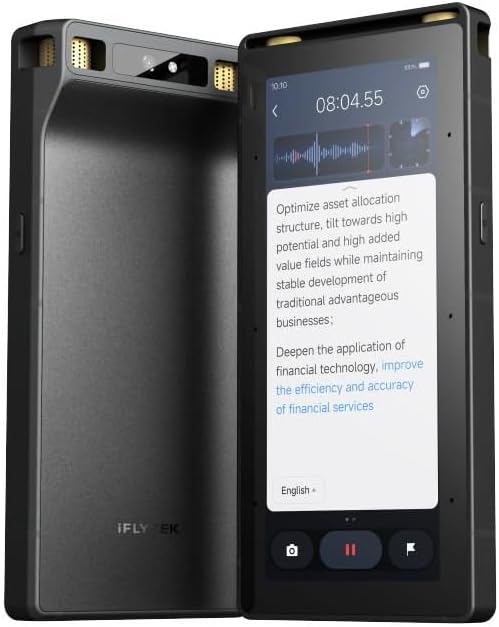
The Offline AI Touchscreen Recorder is the most specialized and premium-oriented model in this guide. It is designed for larger halls, secure environments, and users who need substantial local processing without depending on an internet connection. Its eight-microphone array includes two directional and six omnidirectional microphones, with a stated pickup range of up to 20 meters.
We may earn a commission when you buy through this link, at no additional cost to you.
Offline transcription and translation cover five languages, while offline OCR and video subtitling broaden the device beyond audio. Speaker separation and sound-source localization assist with complex, multi-person sessions. The full touchscreen interface also supports wired projection of live transcripts, turning the device into a shared reference during meetings and presentations.
Security is a major strength. Three-tier hardware encryption covers the lock screen, files, and device-specific protection, and the product includes a five-year Pro membership with premium AI features and cloud services. By contrast, offline language support is narrower than the online multilingual ranges claimed by other devices, and the product has no published customer rating for easy comparison.
This recorder is best for professional meeting environments, large presentations, and organizations that require local transcription. Buyers should verify its physical dimensions and ecosystem needs, but those comfortable with a larger touchscreen will receive a feature set that most card-sized recorders cannot match.
The eight-microphone array and long stated range suit lecture halls, training rooms, and presentations where a small desk microphone would struggle. Directional components can focus on a stage or speaker while omnidirectional microphones preserve surrounding context.
Offline transcription reduces dependence on cloud access, while hardware-level encryption protects the device and stored files. Together, these features are attractive for confidential or regulated conversations, subject to the user's own consent policies.
We may earn a commission when you buy through this link, at no additional cost to you.
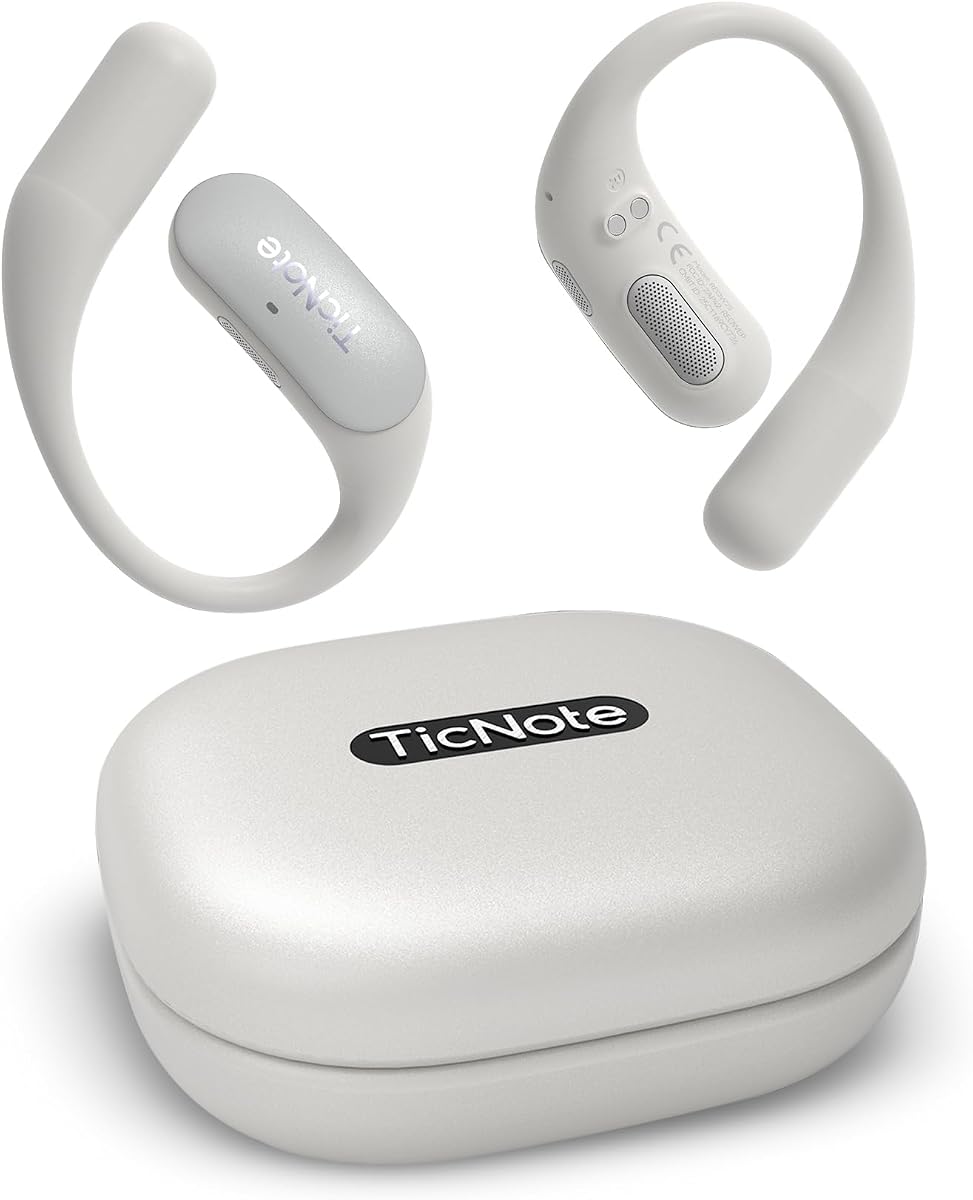
The Mobvoi TicNote Pods WiFi is a wearable recorder designed for hands-free capture in meetings, client calls, interviews, classes, and daily business communication. Its 4.1 rating is the lowest among the rated products, but the distinctive pod format and voice-activated recording support make it worth considering for users who prioritize mobility.
We may earn a commission when you buy through this link, at no additional cost to you.
A dual-microphone array and minus-40 dB environmental noise cancellation target clear speech from up to 10 meters away. The device supports more than 120 languages for transcription and translation, creates structured summaries, meeting notes, highlights, and action items, and includes Shadow AI for reorganizing information into useful outputs.
Its main limitation is the stated five-hour continuous recording battery. The 32GB of local storage is substantial, with capacity for up to 2,150 hours of recordings, but collaborative features rely on TicNote Cloud. Its 4.1 rating also suggests the experience may be less consistent than that of the leading products in the group.
TicNote Pods are best for walk-and-talk interviews, field visits, hands-free note taking, and team environments that value shared editing and version history. They are less compelling for all-day uninterrupted events or offline-first workflows.
Wearable placement and voice activation reduce the need to handle a phone or recorder during a meeting. This is especially useful in interviews, site visits, and other situations where both hands need to remain available.
Encrypted cloud storage, collaborative editing, and version history help teams turn one recording into a shared working document. Recording data is stated to remain on US-based servers and is not used for AI training.
We may earn a commission when you buy through this link, at no additional cost to you.
This Comulytic Note Pro listing earns a 4.2 rating and offers a combination of unlimited free transcription, professional terminology support, fast Wi-Fi synchronization, and a 45-hour battery. The aluminum body measures 1.2 inches thick and includes a 0.78-inch Gorilla Glass display, making it larger than many card-style alternatives but still portable.
We may earn a commission when you buy through this link, at no additional cost to you.
Its AI adaptive recording automatically identifies in-person meetings, calls, and video conferences. A triple-microphone array and AI noise reduction are stated to capture clearly within five meters, while Wi-Fi transfer is advertised at ten times Bluetooth speed. The 90-minute charging time and 107-day standby claim are convenient for professionals who move between long sessions.
The Starter Plan includes unlimited transcription and basic summaries, but advanced summaries, instant abstracts, the Comulytic Assistant, and the Contact Insight Hub require an upgrade. The lower rating than the similar Comulytic listing may indicate differences in software experience, package version, or customer expectations, so buyers should compare the current details carefully.
This model is best for real estate agents, attorneys, financial professionals, sales teams, and consultants who value industry terminology and automated action lists. Its broad included functionality makes it a practical alternative to a conventional recorder, although the premium features may determine the final value.
The knowledge base focuses on language used in insurance, real estate, automotive, finance, law, and related professions. This can make summaries more useful when technical terms and client-specific context drive the meeting's next steps.
Built-in storage preserves a local copy, while unlimited encrypted cloud backup supports access across devices. Real-time Wi-Fi synchronization reduces the waiting associated with a traditional Bluetooth transfer, though cloud features still depend on connectivity and service availability.
We may earn a commission when you buy through this link, at no additional cost to you.
The right recorder depends on where you work, how often you record, what kinds of audio you need to capture, and how you want to use the resulting transcript. Comparing these factors before buying can prevent an attractive design from falling short in everyday use.
Microphone quality determines the raw material available to the transcription engine. A three-microphone or dual-microphone array may be adequate for a quiet one-on-one meeting, while six- or eight-microphone systems offer more flexibility for interviews, crowded rooms, lectures, and large presentations. Pay attention to directional and omnidirectional elements, noise cancellation, and the stated usable distance rather than treating the microphone count as a complete measure of quality.
Prioritize clear speech capture in your normal environment. Match the pickup range to the room and verify whether calls, in-person conversations, or both are central to your workflow.
Look for a transcript that distinguishes speakers, handles interruptions, recognizes action items, and remains readable after a long session. Published accuracy percentages can be useful for comparison, but they are best treated as manufacturer claims because accents, background noise, overlapping speech, and specialist vocabulary all affect results.
Choose a device with appropriate language and industry support. Speaker recognition and structured summaries are especially valuable when you need to know who agreed to do what.
A transcript records what was said, while AI summaries should help you understand why it matters. The most useful outputs include decisions, highlights, action items, to-do lists, role-specific recaps, and follow-up messages. Some devices also generate presentation drafts, calendar reminders, or next-step suggestions from a dedicated AI button.
Check which outputs are included without a paid upgrade. A generous core plan can be more valuable than a technically richer device whose most useful features are locked behind a subscription.
Battery claims range from five hours for the wearable TicNote Pods to 70 hours for the Comu Action Pro. Longer recording life is useful for conferences and field work, while a four-day standby-style claim can be convenient for intermittent everyday capture. Local storage adds resilience, but file quality and available space determine how many hours a device can retain.
Match recording endurance and storage to your longest sessions. For heavy users, fast synchronization and a combination of local and cloud storage provide useful redundancy.
Language support ranges from offline processing for five languages to advertised support for 150 languages. Broad coverage is useful for international meetings, multilingual interviews, courses, and travel, but online translation and offline translation should not be treated as equivalent features. The offline model is more useful in secure or poorly connected environments.
Confirm the languages you actually need, including accent handling and translation quality for your field. Also check whether translation usage has separate monthly limits.
Meeting recordings may contain confidential client, patient, employee, or commercial information. Look for encryption in transit and at rest, hardware controls, private cloud storage, restrictions on AI training, and clear statements about when processing occurs. Certifications such as ISO, SOC 2, HIPAA, GDPR, CCPA, and AES encryption can provide useful evidence, but users should also review account settings and retention policies.
Technology cannot replace responsible recording practices. Obtain consent where required, announce the device, follow local law, and establish a retention plan for recordings that no longer need to remain available.
A recorder that stays in a pocket or attaches to a phone is more likely to be used consistently than a device that requires a dedicated bag and charging routine. Credit-card-sized models minimize bulk, magnetic fixtures support hands-free use, and a wearable pod can be comfortable for active interviews. Larger touchscreen devices may be better when live control, projection, or local processing is a priority.
Choose a form factor you can carry comfortably. Also consider the screen, controls, included case, accessories, and whether your usual phone or computer ecosystem supports the required connection.
Bluetooth is common for mobile transfer, while Wi-Fi can move larger files more quickly and support cloud-oriented workflows. Some products work well offline, while team collaboration depends on cloud synchronization, shared editing, version history, and a central management workspace. Decide whether you need a personal archive or a shared organizational system.
For individual use, cross-device app access is usually enough. Teams should verify permissions, administrative controls, collaboration tools, and the service tier required for shared features.
Before the first meeting, charge the recorder, install its app, create the required account, and test a short sample recording. Confirm that transcription minutes, storage, and any plan limits are set as expected. Learn the basic recording and mark-key-moment controls, and practice transferring a file to the mobile, desktop, or web application.
At the start of a conversation, tell participants that the meeting is being recorded and obtain consent when required. Place the device near the primary speaker, select the appropriate meeting or call mode, and avoid speaking over it unnecessarily. Mark decisions and action items during the discussion, then use the AI summary and question tools to check that the output reflects what mattered.
After the meeting, review the transcript for names, technical terms, and speaker assignments before sharing it. Export or synchronize files through the official app, keep local and cloud copies organized, and delete unnecessary recordings according to your privacy policy. Clean the microphones gently, keep the device away from excessive heat or moisture, and recharge it periodically rather than waiting until the final session begins.
Recording rules vary by location, organization, and type of conversation. Many places require consent from all participants, while others allow recording under narrower conditions, and workplace policies may be stricter. Tell everyone that recording is taking place and obtain permission whenever required by law or policy.
A transcript is a word-for-word text representation of the audio, while an AI summary extracts decisions, themes, highlights, and action items. A useful workflow records the full conversation, then uses the summary for rapid review and the transcript for exact quotes, compliance, or detailed verification.
Some offer local recording, offline transcription, or offline translation, while others depend on an app and cloud processing. The Offline AI Touchscreen Recorder explicitly supports offline processing in five languages, and the Plaud Note can store recordings locally. Confirm the exact offline functions before relying on them in secure locations.
Accuracy depends on the device, microphone quality, room acoustics, accents, overlapping speakers, and technical vocabulary. Some products advertise 98% accuracy, but that is a controlled product claim rather than a guarantee for every environment. Clear speech and strategic placement usually make a larger difference than minor differences between stated accuracy figures.
Several models include a dedicated call mode, while others use directional audio or a vibration-conduction sensor to capture phone sound. You should also review local call-recording rules and inform the other party when recording is required. Avoid assuming that a general meeting mode will capture a phone conversation with the same clarity.
Not necessarily. Unlimited transcription is attractive for heavy users, while a fixed allowance may be sufficient for occasional meetings and can accompany a more transparent service structure. Compare the included minutes, paid-plan features, storage, and language tools rather than focusing only on the word unlimited.
Use strong passwords, enable available encryption and access controls, limit sharing, and avoid public links when the material is confidential. Review retention and deletion settings, and remove recordings that are no longer needed. For medical, legal, financial, or personnel discussions, follow your organization's formal data-handling policy.
No. Most card-sized recorders are designed to pair with a phone or desktop app, and the larger touchscreen model is more relevant for users who value direct on-device control, offline processing, or live projection. Consider your workflow rather than choosing based on screen size alone.
The Comu Action Pro stands out for adaptive six-microphone capture and automatic document generation, while the Plaud Note Pro offers the richest general-purpose experience with multimodal notes, security certifications, and flexible AI analysis. The Note AI Voice Recorder is a strong budget selection with 150-language support, generous monthly AI minutes, local storage, and desktop editing tools.
Prioritize the features your work actually requires: clean speech capture, accurate speaker labels, relevant language support, useful summaries, dependable storage, and privacy protections that match the sensitivity of your conversations. A small device with generous included tools may serve you better than a larger or more elaborate model whose key functions sit behind a subscription.
Before buying, check the current product listing for package contents, service allowances, connectivity requirements, and compatibility. Ratings and prices can change, and promotional details may shift over time, so confirm the latest information and choose the device that best fits your recording routine.


