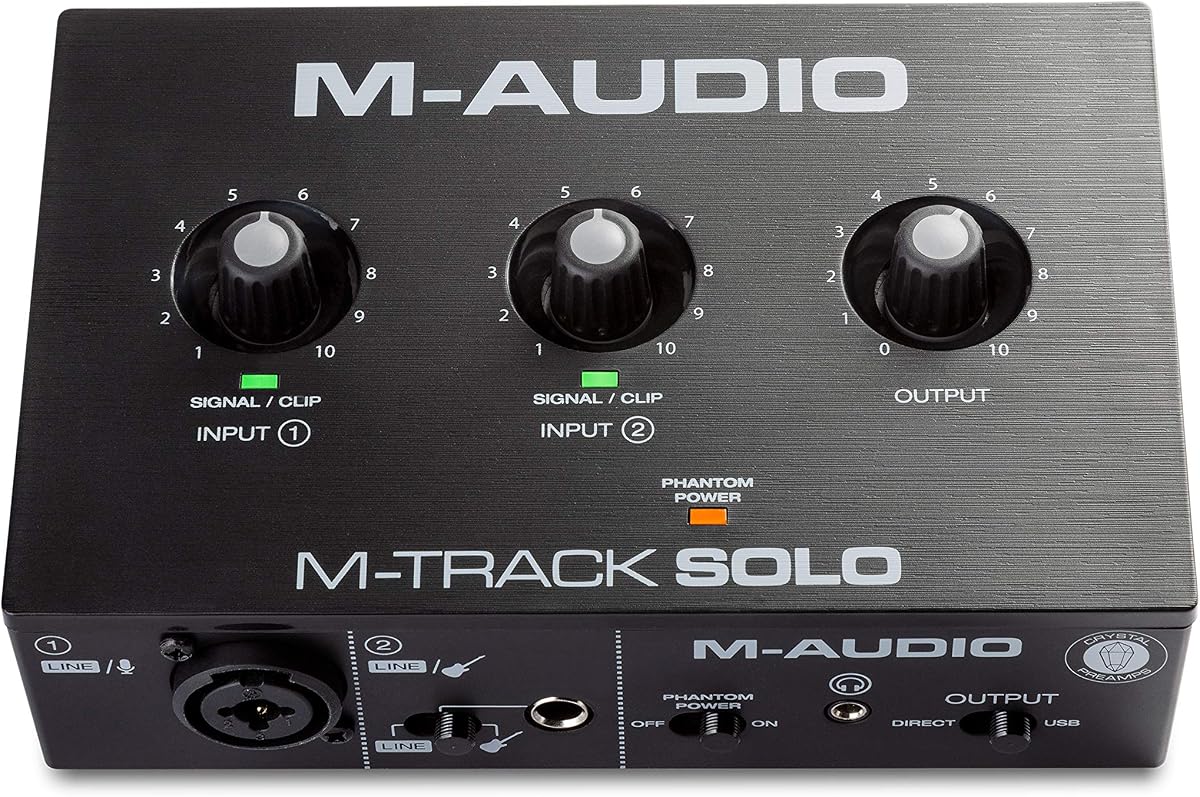
M-AUDIO M-Track Solo USB Audio Interface
4.3Editor score
Dedicated instrument input
Direct zero-latency monitoring
Compact Mac and PC design
Our guide compares the best audio interfaces for guitar, covering inputs, monitoring, resolution, compatibility, features, and setups for every player.
An audio interface for guitar is the bridge between your instrument and a computer-based recording setup. The right model can capture clean electric or acoustic guitar, support vocals, provide low-latency monitoring, and connect reliably to the software you use for recording, streaming, or practicing.
We compared all ten featured interfaces across instrument inputs, microphone connections, monitoring options, resolution, device compatibility, portability, and recording features. The list covers dedicated guitar interfaces, compact desktop units, and expandable studio models for different budgets and experience levels.
Each pick highlights a distinct practical use, from phone recording and simple home practice to professional multitrack production. Product ratings and specifications reflect the supplied information, while availability, bundles, software details, and current prices can change, so verify the latest listing before buying.
4.3Editor score
4.6Editor score

The comparison below highlights the principal inputs, monitoring functions, resolution, and platform support of each interface, making it easier to match a model to a phone-based recorder, home studio, streaming setup, or expandable professional system.


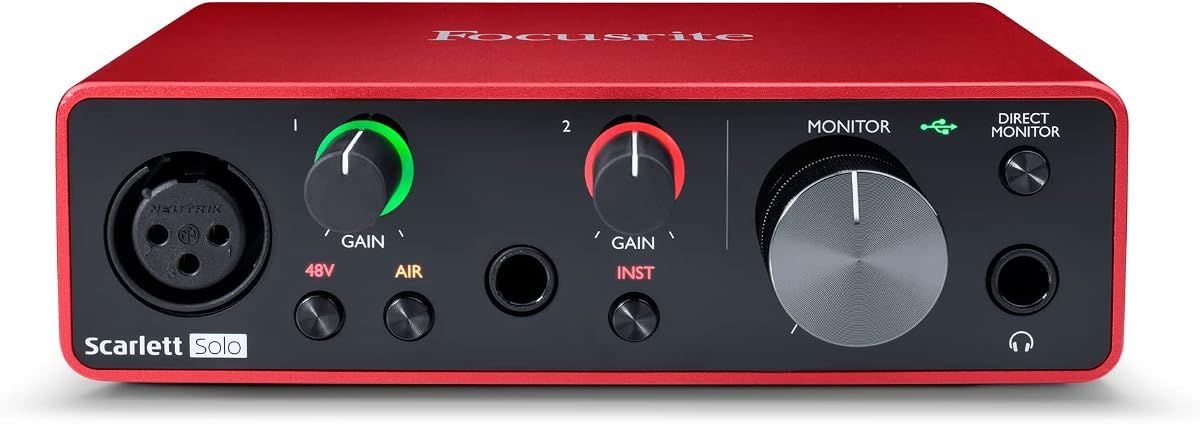
The Focusrite Scarlett Solo 3rd Gen is a compact USB-C interface with a 4.6 rating and a strong balance of recording quality, monitoring, and software support. It offers two high-headroom instrument inputs, allowing an electric guitar, bass, or second instrument to be connected without relying on the microphone preamp for every source. That distinction matters when recording a guitar with a passive pickup output.
We may earn a commission when you buy through this link, at no additional cost to you.
Its high-performing preamps, gain halos, and switchable Air mode form the core of the guitar proposition. Air mode adds brightness and clarity, which can be helpful for an acoustic instrument that sounds overly dark in the room. The interface supports recording and mixing at up to 24-bit and 192kHz, while two balanced outputs provide clean playback through studio monitors or powered speakers.
The Solo is more versatile than its name might initially suggest, but it still has limitations. You must supply your own headphones and computer, and the included software bundle can be more than a new player needs. Its feature set also makes it less focused for someone who only wants a direct phone adapter, but it remains a more complete solution for anyone building a repeatable home recording workflow.
Choose the Scarlett Solo 3rd Gen if your priority is clean guitar capture, dependable monitoring, and a recognized software ecosystem. It is particularly attractive to electric guitarists who want both instrument inputs, as well as acoustic players who can experiment with Air mode. For a first serious home-studio interface, it offers the most versatile balance in this guide.
The dedicated instrument inputs provide an appropriate starting point for electric guitar pickups, while the second input can handle bass, another guitar, or an amplified source. The switchable Air mode offers a quick tonal adjustment for acoustic recordings without requiring the player to alter the guitar's onboard tone controls.
Balanced outputs support clean monitoring through studio speakers, while the headphone connection is convenient for quieter practice and recording. The bundled production software provides a practical starting point for editing, effects, and arranging tracks after a performance has been captured.
We may earn a commission when you buy through this link, at no additional cost to you.
The JOYO MOMIX CAB is built for a specific purpose: recording guitar directly to a phone while providing immediate headphone monitoring. Its 4.2 rating reflects a practical mobile accessory rather than a conventional desktop recording interface. A 6.35mm input accepts a standard guitar cable, while the 3.5mm headphone jack lets the player hear the signal and phone audio together.
We may earn a commission when you buy through this link, at no additional cost to you.
The direct signal is passed to the headphones with zero latency while also traveling to the phone for capture. A green indicator shows a clean input, and a red light warns that the guitar signal is too hot. Its pocket-sized back clip makes it easy to carry to rehearsal rooms, practice sessions, and informal recording locations without adding much bulk to a bag.
The major limitation is that the dry guitar signal cannot be muted, and the interface is not designed for real-time software amplifier simulations or effect processing. Users should also rely on the included USB-C cable, enable OTG on supported Android devices, and accept that compatibility can vary. These constraints make the MOMIX CAB less suitable for a full desktop production workflow.
Buy the MOMIX CAB if your main goal is capturing dry guitar ideas on a phone, practicing with backing tracks, or monitoring while filming. It is less appropriate if you need virtual amps, software effects, a muted direct signal, or a universal desktop audio interface. For phone-only guitar capture, its simplicity and portability are difficult to overlook.
The MOMIX CAB requires no batteries, charging, driver installation, or desktop application. A compatible phone recording app can capture the audio directly, making the device useful for quick idea recording and social video where a traditional interface would be excessive.
Players hear the guitar signal alongside phone audio without noticeable monitoring delay. The shared headphone output makes this arrangement simple, although the unmutable dry signal means users cannot create a software-effects mix in real time.
We may earn a commission when you buy through this link, at no additional cost to you.
The M-AUDIO M-Track Duo has a 4.4 rating and provides a useful two-input configuration for guitarists who also want to record vocals, drums, or another instrument. Each combo input accepts XLR microphones, line-level sources, or instrument-level connections, and phantom power supports compatible condenser microphones. This makes the Duo more adaptable than a single-input guitar box.
We may earn a commission when you buy through this link, at no additional cost to you.
A USB/Direct switch provides control over monitoring, including zero-latency direct monitoring when the interface is used with software. The headphone connection and stereo quarter-inch outputs support different monitoring arrangements, while transparent Crystal Preamps are intended to preserve the character of connected microphones and instruments.
Its 48kHz recording resolution is sufficient for many home recordings, although several modern interfaces in this list support 24-bit/192kHz operation. The output selection is also less universally convenient for desktop setups because it uses stereo quarter-inch sockets rather than the more common 3.5mm or balanced 6.35mm alternatives.
The M-Track Duo is a strong recommendation for a guitarist who wants a vocal input beside the instrument channel and likes having physical monitoring options. It works particularly well for songwriters, podcasters, and livestreamers who need two sources without moving to a larger interface. Choose it for flexibility and simplicity rather than maximum conversion resolution.
The second combo input allows a microphone to be connected alongside an electric guitar or other instrument. Players can capture a full performance without depending on a single computer input, making the Duo suitable for quick demonstrations and basic tracking.
The hardware switch lets performers move between direct and USB monitoring. The direct position offers zero latency, while the USB position allows software effects and virtual instruments to be heard during recording.
We may earn a commission when you buy through this link, at no additional cost to you.
The IK Multimedia iRig USB offers a 4.3 rating and a flexible bridge between guitar, mobile devices, and computers. It records at 24-bit and 48kHz, includes a USB-C cable, and is designed for compatible Mac, PC, iPad, and newer iPhone models. Direct monitoring supports quiet practice without requiring the player to depend entirely on software effects.
We may earn a commission when you buy through this link, at no additional cost to you.
A dedicated amp output can feed an amplifier or pedal rig, and a switch selects between processed and THRU operation. This makes the interface more useful than a basic input box for players who alternate between silent recording and amplified practice. Bundled recording software and plug-ins help shorten the path from installation to a usable session.
The most important limitation is connectivity. The product information specifically states that it will not work properly with a Lightning cable, so owners of older iPhones or iPads should confirm their port before buying. The processed output also relies on appropriate software, so the exact sound depends on the app or host program in use.
Choose the iRig USB if you want one compact interface to support both a computer and modern USB-C mobile setup. It is particularly useful for players who want direct practice, app-based effects, and the option to connect to an external rig. It may not be the right choice for anyone who depends on legacy mobile connectors.
Direct monitoring lets a player hear the guitar while remaining connected to a mobile device or computer. The app or software can add effects, while THRU mode preserves a straightforward instrument path for practice or external equipment.
USB-C connectivity and broad device support make the interface convenient for sessions at a desk, in a rehearsal room, or on the move. Its compact construction also reduces the space required compared with a full desktop recording setup.
We may earn a commission when you buy through this link, at no additional cost to you.
The MAONO PS22 Lite is a compact interface aimed at guitarists, vocalists, podcasters, and streamers. It has a 4.2 rating, supports 24-bit/192kHz recording, and provides a stated dynamic range of 106dB. Its microphone channel includes up to 56dB of preamp gain and 48V phantom power, while a dedicated instrument input supports guitar recording.
We may earn a commission when you buy through this link, at no additional cost to you.
One of its most useful features is the inclusion of ProStudio Routing Software. It offers virtual channels, loopback functions, and ASIO compatibility for low-latency output, which is valuable when combining a guitar with vocals, backing tracks, or streamed audio. The interface also includes modes for recording, live broadcast, and instruments.
The broad feature set creates a slight learning curve. The supplied guidance says to select the MAONO ASIO driver within the audio device settings, and users may need to experiment with routing to get the intended result. Although compact, the PS22 Lite offers fewer physical outputs than larger studio interfaces and is primarily oriented toward computer-based work.
Buy the PS22 Lite if you want a single box for guitar, vocals, and streaming with more control over routing than a simple direct-monitor adapter. It is a sensible option for a home producer who values high resolution and loopback functions. Beginners should budget a little time for setup, while experienced users will appreciate the routing options.
Loopback and virtual-channel functions make it possible to combine instruments, microphones, and program audio. These capabilities are especially relevant to a guitarist who records backing tracks, narrates a lesson, or performs during a live broadcast.
The 24-bit/192kHz converters and stated 106dB dynamic range provide more recording headroom than basic mobile adapters. Its palm-sized format also keeps the hardware manageable without eliminating the physical controls needed for daily operation.
We may earn a commission when you buy through this link, at no additional cost to you.
The PIYONE Q28 has a 4.3 rating and combines two combo inputs with high-resolution conversion in a portable package. It supports 24-bit/192kHz recording and uses a class-compliant USB-C connection for Mac and PC. Because no separate driver is required, it offers a potentially straightforward path to getting a guitar into a recording application.
We may earn a commission when you buy through this link, at no additional cost to you.
Both combo inputs can accept XLR microphones, line sources, or high-impedance instruments, while integrated phantom power supports compatible condenser microphones. A direct monitor function provides zero-latency tracking, and the 3.5mm headphone jack works with common headsets. Fixed LED rings around the gain knobs make input status easier to identify in a dim room.
Its output and routing capabilities are less expansive than those of the larger interfaces in the list. The product data emphasizes headphone monitoring and a monitor mix or loopback function, but it does not describe the same breadth of balanced outputs, digital expansion, or software control found on premium studio models. That makes it better suited to compact mobile production than a large, complex studio.
Choose the Q28 if you want a small two-channel interface with modern resolution, straightforward USB-C operation, and enough flexibility for either guitar or microphones. It is a good fit for a laptop-based creator who values plug-and-play operation over extensive I/O. Confirm that your software supports class-compatible USB audio before committing to the workflow.
The combo connectors make it possible to record a guitar and add a vocal microphone in the same session. The Hi-Z option preserves a familiar route for electric guitar, while phantom power broadens the unit's usefulness for vocal recording.
A single-cable, class-compatible design can reduce setup time and cable clutter. The direct monitor supports low-latency tracking, while illuminated controls provide clear visual feedback when adjusting gain.
We may earn a commission when you buy through this link, at no additional cost to you.
The M-AUDIO M-Track Solo is a straightforward desktop interface for guitarists who need a dedicated instrument input without a large collection of studio features. Its 4.3 rating reflects a balanced approach to recording and monitoring, while the separate instrument and combo connections make it easy to connect a guitar or microphone.
We may earn a commission when you buy through this link, at no additional cost to you.
The USB/Direct switch is especially valuable because it gives performers a hardware path for zero-latency monitoring. A 3.5mm headphone output supports ordinary headphones, and stereo RCA outputs can feed a pair of powered speakers. Transparent Crystal Preamps are included for connected microphones, and phantom power supports suitable condenser models.
The Solo has only two inputs, so recording guitar, vocal, drums, and another instrument at once would require an external mixer or another interface. It records at 48kHz but does not offer the 192kHz maximum of several newer models. These constraints are understandable for a focused unit, but they define its role as a basic tracker rather than an expandable studio centerpiece.
The M-Track Solo is a strong budget choice for a guitarist beginning a home-studio system or anyone who wants a reliable Mac or PC interface for recording and streaming. It provides more useful routing than a simple phone adapter and a more focused design than a full-featured mixer. Pick it when guitar capture, quick monitoring, and uncomplicated operation matter most.
The dedicated line/instrument input provides a straightforward route for guitar recording. A performer can connect the interface, select direct monitoring, and begin tracking without navigating a complicated mixer or multi-output signal flow.
The USB/Direct control makes it possible to choose software monitoring or immediate hardware monitoring. Direct mode is useful when software effects introduce delay, while USB mode allows the host application's processing to be heard.
We may earn a commission when you buy through this link, at no additional cost to you.
The Arturia MiniFuse 1 carries a 4.6 rating and stands out as a compact interface for guitarists whose setups may include more than a microphone and guitar. It includes a combo mic/instrument/line input, two TRS instrument or line inputs, balanced quarter-inch outputs, headphone monitoring, and five-pin MIDI input and output connections.
We may earn a commission when you buy through this link, at no additional cost to you.
The multiple instrument inputs make it possible to capture guitar, bass, keyboard, or another source without an external mixer. MIDI support is particularly useful for players who use a controller, drum machine, or synthesizer. Loopback functionality can also capture app or in-game audio alongside a performance, which is relevant to livestreaming and multimedia content.
Some of these advantages will feel unnecessary to a guitarist who records only one instrument and does not use MIDI. The software package is also extensive, including Ableton Live Lite, Analog Lab Intro, Arturia FX, NI Guitar Rig 6 LE, Auto-Tune Unlimited, and a Splice Creator Plan. Beginners may need guidance on which components are essential for a basic guitar session.
Choose the MiniFuse 1 when you want a compact but well-rounded creative hub with audio, MIDI, loopback, and strong bundled software. Its five-year warranty and stated reliability testing add reassurance for a device intended for regular use. It is an excellent choice for a guitarist expanding into keys, production, or livestreamed performance.
The combination of instrument inputs and MIDI connections lets a small studio function as a central hub. Guitarists can record while controlling compatible synthesizers or sequencing equipment without maintaining separate MIDI and audio interfaces.
Loopback makes it easier to record a guitar performance along with app or game audio. This is useful for online lessons, game-inspired videos, and streams where spoken commentary and music must share one final recording.
We may earn a commission when you buy through this link, at no additional cost to you.
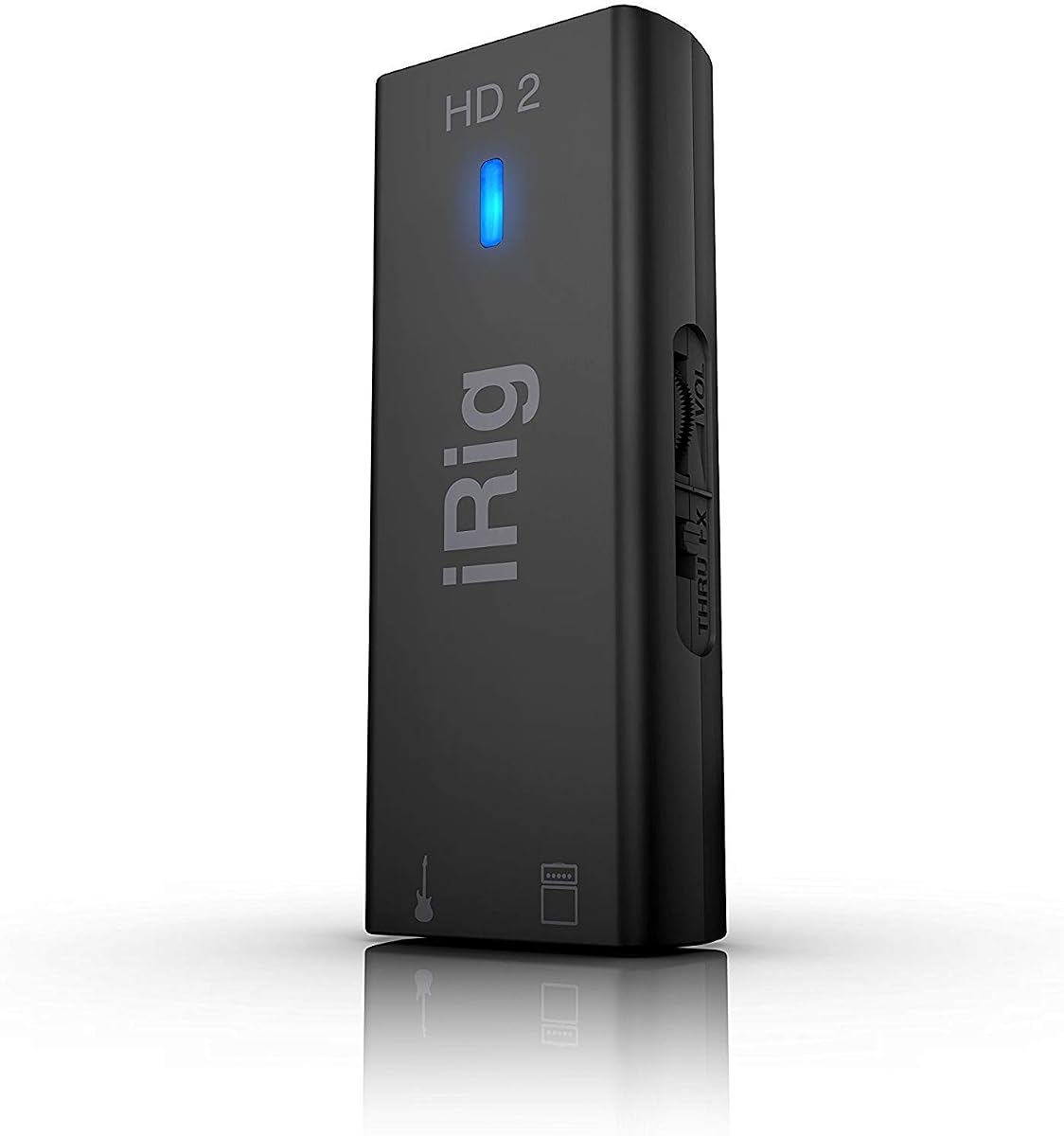
The IK Multimedia iRig HD 2 is a well-known mobile-oriented guitar interface with a 4.4 rating. It combines a 24-bit, 96kHz recording specification with a high-quality instrument-level 1/4-inch Hi-Z input and works with iPhone, iPad, Mac, and PC systems. The supplied USB-C, Lightning, and USB cables give it broad device flexibility.
We may earn a commission when you buy through this link, at no additional cost to you.
Its amp output can connect to an amplifier or pedal setup, with a switchable choice between FX and THRU. Adjustable input gain and a headphone output with its own preamp and level control make the device practical for both recording and practice. Its lightweight, compact construction also makes it easy to carry in a pocket, laptop bag, or gig bag.
The supplied product information is important because mobile operating systems and connectors evolve. While the inclusion of several cables is useful, buyers should confirm that their current device and intended software remain compatible. The 96kHz sample rate is higher than many entry-level interfaces, but the hardware is not a substitute for a full studio with multiple microphone preamps and extensive I/O.
The iRig HD 2 is a good choice for a guitarist who wants to record through an iPhone, iPad, or computer and values high-resolution mobile capture. It also suits players who want to connect to an external amp or pedal rig. Choose it when broad cable compatibility and portable recording matter more than a large desktop control surface.
The Hi-Z input is designed around guitar-level signals, providing a more appropriate connection than a general line input. Adjustable gain gives the player control over pickup output and helps prevent an overly strong signal from overwhelming the recording chain.
THRU mode provides a direct route toward an amplifier or pedal setup, while FX mode uses processed output. That flexibility lets the same device support silent headphone practice and connections to familiar external gear.
We may earn a commission when you buy through this link, at no additional cost to you.
The Fender Quantum HD 2 is the most expansive premium interface in this guide, with 20 inputs and 24 outputs. It is designed for established project studios, guitar-focused production, streaming, and hybrid hardware setups. Front-facing instrument inputs are optimized for guitar and bass, while MAX-HD microphone preamps support vocal and acoustic recording.
We may earn a commission when you buy through this link, at no additional cost to you.
Its 32-bit/192kHz converters, Auto Gain function, loopback routing, DSP monitor mixer, and headphone amplifier provide a more advanced control environment. ADAT and S/PDIF connections can add sixteen digital inputs, allowing the interface to grow as more equipment is introduced. Dual re-amp outputs are especially relevant to guitarists who want to send finished tracks through a pedalboard, amplifier, or other outboard gear for a second sound.
This is not a minimalist device. Players who only need one guitar and a pair of headphones may find the feature set, physical routing, and software controls excessive. The product information also emphasizes a complete Fender Studio Pro perpetual-license package, which adds value for users committed to that software environment but may not be essential for every workflow.
Choose the Quantum HD 2 if you are building a serious home or project studio and want extensive I/O with room for expansion. Its re-amp outputs, digital expansion, automatic gain, and high-resolution converters make it especially compelling for guitar-focused producers. Beginners seeking an uncomplicated first interface will find a smaller model easier to master.
The dedicated re-amp outputs are designed to send existing recordings back through an amplifier or pedal chain. This makes it possible to re-record a clean performance, discover a new amp character, and preserve the original guitar take inside the project.
ADAT and S/PDIF I/O add digital input capacity when a project requires more channels than the analog connections provide. The result is a platform that can accommodate larger recording sessions without relying on a similarly small interface.
Auto Gain is intended to set recording levels quickly and reduce frustration during setup. While experienced engineers will still evaluate levels by ear and meter, the feature can help new players move into a session with fewer technical interruptions.
We may earn a commission when you buy through this link, at no additional cost to you.
The right audio interface for guitar depends on your instrument, recording software, device platform, monitoring method, and expansion goals. Focus on the connection path and signal flow you actually need rather than choosing solely by headline resolution or the number of physical controls.
A guitar interface needs a dedicated high-impedance instrument input so passive and active pickups are captured at an appropriate level. Look for a 1/4-inch or 6.35mm connection, a usable gain range, and indicators that help prevent clipping. Electric guitars with hot outputs, low-output acoustics, basses, and unusual pedalboard signals can all benefit from careful level adjustment. A unit with two instrument inputs is useful when tracking a guitar and bass together or keeping a second source ready without repatching.
Choose an interface with a clear Hi-Z instrument path and enough preamp headroom for your pickups. The input should pair with direct monitoring so you can hear the guitar without software delay.
Direct monitoring routes the instrument signal to the headphones with little or no latency, which is important for fast guitar playing and accurate picking. USB monitoring lets the computer process software effects, amp simulations, or mixing, but it can introduce delay. Many interfaces include a switch, knob, or blend control to move between these paths. Understand whether direct monitoring is fully adjustable, since some designs add the processed signal to the direct signal rather than replacing it.
For dependable practice, prioritize a clear zero-latency mode. For recording with virtual amps and effects, ensure the interface can monitor USB audio at a workable level.
Check the operating system and physical connector before making a purchase. Mac and PC users generally need a USB audio interface, while phone recording may require USB-C, Lightning, or a compatible adapter. Some products are class-compliant and work without a separate driver, whereas others rely on manufacturer software for lower-latency operation. Mobile workflows can also depend on OTG support or specific recording applications, so the supplied compatibility notes deserve careful review.
Match the interface to the device you already own and the software you intend to run. Confirm the required cable, driver, and operating-system version before ordering.
Resolution figures describe how finely an interface captures and outputs digital audio, but they do not tell the entire quality story. A 24-bit/48kHz interface is adequate for many guitar recordings, while 24-bit/96kHz or 24-bit/192kHz options can offer additional headroom and detail. Actual results also depend on preamp quality, circuit design, power, software, and the source. Beginners should prioritize clean, noise-free preamps and reliable gain control over chasing the largest number in the specification list.
Choose a resolution supported by your computer and workflow. Treat 192kHz as an optional benefit rather than a guarantee of a better sounding recording.
A guitar-only setup may need only one instrument input, but combo inputs, extra line connections, balanced outputs, and headphone options determine how easily the interface can grow. Balanced outputs are useful for professional monitors, while RCA or 3.5mm outputs suit simpler desktop arrangements. Digital connections such as ADAT and S/PDIF become relevant when adding external preamps, converters, or a larger recording system. Loopback can simplify streaming by capturing program audio alongside a performance.
Count the sources you expect to record now and the hardware you may add later. Choose enough connectivity for a realistic expansion path without paying for unused studio features.
Headphone output is essential for private practice and tracking, while dedicated monitor outputs are useful when mixing with powered speakers or studio monitors. A volume control is helpful, and a separate monitor mix can let performers hear a different balance from what the software sends to the recorder. Some compact interfaces use a single knob for both headphone and output volume, which simplifies the panel but may make level matching less precise.
Decide whether you will work primarily with headphones, speakers, or both. Make sure the available outputs match your existing monitoring equipment and reduce unnecessary adapter changes.
A guitar interface may live permanently on a desk, travel to rehearsals, or fit into a mobile recording kit. Full-size desktop units generally provide more connections and physical control, while phone adapters and compact interfaces are easier to carry. Consider cable length, power requirements, enclosure size, and whether the device depends on bus power. For frequent mobile use, a durable compact body and a simple connection path can matter more than a large control surface.
Match the form factor to where you will actually record. A studio-only buyer should prioritize features, while a traveling guitarist should value weight, size, and setup speed.
Many interfaces include recording software, effects, virtual instruments, or special access to an app ecosystem. These bundles can make a new system productive without an immediate search for extra tools. They can also create confusion if several programs perform similar functions, so look for the specific tools your workflow needs: guitar amp simulation, multitrack editing, mixing, mastering, looping, or streaming. Ensure included licenses are appropriate for your operating system and that activation requirements are acceptable.
Treat bundled software as a useful benefit rather than the only reason to choose an interface. Prioritize hardware compatibility, clean conversion, and the monitoring and I/O features you will use every day.
Begin by confirming compatibility, connecting the interface with the supplied or manufacturer-approved cable, and installing any required operating-system component before opening a recording application. Connect the guitar to the instrument input and your headphones to the headphone output. Start with the guitar volume and interface gain at conservative levels, then raise them gradually while watching the input meter and the signal indicator.
Choose the correct monitoring mode for the task. Use direct monitoring when you need immediate, low-latency tracking, and USB monitoring when software effects or virtual instruments must be audible. In a full production session, set the input record level below clipping, confirm that the headphone mix contains the guitar, and make a short test recording before performing the complete take.
Treat the interface as sensitive electronic equipment. Avoid resting it on unstable surfaces, placing cables where they can be pulled, or exposing it to excessive moisture, heat, and dust. Disconnect the instrument and computer before moving the unit, keep the gain controls in a known position, and periodically inspect connectors and cables. Use the manufacturer's guidance for firmware, driver, firmware, app, and software updates whenever a new version is available.
If you want to record through a computer with software effects, virtual amplifiers, or a full production system, an audio interface is strongly recommended. It converts the analog guitar signal into digital audio and provides a cleaner, more controllable connection than a basic sound-card input. It also supplies headphone monitoring and usually a direct monitoring option. A phone-only user can use a specialized mobile interface, but the available workflow will be more limited.
Most of the featured interfaces can accept an acoustic guitar through a high-impedance instrument input, although a dedicated microphone input may produce a different and often more natural sound. The Scarlett Solo's switchable Air mode, the MiniFuse's multiple inputs, and the MAONO PS22 Lite's combination of instrument and microphone connections can all accommodate acoustic recording. The best choice depends on whether you want to capture the guitar's own electronics or use a microphone and how much control you need.
Direct monitoring sends the instrument signal directly to the headphones with little or no latency, so the player hears the guitar immediately. USB monitoring routes audio through the computer, allowing software effects, amp simulations, and mix processing to be heard. USB monitoring can introduce noticeable delay, so direct monitoring is often preferred for performance and fast playing. Some interfaces allow both, and some offer a blend control for adjusting the two paths.
No. Many useful recordings can be made at 24-bit/48kHz, and the quality of the preamp, converter, source, and recording chain matters more than the highest available sample rate. Higher resolutions can provide additional detail and editing flexibility, but they also create larger files and require a computer and software that support the selected rate. Choose a higher resolution when your workflow benefits from it rather than assuming it guarantees a better performance.
Only if you plan to record vocals, acoustic guitar through a microphone, drums, amplifiers, or other microphones in addition to electric guitar. A dedicated instrument input is sufficient for a basic electric-guitar setup, while combo inputs let one interface handle both instrument and microphone sources. If your long-term goal is a broader home studio, choosing a model with at least one quality microphone preamp can reduce the need to replace the interface later.
Yes, provided the interface, computer, and streaming application support the required routing. Loopback, virtual channels, and monitor mix functions can capture or separate program audio, game sound, vocals, and guitar. The MAONO PS22 Lite includes routing software for these tasks, while the Arturia MiniFuse 1 and Fender Quantum HD 2 provide loopback functions of their own. Test the routing before a live session and record a short sample to confirm the final mix.
Choose mobile when recording ideas, practicing, and performing away from a desk are your main priorities. The JOYO MOMIX CAB and IK Multimedia iRig models serve this category well, with the former focused on simple phone capture and the latter offering broader device and app support. Choose a desktop interface when you want stable software integration, higher-quality preamps, multiple inputs, flexible monitoring, or room to add microphones and studio outboard gear.
Set the guitar volume to a normal playing level, keep the interface gain conservative, and watch both the input meter and any signal indicator. Increase gain only until the loudest notes sit comfortably below the maximum level. The JOYO MOMIX CAB uses green and red indicator lights for this purpose, while desktop interfaces commonly provide metering in the recording application. If the signal distorts, reduce the source or interface gain rather than lowering it only in the software.
The Focusrite Scarlett Solo 3rd Gen is the most balanced overall recommendation for clean guitar capture, dependable monitoring, and broad software support. The M-AUDIO M-Track Solo is a compelling budget option for a simple home recorder, while the Fender Quantum HD 2 stands apart as the premium choice for extensive I/O, re-amp workflows, and studio expansion.
Prioritize the signal path you need rather than the largest specification. A phone-only player should focus on compatible connectors and low-latency monitoring, while a home producer may need clean instrument inputs, dependable direct monitoring, and room for a vocal microphone. Experienced users should evaluate preamp quality, balanced outputs, loopback routing, digital expansion, and software integration.
Check the current product listing, included accessories, compatibility details, software terms, and current prices before purchasing. Interface standards, mobile ports, operating-system requirements, and bundle contents can change, and confirming those details will help ensure the chosen model integrates smoothly with your guitar, computer, phone, and recording software.
