
VTech SN5147 Amplified Senior Phone
4.0Editor score
Corded and cordless design
Extra-loud visual ringer
50dB audio assist
Our Captioned Telephone guide compares captions, amplified sound, large controls, visual alerts, and hands-free calling to help you choose confidently.
A captioned telephone can turn spoken conversations into accessible text while also providing loud sound, visual alerts, and simpler controls. The best choice depends on whether live captions, memory-friendly dialing, hearing support, or voice control matter most. A device marketed broadly as a senior phone may not actually display captions, so identifying the exact feature is essential.
The products in this guide were compared using their supplied specifications, including captioning method, amplification, visual notification, dialing controls, hands-free operation, connectivity, and intended users. The list covers the Hamilton CapTel 2400iSPNBT as the dedicated real-time captioned option, alongside accessible landlines, amplified phones, a voice-controlled home telephone, and a cordless service bundle.
Each review explains what distinguishes the telephone, who it appears best suited for, and where its limitations matter. Ratings reflect the supplied product information and should be considered alongside current availability and service requirements. Product features, service plans, eligibility rules, and prices can change, so readers should verify the latest listing before purchasing.
4.0Editor score

4.3Editor score

4.2Editor score
This side-by-side comparison shows that only the Hamilton CapTel provides live captions, while the remaining products emphasize accessibility through amplified audio, visual alerts, photo or voice dialing, hands-free operation, or phone-service features. Connectivity and setup requirements should be checked carefully before choosing.




The Hamilton CapTel 2400iSPNBT is the only dedicated real-time captioned telephone in this group, making it the clearest answer for someone who needs conversations converted into visible text. It combines a large touchscreen with up to 40dB of amplified gain, customizable caption settings, and hearing aid compatibility. Its supplied rating of 4.3 reflects a generally positive reception while still leaving room to compare the service and setup requirements carefully.
We may earn a commission when you buy through this link, at no additional cost to you.
Its standout capability is flexible captioning for both incoming and outgoing calls. Users can select fully automated captions or assisted captions with live operator support, depending on their communication needs. The built-in answering machine also presents voicemail captions directly on the screen. This creates a consistent text-based path for calls and messages rather than limiting captions to only one part of the telephone's usefulness.
The compromises are meaningful. A high-speed Wi-Fi connection, standard electrical power, and potentially telephone service are required, and the captioning service is available only to US residents with hearing loss after registration. Those eligibility and service conditions make this a more specialized purchase than a conventional amplified phone. It is also less appropriate for someone who only wants large buttons or a loud ringer and has no interest in captioning.
This is the strongest overall pick for readers who genuinely need live captions and live operator support. It is particularly appropriate for users who also benefit from a large screen, amplified sound, hearing aid compatibility, and captioned voicemail. Buyers should confirm internet availability, residential eligibility, and registration requirements before ordering, but for a true captioned telephone, it offers the most complete supplied feature set.
The phone supports automated captions and assisted captioning for both incoming and outgoing calls. Assisted mode adds live operator support, offering a useful alternative when automatic transcription may be difficult to follow.
A 40dB amplification setting, hearing aid compatibility, customizable caption size, tone control, and captioned voicemail create several ways to tailor communication to individual hearing needs.
We may earn a commission when you buy through this link, at no additional cost to you.
The Picture-Dialing Landline is a straightforward accessibility telephone for seniors and users with memory, vision, or hearing challenges. Its supplied rating is 4.2, and the primary advantage is a layout that reduces the need to remember or manually enter numbers. Eight customizable photo speed-dial buttons and a separate programmable SOS key make frequently used contacts easier to access.
We may earn a commission when you buy through this link, at no additional cost to you.
Sound and visual features work together to improve call awareness. The product specifies a 110dB loud ringer, adjustable receiver and ringtone volume, and a flashing visual indicator for incoming calls. Hands-free calling is also included, which can be valuable for users with arthritis, tremors, or limited grip strength. The large pictorial buttons are designed to be visible and easy to press.
It is important not to mistake this model for a captioned telephone. No live text display or call transcription is listed. The SOS button also must be programmed and does not automatically contact emergency services. While the line-powered design avoids battery and household power requirements, it requires a standard RJ11 phone connection and therefore may not suit a household that has moved entirely to internet calling.
This is the best budget choice in the group for someone whose priority is easier contact recognition, very loud incoming-call notification, and simple one-touch dialing rather than written captions. It is especially relevant for older adults with dementia, low vision, or reduced dexterity. Confirm the standard phone-line connection and program the emergency key before relying on the device.
Placing a family member's photo on a speed-dial key gives the user a visual prompt instead of a string of numbers. That can reduce confusion and make routine calls more confidence-building.
The 110dB ringer, adjustable receiver volume, and flashing indicator provide multiple ways to notice a call. These features are particularly useful in noisy homes or for users with significant hearing loss.
We may earn a commission when you buy through this link, at no additional cost to you.
The VTech SN5147 combines a corded base with one cordless handset, giving users a flexible home phone system designed for seniors and people with hearing loss. Its supplied rating of 4 is complemented by a feature set that reaches beyond basic amplification. A 90dB adjustable ringer, 50dB audio assist, large backlit display, oversized buttons, and visual indicators address several common accessibility concerns.
We may earn a commission when you buy through this link, at no additional cost to you.
Call management is another strength. The system can block up to 1,000 unwanted numbers and robocalls, while four photo speed-dial slots offer direct access to loved ones. Its 22-minute digital answering machine supports remote access, slow playback, spoken Caller ID announcements, and a visual ring indicator. The system can also expand to as many as four handsets using the specified SN5307 model.
The main limitation is that it is an amplified senior phone rather than a captioned telephone. Call conversations are not described as appearing as real-time text. The cordless handset may also depend on household power and the relevant phone service, although the corded base is described as reliable during power outages. Buyers should account for the system's many settings and confirm which features matter most.
This is the premium system pick for a household wanting both a corded backup and cordless mobility, along with strong amplification, visual alerts, call filtering, photo dialing, and voicemail. It may suit a larger home where several family members need separate handsets. It is not a substitute for a true captioned phone, but it is a well-rounded accessible telephone system for hearing support and everyday convenience.
The corded base offers a familiar handset and an outage-friendly connection, while the cordless handset lets users move around the home. Expansion capability makes the system more adaptable to a multi-room household.
A 50dB audio boost, 90dB ringer, flashing alerts, and blocking for up to 1,000 unwanted numbers target both audibility and the disruption of unwanted calls.
We may earn a commission when you buy through this link, at no additional cost to you.
This home telephone is built around a simple idea: a user can answer, dial, and end a call using voice commands without pressing a button to activate the phone. The product is specifically framed as helpful for people with mobility and vision difficulties. It offers a different accessibility approach from large-button and amplified models because hands-free operation is the central feature.
We may earn a commission when you buy through this link, at no additional cost to you.
The phone remains on and listens for commands, allowing a person to initiate and manage calls verbally. Because it uses an existing home phone line, it may fit into a household that wants voice control without changing its basic connection. The design avoids requiring a user to locate or press controls for the most common call-handling tasks.
The supplied data does not include a numeric rating, so no rating is assigned in this review. It also does not specify captions, amplification levels, photo dialing, visual ringers, or answering-machine functions. Those omissions matter: this should be considered a voice-operated telephone rather than a complete captioned or amplified phone. Buyers should confirm compatibility and all desired features before purchase.
This model is best for someone whose biggest obstacle is physical button operation and who can comfortably and reliably use speech commands. It may be especially useful for users with limited hand mobility or difficulty locating controls. It is not the right selection for a shopper who primarily needs real-time captions or exceptionally loud sound.
Voice commands handle answering, dialing, and ending calls, reducing the need to grasp or locate physical controls. That focus distinguishes this phone from conventional large-button models.
The always-listening approach is intended to make routine call tasks more accessible. It is best suited to users who can issue commands clearly and have a compatible home line.
We may earn a commission when you buy through this link, at no additional cost to you.
The Big Button Picture Phone is a compact corded landline designed for older adults with dementia, low vision, or hearing impairment. Its supplied rating of 4.2 fits a product focused on direct, visible controls rather than advanced service features. Large buttons and three replaceable picture buttons make important contacts easier to identify and call.
We may earn a commission when you buy through this link, at no additional cost to you.
Audio can be adjusted up to 40dB, giving the user control over earpiece volume. The wall-mounting design makes installation straightforward and keeps the telephone in a predictable, reachable location. Four nonskid plastic pieces are also included for desktop use, reducing the chance that the phone will slide away from the user.
The product stores numbers in a way that is intended to survive a disconnected phone line, which is useful because users should not have to reprogram favorite contacts whenever a connection is interrupted. However, the supplied information does not mention hands-free operation, visual ringing, call blocking, voicemail, or real-time captions. The limited set of described features should be considered alongside the potential need for a separate assistive device.
This phone is a good fit for a home or care setting where wall placement, large controls, picture contacts, and amplified sound are the main requirements. It may appeal to caregivers because the phone remains stationary and visually predictable. Buyers seeking captions, speakerphone functionality, or a more expansive feature set should consider a different model.
Three replaceable picture buttons let a caregiver assign familiar faces to frequently called numbers. The direct visual cues may make routine calling easier for users with memory or vision challenges.
The supplied wall-mount hardware and nonskid desktop pieces support consistent positioning. Keeping the phone in the same place can make it easier to find and use every day.
We may earn a commission when you buy through this link, at no additional cost to you.
The FLYINGVOICE FIP12WP is a specialized home VoIP telephone for users who benefit from image keys, very high sound, and a prominent help control. It carries the highest supplied rating in the group at 5, although ratings should always be considered alongside the important compatibility requirements. Unlike ordinary analog phones, this device requires an active VoIP service, SIP server, or PBX system.
We may earn a commission when you buy through this link, at no additional cost to you.
Its customizable image keys open to reveal spaces for family photos, giving users with dementia or Alzheimer's a familiar way to identify contacts. A dedicated HELP key provides quick access to pre-programmed assistance. The phone also offers handset volume above 90dB and speakerphone volume exceeding 110dB, with on-phone controls for making adjustments.
The compatibility limitation is the decisive factor. It does not connect to a standard POTS wall jack and is not a plug-and-play analog corded phone. A household without VoIP infrastructure should not buy it under the mistaken assumption that it will work with an ordinary telephone line. It also does not list real-time captions, so buyers seeking text-based calls must look elsewhere.
This phone is best for a household already using VoIP and seeking a highly visible, very loud telephone for a senior or someone with cognitive and hearing accessibility needs. Its wall-mountable design and red visual alert suit homes, hospitals, and nursing homes where a stable, obvious telephone is valuable. Confirm the complete VoIP setup before ordering.
Each large key can hold a family photograph, replacing a number-only contact list with familiar visual cues. This can make who the user wants to call easier to understand.
Speakerphone volume above 110dB and a bright red incoming-call light provide both audible and visual notification. The dedicated help key also adds a clearly marked action for pre-programmed assistance.
We may earn a commission when you buy through this link, at no additional cost to you.
The Serene Innovations High Definition Amplified Phone is a relatively simple option whose main stated appeal is amplified sound. Its supplied rating of 3.5 is lower than most products in the group, and the available product information is limited to describing it as a high-quality amplified phone designed for performance. That makes detailed comparison difficult.
We may earn a commission when you buy through this link, at no additional cost to you.
Amplified audio can make a meaningful difference for users who struggle with ordinary telephone volume. The high-definition positioning may also appeal to buyers seeking a straightforward home telephone rather than a service-heavy or highly specialized device. Because the supplied information does not describe captioning, large controls, or voice features, those functions should not be assumed.
The principal trade-off is uncertainty. The listing does not provide details about amplification levels, visual alerts, speakerphone capability, call blocking, voicemail, or connectivity. Buyers who need a specific feature should verify it directly rather than infer capabilities from the product title. A lower supplied rating also warrants more careful consideration than the scores attached to the better-documented models.
This product may suit someone seeking a simple amplified telephone and little else. It is not a strong match for the central captioned-telephone need because no live caption display is mentioned. It could be appropriate for a user who already knows the model meets their specific requirements, but a model with detailed accessibility specifications may be easier to evaluate confidently.
The phone is built around amplified sound rather than a broad collection of senior features. That simplicity may appeal to users who want improved conversation volume without advanced calling menus.
The supplied description does not list captioning, visual alerts, hands-free controls, or voicemail specifications. Checking the current product page is important for anyone whose needs extend beyond amplification.
We may earn a commission when you buy through this link, at no additional cost to you.
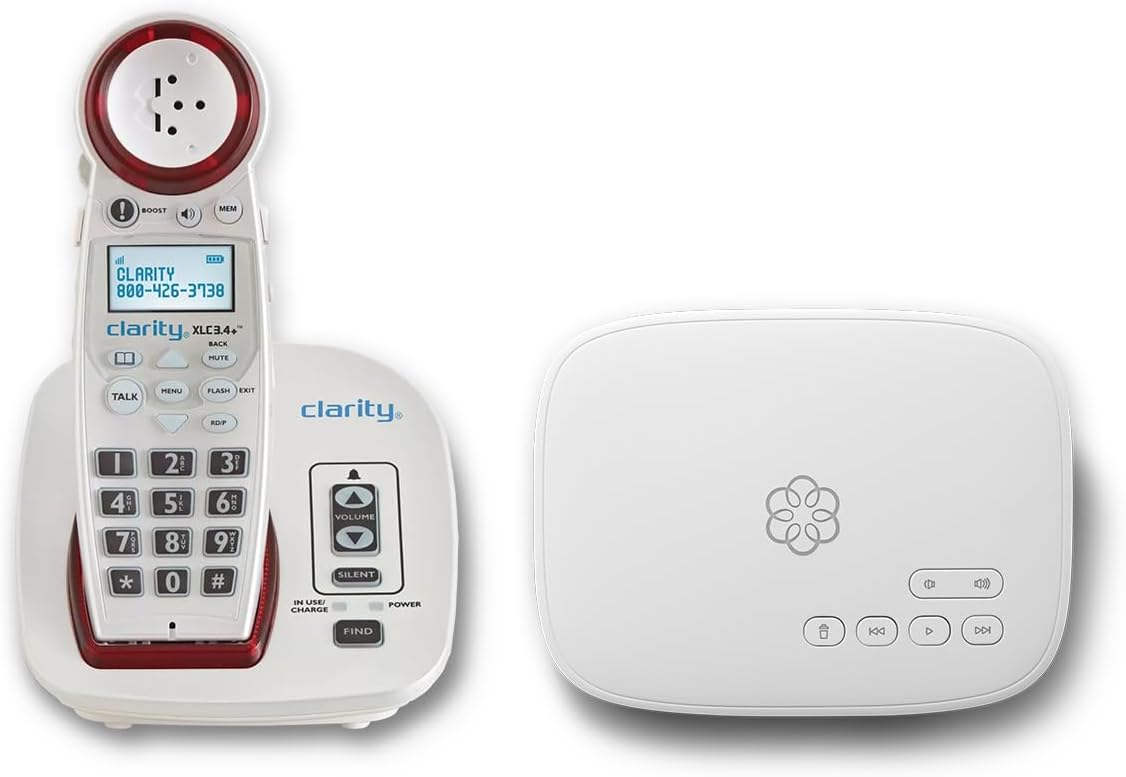
The Ooma Telo with Clarity XLC3.4+ is a connected cordless phone bundle rather than a standalone landline. Its supplied rating of 4.5 makes it one of the better-rated products here, and the package combines an amplified cordless phone with nationwide calling, setup assistance, call blocking, and a concierge support plan. Buyers are purchasing a service-based phone system, not simply a handset.
We may earn a commission when you buy through this link, at no additional cost to you.
Accessibility features include a visual ringer, adjustable ringer and speaker volume, a talking keypad, Caller ID, and hearing aid compatibility. A contacts-only calling option can limit incoming calls to approved contacts, while advanced blocking targets scammers and telemarketers. The bundle also supports address-based 911 information and can notify a loved one by text when emergency calling is activated.
The main qualification is that a subscription is required, and service fees and features can change. The listing also does not provide real-time captions, so this should not be represented as a captioned phone. Readers should assess whether a maintained service bundle offers greater convenience than a basic line-powered device, especially if they value cordless mobility, call filtering, and professional setup support.
This product is best for users who want an accessible cordless phone integrated with a full home-calling service. The talking keypad, visual ringer, and assistance option are particularly useful for seniors or anyone with hearing concerns who may want help during setup. It suits buyers who accept an ongoing service relationship in exchange for integrated calling features and support.
A visual ringer, adjustable speaker and ringer volume, a talking keypad, and hearing aid compatibility provide several ways to make the cordless handset easier to use.
Call blocking, a contacts-only option, address-based emergency routing, text alerts, and concierge setup support make this more of a managed home-phone service than a basic cordless product.
We may earn a commission when you buy through this link, at no additional cost to you.
The 40dB Voice Dialer Phone combines spoken call control with amplification and a visual ring indicator. It supports three voice commands for dialing, answering, and ending a call, while 17 programmable voice-activated memories let users select contacts by name. A prefix feature speaks the number before dialing, adding confirmation that the intended contact has been selected.
We may earn a commission when you buy through this link, at no additional cost to you.
For users with hearing loss, the phone offers earpiece volume up to 40dB, low, medium, and high ringer settings, a hands-free volume control, and a bright LED indicator. Speaking Caller ID, a two-line LCD, a programmable 911 key, redial and pause functions, and power-failure protection expand its everyday utility. Large buttons support users who prefer some physical control alongside voice operation.
Its supplied rating of 2.1 is the lowest in the group, so prospective buyers should be particularly careful. Voice recognition and constantly speaking prompts may not work equally well in noisy homes or with certain speech patterns, even though the supplied information describes the operation as always listening. The phone also offers no text captions. Buyers should confirm that the available settings and voice memory functions meet their expectations.
This product is best for someone who values several distinct controls in one telephone: spoken dialing, hands-free answering, amplified sound, talking caller information, and a visual alert. It may suit a user with limited dexterity who can comfortably use the required voice commands. Because of the low supplied rating, it is better approached as a specialized feature set to verify than as a universally reliable easy choice.
Seventeen voice-activated contact memories and spoken Caller ID reduce the need to read small text or manually operate a keypad. The number prefix feature provides spoken confirmation before dialing.
Earpiece amplification up to 40dB, adjustable ringer levels, hands-free volume control, and an LED ring indicator support users who need sound, visual cues, or both.
We may earn a commission when you buy through this link, at no additional cost to you.
The Nine-Photo Amplified Landline provides a larger picture-dialing layout than the other basic corded options in the group. Its supplied rating of 4.2 indicates a generally favorable reception, and its strongest features are one-touch photo contacts, very high volume, and a hands-free mode. It appears aimed at seniors and family members managing memory, mobility, or hearing concerns.
We may earn a commission when you buy through this link, at no additional cost to you.
Nine photo memory keys allow users to place photographs of important contacts directly on the telephone. The ringer reaches over 110dB, while earpiece volume exceeds 90dB and can be adjusted through three independent settings. A flashing LED alerts the user to incoming calls, and hands-free operation provides an alternative to holding the handset for extended conversations.
The phone is a traditional RJ11 landline and does not require batteries or a separate power supply. That can be attractive for reliability, but the supplied information also states that it does not support caller ID, voicemail, or message recording. Users who rely on those everyday features may need a different model. It likewise does not provide real-time captions.
This is a good choice for a user who wants a broad photo-contact directory, an exceptionally loud ringer, and hands-free operation without depending on batteries or internet-based service. It may work well in homes, hospitals, and nursing homes where the phone stays connected to a traditional line. Buyers should confirm that the absence of caller ID and voicemail matches their household needs.
The expanded photo directory gives users more one-touch contacts than the similarly focused eight-button model. Familiar images can reduce the need to remember numerical sequences.
A 110dB-plus ringer, 90dB-plus earpiece volume, a flashing LED, and hands-free operation cover several common hearing and mobility needs in one design.
We may earn a commission when you buy through this link, at no additional cost to you.
Start by separating genuine captioning from general telephone accessibility. The right product may depend on live text, sound amplification, visual alerts, memory-friendly contacts, voice control, power resilience, compatibility with your telephone service, and the amount of setup support available.
Real-time captions are the defining feature of the Hamilton CapTel 2400iSPNBT in this group. It displays incoming and outgoing conversations as text and can add live operator support through assisted captioning. The other phones primarily improve access through amplification, visual alerts, large controls, photo dialing, hands-free operation, or voice commands. Anyone shopping specifically for Captioned Telephone functionality should confirm that the product screen shows live words rather than assuming that an accessible senior phone includes transcription.
Choose dedicated captioning when reading speech is essential, especially if hearing loss makes conversation difficult even with extra volume. Consider automated versus assisted service, caption readability, screen size, and whether voicemail is also captioned. Check internet, registration, geographic, and telephone-service requirements before buying.
Amplification figures can be confusing because a product may specify different levels for the ringer, earpiece, and speakerphone. The CapTel provides up to 40dB of amplified gain, the Big Button Picture Phone also reaches up to 40dB, and the VTech SN5147 offers 50dB audio assistance with a 90dB ringer. The picture-dialing landlines and FLYINGVOICE list ringer levels above 110dB, while the Nine-Photo Landline lists over 110dB for the ringer and above 90dB for the earpiece.
Compare the specific channel that needs help rather than looking only at the largest number. A user who cannot hear the ring needs ringer and visual-alert support, while someone who struggles in conversation needs earpiece or speakerphone amplification. Hearing aid compatibility and adjustable tone or volume controls are also useful selection points.
Visual notifications are essential for users with hearing loss, noisy environments, or difficulty hearing a conventional ringer. The VTech system, both picture-dialing corded phones, the FLYINGVOICE, the Ooma bundle, and the 40dB Voice Dialer include flashing indicators. A large, backlit display can further reduce reading effort, as offered by the VTech. The CapTel goes further by converting conversations into large, adjustable text on a touchscreen.
Choose based on the type of visual cue that is most useful. Some users need only a bright incoming-call light, while others need to read names, numbers, or complete conversations. Consider screen size, backlighting, caption text size, and whether visual information is limited to the handset or also appears on a base.
Photo-dial buttons can reduce memory, spelling, and number-entry demands for users with dementia, Alzheimer's, low vision, or reduced dexterity. The group includes eight customizable photo keys on the Picture-Dialing Landline, three replaceable picture buttons on the Big Button Picture Phone, customizable image keys on the FLYINGVOICE, nine photo memory keys on the Nine-Photo Amplified Landline, and four photo slots on the VTech SN5147.
Count the number of close contacts rather than choosing solely by the number of buttons. Consider whether images can be replaced by caregivers, whether labels remain visible, and how much effort programming takes. Voice-activated memories on the Voice-Controlled Home Telephone and 40dB Voice Dialer offer another route for users who prefer speech to photographs.
The most important technical step is confirming that the telephone will work with the home's actual service. The FLYINGVOICE requires active VoIP, a SIP server, or a PBX and cannot connect directly to a standard wall jack. The Ooma Telo bundle requires a subscription service. The CapTel requires high-speed internet, electrical power, and in some cases telephone service. Several basic corded phones use an RJ11 line and need no batteries or separate power supply.
List the current service, available wall connections, internet access, household power reliability, and desired emergency behavior before ordering. A device that is excellent on paper but incompatible with the home network is not a practical purchase. Look for a clear setup process and verify any service eligibility before ordering.
Hands-free calling and voice control serve different accessibility needs. Hands-free operation lets a user keep both hands free, which can help someone with arthritis, tremors, limited grip strength, or bedridden use. The picture-dialing landlines, VTech system, Ooma bundle, and 40dB Voice Dialer include some form of hands-free support. The Voice-Controlled Home Telephone goes further by allowing users to answer, dial, and end calls with voice commands.
Voice control is useful for people who cannot easily locate or press buttons, but it depends on clear speech, a quiet environment, and reliable recognition. A hands-free speakerphone may be more forgiving because the user can still dial normally and simply press a single control. Consider comfort, ambient noise, and whether constant spoken prompts are desirable.
A phone intended for regular use should also handle unwanted calls, familiar contacts, and messages. The VTech can block up to 1,000 unwanted numbers and includes a 22-minute answering machine. The Ooma bundle offers advanced robocall blocking, approved-caller-only calling, texting alerts for 911 calls, and personal setup assistance. The FLYINGVOICE and basic picture phones offer dedicated help or SOS keys, but those controls must be programmed and are not automatic substitutes for emergency calling.
Do not assume a labeled emergency or help button contacts 911 automatically. Review the instructions, test programmed contacts, and understand which service handles emergency calls. Caregivers should also consider answering-machine access, slow playback, spoken caller information, and how easily a user can identify a trusted contact.
More features are not automatically better for a user with cognitive, visual, hearing, or dexterity limitations. A dedicated captioned phone concentrates communication into a large screen, while a basic landline offers photo buttons, a loud ringer, and limited controls. The Ooma and VoIP models add service-dependent functionality that may be valuable but also introduces account, network, or setup considerations.
Prioritize the features required for daily safety and communication, then consider secondary functions. A clear interface, stable placement, uncomplicated charging or power arrangement, and contacts that remain easy to recognize can matter more than a long menu of advanced features. Check whether the product is designed for the user's current abilities rather than abilities that may change over time.
Begin by confirming the required connection, registering any eligible captioning service, and completing the setup instructions before relying on the phone for important calls. For the CapTel, connect to high-speed internet and complete the supplied registration process. For VoIP-based models, activate the compatible service and configure the SIP or PBX environment. Traditional RJ11 phones should be connected to a working analog line.
Program the user's most important contacts in a calm, unhurried setting. Assign photographs to picture keys, label the image keys clearly, and test each programmed contact before deleting anything. For any phone with a HELP, SOS, or 911 feature, do not assume it places an emergency call automatically. Read the instructions, enter the required information, and explain to the user exactly how the control works.
Keep the handset in a consistent location and clean it gently with a soft, dry cloth. Avoid harsh liquids around openings, do not pull connected cords sharply, and keep the telephone away from moisture and extreme heat. Review caption display settings, ringer and speaker volume, visual alerts, and photo assignments regularly. If the user's vision, hearing, speech, or dexterity changes, reassess the setup instead of assuming the original configuration still works.
The Hamilton CapTel 2400iSPNBT is the dedicated captioned telephone in the group. It displays live captions for incoming and outgoing calls and offers automated or assisted captioning options. Its voicemail is also displayed with captions. The other products improve accessibility through sound, visual alerts, easier controls, or voice operation, but they are not described as showing live conversation transcripts.
No. The CapTel requires high-speed internet, and the FLYINGVOICE FIP12WP requires an active VoIP service, SIP server, or PBX system. The Ooma Telo bundle is also a subscription-based service. By contrast, the picture-dialing corded phones use a standard RJ11 line and require neither internet nor batteries.
Captioning converts the content of a conversation into visible text during the call. Talking caller ID speaks the name or number of an incoming caller so the user does not need to read a small screen. The latter identifies who is calling, while captioning makes the conversation itself accessible. A telephone can offer one feature without offering the other.
The Nine-Photo Amplified Landline offers the largest listed photo directory with nine memory keys, while the Picture-Dialing Landline provides eight customizable photo buttons. The FLYINGVOICE also has customizable image keys but requires a compatible VoIP setup. The best choice depends on the number of familiar contacts, the available telephone service, and the user's comfort with the programming process.
A loud ringer helps a user notice that a call is arriving, but it does not reveal what is being said. Similarly, visual ringers and flashing lights make an incoming call easier to detect without displaying conversation text. If the user needs to understand spoken words, a device with real-time captions or another transcription solution remains necessary.
Several models offer helpful alternatives to precise keypad operation. Large buttons, photo speed-dial keys, hands-free calling, and voice-activated dialing can reduce dexterity demands. The dedicated Voice-Controlled Home Telephone can answer, dial, and end calls using voice commands. Users should still consider speech clarity, environmental noise, and whether the interface itself is easy to understand.
The product information for the picture-dialing landline explicitly states that its SOS button must first be programmed and does not automatically dial 911. Other emergency-related controls, such as the programmable 911 key on the 40dB Voice Dialer Phone, also require proper setup. Caregivers should read the instructions, perform a test where appropriate, and never rely on an unfamiliar button without understanding its behavior.
First confirm whether you need captions, amplification, a visual ringer, photo dialing, hands-free calling, or voice control. Then verify the telephone line or internet service, power requirements, service subscription, geographic eligibility, and registration. Also check screen and button visibility, emergency programming, voicemail, caller ID, call blocking, and whether a caregiver can maintain the settings.
The Hamilton CapTel 2400iSPNBT is the leading choice for genuine live captioning, offering automated or assisted captions, a large touchscreen, amplified sound, and captioned voicemail. The VTech SN5147 is the more comprehensive premium home system, combining a corded base, cordless handset, audio assistance, visual alerts, call blocking, and answering-machine features. The Picture-Dialing Landline is the budget-oriented accessibility option for users who need photo contacts, a loud ringer, and simple one-touch dialing.
Prioritize the communication barrier that matters most. Live captions are essential when speech itself must be read, while amplified sound and visual alerts help with call detection and conversation volume. Photo buttons suit memory and recognition difficulties, and voice control can reduce the need to operate small controls. Always verify service compatibility, power requirements, emergency behavior, and the user's comfort with the interface before ordering.
Product availability, service plans, eligibility rules, features, and prices can change over time, so readers should check the current listing and service details. A careful comparison of the user's environment, hearing needs, memory needs, and existing telephone service will lead to a more suitable Captioned Telephone than focusing on a single headline feature.