
Square Reader for magstripe (USB-C)
4.6Editor score
Compact USB-C magstripe reader
Free Square Point of Sale app
Digital receipts and sales tracking
Compare 10 leading Credit Card Swipers across magstripe support, payment security, compatibility, portability, and merchant features in this practical buyer
Credit Card Swipers range from basic USB magnetic-stripe readers to complete mobile payment terminals, so the right choice depends on how and where payments will be processed. A useful device should provide reliable card reading, secure transaction handling, straightforward connectivity, and compatibility with your existing equipment.
We compared all ten products by examining their supported payment technologies, connection methods, platform compatibility, portability, security features, and stated merchant applications. The list covers raw three-track readers, contactless accessories, mobile terminals, and integrated point-of-sale systems rather than treating every swiper as the same type of product.
Each review explains who is most likely to benefit from the device and where its limitations matter. Ratings reflect the supplied customer feedback, while product availability and transaction terms can change, so readers should verify current specifications, merchant-account requirements, and compatibility before purchasing.
4.6Editor score

4.5Editor score

3.9Editor score
The comparison below highlights the different roles these products play, from low-cost USB magnetic-stripe hardware to secure integrated retail terminals. Connectivity, card-format support, mobility, and built-in features should be matched to the merchant's existing setup.



The MSR90 USB Swipe Magnetic Credit Card Reader is a compact three-track reader built around keyboard emulation, giving it a 4.2 customer rating and a broadly useful connection method. Its most attractive quality is the claim of reliable bi-directional reading for high-jitter, scratched, and worn magstripe cards, situations in which inexpensive readers often struggle.
We may earn a commission when you buy through this link, at no additional cost to you.
Plug-and-play USB operation simplifies setup because the device does not need a separate driver to function as a keyboard. It can read ISO7811, AAMVA, CA DMV, and most other magnetic card formats, while an LED provides connection and swipe-status feedback. Threaded inserts also give installers a way to mount the reader in a more permanent point-of-sale arrangement.
The trade-off is that this is a magnetic-stripe reader, not a complete contactless payment terminal. Configuration software is available for changing settings on Windows and Mac, and the product's value depends on whether the intended system understands keyboard-emulated input. Buyers should also confirm that their workflow and any relevant regulatory requirements are compatible with this type of device.
This is a sensible option for authorized access-control, identification, loyalty, or legacy point-of-sale applications that specifically require a dependable three-track USB reader. It is less suitable for a merchant wanting an all-in-one, chip-capable, customer-facing terminal. For those needs, one of the integrated or contactless systems in the list is the more sensible purchase.
Bi-directional reading and the stated support for scratched, worn, and high-jitter magstripes distinguish this reader from basic single-direction models. That makes it worth considering for organizations handling older cards or equipment where consistent capture matters.
Keyboard emulation removes the need to install a driver for ordinary input. The green connection and blinking swipe lights provide immediate physical feedback, while threaded inserts support a fixed installation when required.
We may earn a commission when you buy through this link, at no additional cost to you.
The USB Magnetic Stripe 3-Track POS Credit Card Reader Swiper combines a 4.2 rating with a straightforward keyboard-emulation interface. It is designed for organizations that need captured magnetic-stripe data to appear as typed input in a Windows, Mac, or other USB-capable system, including text documents, spreadsheets, and point-of-sale programs.
We may earn a commission when you buy through this link, at no additional cost to you.
The reader supports all three tracks and works with high- and low-coercivity cards. Its compatibility with ISO7811, AAMVA, CA DMV, and most magnetic formats gives it broader utility than a reader limited to one or two tracks. A red LED stays on during connection and blinks when a card is swiped, giving users a simple indication of device activity.
This product is not a full payment terminal and should not be treated as one. It does not offer the chip, NFC, display, printer, or transaction-processing features found in integrated point-of-sale devices. Its suitability also depends on the receiving software correctly handling keyboard-emulated data and on the user's authorization to access the information being read.
It works well for permitted loyalty, banking, access-control, identification, and legacy point-of-sale tasks that specifically rely on magnetic-stripe input. For a retail counter seeking an all-in-one customer payment solution, the Square Terminal, PAX S300, or Dejavoo QD2 will provide a more suitable path than a bare swiper.
Because the reader emulates a keyboard, it can place information into familiar applications such as Notepad, Word, and Excel. This makes it convenient for existing workflows that already accept typed magnetic-stripe data.
Three-track, high- and low-coercivity support covers many common card standards. The connection light and swipe indicator reduce uncertainty during routine authorized operation.
We may earn a commission when you buy through this link, at no additional cost to you.
The Square Terminal is the most complete retail-oriented choice in this guide, combining a card reader, receipt printer, and mobile point-of-sale system in one device. Its 4.5 rating reflects a favorable balance of features, and it is designed for merchants who want one unit to handle sales, payment acceptance, and receipt delivery.
We may earn a commission when you buy through this link, at no additional cost to you.
The terminal accepts all major credit and debit cards, processes chip cards in about two seconds, and can operate cordlessly on a built-in battery designed to last all day. Those characteristics make it appropriate for pop-up shops, market stalls, service businesses, and counter checkout locations where a single mobile device is more practical than a full register.
The important limitation is that Square Terminal is part of a service ecosystem rather than a stand-alone reader. Buyers must accept Square's current processing terms, and the device is not listed as supporting legacy magnetic-stripe-only workflows. Merchants should also confirm that current application features meet their receipt, inventory, staff, and reporting requirements.
For a small business that wants an approachable, integrated payment device without assembling separate hardware, Square Terminal is an excellent recommendation. It is less appropriate for enterprise counter systems that need fixed RS232, Ethernet, PIN-pad, or highly customized integrations. Those requirements point more strongly toward the PAX S300.
Integrating the reader, printer, display controls, and point-of-sale functions reduces the number of separate devices a mobile seller must carry. The result is a more compact checkout setup for temporary or flexible counters.
Cordless operation and an all-day battery allow the terminal to move around a store. Major-card acceptance and quick chip processing support a convenient customer experience.
We may earn a commission when you buy through this link, at no additional cost to you.
The ETEKJOY ET-MSR90 earns a 4.3 rating and offers a compact, practical three-track reader for authorized point-of-sale, banking, loyalty, access-control, and identification systems. Its USB keyboard-emulation design means that ordinary reading can begin without installing a driver, while configuration software remains available for changing settings.
We may earn a commission when you buy through this link, at no additional cost to you.
Its core compatibility is broad: the device reads all three tracks, handles high- and low-coercivity cards, and supports ISO7811, AAMVA, CA DMV, and most other magnetic formats. This makes it particularly useful where an established application already expects keyboard input rather than a proprietary reader protocol.
Physical installation is another strength. The compact enclosure includes a 145-centimeter cable and two three-millimeter screw holes, allowing the reader to be fixed under a counter or attached to a workstation. Conversely, the permanently attached cable limits positioning flexibility compared with a detachable reader, and the unit does not add contactless or chip functionality.
ETEKJOY is best for a business or institution that needs a small, mountable magnetic-stripe reader and already has compatible software. It is less suitable for a customer-facing retail terminal, a mobile seller without a suitable USB computer, or any environment that requires encrypted processing and modern contactless acceptance.
The two bottom screw holes and compact case make the reader practical for permanent installation. Its long attached cable helps position the device at a convenient card-entry point.
Keyboard-emulated output works with text, document, spreadsheet, and point-of-sale software. Broad track and coercivity support adds flexibility for existing magnetic-card operations.
We may earn a commission when you buy through this link, at no additional cost to you.
The Square Reader for magstripe (USB-C) has a 4.6 rating, making it the highest-rated product in the supplied set. It is a small USB-C reader designed to work with the Square Point of Sale app, offering a lightweight way for an eligible Apple-device user to add magstripe reading to a mobile checkout setup.
We may earn a commission when you buy through this link, at no additional cost to you.
Setup centers on downloading the free Square Point of Sale app, creating an account, and beginning to take payments. The app can track sales, manage inventory, accept tips, and send digital receipts, giving the hardware more operational value than a simple input reader would provide on its own.
There is an important compatibility detail in the supplied information: the product description states that it works with Apple devices featuring a Lightning connector, even though the title identifies USB-C. Users should verify the exact physical connector and device requirements before purchasing. It also remains tied to an active Square service relationship and does not provide the built-in printer found in Square Terminal.
This reader is a compelling budget option for a small seller who already uses Square, needs compact magstripe hardware, and values the broader point-of-sale tools. It is less suitable for businesses needing standalone receipt printing, broader connector compatibility, or hardware that is independent of an account-based payment platform.
Sales tracking, inventory management, tips, and digital receipts are managed through the companion application. These tools can make a compact reader more useful than a simple keyboard-input device.
The USB-C title and Lightning-device note in the product description should be reconciled before checkout. Checking the device, cable, and application requirements avoids a compatibility problem.
We may earn a commission when you buy through this link, at no additional cost to you.
The 2xhome POSMATE package includes two compact USB three-track magnetic readers and carries a 4.1 rating. A two-reader set can be useful for businesses that need separate card-entry points, backup equipment, or installations at two nearby workstations without sourcing each unit separately.
We may earn a commission when you buy through this link, at no additional cost to you.
The readers support tracks one, two, and three and are compatible with ISO, ANSI, and AAMVA formats. Stated uses include credit cards, gift cards, driver licenses, and ATM cards, while the 150-centimeter cable gives enough reach for many counter positions. Their small size also makes them less visually intrusive in compact checkout areas.
The most consequential limitation is stated directly: these readers are not suitable when the system requires an encrypted reader. That warning should be taken seriously because a lower-level magnetic-stripe reader may be appropriate for an internal application yet unacceptable for a security-sensitive payment workflow. The product information also does not describe a full POS software bundle.
This set makes sense for authorized organizations with a compatible, non-encrypted magnetic-stripe workflow and a need for two entry points. It should not be selected for modern chip-card processing, contactless payments, or any environment requiring encrypted transaction data.
A pair of readers is more adaptable than a single unit when two registers need independent access. The matching readers can also provide basic operational redundancy.
The product explicitly says it is not suitable for systems requiring an encrypted reader. Check the receiving system's security requirements before treating these as payment devices.
We may earn a commission when you buy through this link, at no additional cost to you.
The SumUp Plus is a wireless NFC and RFID card reader designed to work with a smartphone or tablet through the SumUp app. Its 3.8 rating is the lowest among the products with a supplied numerical score, but the device offers a clear advantage for merchants who want a portable reader without a permanent checkout station.
We may earn a commission when you buy through this link, at no additional cost to you.
The hardware accepts major credit and debit cards, and the free app provides a straightforward way to begin accepting transactions. Bluetooth removes the need for a wired connection to a computer, while the stated absence of hidden fees and long-term contracts gives the service a comparatively flexible structure.
The primary consideration is transaction cost: the supplied details specify a per-transaction charge for in-person payments. Merchants with many low-value sales should model that recurring cost against the device's convenience. As with every account-based reader, merchants must also understand the service's current terms and ensure their business qualifies before relying on it.
SumUp Plus fits independent professionals, mobile vendors, and small retailers who value wireless convenience and modern contactless support more than integrated receipt printing. It is a weaker choice for a fixed counter needing Ethernet, RS232, a PIN pad, or a complete point-of-sale terminal.
Bluetooth connectivity makes it easier to present the reader wherever a customer is standing. The phone or tablet remains the central interface for processing and payment management.
A per-transaction fee can make frequent small purchases less attractive. Volume and average ticket size should be considered before selecting the service for a high-turnover counter.
We may earn a commission when you buy through this link, at no additional cost to you.
The PAX S300 v2 is the most technically comprehensive fixed-counter product in the guide, with a 3.9 rating and support for contactless, magnetic stripe, chip, PIN, and e-signature workflows. It is aimed at multilane merchants that need a secure retail terminal rather than a simple card reader.
We may earn a commission when you buy through this link, at no additional cost to you.
Its strongest distinction is the stated security architecture. PCI PTS 3.x and SRED support are intended to protect and encrypt transaction information, while the integrated PIN pad, dual connectivity, loudspeaker, and color touchscreen create a more complete checkout station. The product also includes substantial processing and memory resources for multimedia performance.
That capability comes with added complexity. RS232 and Ethernet connectivity mean the S300 generally belongs in a planned point-of-sale environment, not a casual phone-based setup. Buyers also need compatible software, proper configuration, and a payment-processing relationship, and the supplied 3.9 rating indicates that the experience may not be flawless for every buyer.
The S300 is a strong premium recommendation for a multi-lane retailer, hospitality counter, or established merchant operation that values integrated security and broad payment support. It is overkill for a solo seller who needs only a lightweight mobile reader, but it offers the most capable checkout experience among the listed options.
PCI PTS 3.x and SRED capabilities, together with encrypted transaction handling, position the S300 for organizations with formal security requirements. Integrated controls can simplify a managed deployment compared with separate components.
Contactless, magnetic stripe, chip, PIN, and e-signature support gives customers several ways to interact with the station. The large color screen and speaker improve on minimal keyboard-style readers.
We may earn a commission when you buy through this link, at no additional cost to you.
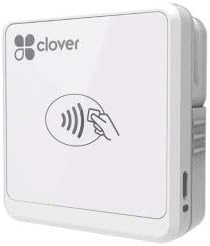
The Clover Go Contactless Reader is a compact mobile accessory for merchants using Clover, with a 4.0 rating and support for iOS and Android. Its EMV- and chip-ready positioning makes it useful for contactless customer payments without the complexity of a full countertop terminal.
We may earn a commission when you buy through this link, at no additional cost to you.
The major appeal is simplicity. The reader does not require a separate merchant account, and its phone-based form factor suits a mobile checkout or a small merchant that already works within the Clover ecosystem. That ecosystem relationship remains important because the hardware is designed to support a particular point-of-sale environment rather than operate independently.
Availability is the biggest practical concern. The supplied description states that quantities are limited or the product may be at end of life, and orders may be fulfilled with the current version of Clover Go. A buyer should therefore confirm hardware revision, compatibility, warranty coverage, and software support before relying on it for a long-term rollout.
Clover Go is a good choice for an existing Clover user who wants a portable, contactless reader. It is a poor fit for a buyer seeking a widely supported standalone device, a wired magnetic-stripe reader, or a terminal with a built-in printer and display.
The compact reader is intended to work with iOS and Android devices, making it convenient for mobile sellers. It is most valuable when the merchant already uses Clover's applications and account.
The description warns of limited quantities and possible end-of-life status. Confirming the exact revision and support timeline can prevent confusion later.
We may earn a commission when you buy through this link, at no additional cost to you.
The Generic Dejavoo QD2 is a mobile wireless payment terminal with no customer rating supplied, making direct user-feedback comparison difficult. It is designed for chip, EMV, and NFC transactions and includes a compact 2.4-inch color LCD, 192 megabytes of memory, a terminal, and a power supply.
We may earn a commission when you buy through this link, at no additional cost to you.
Its self-contained handheld form differs from the phone-connected readers in the guide. The built-in display and wireless design can make it more convenient for mobile merchants who want a dedicated terminal rather than a small accessory. Support for modern chip and contactless technologies also makes it more future-facing than a magnetic-stripe-only reader.
The principal complication is the mandatory relationship with SwyftPAY. The listing says a new merchant account must be obtained before equipment is shipped, and the description identifies SwyftPAY as a contracted reseller for Dejavoo. Buyers should confirm account eligibility, processing terms, activation steps, warranty coverage, and ongoing support before ordering.
The QD2 is most appropriate for a mobile business that wants a dedicated wireless terminal and will meet the required account process. It is less attractive for buyers seeking a simple reader, independent hardware, or a product with a meaningful published rating and a straightforward setup without a merchant onboarding dependency.
A built-in display and wireless terminal design provide more structure than a phone-only reader setup. The included power supply supports use away from a fixed station.
The requirement for a new SwyftPAY merchant account is explicit. Prospective buyers should complete that process first and confirm the account supports the intended workflow.
We may earn a commission when you buy through this link, at no additional cost to you.
The right Credit Card Swiper depends on payment method, platform, security requirements, and mobility. Buyers should begin by identifying the exact job the device must perform rather than comparing all readers as if they perform the same function.
A reader is only one part of a payment workflow. Magnetic-stripe USB readers can send data to compatible software through keyboard emulation, whereas a payment terminal may also include a display, keypad, chip interface, PIN pad, printer, transaction processing, and account management. Choose a reader when the existing point-of-sale system already handles authorization and receipt functions. Choose a complete terminal when you need an independent, customer-facing checkout device.
Magnetic stripe, EMV chip, and NFC are not interchangeable. A three-track reader is relevant only when legitimate cards in the workflow still contain a usable magstripe. Modern customer environments often require chip and contactless support, making the Square Terminal, SumUp Plus, Clover Go, PAX S300, or Dejavoo QD2 more appropriate than a raw magnetic-stripe reader. Verify the exact card technologies accepted by the connected software or processing account.
USB keyboard-emulation readers can work across Windows and Mac systems and with ordinary text-based applications, but the receiving software must support that method. USB-C and Lightning connections are not interchangeable, and Bluetooth readers need compatible mobile devices. Integrated retail terminals may use RS232, Ethernet, or another merchant interface instead. Check the device connector, operating system, application version, and required adapters before purchasing.
Payment hardware should be used only for authorized business and institutional purposes. For active transaction processing, look for a platform that encrypts sensitive information and has appropriate security certifications. The 2xhome set explicitly states that it is not suitable when encryption is required, while the PAX S300 highlights PCI PTS 3.x and SRED capabilities. Do not substitute a low-level reader for a secured terminal in a customer-facing payment environment.
A fixed counter may favor a wired reader with mounting holes, while a mobile seller may benefit from Bluetooth, a built-in battery, or a compact terminal. The Square Terminal's cordless battery is designed for all-day use, and the Dejavoo QD2 includes a power supply for a dedicated mobile setup. Consider counter space, cable reach, charging method, and how long the device must operate between opportunities to charge it.
A physical reader may function only after enrollment with a payment platform. Square requires its point-of-sale application and account, SumUp uses its app and transaction pricing, Clover Go is designed for the Clover ecosystem, and the Dejavoo listing requires a new SwyftPAY merchant account. Review fees, contract terms, activation requirements, payout procedures, and cancellation rules before buying. Hardware price alone does not represent the full cost of accepting payments.
Integrated devices may offer inventory tracking, sales reports, tips, digital receipts, and e-signature capabilities. These features can reduce the need for separate tools, particularly for a small business. A bare USB reader offers fewer built-in management functions, which can be acceptable when the business already has a capable point-of-sale platform. Choose the level of integration that matches the operator's experience and reporting needs.
Payment devices depend on continuing operating-system, application, and processing support. The Clover Go description specifically notes limited or end-of-life quantities, while account-based readers may eventually require a different app version or replacement device. Check manufacturer and merchant-platform support, warranty coverage, replacement procedures, and expected product lifecycle. This is especially important for equipment intended to remain at a counter for years.
Begin by confirming that the device is intended for your authorized workflow, that the card technology is supported, and that the connected computer, phone, or point-of-sale system recognizes the correct interface. For account-based products, complete merchant enrollment and follow the provider's activation process. For keyboard-emulation readers, use a dedicated authorized workflow and confirm that entered data appears correctly in the intended application before beginning normal operations.
Install or update the required point-of-sale application, connect the reader using the specified cable or wireless pairing method, and perform the provider's test transaction procedures. Keep the card path clean and unobstructed, swipe at a steady pace rather than forcing the card, and wait for visual or on-screen confirmation before completing the transaction. Never save, copy, or distribute sensitive card information outside an approved, encrypted business process.
Keep the device dry, free from impact, and away from extreme heat or magnetic equipment that could interfere with normal operation. Inspect cables and connectors regularly, clean the exterior with an appropriate dry or lightly damp method, and avoid abrasive liquids. Store the unit in a protected area when it is not in service, update its software when instructed, and arrange prompt service or replacement if the reader, security indicators, or payment behavior become unreliable.
A magnetic-stripe swiper reads information from the magnetic stripe on a card and usually behaves like a keyboard or specialized reader. A modern payment terminal may support chip and contactless cards, display transaction information, accept a PIN, process payments, and print receipts. Businesses should choose based on the payment methods and security requirements of their authorized checkout workflow.
Several USB readers in this guide use keyboard emulation and state that they work with Windows and Mac systems. Compatibility still depends on the connected application accepting keyboard-emulated data and on the required configuration software being available for the user's system. Mobile products may have narrower platform or connector requirements.
No. Basic USB magnetic-stripe readers can often work with authorized internal software without a separate payment-processing account. By contrast, Square, SumUp, Clover Go, and the Dejavoo QD2 are tied to their respective services, and the Dejavoo listing specifically requires a new SwyftPAY merchant account before shipment.
No. A three-track magnetic reader does not add chip or NFC capability simply because it supports several magnetic tracks. A contactless transaction requires compatible radio-frequency hardware and processing software. Buyers should select a terminal with NFC support if customers need tap-to-pay.
Check the USB connector type, operating-system support, the required keyboard-emulation format, and whether the receiving application accepts that format. Also confirm the required track and coercivity support, encryption expectations, mounting needs, and available configuration software. Testing with a non-sensitive workflow can verify integration before deployment.
That depends on the system requirements. The 2xhome set explicitly says it is not suitable when an encrypted reader is required, while the PAX S300 is designed around security certifications and encrypted transaction processing. Live customer payments should only be handled with approved equipment and software that satisfy the merchant's security and compliance needs.
The answer depends on the required receipt and connectivity features. Square Terminal offers an integrated printer and battery, SumUp Plus connects wirelessly to a phone or tablet, and the Dejavoo QD2 provides a dedicated wireless terminal. A Clover Go user may prefer the compact Clover accessory when its current version meets the required workflow.
Keep the card slot and exterior clean, protect the device from moisture and impact, and inspect cables for damage. Use only recommended cleaning methods, update the connected application, and keep required security software current. If reading becomes inconsistent, the status light behaves abnormally, or the device has been dropped, have it inspected before returning it to service.
Square Terminal stands out as the most complete general-purpose mobile checkout option, combining card acceptance, receipt printing, and cordless operation. Square's magstripe reader offers a compact budget path for compatible users, while the PAX S300 leads the premium field with broad payment-method support and an explicitly secure integrated design.
The remaining products serve more specialized needs. USB magnetic-stripe readers suit authorized systems already prepared for keyboard-emulated input, while the two-reader POSMATE set offers dual counter stations with a crucial encryption limitation. SumUp Plus, Clover Go, and Dejavoo QD2 are better evaluated by account requirements, ecosystem fit, mobility, and long-term support than by reader specifications alone.
Before purchasing, verify current compatibility, merchant eligibility, security requirements, transaction terms, and product lifecycle status. Hardware specifications and marketplace availability can change, and current pricing should also be checked on the linked product page. The most suitable Credit Card Swiper is ultimately the one that fits the authorized workflow, card types, and operating environment without unnecessary complexity.