
Arteck Split Ergonomic Keyboard
4.3Editor score
Wireless split-frame layout
Cushioned wrist and palm rest
Rechargeable six-month battery
Ergonomic keyboards can make long programming sessions more comfortable by reducing awkward wrist extension, forearm rotation, and repetitive strain. The right model should combine a supportive shape, familiar key access, reliable switches, useful connectivity, and enough configuration for your preferred development environment.
We compared all ten keyboards across split or curved layouts, palm support, typing force, programmability, wireless options, operating-system compatibility, and desk footprint. The guide covers premium models, practical wireless choices, fixed-layout alternatives, and lower-cost options for different coding needs.
Each entry explains what the keyboard does best, where compromises appear, and who should consider it. Product configurations and availability can change, so verify the current listing, dimensions, included accessories, and connection details before making a final purchasing decision.
4.3Editor score

4.4Editor score

4.1Editor score
As an Amazon Associate we earn from qualifying purchases.
This side-by-side comparison highlights the main differences in layout, support, connectivity, customization, and everyday practicality. It helps programmers identify the keyboard that best matches their typing habits, development environment, and tolerance for a learning curve.




The Logitech Ergo K860 Wireless is our overall pick for programmers who want meaningful ergonomic support without moving to a radically unfamiliar keyboard. It carries a 4.4 rating and combines a curved split keyframe, a sloping profile, scooped keys, and a pillowed wrist rest. Those features target the wrist and forearm strain that can accumulate during long coding sessions.
We may earn a commission when you buy through this link, at no additional cost to you.
Its design is particularly effective because comfort comes from several coordinated elements rather than one oversized rest. The keyframe places the hands farther apart, the sloping body encourages a more natural forearm angle, and the curved wrist rest provides support where pressure tends to accumulate. Adjustable tilt legs offer zero, negative four-degree, and negative seven-degree positions, allowing programmers to tune the keyboard for seated or standing work.
The K860 also retains features important to daily productivity. It includes a full-size layout with a number pad, CAPS LOCK indicator, quiet keys, and connections through either Bluetooth or the supplied USB receiver. Logitech Options permits Fn-key customization, custom shortcuts, and battery notifications. That combination of comfort features and everyday convenience makes it easier to justify than a niche specialist board.
The trade-offs are modest but real. Its key halves remain fixed in separation, so programmers who want a much wider or more angled stance must look at adjustable models such as the KINESIS Freestyle2 or Advantage360. Logitech Options is also needed for some customization. Even so, the K860 is an excellent recommendation for developers who value a familiar layout, dependable support, and a manageable transition to split typing.
The curved split body and sloping keyframe reduce the need to bend each wrist outward. Combined with the memory-foam rest, it creates a more supportive setup for repeated coding sessions, especially when the keyboard is positioned close to the desk edge.
Logitech Options supports shortcut and Fn-key configuration, while the full-size layout keeps the numeric keypad and familiar key groups accessible. It offers a practical middle ground between conventional typing and heavily remapped specialist keyboards.
We may earn a commission when you buy through this link, at no additional cost to you.
The KINESIS Freestyle2 is the most straightforward choice for programmers who need a split layout with meaningful physical adjustment. It has a 4.3 rating, and its two key modules can rotate and separate by as much as nine inches. This allows the hands, wrists, and forearms to settle into a position that better matches the user's body and desk.
We may earn a commission when you buy through this link, at no additional cost to you.
Its included VIP3 lifters add another important layer. They support tenting at five, ten, or fifteen degrees and incorporate cushioned palm supports intended to keep forearms neutral. Low-force membrane switches provide tactile feedback while reducing the force needed to activate a key, which can be valuable during long sessions involving repeated shortcuts and code entry.
The standard Windows layout is one of its strongest practical features. Cut, copy, paste, multimedia controls, and a number pad are available without special software or drivers. That makes the Freestyle2 easier to integrate into an existing development environment than a fully programmable board that requires remapping during setup.
Its limitations are mainly connectivity and footprint. This version uses a wired USB-A connection, and the separated modules plus palm supports occupy more desk space than a conventional keyboard. It is nevertheless a compelling recommendation for programmers who want to experiment with tenting and separation but do not need extensive software customization.
Independent module rotation and separation make it possible to tune the keyboard gradually. A programmer can begin with a modest split and increase it as the hands become comfortable, reducing the abrupt transition associated with moving directly to an extreme tent.
The custom membrane switches use low activation force and tactile feedback. That combination can reduce finger fatigue during repeated typing while preserving the tactile confirmation that many programmers prefer over an entirely flat-feeling switch.
We may earn a commission when you buy through this link, at no additional cost to you.
The Logitech Wave Keys is a compact, wireless option for programmers who want a gentler ergonomic change. Its 4.2 rating reflects a design that avoids the steep learning curve of a full split keyboard while still using a wavy keyframe, scooped key shapes, and a cushioned memory-foam palm rest.
We may earn a commission when you buy through this link, at no additional cost to you.
The wave profile places the hands, wrists, and forearms in a more natural position, and the palm rest adds support where the heels of the hands rest during pauses. Logitech describes the product as designed and tested against criteria established by leading ergonomists and approved by United States Ergonomics.
Wireless flexibility is another major strength. It connects through Bluetooth or the Logi Bolt receiver, while Easy-Switch allows movement among a laptop, tablet, and phone. The Logi Options+ app provides shortcut choices, making the board convenient for programmers who divide their work among several devices.
The compromise is that Wave Keys does not physically separate the key halves. It therefore may not provide the same neutral forearm positioning as a true split design. Its compact format also means programmers who depend heavily on a numeric keypad should verify layout availability before buying. For smaller workspaces and gradual ergonomic upgrades, however, it remains a versatile recommendation.
The continuous wavy layout preserves the general feel of a standard keyboard while reshaping its profile. This makes Wave Keys approachable for developers who are curious about ergonomic design but are not ready to adopt a fully split board immediately.
Bluetooth, Bolt, and Easy-Switch make it easy to move between development machines. The result is a keyboard that fits both a crowded desk and a workflow that alternates between a workstation, laptop, tablet, or phone.
We may earn a commission when you buy through this link, at no additional cost to you.
The Arteck Split Ergonomic Keyboard delivers a basic split design at a restrained cost, making it our best budget recommendation. It has a 4.3 rating and places the two key groups apart to encourage more natural wrist and forearm positioning. A soft cushioned rest supports the wrist and forearm during typing and pauses.
We may earn a commission when you buy through this link, at no additional cost to you.
Its setup process is straightforward. The nano USB receiver stores at the back of the keyboard and connects to a computer without complicated pairing steps. The keyboard uses 2.4G USB wireless connectivity, avoiding the need for a wired cable while the keyboard is in use.
The rechargeable lithium battery is advertised to last up to six months when the keyboard is used for two hours per day. The package includes the keyboard, receiver, USB-C charging cable, welcome guide, and warranty information. These details make it a practical option for programmers who want a split form factor without investing in extensive configuration software.
This is not as adaptable as the KINESIS models, and the supplied information does not indicate support for Bluetooth, adjustable tenting, or programmable layouts. It is also designed primarily around Windows desktops and laptops. Even so, it provides a meaningful ergonomic improvement in a straightforward package, making it a sensible value-focused choice.
The split frame changes hand placement, while the broad cushioned rest gives the wrists and forearms a place to settle. This combination can make the keyboard feel familiar quickly despite its separated layout.
Programmers who dislike device-pairing software can appreciate the included nano receiver. Connecting the receiver and placing it on the desk is generally all that is required before use.
We may earn a commission when you buy through this link, at no additional cost to you.
The ProtoArc EK01 Plus is a full-size wireless ergonomic keyboard aimed at programmers who work in varied lighting and switch among several devices. Its 4.3 rating is supported by a curved split-frame design, scooped keys, a cushioned wrist rest, adjustable tilt feet, and three levels of white LED backlighting.
We may earn a commission when you buy through this link, at no additional cost to you.
Backlighting can be set to low, medium, or high or turned off completely. Battery-use figures vary substantially depending on that setting, which gives users a way to balance visibility against operating time. A 2,000mAh rechargeable battery, sleep mode after 60 minutes of inactivity, and wake-on-key-press behavior support the board's wireless design.
The keyboard can pair with up to three devices through Bluetooth and 2.4G USB, allowing a quick switch among a laptop, tablet, and computer. Listed compatibility includes Windows 8 or later, Mac OS X 10.12 or later, Android 4.3 or later, and Microsoft systems. Its full-size arrangement also preserves the numeric keypad, an important benefit for many developers.
The main drawback is size. ProtoArc specifically warns that the full-size ergonomic layout may occupy more workspace than programmers expect. It also cannot be connected by cable, so users who need a dependable wired mode should consider another option. Nevertheless, the strong battery, adjustable lighting, and wide device compatibility make this a versatile recommendation for mobile-heavy workflows and low-light coding.
Three brightness levels make the backlight useful across bright offices and dim rooms. Users can also disable it entirely, a particularly helpful setting when battery longevity matters more than visibility.
Pairing with up to three devices simplifies a portable coding setup. A programmer can move from a desktop workstation to a laptop or tablet without maintaining separate physical keyboards for each system.
We may earn a commission when you buy through this link, at no additional cost to you.
The Logitech Ergo K860 Split for Business is designed for organizations that need to deploy ergonomic keyboards across many managed computers. Its 4.1 rating reflects a mature feature set centered on secure wireless connections, a split curved design, full-size keys, and IT-oriented deployment support.
We may earn a commission when you buy through this link, at no additional cost to you.
Logi Bolt technology provides fully encrypted connections and a Secure Connections Only mode. The keyboard can connect to up to three devices, includes a full-size number pad, and is stated to offer two years of battery life. For a software or operations team, Logitech Options support and remote device-firmware-update capabilities add practical administrative value.
Ergonomically, it shares the familiar strengths of the K860: a sloping split frame, pillowed wrist rest, and three adjustable palm-lift positions. These features help reduce wrist bending and support a more natural forearm posture without forcing programmers onto a compact or unfamiliar layout.
Its keyboard halves do not rotate or separate, so individual users have less freedom than with KINESIS models. The managed-deployment emphasis also makes it most compelling for business environments rather than buyers seeking extensive remapping. It is a strong recommendation for IT teams that value secure wireless operation, centralized support, and broad deployment compatibility.
Encrypted Logi Bolt connections and Secure Connections Only mode address an important concern in shared or managed environments. This focus distinguishes the business model from many consumer-oriented wireless keyboards.
The full-size layout and familiar key arrangement make the K860 easier to roll out broadly. Standardized ergonomic equipment can also reduce the need for individual adjustment hardware across an office.
We may earn a commission when you buy through this link, at no additional cost to you.
The KINESIS Advantage360 Professional is our premium selection for programmers who want to reshape the keyboard around their hands and workflow. It has a 4.1 rating and introduces a fully programmable layout, quiet mechanical switches, adjustable separation, integrated tenting, thumb keys, and a contoured split shape.
We may earn a commission when you buy through this link, at no additional cost to you.
Its separation reaches ten inches, and three tenting heights allow the two halves to be positioned in several postures. The patented key wells use a concave form, while the thumb keys and orthogonal arrangement expand the available action space. Kailh Box Pink Silent stems deliver low activation force, a linear feel, and a stated durability of 50 million presses.
Programmability is the central attraction. Users can reconfigure the base layout through GitHub or a web-based graphical interface, making it possible to create shortcuts, layers, and command positions suited to a particular editor or language. Bluetooth linking, optional white backlighting, and plug-and-play support for Windows, macOS, Linux, and Chrome add flexibility to that customization.
This capability comes with trade-offs. Premium palm pads are sold separately, and users may need time to learn remapping and editing workflows. The keyboard also has a sizable footprint because of its separated design. Even so, it is the strongest recommendation for experienced programmers who want a keyboard built around their specific shortcuts, language, and hand geometry rather than a fixed layout.
Programmable layers can place frequently used commands within easier reach. This is valuable for developers who spend hours navigating code, terminals, version-control tools, and debugging interfaces with the same small set of actions.
Wide separation and three tenting settings allow the keyboard to follow the natural line of the forearms. The concave wells and thumb zones then keep individual keys accessible despite the more sculpted arrangement.
We may earn a commission when you buy through this link, at no additional cost to you.
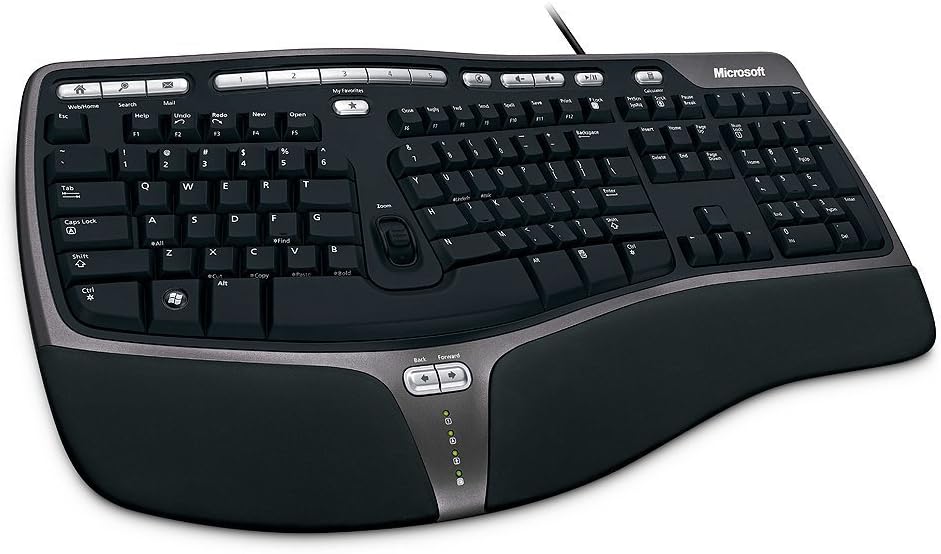
The Microsoft Wired Natural Ergonomic Keyboard 4000 remains a practical fixed-layout split keyboard for programmers who prefer stable wired connectivity. It has a 4.4 rating and uses a split design intended to encourage natural hand, wrist, and forearm positions without introducing unusual key placement.
We may earn a commission when you buy through this link, at no additional cost to you.
A cushioned palm rest provides support during pauses, while the palm lift raises the keyboard to create a more relaxed wrist angle. Dedicated media keys offer immediate control over music and video, making the board useful during focused development sessions or remote meetings.
Compared with advanced split models, the Microsoft design has a more conventional structure. It does not offer independent key-module movement, tenting adjustment, extensive remapping, or wireless device switching. For developers who only need the essential ergonomic benefits of separation and palm support, that simplicity can be a benefit rather than a drawback.
It is best suited to a fixed workstation with reliable USB connectivity. Programmers using multiple devices, needing adjustable geometry, or wanting deep layout customization should investigate the Logitech or KINESIS alternatives. Even with its traditional design, the Natural Ergonomic 4000 remains a well-rated recommendation for users who want its proven split shape without wireless complexity.
The fixed split layout separates the hands and reduces the inward reach associated with a standard keyboard. It provides a meaningful ergonomic shift while retaining familiar full-size key placement.
A wired connection avoids pairing delays, wireless interference, and battery management. That makes this model particularly suitable for an office, home studio, or shared development station that stays connected to one computer.
We may earn a commission when you buy through this link, at no additional cost to you.
The Microsoft Natural Keyboard Elite combines an ergonomic curved shape with convenient multimedia controls, giving it a distinct place in this roundup. Its 4.3 rating reflects a well-recognized design that includes customizable enhanced F-key commands and straightforward access to music and video functions.
We may earn a commission when you buy through this link, at no additional cost to you.
The curved structure is less aggressively split than the models near the top of the list, so it can serve as a comfortable transition for programmers who do not want to relearn a strongly separated layout. Its multimedia controls are especially useful during a coding day that also includes calls, streamed tutorials, or background audio.
Connection support includes both USB and PS/2 ports. This makes the Elite appealing for older or specialized development environments that still depend on legacy interfaces. It is a wired design, however, and it does not offer modern multi-device wireless switching, adjustable tenting, or extensive software-based remapping.
The white finish and rounded form give it a distinctive desk presence, while the enhanced F-key commands add useful programmable actions beyond the dedicated media keys. It is a solid recommendation for programmers with a stationary PC who value simple ergonomics and multimedia access more than modern connectivity or advanced key geometry.
The curved body gently changes hand and wrist positioning without separating the keyboard into dramatically angled halves. That makes it useful for programmers who find aggressive split designs uncomfortable at first.
Enhanced F-key commands and dedicated media controls put frequently used functions close at hand. These shortcuts can support media control, application actions, and routine development tasks without relying entirely on software remapping.
We may earn a commission when you buy through this link, at no additional cost to you.
The Microsoft Natural Ergonomic Keyboard 4000 for Business is a wired, business-oriented model with a 4.4 rating. Its split design, cushioned palm rest, and palm lift are intended to encourage more natural hand, wrist, and forearm positions during extended computer use.
We may earn a commission when you buy through this link, at no additional cost to you.
The improved number pad is notable for programmers who enter figures often. Frequently used numeric functions, including equals, parentheses, and backspace, are placed above the number pad to reduce the reach associated with traditional positioning. Taskbar Favorites for Windows 7 also provide quick access to programs, although current Windows users should recognize that this feature reflects the operating system generation for which the model was designed.
It shares the familiar Microsoft ergonomic profile with the wired Natural Ergonomic 4000, including media keys and a broad full-size arrangement. As a wired business model, it avoids radio pairing and battery concerns, which can simplify use in fixed offices and managed desktops.
One compatibility note applies to older Mac OS X 10.2.x systems: the enclosed IntelliType Pro and IntelliPoint software must be installed before connecting. Overall, this keyboard is a worthwhile recommendation for organizations seeking a traditional split layout, integrated support, and practical number-pad access without the learning curve of a programmable specialist board.
The split keyframe, integrated palm rest, and palm lift work together to support a neutral wrist position. This makes it a practical choice for fixed workstations where programmers and office staff use the same setup every day.
Relocating common numeric functions improves access without replacing the number pad entirely. Taskbar Favorites can further reduce application-launch effort on compatible Windows systems, supporting a smoother daily workflow.
We may earn a commission when you buy through this link, at no additional cost to you.
The right ergonomic keyboard depends on your hand size, work environment, operating system, and willingness to adapt. Prioritize the geometry and support that reduce strain, then confirm that connectivity, programmability, and layout meet your coding habits.
A split layout separates the two key groups so the hands can approach the keyboard from a more natural angle. This can reduce inward reach and help keep the wrists straighter, but the ideal separation depends on shoulder width and forearm alignment. Fixed designs are simpler and often less disruptive to established habits, while adjustable modules allow programmers to increase separation gradually as they acclimate.
Tenting raises the inner edges of the keyboard so the hands approach in a more natural, tent-like position. The KINESIS Freestyle2 supports several VIP3 levels, while the Advantage360 offers three tenting heights. If your wrists bend sharply inward or your forearms rotate toward each other, tenting may be more valuable than additional palm padding. Begin with a modest angle and avoid forcing a posture that feels unnatural.
Palm support should feel soft without lifting the wrists excessively. A memory-foam layer can conform to the resting position of the hands, while a fixed cushion provides a consistent platform. Keep the keyboard close enough that the forearms can rest lightly without reaching forward. Support should complement positioning rather than substitute for it; a poorly angled keyboard can remain uncomfortable even with a generous rest.
Programming involves long stretches of repeated typing and shortcut presses, so switch force matters. The Freestyle2 uses low-force membrane switches, while the Advantage360 uses silent mechanical stems rated for 50 million presses. Membrane keys generally feel quiet and light, while mechanical options can provide more pronounced feedback. The best choice depends on sensitivity preferences, noise tolerance, and whether a familiar typing feel matters more than customization.
Programmable keyboards can move commands, macros, navigation tools, and layer controls closer to the fingers. This can reduce repetitive mouse movement and accelerate shortcuts for frequently used editor or terminal functions. The Advantage360 is the most extensively programmable model in the list, while Logitech products offer lighter customization through Logitech Options or Logi Options+. Extensive remapping requires setup, testing, and a willingness to maintain a personalized layout.
Wireless freedom can simplify a multi-computer desk, but connection method matters. Bluetooth supports portable workflows, while 2.4G receivers often provide straightforward pairing with one computer. Some models can switch among several devices. Business users should also consider encrypted wireless operation and centralized device support. Programmers who favor reliability may prefer a wired connection that avoids pairing and battery management altogether.
Ergonomics often require more space than a standard keyboard. Split halves, tenting accessories, palm rests, and full-size number pads can widen the overall footprint. Compact models such as Logitech Wave Keys can help on smaller desks, while full-size boards benefit programmers who enter numbers frequently. Measure the available work area and consider monitor placement, mouse space, and the angle required to keep forearms relaxed.
Confirm the operating systems, connection ports, and receiver requirements used by your development environment. Some models list broad Windows and macOS support, while others emphasize Windows layouts or require legacy software. Also verify whether palm pads, receivers, cables, or other essentials are included. The Advantage360, for example, includes essential connection cables but lists premium palm pads separately.
Begin by placing the keyboard directly in front of your body and close enough that your elbows remain near your sides. Keep the forearms roughly level, relax the shoulders, and position the keyboard so the hands can reach without lifting the wrists. For a split model, start with modest separation and tenting, then make small adjustments over several days instead of forcing a dramatic posture immediately.
Use the included palm or wrist support as a resting area rather than pressing the wrists into it continuously. During active typing, let the hands move lightly over the keys. When pausing, release the shoulders and allow the forearms to rest naturally. For a wireless model, connect the receiver or pair through the documented Bluetooth procedure, update any optional configuration app, and confirm that all required keys register correctly.
To preserve the keyboard, clean the keycaps and exterior with a soft, slightly damp cloth, avoiding excessive moisture around switches, ports, and charging contacts. Remove loose dust from between keys with a soft brush. Charge according to the manufacturer's instructions, keep wireless reception unobstructed, and inspect the battery or charging system periodically. For highly adjustable models, retighten or reseat cables and supports only as directed so the alignment is not accidentally altered.
Yes, ergonomic keyboards can suit programming because they encourage more natural hand, wrist, and forearm positions during long typing sessions. Models with programmable layouts can also place common coding shortcuts closer to the fingers. The best choice depends on your editor workflow, hand size, and tolerance for a learning curve, so a gradual adjustment period is advisable.
A fully split keyboard can reduce inward reach and help keep the forearms more neutral. It may be especially useful if you already feel wrist or forearm discomfort during conventional typing. However, the change can temporarily slow typing, so beginners should start with limited separation and use the layout consistently before judging its long-term comfort.
Splitting moves the two key groups apart, while tenting raises the inner edges of those groups. Separation helps align the hands with the shoulders, and tenting can reduce inward wrist bending by changing the approach angle. A programmer may benefit from either independently, so it is worth adjusting one variable at a time.
Modern wireless keyboards can be dependable for everyday coding, but connection quality and battery management still matter. Bluetooth is useful for switching among portable devices, while a 2.4G receiver can provide a simple dedicated connection. For security-sensitive managed environments, select a model with encrypted wireless support, or use a wired model when absolute connection simplicity is the priority.
No. Programmable keys are helpful when you repeat the same editor, terminal, or debugging commands, but they are not essential for productive programming. Many developers benefit more from a comfortable geometry and familiar layout. Consider deeper customization only if you are willing to configure, test, and maintain the additional commands.
Adaptation varies with your previous typing habits, the degree of separation, and how often you use the keyboard. Some programmers become comfortable within days, while others need several weeks to regain speed. Start with a moderate adjustment, avoid working exclusively on an unfamiliar layout during a deadline, and increase separation or tenting gradually as comfort improves.
A number pad is useful for spreadsheet work, data entry, version numbers, and numerical debugging, but it can widen the keyboard and force the hands farther from the primary typing area. Developers who mainly type code may prefer a compact layout, while those with regular numeric tasks should retain a full-size arrangement. Check the exact layout before deciding.
Regularly remove dust and debris from between the keys, clean the palm rest with a suitable damp cloth, and keep charging contacts and receiver storage areas free of obstruction. Wireless models should be charged according to the included guidance, while wired models mainly need periodic cable and connector inspection. Avoid flooding openings with liquid and follow any model-specific care instructions.
The Logitech Ergo K860 Wireless is the most balanced overall recommendation, combining a familiar full-size layout with credible split support, wireless connectivity, and useful customization. The Arteck Split Ergonomic offers a budget-friendly path into split typing, while the KINESIS Advantage360 Professional leads for programmers who want premium mechanical switches and extensive programmability.
Choose according to the discomfort you want to solve rather than the most dramatic appearance. Fixed layouts are easier to adopt, adjustable geometry can provide a more individualized fit, and programmable keys help when repetitive editor commands justify the setup effort. Give any new board enough time to adjust its separation, tenting, and support while keeping your desk uncluttered.
Before ordering, verify current product details, dimensions, included accessories, operating-system support, and connection requirements. Keyboard layouts, firmware, accessories, and configurations can evolve, so the current listing is the best source for final compatibility information.
