
Fiber Optic HDMI Cable 50ft
4.3Editor score
48Gbps bandwidth
50-foot directional design
8K and 4K support
Our HDMI Fiber Optic Cable guide compares 10 long-range options for 8K, 4K gaming, home theater, in-wall installs, HDR, and reliable AV connectivity in 2026.
HDMI Fiber Optic Cable solutions make long-distance display connections practical when a room layout, media console, projector, or in-wall pathway makes conventional wiring difficult. The right cable should match your resolution, refresh rate, audio features, installation method, and source-to-display direction rather than simply advertising the longest possible run.
We compared all ten products by examining advertised bandwidth, supported resolutions, directional design, connector construction, gaming features, installation suitability, and notable compatibility warnings. The list includes 48Gbps HDMI 2.1 options, 18Gbps 4K models, detachable and armored cables, and units designed specifically for permanent in-wall routing.
Each review explains where a cable stands out, where its specifications require caution, and which type of setup it best serves. Ratings and product details reflect the supplied listing information, while current pricing, availability, and retailer policies should be checked before purchasing because they can change.
4.3Editor score

4.7Editor score

4.4Editor score
The table below compares every cable by its core capabilities, including advertised bandwidth, maximum cable length, directional requirement, and intended installation. It is designed to make long-run and in-wall requirements easier to compare before evaluating the detailed reviews.




This 50-foot fiber optic HDMI cable is a budget-oriented option for users who want a long connection without settling for an 18Gbps model. Its listing advertises HDMI 2.1 performance, 48Gbps bandwidth, 8K at 60Hz, and 4K at 120Hz, giving it substantially more headroom than a basic 4K cable.
We may earn a commission when you buy through this link, at no additional cost to you.
Its feature list is notably broad for this tier. Dynamic HDR, eARC, HDCP 2.2 and 2.3, VRR, ALLM, DSC, 3D, and multiple audio formats are all listed, while backward compatibility extends to older HDMI versions. Gold-plated connectors, zinc-alloy housing, and a claimed 20,000-plus bending-cycle tolerance make it appear suited to regular home use.
The most important caveat is not length but direction. The SOURCE connector must connect to the console, computer, player, or set-top box, while DISPLAY connects to the television, monitor, or projector. The listing also specifically warns of laboratory-observed compatibility problems with LG OLED and LCD displays, making manufacturer confirmation advisable for LG owners.
This is a compelling pick for a 50-foot run between a gaming console or media source and a distant television, provided the direction labels are followed and your display is not affected by the noted LG issue. For users who need a shorter premium cable or specialized permanent installation features, the alternatives provide more specialized construction.
The advertised support for 8K, high-refresh 4K, HDR, VRR, and eARC makes this cable unusually well equipped for modern displays. That combination is useful when a longer copper run would be inconvenient or impractical.
Fiber optic HDMI links are directional, so the SOURCE end belongs to the playback device and the DISPLAY end belongs to the screen. Check both labels before routing the cable, especially when passing it through a wall or conduit.
We may earn a commission when you buy through this link, at no additional cost to you.
The Highwings 50-foot fiber optic HDMI cable combines a 4.7 rating with an ambitious HDMI 2.1 specification, making it an appealing general recommendation for 8K televisions, high-refresh 4K screens, and modern gaming setups. It advertises 48Gbps bandwidth, 8K at 60Hz, and 4K at 120Hz without compression or delay.
We may earn a commission when you buy through this link, at no additional cost to you.
Gaming is a central strength in the listing. Variable refresh rate is included, along with support for eARC and the claimed ability to maintain smoother frame presentation. The construction uses an aluminum-alloy shell, a reinforced anti-bending tail, 24K gold-plated plug contacts, and military-grade tensile nylon, giving the cable a more robust appearance than a basic long-run model.
Its trade-offs are practical rather than dramatic. It is unidirectional, so orientation must be respected, and the supplied information does not identify it as a CL3-rated cable for concealed in-wall installation. Those limitations make it less specialized than the RUIPRO, Highwings CL3, or BlueRigger options for professional installations.
Overall, this is the strongest balanced pick in the group. It suits a homeowner seeking one long cable for high-resolution television, console gaming, and home theater use. Choose it when a 50-foot run fits your layout, your endpoints support the advertised modes, and the SOURCE and DISPLAY ends can be routed correctly.
VRR support makes the cable relevant to current-generation consoles and compatible PCs, while 4K at 120Hz and 8K at 60Hz cover demanding display modes. eARC adds value for users who want high-quality audio return over the same connection.
Aluminum-alloy connector housings, gold-plated contacts, and reinforced strain relief address the areas most likely to wear during installation and reconnects. The result is a practical choice for a cable that may be handled or repositioned over time.
We may earn a commission when you buy through this link, at no additional cost to you.
The RUIPRO 33FT cable stands apart with detachable connector heads and a full fiber optic armored construction. These are meaningful advantages for permanent installations, especially when the cable is routed in-wall and an exposed terminal must be connected before the display is positioned.
We may earn a commission when you buy through this link, at no additional cost to you.
The listing advertises 48Gbps bandwidth, Dynamic HDR, eARC, and uncompressed 8K at 60Hz and 4K at 120Hz performance. Its detachable design can prevent a damaged or incorrectly installed terminal from forcing replacement of the entire run. The product is also described as forward-compatible with future replaceable heads, adding a degree of installation flexibility.
A stainless-steel armored structure is intended to provide tensile strength, compression resistance, and tangle-free handling. The fiber cable itself is described as thin, flexible, and soft, which is particularly useful for conduit. The tradeoff is that connectors must be handled and attached correctly, and this model is shorter than the 50-, 100-, and 150-foot options in the list.
This premium pick is ideal for home theaters, conference rooms, engineering installations, medical environments, or any project where replaceable ends and low-interference fiber routing are priorities. It is less suitable for a homeowner who simply wants the longest possible run and has no need for a detachable permanent installation.
Connector heads can be attached after the fiber run is placed, which simplifies routing and repairs. This is especially helpful behind finished walls where replacing an entire fixed cable would be inconvenient.
The stainless-steel outer structure is intended to improve resistance to bending, pulling, compression, and tangling. A thin, flexible fiber core also makes the cable easier to pull through conduit than a bulky conventional cable.
We may earn a commission when you buy through this link, at no additional cost to you.
This Highwings cable is designed around a clear use case: a long, high-bandwidth connection that must pass through a wall. Its CL3 in-wall rating is the defining feature, while the advertised 48Gbps bandwidth, 8K support, and 4K at 120Hz capability keep it aligned with modern displays.
We may earn a commission when you buy through this link, at no additional cost to you.
The slim fiber construction is intended to reduce the difficulty of routing through conduit during renovation. The listing also highlights eARC, VRR, support for major gaming devices, and compatibility with HDTVs, projectors, monitors, Blu-ray players, A/V receivers, and graphics-equipped PCs. That broad device support makes it useful for a central media hub as well as a dedicated gaming room.
The cable remains unidirectional, which is a significant consideration when planning a retrofit. The source side may need to be identified early, and the ends cannot be reversed. Although the listing mentions lifetime after-sales service, buyers should still verify installation requirements and local building regulations before cutting a pathway.
Choose this cable when a 50-foot run is needed and the cable will be concealed in a wall. Its CL3 designation and narrow fiber design make it more purposeful than many general-purpose alternatives, particularly for a renovation or new-build media installation.
CL3 suitability and a slim fiber profile are the main reasons to consider this model for concealed wiring. Its narrower construction can also help when existing conduit space is limited.
The listed 48Gbps bandwidth, eARC, VRR, and high-refresh 4K support make the cable suitable for both a modern television and a gaming source. Existing older HDMI devices can also be connected through the stated backward compatibility.
We may earn a commission when you buy through this link, at no additional cost to you.
The Snowkids 100FT model is aimed at spaces where a conventional long cable would be difficult to route or maintain. It combines a 100-foot run with advertised 48Gbps bandwidth, 8K at 60Hz, and 4K at 120Hz support, making it more ambitious than a simple 4K extension.
We may earn a commission when you buy through this link, at no additional cost to you.
Its listed capabilities include 48-bit-per-pixel HDR, 3D, Ethernet, eARC, VRR, QFT, QMS, ALLM, and DSC. Compatibility extends to televisions, laptops, monitors, game consoles, projectors, entertainment systems, video-conference equipment, and Blu-ray players. The listing also states that the cable is suitable for both indoor and outdoor arrangements, although proper weather protection remains the installer's responsibility.
Construction includes 24K gold-plated ports, military-grade tensile nylon, and a design advertised to withstand as many as 25,000 flexes. As with other optical HDMI cables, direction matters: source equipment receives the SOURCE end and the television, monitor, or projector receives the DISPLAY end.
This is a compelling choice for a long home theater route, detached media area, or large installation where 100 feet of reach is genuinely necessary. Users considering concealed wall routing should look for a separately confirmed in-wall rating, and every installation should preserve the required source-to-display orientation.
The key advantage is the combination of a 100-foot length and a 48Gbps headline specification. That makes the model relevant to users who want modern high-resolution support across a genuinely long connection.
The flexible nylon construction and advertised 25,000-flex tolerance target the stress points encountered while installing and using a long cable. Gold-plated ports support dependable contact in a permanent setup.
We may earn a commission when you buy through this link, at no additional cost to you.
The iBirdie 100-foot cable serves a different role from the 48Gbps models in this roundup. It is an active 18Gbps fiber optic solution focused on 4K at 60Hz, HDR, Dolby Vision, Atmos, 4:4:4 chroma, and ARC rather than 8K or high-refresh 4K.
We may earn a commission when you buy through this link, at no additional cost to you.
Because it is active, the cable requires stable power to operate correctly. A USB power lead is included for situations where the source, hub, switch, or splitter cannot provide enough power through its HDMI port. This added dependency makes setup less simple than a plug-and-play passive fiber cable, but it may be necessary for certain routing chains.
The source and display ends must also be oriented correctly. For ARC use, the source end connects to the A/V receiver and the display end connects to the television. The listing also notes that some televisions do not enable every HDMI 2.0 feature automatically, so the relevant television settings may need to be adjusted after installation.
This is a strong option for a long 4K home theater run where 4K60 is the ceiling and audio return matters. It is less appropriate for an 8K television, 4K at 120Hz gaming setup, or user who wants a completely self-powered cable.
The included USB cable can provide supplemental power when a connected hub, switch, or splitter cannot deliver enough through its HDMI output. Confirm that the source can support the active cable before installation.
Support for Dolby Vision, Atmos, HDR10, 4:4:4 chroma, CEC, and ARC provides a solid feature set for 4K60 displays and A/V receiver setups. The important limitation is its 18Gbps bandwidth ceiling.
We may earn a commission when you buy through this link, at no additional cost to you.
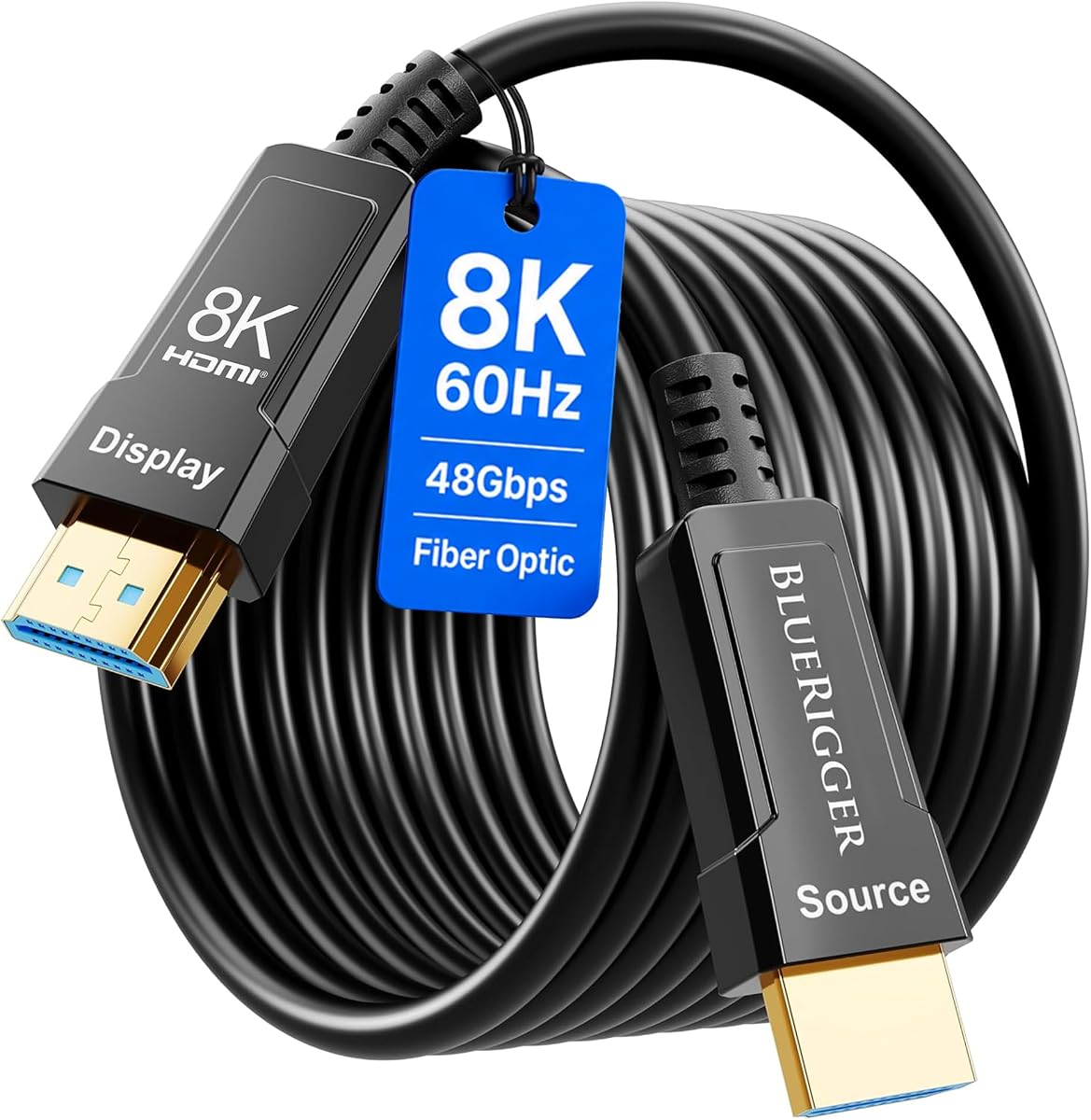
The BlueRigger 50FT cable distinguishes itself with advertised support for 4K at 144Hz, 8K at 60Hz, and 48Gbps bandwidth. That makes it particularly interesting for gamers and enthusiasts seeking a long connection without settling for the more common 4K120 ceiling.
We may earn a commission when you buy through this link, at no additional cost to you.
The cable also carries a CL3 rating for in-wall installation, four optical fiber strands, 24K gold-plated connectors, and a zinc-alloy shell. Gaming-oriented features include VRR, HDCP 2.2 and 2.3, QMS, QFT, and ALLM. The listing also names Dolby Vision, Dolby Atmos, DTS Master, and DTS:X among supported audio formats.
As a directional product, the SOURCE end must attach to the console, PC, or source device, while the DISPLAY end attaches to the screen or projector. Its advertised capabilities also require suitable source hardware and display settings; possessing the cable alone does not enable 8K or 144Hz modes.
BlueRigger is an excellent match for a dedicated gaming room, home theater, or new-build wall run where both high-refresh gaming and permanent wiring matter. The lifetime warranty and stated customer support add reassurance, while the CL3 rating provides a key advantage over general-purpose 50-foot alternatives.
Advertised 4K at 144Hz support distinguishes this cable from models that top out at 120Hz. Actual output still depends on the graphics hardware, display, and game configuration.
CL3 in-wall suitability and four optical fibers make the cable more appropriate for a planned installation than a temporary extension. Its thin optical design can also simplify routing through conduit.
We may earn a commission when you buy through this link, at no additional cost to you.
The Cratree 150FT model is the reach specialist in this list, providing a 45-meter cable while still advertising 48Gbps bandwidth, 8K at 60Hz, and 4K at 120Hz. It is intended for installations where source equipment and display are separated by an unusually large distance.
We may earn a commission when you buy through this link, at no additional cost to you.
A 4.06mm profile is the standout physical feature. Such a slim cable is easier to route through conduit, behind furniture, or around complex installations. Internally, the listing describes a dedicated optical engine, high-performance signal-processing chipset, 24K gold-plated connectors, an aluminum-alloy shell, and multi-layer shielding to reduce degradation and interference.
The advertised feature set includes HDR, VRR, QMS, QFT, 32 audio channels, automatic audio synchronization, 1,536kHz audio sampling, and eARC. It is also backward compatible with older HDMI versions, and the supplied information identifies common gaming devices, displays, and projectors among compatible endpoints.
Choose this cable when 150 feet of reach is essential and a 4K or 8K installation demands more than a basic extension. The slimness makes routing easier, but buyers should confirm local installation requirements because the supplied listing does not state a CL3 in-wall rating.
A 150-foot length is uncommon, and the 4.06mm diameter makes that reach more practical in crowded pathways. It is particularly relevant to large homes, commercial rooms, and long projector runs.
The dedicated optical engine, chipset, shielding, and gold-plated connectors form a focused signal-delivery design. These features help explain why the cable is positioned for long-distance digital video rather than basic device extension.
We may earn a commission when you buy through this link, at no additional cost to you.
This 50-foot HDMI 2.1 fiber optic cable is a flexible middle-ground option for modern home theaters, gaming rooms, and AV racks. It advertises 48Gbps bandwidth, 8K at 60Hz, 4K at 120Hz, HDR, VRR, ALLM, and eARC, while its thin construction is designed for conduit and tight spaces.
We may earn a commission when you buy through this link, at no additional cost to you.
The listing emphasizes reduced interference from power cables, speakers, and wireless routers, along with 360-degree bendability. Its 50% thinner-and-lighter claim relative to copper is particularly useful when routing behind large televisions or through existing wall passages. A broad source list includes consoles, PCs with discrete graphics, Blu-ray players, laptops, projectors, and displays.
The specifications deserve careful interpretation. The listing simultaneously discusses 50-foot and 100-foot-plus transmission claims, while a pro tip states that cables at 60 feet or longer may not support ARC or eARC because of extended-distance limitations. The 50-foot configuration is within the recommended range for those return-audio features, but the direction and product length must match the exact listing purchased.
The compatibility section also warns that some LG OLED televisions may have problems with HDCP 2.2 or very high-bandwidth modes. This is the most flexible option for a 50-foot run when a slim, routeable cable is the priority, provided the connected television is compatible and eARC is required only within the stated length range.
The lightweight profile and 360-degree bendability make the cable practical behind wall-mounted televisions and inside conduit. These physical qualities can matter as much as nominal bandwidth in a completed installation.
The supplied guidance recommends a cable under 60 feet when ARC or eARC is important. It also lists compatibility concerns for some LG OLED displays, so verify the television model before committing to a concealed route.
We may earn a commission when you buy through this link, at no additional cost to you.
The Highwings 100FT model focuses on 4K at 60Hz rather than 8K. With an advertised 18Gbps capacity, 3840 by 2160 resolution, gold-plated connectors, and a listed length of 98 feet, it is a practical option for a large room where older 4K equipment needs a longer connection.
We may earn a commission when you buy through this link, at no additional cost to you.
The product is described as meeting the HDMI second-generation standard and remaining compatible with HDMI 1.4, 1.3, and 1.2 devices. It also supports 4:4:4 color, HDR10, HDR10+, Dolby Vision, and audio return functionality. Plug-and-play operation means no driver installation is required, although the ends must still follow the required source-to-display direction.
Construction is designed around long-term handling. The listed SR joint design at both ends helps prevent connector cracking, while the product is advertised to withstand more than 15,000 bends. Those claims make it relevant for installations where the cable will be routed carefully but still connected and disconnected over time.
This is the sensible choice when 4K60 is sufficient and the goal is extending a familiar home theater or projector setup over a long distance. It is not the right option for an 8K display, 4K120 gaming system, or modern installation that specifically requires a 48Gbps link.
The 18Gbps bandwidth is appropriate for 4K at 60Hz with advanced color and HDR formats. It provides a useful long-run option without paying for capabilities that the connected equipment may not use.
The SR joint design and stated bend tolerance focus durability around the most vulnerable connection points. That is valuable for a long cable that remains connected permanently but may still be handled during setup.
We may earn a commission when you buy through this link, at no additional cost to you.
The best HDMI Fiber Optic Cable is the one that fits your equipment, pathway, and required video mode without introducing unnecessary power, direction, or installation complications. Consider bandwidth, length, construction, audio support, and compatibility before making a choice.
Begin with the highest resolution and refresh rate your television, projector, monitor, console, and graphics hardware will actually use. A 48Gbps cable is positioned for HDMI 2.1 modes such as 8K at 60Hz and 4K at 120Hz, while 18Gbps models are generally aimed at 4K at 60Hz. A higher-bandwidth cable cannot create a mode your source or display does not support, but a lower-bandwidth cable may prevent a modern setup from reaching its intended output when combined with a long-run active design.
Choose 48Gbps for next-generation gaming, 8K displays, or high-refresh 4K systems. Choose 18Gbps for a conventional 4K theater, projector, or television whose sources operate at 4K60.
Measure the complete route rather than only the straight-line distance between devices. Include wall drops, furniture clearance, bends, service loops, and the space needed to attach each plug. Fiber optic cables excel over long distances, but a shorter run can still be preferable when it avoids unnecessary bulk or reduces the risk of a connection or routing problem.
For most home setups, choose the shortest length that comfortably covers the route. Reserve 50-, 100-, and 150-foot models for installations that genuinely span those distances.
Most fiber optic HDMI cables in this category are directional, meaning the SOURCE plug connects to the device producing the image and the DISPLAY plug connects to the screen. Reversing the ends usually results in no image. Some models support ARC or eARC, and those functions may also depend on the correct source-side arrangement, particularly when an A/V receiver is involved.
Mark the ends before pulling a cable through a wall. Confirm which equipment will serve as the source and verify the listing's audio-return guidance before installation.
Passive fiber designs are generally the simplest because they do not require a separate power connection. Active cables, such as the iBirdie model in this list, need stable power to operate properly and may include a USB lead for use with hubs, switches, or splitters that cannot supply sufficient power. This can be useful in complex chains but introduces another installation variable.
Choose a self-powered design for straightforward connections. Use an active model only when its power arrangement matches the source device and the setup has a practical way to keep the supplemental lead connected.
A permanent in-wall installation deserves a cable specifically listed and rated for that use. The RUIPRO, Highwings CL3, and BlueRigger options have relevant specialized construction or ratings, while the thin Cratree model is useful when conduit space is especially limited. Do not infer that any fiber optic cable is automatically safe for concealed residential wiring; check the stated rating, local requirements, and installation conditions.
For planned wall work, favor a named CL3-rated model and allow for connector clearance at both ends. For a tight but visible route, a slim fiber profile may be the more important criterion.
Long cables are most vulnerable at the strain-relief section where the flexible line meets the rigid plug. Gold-plated contacts, reinforced boots, aluminum-alloy or zinc-alloy shells, and stated bend-cycle testing can provide useful indicators. Detachable heads offer an additional service advantage because a damaged terminal can be replaced without replacing the entire in-wall run.
Look for protected connector housings and reinforced joints if the cable will be handled often. Choose detachable ends when installation access is limited or future serviceability matters.
A cable that supports 48Gbps may still need to carry gaming and audio features such as VRR, ALLM, eARC, DSC, Dolby Vision, and high-bandwidth surround formats. These features make the cable more versatile, but every device in the chain must support the relevant function. TVs may also have settings that need adjustment before the intended format becomes available.
Prioritize eARC for home theaters, VRR and ALLM for compatible gaming setups, and HDR-related support for modern televisions. Confirm the capabilities of the source, receiver, and display rather than relying on the cable alone.
Some listings identify specific display families that may present problems. The 50-foot budget fiber cable and another directional 8K model both include warnings concerning certain LG OLED or LCD displays, particularly with HDCP 2.2 and very high-bandwidth modes. Compatibility is not guaranteed merely because a device uses an HDMI port.
Check the exact television, monitor, projector, console, and receiver models before purchasing. If your setup includes a warned-about brand or unusual device combination, seek direct confirmation from the seller or manufacturer.
Plan the route before connecting either end. Identify the SOURCE device and DISPLAY device, measure the complete path, and keep the cable away from sharp edges, pinch points, excessive tension, and power sources that may create interference. For an in-wall installation, use a cable explicitly rated for that purpose and follow applicable local building requirements.
Connect the SOURCE plug to the output of the console, computer, Blu-ray player, set-top box, or A/V receiver, then connect DISPLAY to the television, projector, or monitor. Never reverse these ends on a directional cable. If the product includes supplemental power for an active design, provide that power before troubleshooting the image or audio.
After connecting, select the appropriate HDMI input and enable the matching resolution, refresh rate, HDR, VRR, and audio-return settings on the display. Add gentle strain relief near each plug without tightly wrapping the fiber. If a problem occurs, test the cable over a shorter route first, then check direction, power, television settings, and endpoint compatibility before replacing it.
Yes, but only when the cable advertises the necessary 48Gbps bandwidth and both connected devices support the desired mode. The 48Gbps products in this guide list 8K at 60Hz and 4K at 120Hz capabilities. The 18Gbps models are primarily intended for 4K at 60Hz. Cable bandwidth alone cannot create a resolution or refresh rate that the source, display, or settings do not support.
The most common cause is reversed SOURCE and DISPLAY ends, because these cables are normally directional. Confirm that SOURCE connects to the console, computer, player, or receiver and DISPLAY connects to the screen. If the cable is active, also verify that it has the required supplemental power, then check the selected television input and display settings.
No. Some models specifically include a CL3 in-wall rating, while others do not state one. A slim fiber profile can make routing easier, but a small diameter alone does not establish suitability for concealed wiring. Check the product specification, local building rules, and any required fire and electrical certifications before cutting a wall or using existing conduit.
It can, depending on the cable's electronics and the manufacturer's design guidance. One product listing in this guide specifically recommends a cable under 60 feet when ARC or eARC is required and notes that very long runs may not support those return-audio functions. Check the exact product's guidance before assuming every advertised feature will work over its maximum length.
No. Most of the models listed are presented as plug-and-play, while the iBirdie 100-foot model is explicitly active and includes a USB power lead. Active cables need a stable power source, which can be important when connected through a hub, switch, or splitter. Match the power arrangement to the model rather than applying it universally to every fiber cable.
Most of the listed cables advertise backward compatibility with older HDMI versions, so they can be used with a range of legacy equipment. The attainable picture quality will still be limited by the oldest device in the chain. For example, an 18Gbps cable cannot unlock 4K120 or 8K on hardware that does not support those modes.
Some television models may not negotiate correctly with particular optical cables, especially when high-bandwidth modes or HDCP 2.2 are involved. Two products in this roundup include LG-related warnings. If you own an LG OLED or LCD display, provide the exact model number to the seller and consider a cable with a clear compatibility guarantee before installing it permanently.
They can be. A detachable design allows the fiber run to be routed before the terminal heads are attached, which reduces installation pressure and makes a damaged connector easier to replace. The RUIPRO model is the clearest example in this guide. It is particularly useful behind finished walls, although buyers still need to attach and secure the heads carefully.
The Highwings 50FT HDMI 2.1 cable is the most balanced general choice, combining a 4.7 rating with 48Gbps bandwidth, high-refresh 4K support, VRR, eARC, and reinforced connectors. The lower-cost 50-foot fiber cable provides an impressive budget feature set, while the RUIPRO detachable armored model stands out for premium permanent wiring.
Prioritize the features your setup genuinely requires: choose 48Gbps for 8K or high-refresh 4K, 18Gbps for a conventional 4K60 theater, CL3 suitability for concealed in-wall work, and detachable ends when service access is difficult. Always confirm cable direction, endpoint compatibility, and any manufacturer warnings before routing the cable into a finished room.
Finally, check the current product listing, pricing, and availability before purchasing, since marketplace details and promotions can change. The listed ratings and specifications provide a strong starting point, but the latest retailer information is the best source for current terms and support policies.