
MINISFORUM NAB9S
4.5Editor score
Four independent 4K displays
Dual 2.5G Ethernet
Tool-free memory upgrades
Our Intel Core i9 Mini PC guide compares ten powerful compact computers for gaming, creative work, business use, networking, and upgradeability in 2026.
An Intel Core i9 Mini PC packs high-end processing into a compact enclosure, but the best model depends on whether you value raw multicore performance, efficient cooling, fast networking, multiple displays, or room to upgrade. These systems can replace a conventional tower in many homes and offices while still delivering strong performance for demanding applications.
We compared all ten products using their processors, core and thread counts, memory configurations, storage options, display support, network hardware, expansion capabilities, and stated use cases. The list covers performance-oriented gaming mini PCs, compact workstations, business systems, barebones, and newer Intel Core Ultra alternatives built for creators, developers, and AI-assisted workflows.
Each review explains the standout features, practical trade-offs, and likely buyer for every model. Ratings and specifications reflect the supplied listings, while features and availability can change over time. Prices also change frequently, so compare current listings and confirm the exact configuration before buying.
4.5Editor score

4.6Editor score

4.5Editor score
The comparison below highlights processor class, memory, storage, networking, and display capabilities across ten compact PCs designed for performance-sensitive work, gaming, content creation, and infrastructure applications.


The MINISFORUM M1-1390 is a compact Core i9 mini PC built around the Intel Core i9-13900HX, a 24-core, 32-thread processor with boost speeds up to 5.4GHz. It carries a 4.5 rating and stands out for combining flagship-style CPU parallelism with 32GB of DDR4 memory, a 1TB PCIe 4.0 SSD, and a remarkably small enclosure.
We may earn a commission when you buy through this link, at no additional cost to you.
Its hybrid processor design assigns eight performance cores and 16 efficiency cores to different workloads, making it suitable for intensive multitasking, office applications, programming, and high-resolution media work. The included 1TB NVMe drive supports PCIe 4.0 transfer speeds, while a second matching storage position allows the system to expand to two 4TB drives. RAM can also be increased to 96GB, which offers meaningful headroom for virtual machines, large project files, and heavy multitasking.
Connectivity is another strength. The M1-1390 includes one 2.5G Ethernet port, WiFi 6E, Bluetooth 5.2, HDMI 2.1, DisplayPort 1.4, and a USB-C port with power, display, and data functions. That display selection supports up to three 4K screens, while five USB ports provide ample room for peripherals. The main limitation is that DDR4 memory is less forward-looking than the DDR5 used by several competing models, and there is only one wired network connector.
This is an excellent choice for a buyer who wants maximum multicore performance without moving to a full workstation tower. It is especially attractive for software developers, office power users, analysts, and media professionals who need several displays but do not require enterprise networking or discrete graphics. For most such users, the M1-1390 offers the strongest balance of CPU capability, memory, storage expansion, and compactness in this group.
The 24-core, 32-thread processor gives the M1-1390 considerable capacity for parallel work. Its eight performance cores handle demanding foreground tasks, while the sixteen efficiency cores can support background activity, allowing demanding applications to remain responsive during a busy workday.
Dual NVMe positions and three 4K outputs make the system easy to adapt as project libraries and monitor requirements grow. The additional storage can separate an operating system drive from a high-capacity work drive while preserving fast access throughout the system.
We may earn a commission when you buy through this link, at no additional cost to you.
The Beelink GTi13 combines an Intel Core i9-13900HK with 32GB of DDR5 memory and a 1TB SSD, earning a 4.6 rating among the strongest completed configurations in this guide. Its appeal lies in balance: the processor delivers 14 cores and 20 threads up to 5.4GHz, while the surrounding feature set emphasizes fast data transfer, networking, flexible displays, and thoughtful everyday conveniences.
We may earn a commission when you buy through this link, at no additional cost to you.
The hybrid CPU contains six performance cores and eight efficiency cores, making it well suited to gaming, live broadcasting, rendering, and programming compilation. Its DDR5 configuration offers higher memory bandwidth than the DDR4 systems in the list, while the NVMe storage reduces file-loading delays. Two memory slots permit expansion to 96GB, and two storage positions can support as much as 8TB when suitably populated.
The GTi13 is particularly impressive for connectivity. It provides two 2.5G Ethernet ports, WiFi 6 with an Intel AX200 chip, Bluetooth 5.2, a Thunderbolt 4 port with 40Gbps signaling, and a PCIe x8 slot for compatible expansion. A built-in fingerprint sensor adds convenient sign-in and file-access functionality, while dual speakers, voice recognition, an SD card slot, and a dust-resistant design make it more versatile than a bare office machine.
Those extras do come with caveats. The 14-core processor has fewer cores than the 24-core Core i9 HX alternatives, and advanced graphics expansion depends on compatible hardware and the Beelink dock ecosystem. Even so, the GTi13 is our top overall pick for users who want broad capabilities without selecting a barebones system or paying for enterprise-oriented networking. It is particularly well matched to creators, developers, streamers, and advanced home-office users.
The 40Gbps Thunderbolt 4 connection can handle high-speed data transfer, charging, and display output. It also enables the use of compatible docks, making it a practical bridge between a compact footprint and a more elaborate desk setup.
DDR5 memory and two 2.5G ports create a useful foundation for large files, local services, and demanding applications. The wired options are particularly valuable when a home or office has a fast network and reliable cabling available.
We may earn a commission when you buy through this link, at no additional cost to you.
The KAMRUI Hyper H2 is built around the 14th Gen Intel Core i9-14900HX, giving it 24 cores, 32 threads, 36MB of cache, and boost speeds up to 5.8GHz. The mini PC has a 4.5 rating and is aimed at demanding multitasking, creative work, and high-load applications in a housing measuring 5.04 by 5.04 by 1.63 inches.
We may earn a commission when you buy through this link, at no additional cost to you.
Its 32GB of dual-channel DDR4 can be expanded to 64GB, and the 1TB PCIe 4.0 NVMe drive can be supplemented through a second M.2 2280 position. For displays, HDMI 2.0, DisplayPort 1.4, and a USB 3.2 Gen2 Type-C port support a three-monitor 4K arrangement. WiFi 6E and Bluetooth 5.2 cover wireless peripherals, while the port selection includes several high-speed USB-A connections.
Thermal design receives particular attention. KAMRUI lists a centrifugal fan, dual copper heat pipes, a dual-fin module, and an aluminum heatsink. The stated airflow and heat-dissipation improvements are intended to sustain the processor's 55W performance under load while also helping keep the SSD at suitable temperatures. Its small footprint and included VESA mount also make it straightforward to place behind a compatible display.
The primary compromise is networking: the system has one 1Gbps RJ45 port rather than the dual 2.5G arrangement found in several rivals. DDR4 is also older than current DDR5 alternatives. Even with those limitations, the Hyper H2 is a compelling choice for buyers who place processor throughput and sustained multicore performance above everything else. It is especially relevant to heavily loaded workstations, advanced content creation, and competitive gaming setups.
The i9-14900HX offers the largest core count and highest listed maximum clock among the traditional Core i9 models here. That makes the H2 most compelling when compiling software, editing complex timelines, running many applications, or processing workloads that benefit heavily from parallel execution.
Dual heat pipes, dual airflow channels, and a centrifugal fan support consistent performance during extended tasks. The compact design still requires adequate clearance around the enclosure, so positioning it in a closed cabinet can reduce its thermal advantage.
We may earn a commission when you buy through this link, at no additional cost to you.
The MINISFORUM NAB9S brings an Intel Core i9-13900HK into a relatively approachable configuration with 16GB of DDR4 memory and a 500GB PCIe 4.0 SSD. It has a 4.5 rating and stands out for offering four independent display outputs and two 2.5G Ethernet ports, features that are uncommon in a compact general-purpose mini PC.
We may earn a commission when you buy through this link, at no additional cost to you.
The 14-core, 20-thread processor uses Intel's hybrid architecture and boosts to 5.4GHz, handling office workloads, programming, content creation, and everyday computing with ample power. A tool-free removable top cover makes memory and storage access convenient, while dual DDR4 SO-DIMM slots allow an upgrade to 32GB. Storage can be expanded with a second 2.5-inch SATA SSD or hard drive.
Display support extends to four 4K screens through two HDMI and two USB-C video outputs. Dual 2.5G Ethernet makes it useful for firewall, network aggregation, or file-server arrangements, while dual-band WiFi 6 and Bluetooth 5.2 provide modern wireless options. A revised cooling system uses dual heat pipes, dual airflow channels, active SSD cooling, and dual-side ventilation to support extended workloads.
Its obvious weakness is the starting memory and storage allocation. Sixteen gigabytes can be limiting for large creative projects or multiple virtual machines, while 500GB may fill quickly with high-resolution media. Nevertheless, the upgradeable design lets buyers add components as their needs evolve. The NAB9S is a smart budget pick for display-focused professionals, home labs, and office users who value connectivity more than maximum CPU core count.
The four-display capability is unusually valuable in a small-form-factor system. It can separate communication, reference material, editing timelines, and active applications across separate screens without requiring a full-size tower.
A removable top cover and dual memory slots make the initial 16GB and 500GB configuration less restrictive. Buyers can add capacity when their software, files, or virtualization requirements justify the upgrade.
We may earn a commission when you buy through this link, at no additional cost to you.
The MINISFORUM MS-01 is a compact workstation with an Intel Core i9-13900H, 32GB of DDR5 memory, and a 1TB SSD. Its 4.5 rating reflects a configuration focused less on ordinary office use and more on infrastructure, high-speed networking, specialized storage, and the ability to add a discrete graphics card.
We may earn a commission when you buy through this link, at no additional cost to you.
Networking is the defining feature. Two 10Gbps SFP+ ports support high-capacity links and link aggregation, while two 2.5G RJ45 ports provide flexible wired connectivity. The listing also highlights USB4 support for 20Gbps Thunderbolt Ethernet, creating a total potential network transfer rate of up to 65Gbps. These options make the system relevant to NAS users, homelab builders, network administrators, and businesses running compact infrastructure appliances.
Storage is equally adaptable. The MS-01 supports up to three M.2 2280 or 22110 NVMe drives, includes a PCIe 4.0 interface capable of 7000MB/s transfer speeds, and can use RAID 0 for capacity or RAID 1 for redundancy. A U.2-to-M.2 adapter expands the range of compatible enterprise storage. Its standard PCIe 4.0 x16 slot can also accept a high-performance graphics card, network card, or storage controller.
The drawback is practical rather than technical: enterprise connectivity and full expansion capability make the MS-01 more complex and likely larger than a conventional mini PC. A simple office user may never need SFP+ networking or RAID. For a technical buyer who values compactness without giving up workstation-class interfaces, however, it is the premium option in this guide and the most convincing choice for a serious homelab or professional infrastructure build.
SFP+ and multiple RJ45 interfaces provide more choices than a typical computer offers. They can connect directly to compatible network equipment, aggregate links, or support specialized server and storage workflows in a compact enclosure.
The PCIe 4.0 x16 slot and numerous storage positions allow the system to evolve from a compact general-purpose PC into a graphics, storage, or network-focused workstation. That modularity is its main reason to command a premium.
We may earn a commission when you buy through this link, at no additional cost to you.
The GEEKOM IT13 MAX uses the Intel Core Ultra 9 185H rather than a conventional Core i9 processor, bringing a 65W design, local AI acceleration, and improved graphics into a compact system. It has a 4.6 rating and includes 16GB of DDR5 memory and a 1TB SSD, forming a modern platform for creators, developers, engineers, and privacy-conscious AI users.
We may earn a commission when you buy through this link, at no additional cost to you.
The integrated AI capabilities are the chief attraction. The listing emphasizes local NPU acceleration for applications such as computer vision, machine-learning workloads, and language models, while cloud services remain available for deeper research. Local processing can also reduce unnecessary uploads of documents, prompts, and other sensitive material, making the system interesting for studios and technical environments with data-handling requirements.
For general productivity, the mini PC supports Windows and major Linux distributions, including Ubuntu, Debian, and CentOS. It can handle office applications, 4K editing in DaVinci Resolve, Docker, Proxmox, and embedded development workflows. Dual Ethernet ports and support for up to four displays—including 8K through USB-C and 4K through HDMI—make it suitable for trading, programming, cross-screen debugging, and media review.
The IceBlast 3.0 cooling system is designed to sustain 65W performance while operating quietly, and GEEKOM backs the system with a three-year warranty. The 16GB starting memory is the main constraint for advanced local AI or large virtualized environments, though the platform provides a strong starting point. The IT13 MAX is best suited to buyers who value efficiency, modern connectivity, and local AI over the maximum core count of an HX-class Core i9.
The built-in AI hardware allows compatible software to process certain tasks locally instead of sending every input to a cloud service. This can improve responsiveness and keep sensitive working material on the device when the application and model support that approach.
The listed IceBlast 3.0 system emphasizes sustained performance with reduced acoustic output. That makes the IT13 MAX more appropriate for classrooms, studios, offices, and home workspaces where a loud conventional desktop would be disruptive.
We may earn a commission when you buy through this link, at no additional cost to you.
The MINISFORUM MS-01 Workstation barebone provides the Core i9-13900H processor, network interfaces, expansion slots, and enclosure without RAM, storage, or an operating system. Its 4.5 rating makes sense for a configurable platform designed around a 14-core, 20-thread processor with speeds up to 5.4GHz and integrated Intel Iris Xe graphics.
We may earn a commission when you buy through this link, at no additional cost to you.
The two DDR5-5200 slots allow buyers to select memory based on capacity and budget, while the primary M.2 2280 PCIe 4.0 position and additional M.2 slots support multiple NVMe drives. Compatible 22110 enterprise-style SSDs are listed, as are RAID 0 and RAID 1 configurations. A standard PCIe x16 slot can be used for a discrete graphics card or another expansion device, with the listing specifically mentioning compatibility with an RTX 3050.
Its networking is equally adaptable. Two 10G SFP+ ports, two 2.5G RJ45 ports, and two USB4 connections provide options for high-speed LANs, network storage, servers, and Thunderbolt Ethernet. Video output includes one HDMI connection and two USB4 outputs, with listed support for 4K@60Hz, 8K@30Hz, and 4K@144Hz depending on the connection and display configuration.
A barebone system is not automatically the least expensive complete computer, because buyers must add compatible memory, SSDs, and an operating system. That makes this model less convenient for casual users. In return, it offers a high degree of control and is ideal for experienced builders, homelab operators, and organizations assembling a specialized compact workstation around specific storage and networking requirements.
Selecting memory and storage yourself can prevent overbuying capacity that will not be used or underbuying for a demanding project. It also makes this barebone attractive when you already own compatible, high-quality components.
SFP+, RJ45, USB4, RAID support, and multiple NVMe positions create a foundation for compact server-like uses. A buyer focused on a standard office desktop will not use most of these features, but a technical builder may value them enormously.
We may earn a commission when you buy through this link, at no additional cost to you.
The GEEKOM XT13 Pro is a Core i9-13900H mini PC supplied with 32GB of RAM and a 2TB PCIe 4.0 SSD. It carries a 4.1 rating, the lowest among the ten products, but its generous memory and storage allocations make it relevant to buyers who want ready-made capacity for gaming, 4K editing, 3D work, and virtualization.
We may earn a commission when you buy through this link, at no additional cost to you.
The processor provides 14 cores and 20 threads with speeds up to 5.4GHz. Its Intel Iris Xe graphics include AV1 encoding and decoding, and GEEKOM lists support for AAA gaming, 4K multi-track editing, and Blender or Cinema 4D rendering. Memory can be expanded to 96GB, while the included 2TB drive can be supplemented for up to 4TB of total storage.
Wireless connectivity includes tri-band WiFi 6E across 2.4, 5, and 6GHz, along with Bluetooth 5.3. GEEKOM also emphasizes longevity with a three-year hardware warranty, local repair support, and technical assistance. These service details may be especially relevant to a buyer who plans to use the system for business or continuous production work rather than occasional home tasks.
The principal drawback is that the machine depends on integrated graphics, so it is not a substitute for a high-end gaming desktop with a powerful discrete GPU. Its lower rating also suggests that customer experiences may be more mixed than those of the leading models. Even so, the XT13 Pro offers a strong specification sheet for creative users who prioritize capacity, established i9-H performance, modern wireless connectivity, and long-term support.
A 2TB SSD reduces the likelihood that a creative project or game library will immediately exhaust the primary drive. Additional storage expansion offers room for project files, caches, backups, and operating systems.
AV1 decode and encode support can be valuable in modern editing workflows, while the 32GB memory configuration helps applications and background services coexist. Integrated graphics are less suitable for demanding 3D games, but remain useful for general multimedia and productivity.
We may earn a commission when you buy through this link, at no additional cost to you.
The GEEKOM GT13 MAX is a professional-oriented AI mini PC built around the Intel Core Ultra 9 185H, which provides 16 cores, 22 threads, Intel Arc graphics, and an AI Boost NPU rated at up to 11 TOPS. Its 4.4 rating reflects a modern platform aimed at local AI, professional creation, and multi-screen workflows.
We may earn a commission when you buy through this link, at no additional cost to you.
The NPU can support compatible lightweight language models, document question-and-answer systems, retrieval-augmented search, OCR, transcription, meeting summaries, subtitles, image processing, and noise reduction. Running suitable tasks locally may reduce cloud latency and avoid unnecessary uploads of private documents. More demanding research and cloud-based applications remain available, giving users a flexible mix of local and remote processing.
Intel Arc graphics with eight Xe cores, ray tracing, and AV1 decoding provides a stronger multimedia foundation than basic integrated graphics. Display connectivity includes dual USB4, dual HDMI 2.0, and Mini DisplayPort 1.4, supporting as many as four displays. Networking adds WiFi 7, Bluetooth 5.4, and dual 2.5G Ethernet for fast wired and wireless connections.
The included 16GB of DDR5 can be expanded to 96GB, and the 1TB SSD can scale to 6TB of storage. IceBlast 2.0 cooling, a full-copper heatsink, and a large quiet fan support stable operation, while reinforced ABS housing, extensive environmental testing, and a Kensington lock slot suit professional deployment. It is best for AI developers, engineers, analysts, and creators who value the NPU and modern connectivity over conventional Core i9 core count.
The 11 TOPS NPU adds dedicated hardware for compatible inference and media tasks. It can accelerate supported workflows while the CPU and graphics processor handle other parts of a larger application.
USB4, HDMI, and Mini DisplayPort make it possible to create a detailed workstation with multiple high-resolution screens. That flexibility supports coding, monitoring, trading, design review, and timeline-heavy editing workflows.
We may earn a commission when you buy through this link, at no additional cost to you.
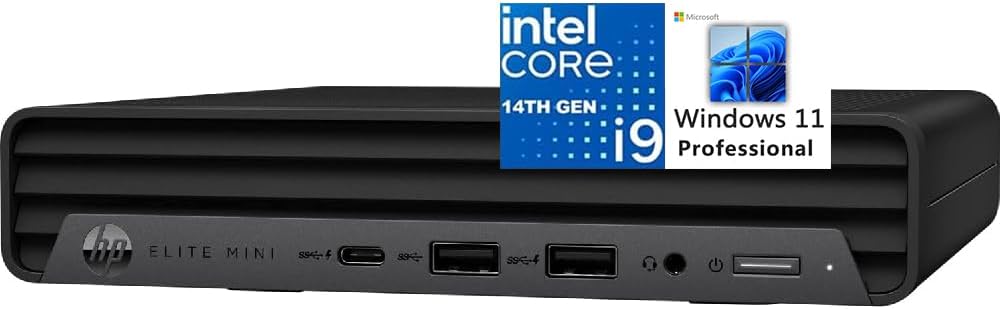
The HP Elite Mini 800 G9 is a complete business mini PC with a 14th Gen Intel Core i9-14900T, 16GB of DDR5 memory, a 1TB PCIe NVMe SSD, and Windows 11 Professional. Its 4.6 rating and inclusion of a wired keyboard and mouse make it one of the most approachable options for organizations or home users seeking a ready-to-use business system.
We may earn a commission when you buy through this link, at no additional cost to you.
The processor provides 24 cores split between eight performance and sixteen efficiency cores, 32 threads, 32MB of cache, and speeds up to 5.5GHz. Intel UHD Graphics 770 handles integrated graphics needs, while the compact business enclosure is designed for quiet operation. That combination is well suited to office applications, business analysis, large mailboxes, document workflows, and multitasking across many open applications.
Connectivity is professionally diverse. The system includes five USB-A ports, one 20Gbps USB Type-C port, one RJ45 connection, two DisplayPort 1.4 outputs, HDMI 2.1, and a combined headset and microphone jack. WiFi 6, Bluetooth, and support for up to four 4K/60Hz displays make it useful for desk configurations that require several screens. Windows 11 Pro also adds business-oriented features and Copilot integration.
Its main limitation is the 16GB memory allocation, which may be modest for intensive virtual machines, large video projects, or engineering software. It also lacks the SFP+, USB4, multi-gigabit, and PCIe expansion features found on the more specialized mini workstations. Even so, the Elite Mini 800 G9 offers strong core count, a complete software package, a quiet design, and a straightforward path to a capable business desktop.
A licensed Windows 11 Pro installation, storage, memory, wired keyboard, and mouse make setup straightforward. Users can focus on deploying the computer instead of selecting every essential component individually.
Twenty-four cores and 32 threads provide useful background capacity for office applications, communications, browser sessions, and data analysis. The compact, quiet design also fits comfortably in shared offices, reception areas, and home workspaces.
We may earn a commission when you buy through this link, at no additional cost to you.
Choosing a high-performance mini PC requires balancing processor capacity, memory, graphics, storage, networking, cooling, and expansion. The most powerful specification sheet does not always produce the best result if it conflicts with your actual workspace or workload.
Choose the highest core count your primary applications can use, but consider cooling, power limits, and noise as well. A compact system that maintains stable performance under sustained load is more valuable than a processor whose full potential is difficult to sustain.
Prioritize the maximum supported capacity as well as the current amount. A system that can eventually reach 64GB or 96GB provides better long-term flexibility, especially when it has two accessible memory slots.
Match the outputs to your displays and workflow. A professional discrete GPU requires a suitable PCIe slot, compatible chassis clearance, adequate power, and the willingness to accept a larger footprint.
Favor systems with at least two fast storage positions if your files will grow. A separate operating system drive, high-speed cache drive, or backup drive can improve both flexibility and data organization.
Choose networking based on the equipment you actually have. Faster ports provide little benefit without compatible switches, adapters, storage devices, or cabling, while extra USB-C functionality can be more valuable in a regular desk setup.
Leave enough ventilation space around the enclosure and avoid enclosing a high-power system in a tight cabinet. A cool, stable machine is usually more valuable than maximum short-term speed followed by thermal throttling.
A smaller system is not automatically better if it is difficult to service or cannot sustain its intended workload. Balance physical size with the ports, cooling, and expansion that your work actually requires.
For a straightforward office or home setup, a complete configuration usually offers the least friction. For an experienced builder, a barebone can provide better control, provided the additional parts and setup time are included in your plans.
Begin by confirming that the listed processor, memory, storage, operating system, and included accessories match your requirements. Move any data from an existing computer, install the latest operating-system and driver updates, and connect the desired displays and peripherals through the appropriate ports. For a barebone system, install compatible DDR5 memory, an NVMe or other supported SSD, and an operating system before attempting the initial startup.
Place the mini PC on a stable, hard surface with open space around its vents. Avoid carpets, enclosed cabinets, and tightly packed arrangements that restrict airflow. If using VESA mounting, check the included hardware and display compatibility. Connect high-speed storage through the fastest supported interface, and use the appropriate USB-C, DisplayPort, or HDMI connection for each display to preserve the intended resolution and refresh rate.
Keep software and firmware current, maintain free storage space, and back up important files. Use the included or appropriate operating-system tools to monitor temperatures and storage health. Clean exterior vents with compressed air while the system is shut down, and avoid opening the enclosure unless the manufacturer permits it. For systems with swappable memory or storage, power down, disconnect power and peripherals, and follow the documented upgrade procedure.
Yes, for many modern games and demanding video-editing workflows, especially when paired with fast memory and NVMe storage. The 24-core HX options offer the strongest parallel performance, while the HX and HK models can be effective for gaming, streaming, and 4K editing. Integrated graphics are the main limitation for graphics-intensive games, so buyers seeking the highest gaming performance should verify the system has a suitable PCIe slot and can accommodate a capable discrete GPU.
The HX and HK families are designed for higher-performance mobile platforms, while the H family emphasizes a lower power envelope suitable for compact business and workstation systems. In this list, the 13900HX and 14900HX provide 24 cores and 32 threads, whereas the 13900HK and 13900H provide 14 cores and 20 threads. Actual behavior also depends on cooling, power limits, memory, storage, and the software being used.
It is sufficient for many office tasks, web browsing, video calls, and lighter creative work. Heavy multitasking, local virtual machines, large media projects, and demanding engineering software can benefit from 32GB or more. Several models make this easy to address with two memory slots, so a 16GB configuration can be a sensible starting point when future expansion is planned.
Most models support multiple high-resolution displays, with configurations ranging from three screens on the M1-1390, GTi13, and Hyper H2 to four on the NAB9S, IT13 MAX, GT13 MAX, and Elite Mini 800 G9. Exact resolution and refresh rates depend on the output combination, display capabilities, and operating-system configuration, so verify the manual and monitor specifications before arranging a multi-screen desk.
A barebone system makes sense if you want to choose memory, storage, and the operating system yourself or already own compatible components. It is especially useful for technical builders creating a specific workstation or homelab configuration. First-time users who want a plug-and-play system will usually find a completed configuration simpler and less likely to involve compatibility or setup issues.
Yes. The GEEKOM IT13 MAX and GT13 MAX use the Intel Core Ultra 9 185H, adding an NPU, newer graphics, and modern efficiency features to a comparable high-performance class. They are particularly compelling for local AI, video, and hybrid productivity workflows, while the Core i9 HX models remain attractive for their larger core counts and traditional high-performance emphasis.
Cooling is very important because it affects sustained processor performance, component temperatures, and acoustic output. Systems with multiple heat pipes, active SSD cooling, and well-designed airflow are better suited to prolonged workloads. Even a well-cooled mini PC should be placed in an open location with ventilation, and users should monitor behavior during extended rendering, compilation, gaming, or other demanding tasks.
All of the listed systems provide wired Ethernet and wireless connectivity, but the available port speeds differ. Models with 2.5G Ethernet or 10G SFP+ are better for large transfers and specialized network equipment. The MINISFORUM MS-01 is particularly oriented toward NAS and homelab use because of its multiple high-speed network interfaces, SFP+ connectivity, and extensive storage expansion.
The best general choice in this guide is the Beelink GTi13 because it balances a complete 32GB DDR5 configuration, fast storage, dual 2.5G networking, Thunderbolt 4, and PCIe expansion without becoming a specialized barebones platform. The MINISFORUM NAB9S is the budget-minded alternative for buyers who prioritize four displays, easy upgrades, and dual wired networking, while the MINISFORUM MS-01 is the premium choice for complex networking, RAID, enterprise storage, and discrete graphics expansion.
Buyers focused on maximum conventional CPU throughput should look closely at the KAMRUI Hyper H2 and MINISFORUM M1-1390, both of which offer 24 cores and 32 threads. For modern local AI and newer integrated graphics, the GEEKOM IT13 MAX and GT13 MAX provide dedicated NPU capabilities, while the GEEKOM XT13 Pro emphasizes generous storage. The HP Elite Mini 800 G9 is the most straightforward complete business option, with Windows 11 Pro and included peripherals.
Before buying, confirm the current configuration, port layout, operating system, warranty, and compatibility with your displays and peripherals. Prices and product availability change regularly, and the same model may appear with different memory or storage options. Use the comparisons to prioritize the features your work genuinely needs, then check the current listing before making a final decision.