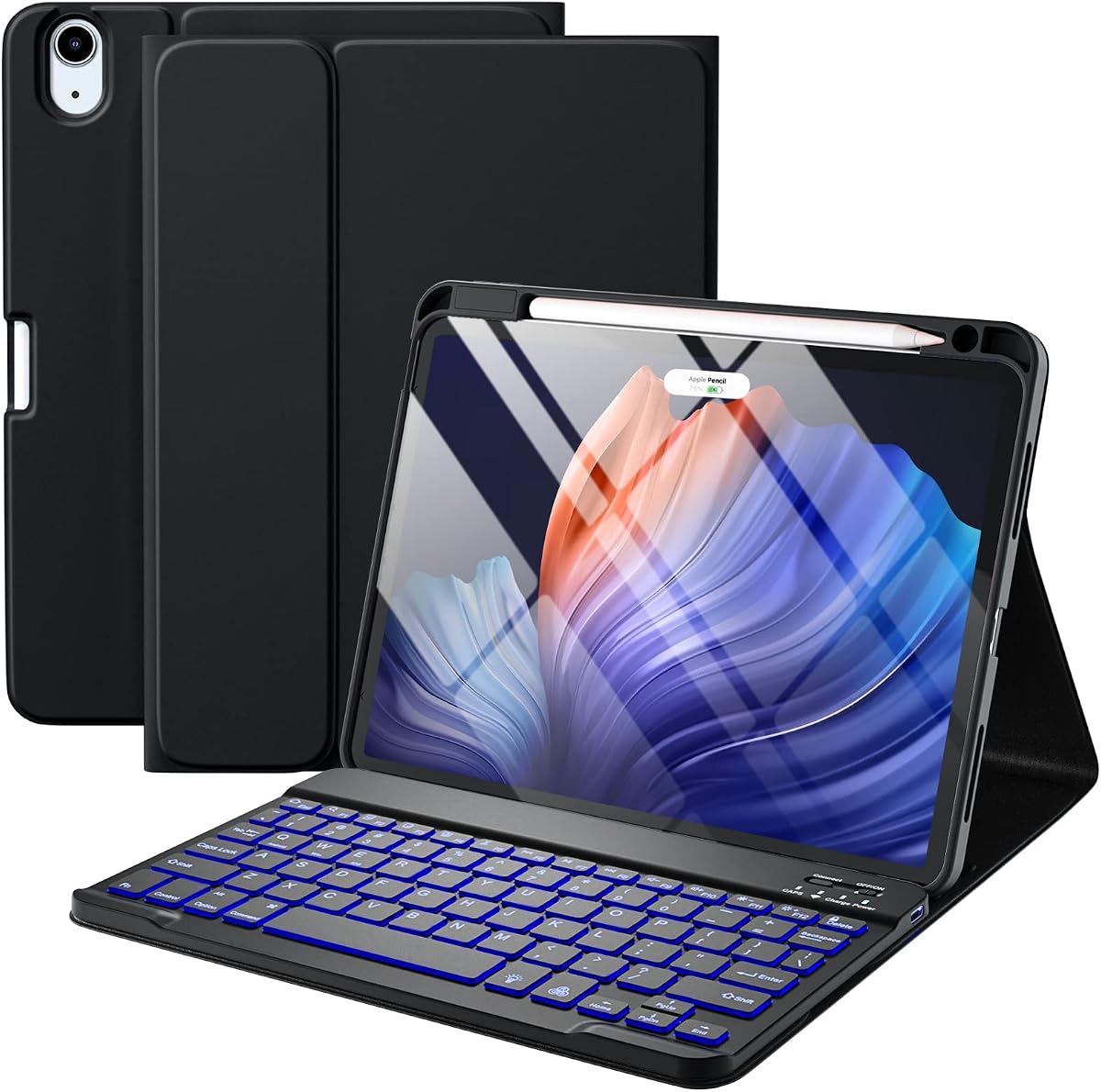
Harvopu Detachable Keyboard Case
4.3Editor score
Detachable backlit keyboard
Rechargeable 400mAh battery
Charging Apple Pencil holder
Explore the best iPad Air folio case with keyboard, comparing compatibility, trackpads, stands, typing, protection, and features for individual needs.
An iPad Air folio case with keyboard can turn a tablet into a more practical writing, studying, and travel companion. The strongest models combine a comfortable keyboard, responsive trackpad, stable viewing stand, reliable protection, and a design that still allows the iPad to function naturally as a tablet.
This guide compares ten keyboard folios based on their supplied compatibility, ratings, protection, viewing modes, keyboard layouts, trackpad functions, charging arrangements, and stylus support. It covers official and third-party options for current and earlier iPad Air generations, including renewed models and accessories designed to work across several tablet families.
Each review explains who the product is likely to suit and where its compromises lie. The comparison also highlights the key differences between detachable designs and fixed-folio formats. Prices and availability can change, so readers should confirm the current listing, tablet model number, included accessories, and warranty details before purchasing.
4.3Editor score

4.5Editor score

4.5Editor score
The table below provides a side-by-side view of keyboard layout, trackpad support, viewing flexibility, protection, and compatibility. It is designed to make the most important differences easier to identify before choosing a folio.




The Logitech Flip Folio Keyboard Case earns a 4.5 rating and stands out as the most balanced option in this guide. It combines a well-spaced backlit keyboard, a precise multi-touch trackpad, an adjustable kickstand, solid protection, and a layout that moves smoothly among typing, sketching, viewing, and reading positions.
We may earn a commission when you buy through this link, at no additional cost to you.
Its strongest advantage is the integrated Smart Connector arrangement. The keyboard pairs instantly and draws power directly from the iPad Air, eliminating the need to manage a separate keyboard battery. The backlit keys adjust to ambient lighting and allow manual brightness changes, while the full row of iPadOS shortcut keys reduces the need to reach for the screen.
The trackpad supports familiar multi-touch gestures such as swiping, pinching, and scrolling. Four use modes make the folio more versatile than a conventional laptop sleeve, and the 40-degree kickstand gives the tablet a stable elevated position. The magnetic closure, scratch protection, and claimed MIL-STD 810G compliance also suit frequent travel. Storage for Logitech Crayon or magnetic Apple Pencil attachment adds further utility.
The main trade-off is the fixed design. Unlike a detachable keyboard case, the folio remains physically attached to the tablet, so removing it to read or sketch in a more traditional handheld position takes more effort. Compatibility is also focused on one iPad Air generation rather than several. Even so, buyers who want the fewest charging and pairing headaches will find this a compelling all-purpose choice.
The large trackpad makes cursor movement and familiar iPadOS gestures practical without constantly touching the display. Combined with spacious keys, shortcut functions, automatic backlighting, and four distinct stand configurations, it supports everything from long writing sessions to media viewing and handwritten sketching.
The folio wraps the tablet in a sturdy shell with reinforced protection, a magnetic closure, and a stated military-grade drop standard. That makes it a sensible choice for commuters, students, and anyone who regularly places an iPad in a bag alongside keys and other hard objects.
We may earn a commission when you buy through this link, at no additional cost to you.
The Harvopu Backlit Keyboard Case has a 4.3 rating and offers one of the broadest compatibility claims in the list. It supports multiple 11-inch iPad Air configurations alongside 4th and 5th generation 10.9-inch models, making it a practical option for households that own or encounter more than one supported tablet.
We may earn a commission when you buy through this link, at no additional cost to you.
Its magnetic keyboard can remain attached for laptop-style use or detach completely for reading, video, and creative work. The keyboard reconnects through Bluetooth and offers seven backlight colors with a breathing effect. A built-in 400mAh lithium-ion battery uses an energy-saving mode, while the included Type-C cable replenishes the keyboard in roughly two to three hours.
Three anti-slip grooves inside the case provide different elevated viewing positions for typing, writing, drawing, and browsing. The PU leather upper cover and TPU rear panel protect the tablet while preserving access to ports, speakers, microphones, cameras, and other controls. The integrated holder can charge supported second-generation or newer Apple Pencil models without removing the case.
This design does require more charging and pairing management than Logitech's Smart Connector model or Apple's Magic Keyboard. The separate keyboard also adds thickness, while the case and accessory bundle may take up more room than a slim integrated folio. In return, broad model support, colorful lighting, stylus charging, and detachable convenience make it a strong value-oriented choice.
Strong magnetic attachment keeps the keyboard stable while typing, yet lets users pull it away when the iPad should behave like a conventional tablet. Remote use is possible when the detached keyboard is within Bluetooth range, which can be useful for presentations or when a propped-up screen is more convenient than a traditional laptop posture.
The rechargeable Type-C keyboard avoids disposable batteries, while the case's holder supports charging for compatible Apple Pencil versions. Together, these features help keep frequently used accessories organized without requiring the tablet to leave its protective shell.
We may earn a commission when you buy through this link, at no additional cost to you.
Apple Magic Keyboard for iPad Air carries a 4.5 rating and represents the premium, integrated approach to turning an iPad into a laptop-like device. Its thin floating cantilever design, physical scissor keys, built-in trackpad, and full 14-key function row create an uncluttered mobile workstation.
We may earn a commission when you buy through this link, at no additional cost to you.
The magnetic attachment and two-cantilever hinge allow the tablet to float above the keyboard while viewing angles are adjusted smoothly. Because the keyboard draws power from the iPad, there is no separate charging cycle or pairing process. A USB-C connector provides pass-through charging, allowing a cable to remain connected while the accessory is attached.
Compatibility is notably broad for an official accessory. It works with 11-inch iPad Air M2, M3, and M4 models as well as iPad Air 4th and 5th generations. The case folds to provide front and back protection, preserving the basic folio function without adding the bulk of a conventional protective shell.
This product's compromises are important. The supplied title specifies US English, which may not suit every buyer, and the listed features do not mention keyboard backlighting. Its premium category also places it beyond many generic alternatives. It remains the premium choice for users who prioritize refined construction, low-profile portability, effortless power, and native iPad integration.
The floating design creates a familiar laptop relationship between screen and keyboard while remaining thin enough for frequent travel. Its hinge provides smooth angle changes, and the magnetic attachment makes transitioning between attached and handheld use straightforward.
Drawing power from the iPad removes one of the most common sources of friction in third-party keyboard cases. USB-C pass-through charging adds another layer of convenience by allowing the tablet to charge while the keyboard remains fitted.
We may earn a commission when you buy through this link, at no additional cost to you.
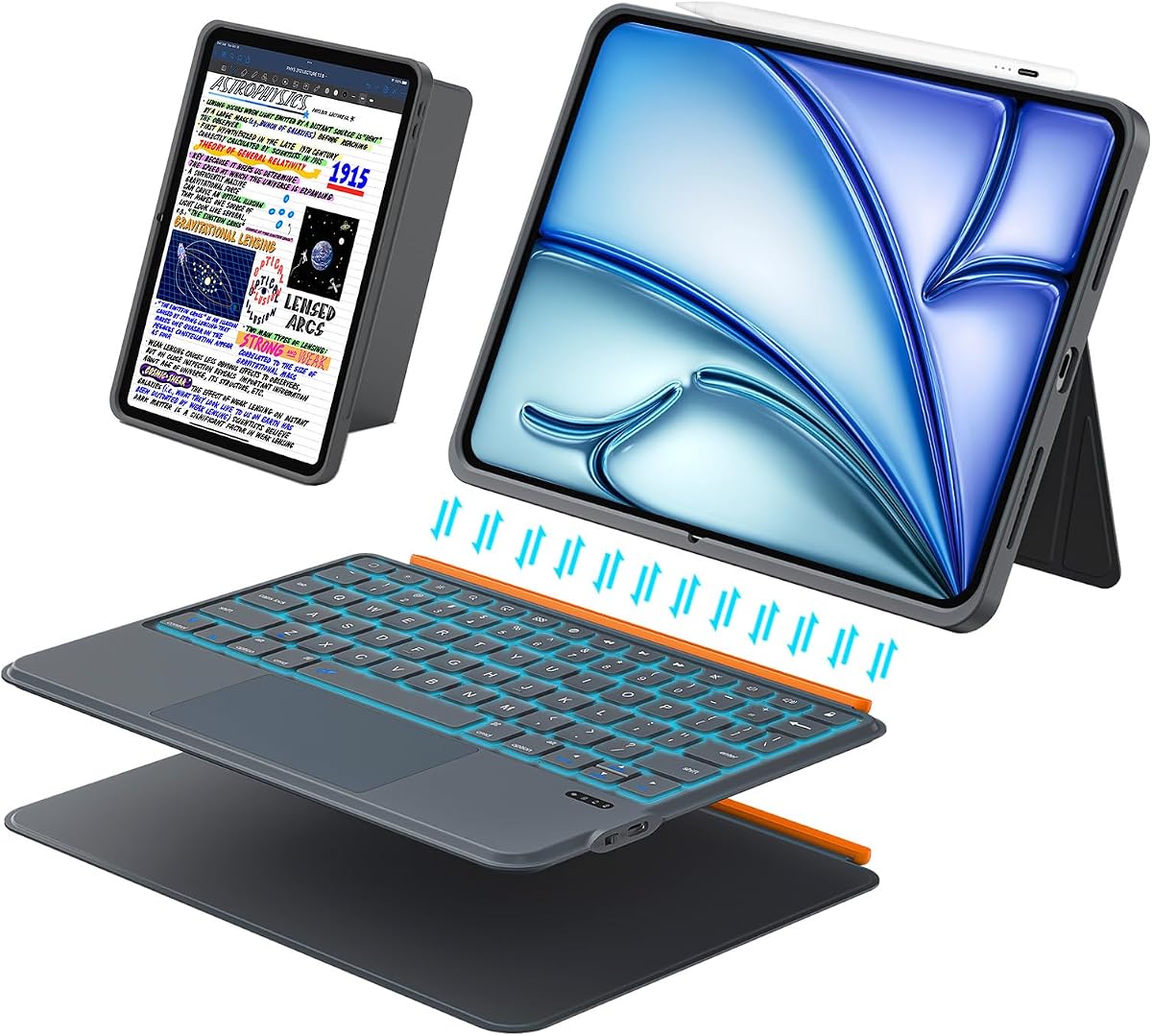
The ESR Ultra-Light Keyboard Case has a 4.4 rating and focuses on a slim, mobile-friendly footprint. At a stated 6.9mm thick, it is positioned for buyers who want laptop-style input without the bulk associated with many folios and detachable keyboard systems.
We may earn a commission when you buy through this link, at no additional cost to you.
The magnetic keyboard attaches for work and detaches for reading, video, or sketching. Its trackpad is stated to be 65% larger than those on regular keyboards and supports one-finger dragging and three-finger scrolling. A 65-degree position handles typing and media viewing, while a 20-degree position lowers the tablet for writing and sketching.
Compatibility covers 11-inch iPad Air M4, M3, and M2 models plus 4th and 5th generation Air tablets. The form-fit cover uses reinforced Air Guard corners, magnetic strips, and precise cutouts for buttons and ports. That combination of slimness and protection may appeal to commuters who do not want a bulky accessory attached to a compact tablet.
The obvious limitation is the lack of a keyboard backlight, explicitly noted in the product information. Two fixed angles offer less adjustment than continuous or multi-position stands. The detachable keyboard also needs its own power management. For travel-focused users who prioritize low weight and a large trackpad over illuminated keys, however, it is a focused and attractive design.
The slim construction makes the case easier to fit into small bags and laptop sleeves than a deep folio with a permanently attached keyboard base. Its detachable keyboard also lets users carry the tablet without a rigid typing deck when that is all the task requires.
The enlarged touch surface is a meaningful feature for editing, browsing, and app navigation. Gesture support reduces repeated screen taps, while the low-angle writing position can make handwriting and sketching feel more natural than a steep laptop-like setup.
We may earn a commission when you buy through this link, at no additional cost to you.
The Magnetic Multi-Touch Keyboard Case has a 4.3 rating and offers a broad alternative for users who move between iPad Air and compatible 11-inch iPad Pro devices. Its floating cantilever stand creates a familiar laptop silhouette, while the magnetic arrangement makes transitions between tablet and workstation modes relatively direct.
We may earn a commission when you buy through this link, at no additional cost to you.
A built-in precision trackpad supports multi-touch gestures for editing, presentations, and browsing. A row of iPadOS shortcuts provides quick access to common functions. The keyboard adds illumination with three brightness levels and a 750mAh rechargeable battery. USB-C charging offers a familiar way to replenish the keyboard, and the supplied information describes extended use on a single charge.
The case combines a keyboard base with synthetic vegan leather around the tablet. Its stated structural protection is intended to guard against knocks and falls during travel or daily use. Compatibility lists 11-inch iPad Air M4, M3, and M2 generations, 4th and 5th generation 10.9-inch Air models, and four generations of 11-inch iPad Pro.
As with most detachable designs, the keyboard requires its own charging routine and Bluetooth connection. The compatibility list is extensive enough that model-number verification is essential, especially for buyers sharing devices across tablet families. Pencil storage is not mentioned in the supplied information. Overall, it is a well-equipped choice for users who value illumination, gestures, and cross-model support.
Three backlight levels let users adapt the keyboard to bright rooms, ordinary working environments, or dimmer evening use. The shortcut row complements the keyboard's dedicated keys with fast access to familiar iPad controls, reducing interruptions during writing or presentation preparation.
Supporting current iPad Air generations, older Air models, and multiple 11-inch iPad Pro generations creates useful flexibility. Buyers should still confirm the exact A-number printed on the device because similarly sized tablets can have different dimensions and accessory connections.
We may earn a commission when you buy through this link, at no additional cost to you.
The Detachable 78-Key Keyboard Case earns a 4.5 rating and combines broad device support with a highly adjustable magnetic stand. Its modular construction allows the keyboard to be used with the case for typing or removed for reading, drawing, and entertainment, making it useful for users who divide their time between productive and media-focused tasks.
We may earn a commission when you buy through this link, at no additional cost to you.
Bluetooth 5.3 provides automatic quick pairing after initial setup. The 78-key scissor keyboard has a stated 1mm travel and dedicated iPadOS shortcuts. The larger precision trackpad supports taps, swipes, scrolling, app switching, and palm rejection. A 160-degree rear stand adds substantial angle adjustment in landscape orientation.
Compatibility spans 11-inch iPad Air M4, M3, and M2 models, specified 10th- and 11th-generation iPads, 4th and 5th generation 10.9-inch Air models, and several 11-inch iPad Pro generations. The PU leather shell provides full-edge coverage intended to protect against drops and scratches while remaining easy to clean.
The keyboard remains a separate accessory and therefore needs Bluetooth connection and battery management. Although the title mentions backlighting, the supplied feature details do not explain its levels or duration. Portrait placement is supported, but the most stable adjustable-angle arrangement is in landscape mode. Overall, this is a versatile, highly rated option for work-heavy users who value angle control.
The rear support can move through a stated 160-degree range in landscape use, providing more placement freedom than a two-position stand. This helps users alternate between an upright typing posture and a lower screen position for browsing or media viewing.
Removing the keyboard leaves the iPad in a cleaner tablet form for watching video, reading, or sketching. When productivity resumes, the magnetic keyboard can return to create a more conventional workstation without requiring a separate full-size external keyboard.
We may earn a commission when you buy through this link, at no additional cost to you.
The renewed Apple Smart Keyboard Folio carries the highest listed rating at 4.6. It delivers a deliberately simple alternative to the feature-heavy third-party folios: a full-size keyboard, front cover that doubles as a stand, and no separate charging or pairing process.
We may earn a commission when you buy through this link, at no additional cost to you.
Its keyboard connects directly through the iPad's Smart Connector arrangement, so there is no independent battery to charge and no wireless pairing routine. The front cover protects the display when closed, then folds back to support the tablet for typing and viewing. The design keeps the overall package relatively restrained for users who prefer Apple's established accessory format.
The supplied title identifies compatibility with iPad Pro 11-inch 4th generation and iPad Air 5th generation. This older-generation scope is the main limitation compared with products explicitly supporting 11-inch Air M2, M3, and M4 models. It is also a renewed item, so buyers should review the seller's condition description and warranty policy carefully.
No trackpad is mentioned in the supplied features, making this less suitable for buyers who want cursor control without touching the screen. It is also not as flexible as newer detachable cases. Nevertheless, for an owner of a compatible older tablet who values simple operation, dependable key coverage, and minimal charging complexity, this renewed Apple folio remains a practical choice.
The keyboard draws power through its direct connection to the compatible iPad. That removes the need to search for a charging cable or manage a separate keyboard battery, making it especially convenient for users who prefer fewer accessories and simpler setup.
The folio protects the display when closed and folds into a support for viewing and typing. Its straightforward design suits quick transitions, although it does not provide the wider range of viewing modes or stylus-oriented features found in more specialized folios.
We may earn a commission when you buy through this link, at no additional cost to you.
The renewed Logitech Folio Touch has a 4.1 rating and offers an established, feature-rich design for iPad Air 4th and 5th generation owners. Its defining elements are a multi-touch trackpad, backlit keyboard, adjustable kickstand, direct power connection, stylus support, and a protective wraparound construction.
We may earn a commission when you buy through this link, at no additional cost to you.
The trackpad supports swiping, pinching, scrolling, and other iPadOS navigation gestures. Large, well-spaced keys include a row of iPadOS shortcut controls, and the backlighting automatically adjusts to the environment with manual brightness control. The kickstand provides a 40-degree range, allowing the folio to switch among type, sketch, view, and read configurations.
Smart Connector technology handles pairing and draws power from the iPad, eliminating a separate charging requirement. The case also provides a place for Logitech Crayon or a compatible second-generation Apple Pencil, with the latter able to charge while attached. A magnetic closure and stated drop-protection standard support everyday portability.
The renewed status means buyers should evaluate cosmetic wear, included accessories, and warranty coverage. Compatibility is limited to specific 4th and 5th generation Air model numbers, so it cannot be assumed to fit the newer 11-inch Air family. Its 4.1 rating is also the lowest among the listed products. Even so, the Folio Touch remains unusually complete for compatible owners seeking a trackpad and illuminated keys in one protective package.
The folding keyboard and kickstand work together to create multiple positions for typing, sketching, reading, and viewing. That flexibility makes the folio more useful across a full day than a standard laptop sleeve, especially for students and creative users.
Built-in provision for a Logitech Crayon or compatible Apple Pencil helps prevent a frequently used stylus from being lost. On supported Apple Pencil versions, charging can occur without removing it from the folio, improving the convenience of a note-taking setup.
We may earn a commission when you buy through this link, at no additional cost to you.
The Harvopu Illuminated Keyboard Case has a 4.3 rating and emphasizes colorful illumination, flexible positioning, and broad compatibility. It supports the 11-inch iPad Air M4, M3, and M2 models alongside 4th and 5th generation 10.9-inch iPad Air versions.
We may earn a commission when you buy through this link, at no additional cost to you.
Its magnetic keyboard attaches securely for typing and detaches when a conventional tablet experience is preferable. The keyboard connects through Bluetooth using a simple Fn plus C shortcut. Seven backlight colors and three brightness levels provide more personalization than a standard unlit keyboard, making it useful in dim settings and for users who enjoy a distinct visual style.
The built-in multi-touch trackpad supports smoother editing, browsing, and app management without repeated touchscreen interaction. Multiple viewing positions allow the screen angle to be changed for typing, watching video, or drawing. Precise cutouts preserve access to ports, buttons, cameras, and other tablet features while the case remains installed.
The product information does not specify keyboard battery capacity, stylus storage, charging time, or a detailed drop-protection standard. It also requires separate Bluetooth pairing and power management. Those omissions make it less thoroughly documented than some competitors. For buyers who prioritize colored lighting, detachable convenience, and compatibility across several Air generations, it remains a compelling option.
Seven colors and three brightness levels let users adapt the keyboard to different surroundings and preferences. The illumination is more expressive than a simple two-level backlight, although buyers seeking a plain office aesthetic may prefer a subtler option.
The supplied guidance recommends finding the A-number through the iPad's About settings. That check is especially important for Air buyers because the 11-inch M4, M3, and M2 models and the 10.9-inch earlier generations share a general product category but require different cases.
We may earn a commission when you buy through this link, at no additional cost to you.
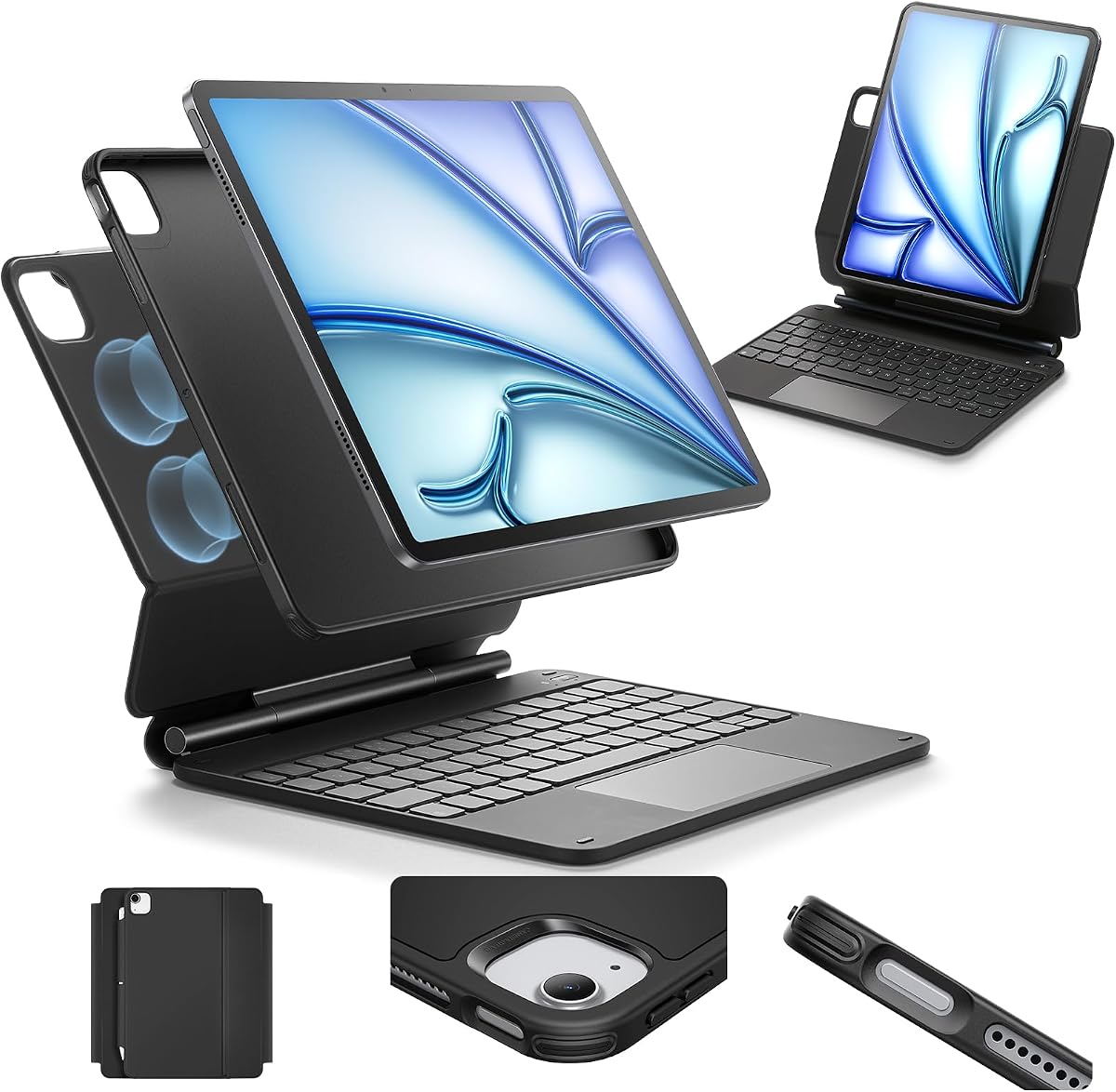
The ESR Multi-Mode Keyboard Case has a 4.2 rating and distinguishes itself with a detachable back cover, raised-screen viewing, and portrait support. The magnetic cantilever stand can position the iPad at a suitable height for typing or browsing, while the tablet's rear case can be removed independently for hands-on use.
We may earn a commission when you buy through this link, at no additional cost to you.
That separation creates several practical configurations. The raised screen view can improve posture during extended work, portrait mode is useful for FaceTime or reading, and the floating cantilever arrangement creates a familiar laptop-like profile. The back cover continues to provide full-body protection when detached, so users do not need to handle the bare tablet for every quick task.
The extended multi-touch trackpad supports tap, pinch, and swipe gestures intended to improve navigation and document work. Compatibility includes current 11-inch iPad Air models, 4th and 5th generation 10.9-inch Air models, and several 11-inch iPad Pro generations. Strong magnets are used to hold the tablet and case together securely.
Compared with illuminated alternatives, the supplied information gives limited detail about keyboard lighting, battery capacity, charging method, and stylus support. The stand and keyboard base also add more bulk than a detachable keyboard paired with a very thin shell. Even so, the multi-mode construction is ideal for users who split time among typing, portrait communication, creative work, and protected tablet use.
Separating the back shell from the keyboard assembly lets users choose exactly how much protection and structure they want to carry. It also opens the tablet for sketching or other direct touch work while retaining the ability to return to the raised desktop arrangement.
The raised screen position helps bring the display closer to eye level during typing and browsing. Portrait support adds a different kind of flexibility, making the folio suitable for video calls, vertical reading, and other tasks that benefit from an upright narrow layout.
We may earn a commission when you buy through this link, at no additional cost to you.
The best iPad Air folio case with keyboard depends on tablet generation, typing habits, portability needs, and preferred viewing modes. Use the following factors to narrow the field before comparing individual models.
Compatibility should be checked using the tablet's A-number rather than relying only on the marketing name. The products in this guide cover 11-inch iPad Air M2, M3, and M4 models, 10.9-inch 4th and 5th generation iPad Air versions, and several 11-inch iPad Pro generations. Similar diagonal screen sizes do not guarantee matching cutouts, magnetic connectors, keyboard dimensions, or stand geometry. Apple devices list the relevant model identifier under Settings, General, About, and the model number can be tapped to reveal additional details.
In short, verify the exact model number before ordering, especially when purchasing an older accessory or choosing from a list with broad compatibility claims.
A fixed folio keeps the keyboard and case physically integrated, generally creating a secure all-in-one package with fewer separate pieces. It is convenient for users who always want the keyboard close at hand, although removing the folio to read or sketch may take longer. A detachable design lets users remove the keyboard while retaining the protective shell, which is useful for media viewing, handheld tasks, and travel. Some detached keyboards also work as remote Bluetooth input, but that depends on the specific product.
Choose a fixed folio for simplicity and a detachable design for flexibility. The best option is the one you will use in the way that matches your actual routine.
A useful trackpad should support more than a basic pointer. Look for multi-touch gestures such as swiping between screens, pinching for zoom, scrolling with multiple fingers, and clicking or tapping without requiring a firm press. Larger surfaces are generally easier to control precisely, while palm rejection can keep accidental touches from disrupting work. Buyers who already use an iPad in tablet mode may appreciate gesture support more than those who prefer a full physical mouse.
Prioritize reliable multi-touch behavior and a surface large enough for comfortable navigation. If the product listing does not specify gesture support, consider whether the design meets your cursor-control needs.
Comfort depends on key spacing, travel, feedback, and the inclusion of iPadOS shortcuts. A full row of brightness, media, and system keys is useful in a compact layout because it reduces the need to reach for on-screen controls. Scissor-switch keyboards tend to remain relatively thin, while larger travel may suit users who prefer a pronounced press. The US English specification on the Apple Magic Keyboard listing is worth noting because keyboard layouts can differ for other regions.
Look for well-spaced keys, familiar shortcut access, and a layout that matches your typing habits. If long writing sessions are common, ergonomics should take priority over the lowest possible accessory weight.
Backlit keys help in dim spaces, while brightness controls allow users to reduce glare in brighter environments. They can also consume more energy, making charging arrangement important. Logitech's Smart Connector models and Apple's Magic Keyboard draw power directly from the iPad, while Bluetooth keyboards generally need a separate rechargeable battery. Check charging connector type, estimated recharge time, and whether the keyboard works while charging.
Prioritize no separate charging if simplicity matters, or a clearly documented rechargeable system if a detachable or slimmer design is more important.
A laptop-style angle is useful for typing, while a lower angle is often better for handwriting and sketching. Adjustable kickstands, grooved trays, cantilever hinges, and multi-mode stands each provide different levels of positioning. Some products offer only two fixed angles, whereas others allow a much broader range. Portrait support is another consideration for FaceTime, reading, and narrow document views. A useful stand should also resist wobbling and hold the selected angle without constant adjustment.
Match the stand to the tasks you perform most often. Frequent typing favors a stable raised position, while writing and sketching usually benefit from a flatter setup.
Protection can come from a rigid rear shell, flexible PU leather, TPU edging, reinforced corners, a closing magnetic latch, or a combination of these features. Some products specify a military-grade drop standard, while others describe general resistance to scratches, dust, and knocks. Precise cutouts are equally important because speakers, cameras, microphones, buttons, and charging ports must remain accessible while the tablet is covered.
Look for full-edge coverage, secure closure, reinforced corners, and accurate openings. If protection is a priority, compare documented standards rather than relying on appearance alone.
A keyboard folio can become a more complete note-taking system when it stores or charges a compatible stylus. Logitech models support Logitech Crayon or specified Apple Pencil arrangements, while the Harvopu Backlit Keyboard Case includes a holder that supports charging for certain Apple Pencil versions. Also note whether the package includes a charging cable, user guide, or stylus. Accessories can reduce setup time, but compatibility must be confirmed carefully because stylus charging standards differ.
Check stylus support, charging cables, and included guides before ordering. A compatible holder can add value, but an unsupported pencil may provide no benefit.
Before the first full use, install the case according to its instructions and verify that every cutout lines up with the tablet's buttons, cameras, speakers, and ports. For a magnetic model, attach the tablet to the keyboard base and move it gently to confirm that the connection is secure. Pair Bluetooth keyboards by following the listed Fn shortcut, and allow any rechargeable battery to reach a full charge before relying on it during a long session.
Choose the viewing mode that matches the current task: an elevated laptop-style position for typing, a lower angle for writing or sketching, and portrait orientation where supported for calls or vertical reading. Detach the keyboard only when the case design allows it, and never force a fixed folio at the hinge. When using a stylus, confirm that the exact model is compatible with the built-in holder or charging feature before inserting it.
Remove the iPad before cleaning the case. Use a soft, lightly dampened cloth on the exterior and avoid spraying liquid directly onto the keyboard, trackpad, ports, or magnetic contacts. Do not use abrasive pads, harsh chemicals, or excessive moisture. Keep the magnetic closure away from cards, keys, and other objects that could scratch the tablet, and allow the keyboard and tablet to dry fully before reassembling the folio.
Open Settings, select General, then About, and look for the model information. Tap the model number line if it does not immediately reveal the A-number used by accessory sellers. Compare that identifier with the compatibility list, because iPad Air 11-inch M2, M3, and M4 models are different from 10.9-inch 4th and 5th generation versions. Checking before purchase helps prevent an incorrect fit.
Detachable cases are often more flexible because the tablet can be used without a rigid keyboard base for reading, media, or sketching. Fixed folios provide a more unified package and may be easier to keep together while traveling. The best choice depends on how often the user switches between laptop-style work and handheld use, as well as how much bulk the user is willing to carry.
A trackpad is valuable if you want more precise cursor control and iPadOS gestures without carrying a separate mouse. It can make editing, browsing, multitasking, and presentation work feel more natural. However, some inexpensive or older folios omit a trackpad entirely. If you mainly type long documents, the keyboard and viewing stability may matter more than touchpad functionality.
Use a stable raised angle similar to a laptop for typing and general work. Choose a flatter position for handwriting, drawing, or using a stylus because it reduces the need to reach over the keyboard. For video calls or vertical reading, use portrait mode if the case supports it. The best angle should keep the screen stable without requiring the user to hold it in position.
It depends on the connection system. Logitech Smart Connector models and Apple's Magic Keyboard draw power from the iPad and do not require a separate keyboard charge. Detachable Bluetooth keyboards generally use their own rechargeable battery and need periodic charging. Check whether charging can continue while the keyboard is attached and confirm the connector type before planning to work through a long charging session.
A renewed product can provide the same core functions as a new model, but its condition, warranty, and included accessories may differ. Inspect the listing for cosmetic wear, missing cables, and compatibility details. Renewed Apple and Logitech folios are particularly attractive when the buyer wants established Smart Connector convenience and does not mind older tablet compatibility. The seller's return policy is important because physical accessories can show wear sooner than electronic components.
Only when the manufacturer explicitly lists the relevant iPad Pro generation and model numbers. Some models support several 11-inch Air and Pro generations, while others are limited to one iPad Air family. Screen size alone is not sufficient because dimensions, port locations, and magnetic attachment arrangements can differ. Confirm the exact A-number and review the full compatibility statement before ordering.
Look for full front and back coverage, secure magnetic closure, reinforced corners, and accurate access to ports and controls. Some models also state a military-grade drop standard, while others provide less formal but still useful scratch and bump protection. Consider how the tablet will be carried: a frequently transported device benefits from a rigid rear panel and reliable closure, whereas occasional use may require less bulk.
The Logitech Flip Folio Keyboard Case is the strongest all-around choice because it combines adaptive backlighting, a precise trackpad, four use modes, direct iPad power, stylus support, and strong protection. The Harvopu Backlit Keyboard Case stands out as the best budget option because of its broad compatibility, detachable design, rechargeable Type-C keyboard, colorful lighting, and charging stylus holder. For buyers seeking the premium integrated experience, Apple Magic Keyboard offers a remarkably thin cantilever design, trackpad, and effortless power integration.
Prioritize exact model compatibility first, followed by the way you actually use your iPad. Frequent typists should examine key spacing, backlighting, shortcut controls, and sustained stability. Creative users may prefer a lower viewing angle, stylus support, and a detachable design. Travelers should balance protection against thickness, while users who dislike charging accessories will favor a model powered directly by the tablet.
Before making a final decision, confirm the tablet's A-number, inspect the current listing for included accessories, and check the warranty and return terms. Product details and availability can change, and renewed units may vary in condition. Reviewing those points alongside your specific workflow will help you select an iPad Air folio case with keyboard that remains useful well beyond the initial novelty of typing on an iPad.