
CallToU Caregiver Pager
4.5Editor score
Numbered call identification
500-foot wireless range
55 selectable ringtones
IP65 waterproof buttons
Our Panic Buttons for Offices guide compares ten wireless, monitored, caregiver-pager, and strobe-alert systems to help you choose the right safety setup.
Panic buttons for offices range from compact monitored devices to wireless strobe sirens, caregiver-pager systems, and location-sharing wearables. A useful model must be easy to reach, difficult to activate accidentally, and able to deliver an alert in a noisy workplace. Installation demands, notification methods, and response protocols matter as much as the hardware.
This guide compares ten options using their published specifications, including alert type, sound output, wireless range, power options, display features, water resistance, and compatibility. It covers systems intended for reception desks, clinics, warehouses, schools, stores, banks, hospitals, and general business premises. The assessment also distinguishes local alarms from systems that contact phones or monitoring services.
Each review explains where a product is strongest, where its trade-offs appear, and which workplace it may suit best. The leading selections include the SimpliSafe Panic Button for monitored security integration and two CallToU-style wireless caregiver systems for identifying the originating call station. Product features, compatibility, availability, and pricing can change, so check current listings before purchasing.
4.5Editor score

4.8Editor score

4.5Editor score
The comparison below highlights each system's core alert method, installation model, range or reach, and most important workplace feature, making it easier to compare local sirens, pagers, monitored buttons, and location-aware wearables.




This Panic Alarm Button for House Remote Control Alarm Siren for Office has a 4.4 rating and is the most flexible conventional siren-and-button kit in the list. Its two strobe sirens and four wireless call buttons make it a practical option for offices with multiple workstations, reception counters, or separate areas where staff need to summon help without using a phone.
We may earn a commission when you buy through this link, at no additional cost to you.
The core advantage is the combination of sound and light. Maximum output reaches 120 dB, while the visible strobe can help personnel notice an alert in noisy or bright settings. Volume can be adjusted from zero to maximum, and alarm duration can run from 30 seconds to 10 minutes. Each button has a simple push design and 360-degree waterproof handling, supporting placement near washrooms, counters, or other damp areas.
The sirens can operate through DC charging or replaceable batteries, and the stated continuous battery operation can reach 30 days. That gives an organization more flexibility than a receiver that must remain plugged in, although actual runtime will depend on usage and battery conditions. The system is registered for easier setup, and the included instructions and accessories simplify initial installation.
This is not a monitored emergency service and does not automatically send police, medical, or workplace assistance. Its purpose is to create a conspicuous local alert so nearby people can respond. Offices needing a full escalation chain should treat it as a local notification layer, pair it with a clear response procedure, and use a separately managed communications channel for contacting emergency services.
The best fit is a small-to-medium workplace that wants several call points and more than one visible siren. It is especially useful in noisy areas where sound alone may be missed. Verify the listed range in the actual building, position buttons away from accidental contact, and test the system regularly before relying on it during a genuine incident.
The strobe gives staff a second way to notice the alarm, which is useful where machinery, music, or conversations can mask sound. Positioning the sirens in central visible areas can improve recognition without requiring workers to carry a device.
Four buttons can be distributed among a reception desk, office area, and other high-traffic locations. Each location should be marked clearly and checked to ensure the button is easy to press but not vulnerable to accidental activation.
We may earn a commission when you buy through this link, at no additional cost to you.
This Wireless Caregiver Pager Call Button Nurse Call System has a 4.5 rating and stands out for its six-button bundle and numbered LED display. Although its language centers on caregiving, the underlying design is well suited to offices where employees need to identify the exact desk, room, or workstation that requested assistance.
We may earn a commission when you buy through this link, at no additional cost to you.
Each call button can be associated with its own ringtone, and the receiver displays the number associated with the caller. That combination lets staff distinguish locations rather than merely hearing that some button was pressed. The receiver offers 38 ringtones, five volume levels from silent to 110 dB, and a generous 120 dB maximum level for noisy workplaces.
Installation avoids complicated wiring. The receiver plugs into an outlet, while the wireless buttons can be placed on walls, desks, or other surfaces. The stated 500-foot, or 150-meter, reception range is suitable for many small offices, clinics, and multistory buildings, although walls and floor materials can affect real-world performance. Additional receivers and buttons can be added to expand coverage.
The main limitation is that this is fundamentally a local pager. It does not independently contact emergency services, send location information, or integrate with a broader building platform. The receiver also depends on mains power, making a plug-in backup advisable in facilities where uninterrupted coverage is critical.
This system is a strong option for reception areas, medical rooms, care facilities, or offices that want a receptionist or supervisor to know which call point was activated. Its six waterproof buttons, location display, and broad sound customization offer excellent control. Test all locations during setup, assign a documented response procedure, and confirm that the receiver can be carried where staff actually work.
The LED number display is especially helpful in shared workplaces. A responder can see which assigned station is calling, reducing the need to search multiple rooms or rely solely on a verbal description over an intercom.
Programming buttons to different ringtones adds another identification layer. This can make repeated announcements unnecessary in a busy clinic, office, or care environment where sound-only paging is otherwise difficult to interpret.
We may earn a commission when you buy through this link, at no additional cost to you.
This Panic Button for Personal Safety – Silent Beacon Bluetooth Emergency Alert has a 2.9 rating, the lowest among these picks, but it occupies a different category. It is a wearable Bluetooth device intended to contact chosen phone numbers and share the user's location discreetly when an alert is activated.
We may earn a commission when you buy through this link, at no additional cost to you.
The Emergency Alert Mode sends real-time GPS location through text, email, and push notifications. The device also supports two-way calls and a built-in speaker and microphone. A Silent Mode can provide privacy where a conventional audible panic alarm would be inappropriate, while other modes include check-in alerts, low-battery notices, and footstep tracking.
The stated battery life is 42 days on a full recharge, and the device carries IPX4 water resistance. Its microphone, USB port, and speaker are also described as waterproof. It can be worn or carried by workers who move around a site, including lone employees entering isolated areas, although workplace policy should govern personal wearable use.
Important limitations prevent a broader recommendation. Some features may require a paid subscription, and the product cannot be evaluated here as thoroughly as a simpler local alarm based solely on its published information. Its phone-based notification model also depends on suitable cellular coverage, device configuration, contacts, and account permissions. It should not be treated as a substitute for a monitored security service without confirmation of the required plan.
This product is best for a workplace seeking a discreet personal alert channel for mobile staff. It may complement a fixed panic button rather than replace it. Before rollout, test the alert path from several building areas, confirm connectivity, designate reliable recipients, and document what employees should do after sending an emergency alert.
Sharing a live location can reduce the time needed to identify a person in a large or unfamiliar workplace. It is most useful when designated responders regularly carry a phone and can act on the information.
A silent beacon can help someone summon assistance without announcing the situation to nearby people. That makes it potentially useful for isolated workers, although employees should understand exactly how the mode behaves before relying on it.
We may earn a commission when you buy through this link, at no additional cost to you.
This Daytech Wireless Panic Button Alarm-120dB Strobe Siren with Panic Buttons has a 4.2 rating and provides a traditional RF-triggered siren for offices seeking long-distance local signaling. The stated operating range is 500 feet in an open area, which can be useful for larger properties, warehouses, or outdoor work areas.
We may earn a commission when you buy through this link, at no additional cost to you.
The alarm combines a 120 dB sound level with a flashing strobe, giving personnel both an audible and visual indication. The button is waterproof and suitable for locations such as washrooms or bedside areas. Transmitters and the siren arrive pre-paired, supporting straightforward setup, and one siren can work with as many as eight transmitters, including buttons and remotes.
A cancel or off function allows responders to silence the alarm after assistance has arrived. The unit includes a built-in battery that takes over during a power interruption, an important feature for emergency signaling. However, the stated standby time of about 10 hours is modest compared with the longer battery claims made by some other kits, so power resilience should be checked regularly.
This is a local alert system, not a professional monitoring service, and the siren cannot be used alone. The product description also warns that the voice alert may be intense and advises protecting hearing during testing. Employers should assess noise exposure and workplace hearing policies before activating full volume.
It is well suited to offices, schools, warehouses, shops, banks, and similar premises where a conspicuous siren is acceptable. The eight-transmitter capacity offers room for expansion. The best results require careful placement of the siren, realistic range testing, and a clear method for turning off the alarm after a legitimate response.
The ability to pair one siren with multiple buttons and remotes makes this a scalable choice for a facility with several departments. Each added transmitter should be assigned a clear location and recorded in the response plan.
The internal battery can keep the siren operating when mains power fails. Because the stated standby time is limited, regular battery checks and prompt replacement are essential parts of a dependable installation.
We may earn a commission when you buy through this link, at no additional cost to you.
This CallToU Caregiver Pager Wireless Call Button System has a 4.5 rating and combines straightforward wireless setup with clear numeric call identification. Although it was designed around eldercare and clinical environments, those same qualities translate well to an office reception area, staff room, or medical office.
We may earn a commission when you buy through this link, at no additional cost to you.
Each button is paired with a unique number, and the receiver's large display helps staff identify who needs assistance. This can be especially useful where several employees share a desk but work in different rooms. The system offers 55 ringtones and five volume levels up to 110 dB, allowing administrators to balance a distinctive tone with the noise level of the workplace.
The stated reception range is 500 feet, or 150 meters, and the system can be expanded with additional receivers and call buttons. It supports homes or buildings with two or three stories according to the product information. Installation requires no complex wiring: the receiver plugs into an outlet, and the buttons can be mounted on suitable surfaces.
The buttons have IP65 waterproof protection, making them appropriate for washrooms and other damp locations. The receiver remains dependent on electrical power, so offices requiring resilience should consider a backup outlet or uninterrupted power source. The system also does not contact responders outside the premises; someone must hear and answer the pager.
This is an attractive choice for organizations seeking a clear, low-complexity way to identify a call location. Install it where staff can hear the receiver, label the call stations, and create a rapid response procedure. It is particularly well suited to small offices, clinics, care rooms, and reception environments where a local paging system is enough.
Unique numbers let a responder see which button was pressed instead of investigating every possible call point. This saves time and reduces ambiguity in facilities with multiple desks or rooms.
No complicated wiring is required, so buttons can be positioned according to actual employee movement rather than existing cable routes. The receiver still needs a reliable outlet and should be placed where staff can hear it.
We may earn a commission when you buy through this link, at no additional cost to you.
This compact Panic Alarm Button for House Remote Control Alarm Siren for Office has a 4.1 rating and is a more focused alternative to the two-siren version. It includes one remote strobe siren kit, instructions, and accessories, making it suitable for a reception desk, small office, or single high-risk location.
We may earn a commission when you buy through this link, at no additional cost to you.
When a panic button is pressed, the siren produces sound and activates a strobe. Maximum output is 120 dB, and volume can be adjusted all the way down to zero. The alert duration can be configured from 30 seconds to 10 minutes, allowing administrators to avoid either an unnecessarily short alarm or an intrusive prolonged noise.
Power flexibility is one of the kit's strongest features. The siren can run using DC charging or replaceable batteries, and the description states that continuous battery operation can last up to 30 days. The wireless push button is described as waterproof in all directions, with a simple base design intended to make battery changes easier.
Because the package centers on one siren, it offers less coverage than the four-button, two-siren kit in the same family. It also remains a local alert rather than a dispatch service. If the office needs to summon someone beyond the immediate area, it should be connected to a broader response process rather than assumed to provide external assistance.
The product works best as a focused, flexible alert for a smaller workplace or a clearly defined zone. Choose a prominent siren location, test whether the intended responders can see the strobe, and avoid setting the duration so long that normal operations are repeatedly disrupted. Confirm button placement and battery checks as part of routine safety inspections.
The 30-second-to-10-minute adjustment lets administrators tailor an alert to the area. A short setting may suit a busy office, while a longer setting could be appropriate where staff need more time to investigate.
DC charging and replaceable batteries make it easier to position the siren where a permanent outlet is inconvenient. Users should still check the batteries regularly because the longest runtime figure assumes appropriate operating conditions.
We may earn a commission when you buy through this link, at no additional cost to you.
This SimpliSafe Panic Button – Built-in Silent Panic Feature has a 4.8 rating, the highest among the ten products, and is the strongest choice when a workplace already uses the SimpliSafe ecosystem. It provides a one-press panic trigger and can generate either audible or silent alerts through the compatible security system.
We may earn a commission when you buy through this link, at no additional cost to you.
The feature set is particularly relevant to offices where a visible alarm could escalate a situation or cause confusion. Silent triggering can notify a monitoring pathway without announcing the event locally. Medical and fire alert functions are also customizable, and professional monitoring is required for the described fast-help and remotely supported alert functions.
Installation is straightforward. The button can be attached using the peel-and-stick method or installed with included hardware, and setup is completed through the SimpliSafe App. It is compatible with the SimpliSafe Gen 3 home security system, so an office must verify that its current base station and service configuration support this device.
The stated battery life can reach five years depending on usage, reducing maintenance compared with systems that use replaceable batteries more frequently. As with all wireless devices, actual longevity depends on activation frequency, battery condition, and environmental factors. Regular testing remains necessary even when replacement intervals are long.
This is the top pick for an office that wants its panic button integrated into a broader monitored security system rather than operating as an isolated siren. It is less suitable for organizations without compatible SimpliSafe equipment or those seeking a standalone alarm with no platform dependency. Confirm monitoring options, response procedures, and account requirements before deployment.
A silent alert can be useful when announcing a panic event could create safety concerns. It also integrates with medical and fire alert customization, allowing the device to fit more than one emergency workflow when supported by the active system.
Offices already using SimpliSafe Gen 3 can add the button without treating it as an unrelated alarm. Central app-based setup can make testing, configuration, and user orientation easier than managing a standalone siren.
We may earn a commission when you buy through this link, at no additional cost to you.
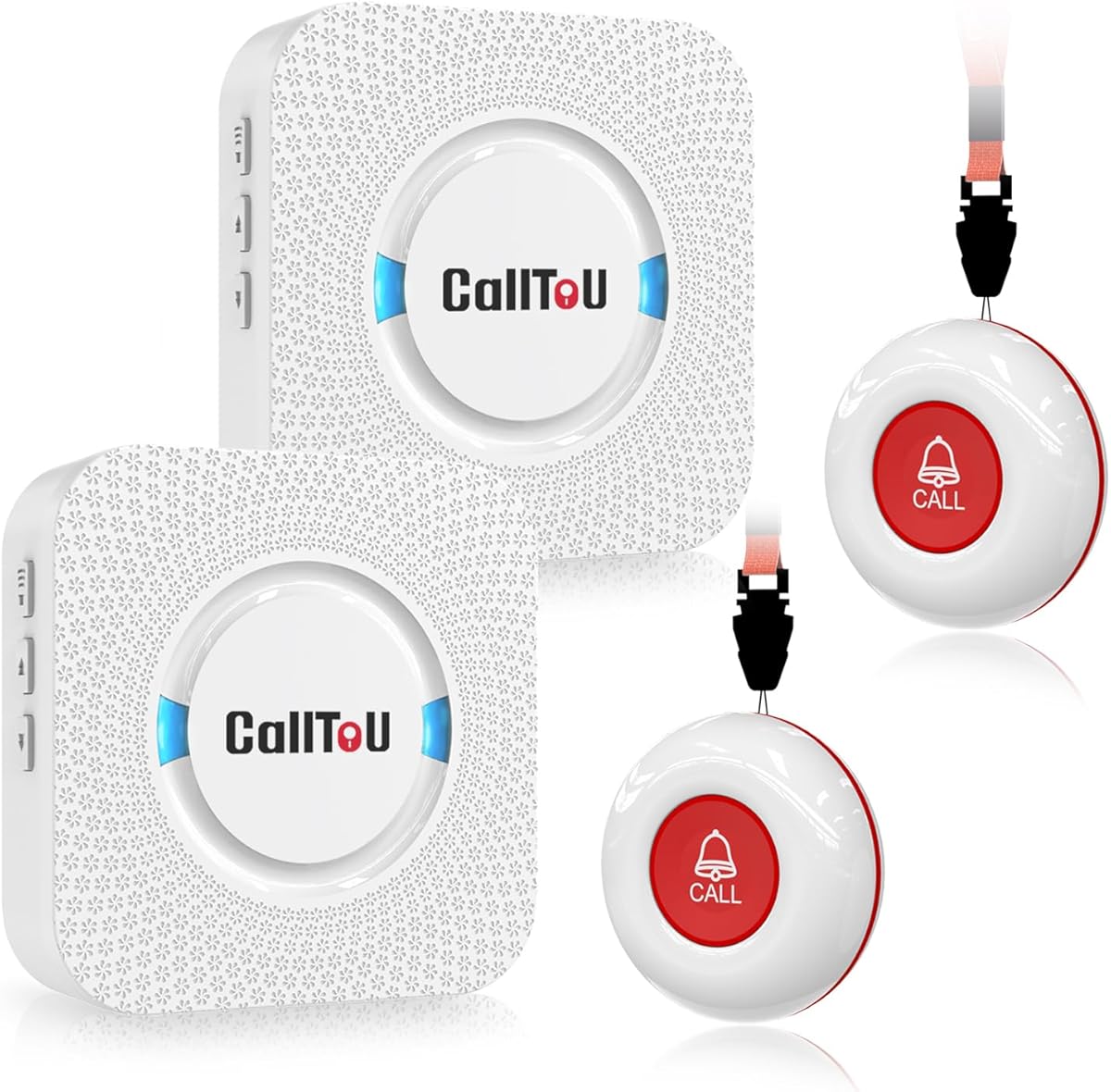
This CallToU Caregiver Pager with 2 Wireless Call Button for Elderly at Home has a 4.6 rating and distinguishes itself with two receivers. It is a good fit for an office where a supervisor and a receptionist both need to receive calls, or where one receiver can remain at a desk while another moves through the facility.
We may earn a commission when you buy through this link, at no additional cost to you.
The receiver can be carried between rooms because its open-area working range is listed at more than 500 feet. Call buttons may be worn around the neck with the included strap or secured to a surface using a bracket or double-sided adhesive. That flexibility makes the system useful for a mobile employee, a medical room, or a reception counter.
Users can select from 55 ringtones and five volume levels ranging from silent to 110 dB. Distinct tones help receivers identify the type or location of a call without relying exclusively on sight. Both buttons and receivers are described as waterproof and dustproof, which supports use in washrooms, clinics, and less protected work areas.
Both receivers require connection to an electrical outlet, so portability means relocating the receiver rather than operating indefinitely away from mains power. The two-button configuration is smaller than some multi-button systems, and offices requiring many distinct call locations may need to expand the setup.
The system is best for a small office that values receiver mobility and reliable local paging. Place the buttons according to employee risk and accessibility needs, keep receivers within earshot, and test each tone. The package's user manual and stated customer support can help with setup, but employers should still create a workplace-specific response plan.
A second receiver reduces the chance that an alert goes unnoticed when one employee leaves a desk or moves into another area. Distributing receivers can also shorten the time required for a nearby response.
The call button can be worn as a pendant, fixed to a wall, or attached with a bracket. That range of mounting options is useful when a fixed desk button is not the most accessible choice for every employee.
We may earn a commission when you buy through this link, at no additional cost to you.
This Strobe Siren Alarm Panic Alarm Buttons system has a 4.3 rating and provides a balanced package of one siren and four buttons. It suits offices that want several employee-accessible call points without carrying the duplicated siren count found in the first kit.
We may earn a commission when you buy through this link, at no additional cost to you.
The siren creates a 120 dB maximum sound output and a bright strobe when a button is pressed. Volume can be adjusted from zero to maximum, while the alert duration is adjustable from 30 seconds to 10 minutes. Those controls make it possible to tune the system for a quiet reception area, a busy shop floor, or a larger office.
The siren can use DC charging or replaceable batteries, with a stated continuous battery life of up to 30 days. The buttons feature 360-degree waterproof handling and a simple push base that allows battery changes without exposed screws. The product is listed for offices and other settings including schools, warehouses, shops, banks, hotels, businesses, and hospitals.
Its limitations are the same ones inherent to a local alert design. It does not independently notify a monitoring center, and a single siren may not be visible from every part of a large or divided workplace. The stated operational figures also assume suitable placement, power, and battery conditions.
This system is a strong candidate for small and medium workplaces that need multiple call points. Install the siren centrally where the strobe is visible, distribute buttons according to activity and accessibility, and test every unit under real ambient conditions. If the office spans several wings, adding a second siren from a compatible kit may provide better coverage.
Four wireless buttons provide enough call points for a compact office or several distinct departments. Assigning each button a permanent location helps employees form a consistent response habit.
The strobe can draw attention in locations where an audible signal is difficult to hear. A central mounting point is important because the single siren cannot be visible from every room.
We may earn a commission when you buy through this link, at no additional cost to you.
This Daytech Panic Button Alarm-Remote Emergency Strobe Siren Alarm Kit has a 3.8 rating and offers a familiar emergency-alarm format for offices that need a highly visible local signal. The package includes a wireless siren and call button, with the components paired before shipment for easier setup.
We may earn a commission when you buy through this link, at no additional cost to you.
The siren produces 120 dB sound with a flashing light and communicates with the button through an RF signal. Its stated range is 500 feet in an open area. One siren can support up to eight transmitters, including buttons and remotes, so the system can grow as more departments or call locations are added.
A built-in battery takes over when external power is lost, while the cancel function allows responders to turn off the alarm after help has arrived. The call button is waterproof and suitable for a washroom, bedside area, or similar location. The product is marketed for offices, schools, stores, banks, hotels, businesses, hospitals, and warehouses.
This ranking reflects the limited information available and the product's more limited stated backup time of about 10 hours. The siren cannot operate alone, the system is not a monitored dispatch service, and its high sound level may require precautions during testing. Actual range can also be reduced by walls, floors, and other obstructions.
The kit is best for a workplace that wants a scalable local siren and already understands how radio-triggered alerts work. Confirm compatibility before adding transmitters, test coverage throughout the building, and establish a procedure for silencing the siren after a response. Regular battery checks are particularly important because of the modest stated standby time.
A single siren can work with as many as eight transmitters, allowing a workplace to add buttons without changing its basic alert design. Expansion should follow a site survey so that added transmitters do not exceed practical radio coverage.
The cancel control lets a responder silence the siren once the incident is under control. Staff should know which control to use and must not silence the alarm unless help has been dispatched or the event is demonstrably resolved.
We may earn a commission when you buy through this link, at no additional cost to you.
The right workplace panic button depends on who must respond, how quickly they need to be reached, and what happens when the button is pressed. Review the response path, installation constraints, alert visibility, and ongoing maintenance needs before comparing models.
Choose based on the required response chain, not just the most dramatic alarm. If staff can immediately reach every floor and trained responders remain on site, a local siren may be sufficient. If the concern is an employee alone outside reception hours, remote notification is more important.
Match the alert to the workplace and its users. Use visible and audible signals where noise is high, and consider silent or discreet alerts only when a trained monitoring pathway is already in place.
Do not rely on a maximum range specification alone. Perform a walk-through test from every call point and document any weak or inconsistent zones before deployment.
Verify every compatibility requirement before purchase. A low-friction installation is one that fits the existing security system, power plan, and IT permissions without extensive modification.
Favor a system whose power design matches the site's risk level, and schedule recurring tests. Battery longevity is less important than confirmed operation when an alert is needed.
Prioritize suitable environmental protection and ergonomic mounting. A button that survives moisture but is difficult to reach or identify will not improve response time.
Choose enough call points to cover meaningful risk zones, then confirm that the system can expand. A clear location map is as important as the number of buttons.
Buy the hardware only alongside a clear response plan. Regular testing and named responsibilities turn a technical alert into a dependable workplace safety process.
Begin with a site assessment. Map employee locations, identify isolated work areas, note where machinery or background noise is highest, and decide which personnel should respond. Assign a distinct call-point identifier to each button and select a receiver or siren location that gives clear audio and visual coverage. Install devices on stable, accessible surfaces, following the supplied instructions, and avoid placements where accidental pressure, cleaning chemicals, direct weather, or heavy vibration could cause problems.
Next, configure the system for its intended environment. Program numbers or ringtones, adjust sound levels, select the siren duration, and connect the appropriate receivers or monitoring service. If the device is part of a security platform, confirm that the base station, app, account, generation, and service plan are compatible. Brief employees on what the button does, who will respond, and what they should do after pressing it. Clear signage should explain the purpose of the button without using language that could cause confusion during an emergency.
Care for the system through a documented inspection routine. Test every button and receiver on a regular schedule, check battery conditions, clean buttons as directed, and test operation during a simulated power interruption where relevant. Keep button locations, receiver positions, pairings, and account details current. Replace batteries promptly, investigate failed transmissions, and retest after any equipment change, office rearrangement, or upgrade.
The best type depends on the workplace's response plan and risk profile. Local strobe sirens are effective when trained staff are always nearby, while numbered pagers are better when responders need to identify the source of a call. Wearables or integrated monitored buttons suit workplaces where off-site notification or location information is important. The best system is one that is reachable, clearly explained, regularly tested, and connected to a defined response process.
Not always. Many products in this guide create a local audible or visual alert, and a caregiver pager signals a nearby receiver. Other products may send text, email, or push notifications, while integrated systems can work with a professionally monitored plan. Check the current product description and service requirements carefully, because a physical panic button does not necessarily provide automatic police or medical dispatch.
Yes, and a siren with both sound and a strobe is often the most practical choice in a noisy environment. The visual signal can attract attention when machinery or conversations mask the alarm. Sound levels should still be selected with hearing safety and workplace noise policies in mind. Test the alert under realistic conditions and confirm that the strobe is visible from likely response areas.
The correct number depends on the number of employees, rooms, and risk zones rather than a universal formula. At least one accessible call point should serve each isolated or high-risk area, and additional buttons may be needed near reception, production spaces, or other locations where employees work alone. Choose a kit that offers enough coverage and can be expanded. Label each station and maintain a location map so responders know where to go.
A caregiver or nurse-call system typically uses numbered buttons, distinctive tones, and a receiver intended to identify a patient or resident quickly. A workplace panic button may use a local siren, a monitored security platform, a phone alert, or a location-sharing wearable. The underlying action is similar, but workplace selection should reflect the need for staff identification, local coverage, remote escalation, or integration with existing security services.
The workplace should define this procedure before deployment. Depending on the system, the employee may remain in a safe location, move toward a designated meeting point, or contact security by another method. Staff should never re-enter danger solely to reset the alarm. A written plan should identify responders, alternate communication methods, emergency-service criteria, and the procedure for cancelling a false or resolved alert.
Testing frequency should match the risk level, usage pattern, and manufacturer guidance. A practical routine includes regular checks of every call point, audible and visual alerts, receiver operation, network connectivity where applicable, and backup power. Test after battery replacement, equipment updates, room changes, or staff turnover. A short documented drill is often more useful than simply confirming that a button powers on.
Wireless signals can be affected by walls, floors, metal, wiring, and other obstructions. A stated open-area range of 500 feet or 150 meters does not guarantee that distance inside a building. Test reception from every intended button location, especially in basements and areas with many structural obstacles. If coverage is unreliable, add a receiver or siren, reposition the equipment, or choose a wired and professionally designed alarm solution.
The three leading choices serve different priorities. The SimpliSafe Panic Button is the strongest integrated option for an office already using a compatible SimpliSafe Gen 3 system, especially when audible or silent monitored alerts are important. The CallToU Caregiver Pager System offers numbered call identification, flexible tones, and simple wireless setup, while the six-button Wireless Caregiver Pager System provides greater call-point coverage and detailed location identification.
For a smaller workplace that mainly needs a conspicuous local alert, the Daytech and strobe-siren kits provide useful combinations of 120 dB sound, visible strobes, wireless buttons, and battery flexibility. The wearable Silent Beacon serves a different need by providing discreet location sharing and phone notifications, although subscriptions and connectivity requirements deserve careful review. Prioritize the response path first, then range, power resilience, call-point identification, and everyday accessibility.
Before buying, verify current specifications, compatibility, service requirements, and the product's included components. Features, packages, monitoring plans, and pricing can change, so use the latest listing to make the final decision. Most importantly, pair the chosen equipment with clear signage, trained responders, regular tests, and a written procedure that tells employees exactly what happens after an alert is sent.