
Ostrich 65W Round-Tip Charger
4.5Editor score
Round-tip connector included
Adapter converter cable
Extensive safety mechanisms
Replacement Dell Laptop Charger guide comparing USB-C and round-tip options, wattage, connector fit, safety features, model compatibility, and included cords.
A replacement Dell laptop charger must do more than fit physically. It must match the connector, support the laptop’s required wattage and voltage, provide safe electrical performance, and work reliably across home offices, travel, and everyday use. The right choice depends heavily on whether your Dell model uses a round barrel plug or USB-C.
This guide compares ten replacement Dell laptop charger listings, including OEM-style round-tip adapters, USB-C power adapters, a 45W option, and a bulk case configuration. We evaluated the available information for connector type, output, input range, included accessories, supported model families, safety features, and compatibility details.
The picks show where each product stands out: the Ostrich option is a versatile round-tip choice, the QXA adapter offers broad USB-C coverage, and the original Dell 45W adapter serves compatible lower-power systems. Product listings and availability can change, so confirm your laptop’s exact model and connector before ordering.
4.5Editor score

4.8Editor score

4.6Editor score
This side-by-side comparison organizes the chargers by connector type, output, compatibility, and package contents, helping readers identify the option that matches their Dell system and charging setup.



The Ostrich Charger Compatible with Dell Laptop Computer 65W 45W Round Tip Power Adapter earns a 4.5 rating and stands out as a flexible solution for Dell laptops that use a conventional round charging port. Its most useful feature is the included converter cable, which allows a 4.5 x 3.0mm plug to work with laptops fitted with a 7.4 x 5.0mm connector.
We may earn a commission when you buy through this link, at no additional cost to you.
The adapter supplies up to 65W at 19.5V and 3.34A while accepting 100–240V input. It is described as compatible with 65W and 45W Dell laptops with round connectors, including Inspiron, XPS, and Vostro systems. The package includes the power adapter, a power cord, and the connector converter, giving buyers the core items needed for setup.
The listing also describes protections against short circuits, overvoltage, overcurrent, and internal overheating. That focus is important because a replacement adapter becomes part of the laptop’s power system and should be evaluated on more than whether the tip fits. One limitation is that the round connector simply cannot serve a USB-C-only Dell, and the broad compatibility language still requires a model-level check.
This is a strong choice for owners of older or still-common round-tip Inspiron, XPS, and Vostro notebooks, especially when the original adapter has been lost or damaged. It is also appealing for anyone who wants a single round-tip solution with a converter for the larger Dell barrel connector. Confirm the charging-port shape, voltage requirement, and model before purchasing.
The supplied 4.5 x 3.0mm to 7.4 x 5.0mm converter cable broadens the adapter’s usefulness across two common Dell round-tip formats. It reduces the need to search for a completely different adapter when a compatible laptop uses the larger socket.
Protection against short circuits, excessive voltage, excessive current, and internal heat addresses several common adapter failure concerns. The stated 30-day return window and lifetime exchange policy also add support beyond the initial purchase.
We may earn a commission when you buy through this link, at no additional cost to you.
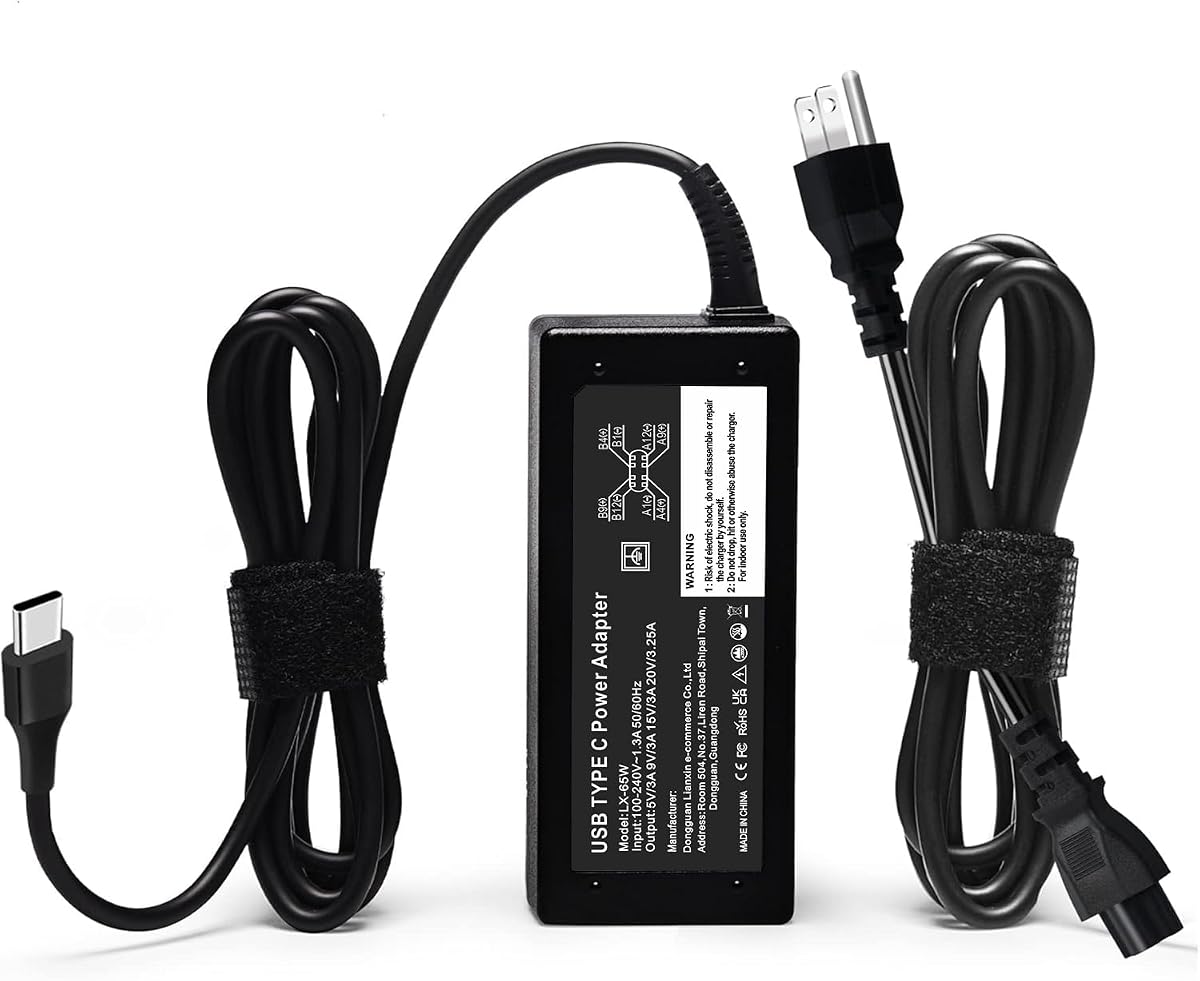
The Replacement for Dell Laptop Charger 65W Watt USB Type C AC Power Adapter has the highest stated rating in this group at 4.8. It is a compelling all-around USB-C adapter because it combines 65W output, worldwide 100–240V input, broad model coverage, and a package that includes both the AC adapter and a power cord.
We may earn a commission when you buy through this link, at no additional cost to you.
Its compatibility list is especially detailed, covering selected Dell Latitude, Dell Pro, XPS, Inspiron, and Chromebook systems. It also provides replacement part numbers associated with several 45W, 60W, and 65W USB-C adapters. This makes the listing useful for owners who know their adapter part number but not the exact marketing name of their computer.
The output reaches 20V at up to 3.25A, and the listing states that the adapter supports selected lower-wattage Dell laptops as well. Built-in protection is listed for overvoltage, overcurrent, overheating, overload, and short circuits. The only major qualification is connector type: this product does not address laptops that require a round barrel plug.
This is the most practical choice for many newer Dell users because it covers a wide assortment of USB-C-equipped business, consumer, and education systems. It is also a sensible travel option given its compact form. Still, check the exact system model and USB-C charging requirements, especially when a laptop supports multiple power profiles or includes demanding discrete graphics.
The inclusion of numerous 45W, 60W, and 65W part numbers gives buyers a practical way to match an existing adapter label. It can be more reliable than matching only a family name, especially within Dell’s large Latitude and Latitude Pro ranges.
The adapter and included cord create a straightforward travel kit for offices, classrooms, hotels, and commuting. Worldwide input support means the same unit can be used across different regions without relying on a separate travel adapter for the charger itself.
We may earn a commission when you buy through this link, at no additional cost to you.
The Dell Laptop Charger 65W Watt USB Type C AC Power Adapter is described as a genuine original Dell AC adapter and targets newer Latitude and XPS models that use USB-C. Its 3.9 rating is the lowest among the products with published feedback, but its original-part positioning gives it a different appeal from generic replacement adapters.
We may earn a commission when you buy through this link, at no additional cost to you.
The charger offers 65W at 20V and also lists 45W, 27W, and 15W output profiles. The package includes a three-foot power cord. Relevant part numbers include 0WMDHR, 0VT148, 0CJG9W, 0T3JDJ, and 723JG, while the stated factory models include LA65NM190, HA65NM190, and HKA65NM200.
Compared with the broader third-party USB-C options, its listed computer coverage is narrower. That makes careful model verification especially important. The included cord is also shorter than the ten-foot cord described for the STJJNNWI adapter, which may matter in offices where the outlet is far from the desk.
This is best for a buyer who values an adapter identified as original Dell equipment and owns one of the specifically listed models. It can also suit a repair technician seeking a known OEM-style option. Buyers with compatible USB-C systems outside the listing should favor an option with more extensive model and part-number coverage.
For owners who want the appearance and part-number alignment of an original Dell adapter, this listing offers a focused alternative. Original branding can be reassuring when the adapter must fit a particular Dell USB-C charging profile.
The stated 65W, 45W, 27W, and 15W profiles make the adapter suitable for compatible systems with different charging requirements. Buyers should still verify that their computer negotiates the correct USB-C power profile.
We may earn a commission when you buy through this link, at no additional cost to you.
The Replacement for 65W Dell Laptop Charger USB-C is unusual because it is configured primarily for institutional purchasing. The listing describes a case containing 50 consolidated units, making it a practical option for offices, schools, repair shops, and other environments that need standardized charging equipment in volume.
We may earn a commission when you buy through this link, at no additional cost to you.
The adapter provides 65W through USB-C with 100–240V, 50–60Hz input. Its output profiles include 5V, 9V, 12V, 15V, 18V, and 20V, with the maximum listed at 3.25A. Compatibility information names numerous Latitude 5000- and 7000-series systems and several Dell Pro 13, 14, and 16 configurations.
Safety features include overvoltage, overcurrent, short-circuit protection, real-time temperature detection, and heat dissipation. The listing also describes oxygen-free copper wiring with thickened tin plating. While a single unit may appear in a smaller configuration depending on seller selection, the highlighted configuration is clearly centered on orders of 50 or more.
This is the strongest match for a school district, managed workplace, technician, or refurbisher that needs consistent replacements across a fleet. For an individual owner, the bulk-focused presentation may be unnecessarily complicated. Regardless of order size, confirm the exact Dell model or part number because the lengthy compatibility list includes several generations and naming conventions.
Consolidating 50 units in one outer case simplifies receipt, storage, and distribution for institutional buyers. A standardized charger can also simplify replacement procedures when several computers use the same USB-C configuration.
Real-time temperature detection and multiple output protections are especially relevant in offices and schools where chargers remain plugged in for extended periods. These claims are useful differentiators when evaluating a high-volume replacement program.
We may earn a commission when you buy through this link, at no additional cost to you.
The DECSZDY Replacement for Dell Laptop Charger 65W USB-C provides an extensive compatibility map and a 4.1 rating. It is designed for USB-C Dell laptops and includes a power cord, giving buyers a complete basic charging kit without requiring a separate cable for the wall connection.
We may earn a commission when you buy through this link, at no additional cost to you.
Input ranges from 100–240V at 50–60Hz and 1.8A, while the listed output modes are 5V, 9V, 12V, 15V, 18V, and 20V, reaching 3.25A at 20V. The model list includes many Latitude, XPS, Chromebook, and Inspiron systems, including several 2-in-1 configurations.
The part-number list is similarly extensive, covering 45W, 60W, and 65W adapter references as well as numerous alphanumeric Dell numbers. Built-in protection is stated for short circuits, overcurrent, overvoltage, overheating, and overload. The package contains one power adapter and one power cord, with round-the-clock email support also advertised.
This is a good general USB-C replacement for a buyer whose Dell appears in the supplied compatibility information and who values a single listing covering many product lines. It may be particularly useful when an older part number is available but the computer’s retail name is unknown. Confirm both connector and power profile before ordering, especially for specialized or newly released systems.
Listing models and part numbers together gives buyers two ways to check fit. A system name can help those who know the label on the laptop, while the adapter number can help when the original charger is still available for comparison.
Supporting several voltage and current combinations increases the usefulness of the adapter across compatible Dell USB-C devices. The 20V, 3.25A mode provides the listed 65W maximum.
We may earn a commission when you buy through this link, at no additional cost to you.
The 60W 65W USB C Laptop Charger fits for Dell Pro 14 16 13 Plus USB-C Adapter offers a practical combination of broad modern-model support and a long cord. Its 4.4 rating places it among the stronger-rated USB-C options in the roundup.
We may earn a commission when you buy through this link, at no additional cost to you.
The adapter accepts 100–240V at 50–60Hz and provides 15V, 20V at several current levels, with a maximum of 3.25A. Its ten-foot cord is a clear convenience for shared workspaces, conference rooms, hotel desks, and installations where the wall outlet is not directly beside the computer.
Compatibility information covers Dell Plus 14 and 16 systems, Dell Pro 13 Plus, Premium, and Pro 16 Plus models, numerous Latitude systems, selected XPS and Inspiron USB-C laptops, and Chromebooks. The listing notes that some Inspiron models work only with the 65W version and identifies a set of 60W and 65W Dell part numbers.
Choose this adapter when cable reach matters or when your exact system is among the listed Plus or Pro configurations. A long cord is not automatically better, however, since it can be cumbersome in a laptop bag and may be more likely to become tangled. Ensure the selected model is configured for the wattage your laptop expects.
The ten-foot cord can keep a laptop connected without requiring the adapter to sit directly beside it. That makes the charger easier to use in rooms with awkward outlets, shared desks, or temporary workstations.
The listing includes several DB, PC, and PB model families associated with Dell Plus and Dell Pro computers. This gives it particular relevance to buyers of recent business notebooks and convertibles, provided the exact configuration is verified.
We may earn a commission when you buy through this link, at no additional cost to you.
The Dell 45W Replacement AC Adapter for Dell has a 4.6 rating and focuses on a specific original Dell part. It is listed for part numbers 0KXTTW and LA45NM140, making it most appropriate when a buyer can match one of those references to the original adapter.
We may earn a commission when you buy through this link, at no additional cost to you.
The adapter accepts worldwide 100–240V AC input at 50–60Hz and produces 19.5V at up to 2.31A, for a maximum of 45W. A power cord is included. Its straightforward specifications make it a natural choice for a Dell system originally designed around a 45W barrel charger.
Compared with the 65W round-tip alternatives, the important distinction is not merely lower output but different intended equipment. A 65W adapter may fit some systems that accept it, while a 45W unit is appropriate when the laptop or original adapter specifically calls for 45W. The part-number focus is both an advantage and a limitation.
This is a premium-style choice for owners who want an original Dell replacement and know the relevant part number. It is also attractive for compatible lower-power systems where a smaller, purpose-specific adapter is preferable. Before ordering, compare the connector, voltage, amperage, and printed part number with the charger being replaced.
A 45W adapter can be the correct choice for Dell systems designed around lower charging demand. Matching the original specification reduces unnecessary guesswork and avoids substituting a much larger adapter for equipment that never required it.
The inclusion of 0KXTTW and LA45NM140 gives buyers concrete identifiers to compare. A visual and label-based match is more dependable than relying only on a broad Inspiron, Latitude, or XPS family name.
We may earn a commission when you buy through this link, at no additional cost to you.
The 65W AC Charger for Dell Inspiron 11 13 15 17 3000 5000 7000 La65ns2-01 specializes in round-tip Inspiron charging. It carries a 4.4 rating and is particularly relevant to users of Dell’s larger 11-, 13-, 15-, and 17-inch Inspiron families, including several 3000, 5000, and 7000-series systems.
We may earn a commission when you buy through this link, at no additional cost to you.
The charger supports both 4.5 x 3.0mm and 7.4 x 5.0mm sockets, while supplying up to 65W at 19.5V and 3.34A. Its 110–240V input range accommodates use in many regions, and the included cord is listed at 8.8 feet. That offers more reach than the three-foot cord offered with the original Dell USB-C adapter.
The replacement part list includes KXTTW, 04H6VH, ADP-45XD BA, D0KFY, 332-1827, JHJX0, and several 45NM references. The listing also notes that model number SK90195334 is compatible with BRJ65195334 and states that the adapter carries CE and FCC safety certification.
This is a strong choice for an older or mainstream Inspiron that uses one of the supported round connectors, particularly if the original LA65NS2-01-style adapter has failed. The lengthy model list is useful, but it includes family names and specific model numbers, so verify the connector and label before buying. USB-C-equipped Inspiron models need a USB-C charger instead.
Supporting both common Dell barrel dimensions makes this adapter adaptable within older and mainstream Inspiron systems. It is better suited to round-tip computers than the USB-C choices elsewhere in the guide.
The 8.8-foot cord offers enough reach for many desk arrangements and avoids keeping the adapter block directly beside the laptop. Route the cable carefully so it does not become a trip hazard or become pinched against furniture.
We may earn a commission when you buy through this link, at no additional cost to you.
The supplied data for ASIN B0F371QBYX contains no product title, rating, image, or factual specifications. Consequently, there is not enough information to assess its connector, wattage, voltage, compatibility, protection features, or package contents.
We may earn a commission when you buy through this link, at no additional cost to you.
Because connector type is the most important replacement consideration, a listing without that detail should not be selected based on the ASIN alone. The same applies to the required power profile. Even an adapter described broadly as a Dell charger may use a 4.5 x 3.0mm barrel, a 7.4 x 5.0mm barrel, or USB-C, and those interfaces are not interchangeable.
The available Amazon link can be used to inspect the live listing and compare the adapter label with the charger being replaced. Buyers should seek the output wattage, voltage, amperage, connector dimensions, supported part numbers, certification information, safety protections, and included power cord.
This product is included to represent the full supplied ranking, but the lack of usable data prevents a strong recommendation. Consider it only after verifying the live listing and confirming that its specifications precisely match the Dell laptop. One of the documented USB-C or round-tip options in this guide will be easier to assess with confidence.
Do not assume that a Dell-branded search result supports the same charging interface or wattage as the original adapter. Compare the physical plug and the complete electrical label before ordering.
The product link may contain current images and specifications that were not included in the source data. Those details should be checked independently, particularly the connector and supported model numbers.
We may earn a commission when you buy through this link, at no additional cost to you.
No factual listing information was supplied for ASIN B0921QPWQX beyond its identifier and Amazon link. With no connector, output, input, compatibility, certification, or included-accessory information, it is impossible to establish whether this is a round-tip adapter, a USB-C adapter, or another type of Dell accessory.
We may earn a commission when you buy through this link, at no additional cost to you.
This uncertainty is especially important because charging ports and power requirements have changed across Dell product generations. A visually similar charger can still be inappropriate if its output profile does not match the laptop, and an incorrect barrel-tip size can make physical insertion impossible. Numerical labels provide a more reliable basis for selection than appearance alone.
The live listing should be consulted for the adapter’s full specifications, supported Dell part numbers, and the contents of the package. Buyers should also check whether the power cord is included, whether the product is intended for home or travel, and whether a separate USB-C cable is needed for the computer.
This listing is retained for completeness rather than presented as a confident recommendation. If the live details prove compatible and provide clear safety information, it may be a workable choice. Otherwise, the documented options in this roundup offer far stronger information for a replacement Dell laptop charger.
Start by identifying whether the laptop accepts a round barrel connector or USB-C. This single check eliminates many otherwise plausible but unusable adapters.
Photograph or read the output label on the old adapter, then compare voltage, amperage, wattage, and part number. This information provides a much stronger compatibility check than the general Dell name.
We may earn a commission when you buy through this link, at no additional cost to you.
A reliable replacement starts with the laptop’s charging interface and original electrical label, then expands to wattage, connector size, supported models, safety protections, portability, and included accessories.
Determine whether the laptop accepts a round barrel plug or USB-C before considering any other feature. Round-tip Dell systems may use either a 4.5 x 3.0mm connector or a larger 7.4 x 5.0mm connector, while many newer business and consumer systems use USB-C. A physically similar plug can still fit poorly if its diameter is wrong, and USB-C is not a universal substitute for every Dell charging port.
Choose based on the port in the laptop, not merely the brand or model year. If the original adapter is available, compare its plug directly. For round-tip systems, the Ostrich and SK90195334 options support both common barrel sizes, while the Dell 45W Original AC Adapter is most appropriate when its part number and connector match.
Wattage indicates the maximum charging power, but the adapter also needs suitable voltage and current outputs and a USB-C profile accepted by the laptop. A 65W adapter is common for many Dell systems, while some laptops use 45W or 60W adapters. Higher maximum output does not automatically make an adapter appropriate if the computer’s charging circuit and connector do not support it.
Read the output label on the original charger and match voltage and amperage where possible. A 19.5V, 2.31A adapter is a different product from a 19.5V, 3.34A model, even though the maximum wattages and voltage can appear similar. For USB-C units, verify that the supported Dell power profiles and part numbers include the laptop in question.
The AC input range determines whether a charger can be used in different locations without a voltage-conversion device. An adapter with 100–240V AC input is broadly suitable for international travel, while 110–240V covers many regions but not every one. The listed frequency should also be compatible with the local electrical supply.
Worldwide input support is a useful advantage for frequent travelers or organizations with staff working across countries. The US-style power cord included with a product may still require a separate plug adapter for the destination, because the cord and the charger’s input range solve different parts of the travel problem.
A useful compatibility list should contain more than vague family references. Exact model numbers, original adapter part numbers, and connector dimensions provide stronger evidence of fit. Dell has used numerous generations of Latitude, Inspiron, XPS, Chromebook, and Pro systems, some with similar names but different charging requirements.
Cross-check at least two identifiers when possible. Compare the replacement part number with the label on the old charger and confirm the computer’s exact model. If a listing says “select” models, determine whether the word is merely a general disclaimer or a meaningful limit. The QXA and DECSZDY listings are particularly useful here because they pair model names with numerous part numbers.
A laptop charger should include protection against the conditions most likely to damage it or the connected computer. Common features include overvoltage, overcurrent, overload, short-circuit, and thermal protection. Real-time temperature monitoring can add another layer of assurance in settings where the adapter is left plugged in for long periods.
Look for documented protections rather than assuming every generic adapter has them. The Ostrich listing names short-circuit, overvoltage, overcurrent, and overheating protection; the QXA, GVKRLXZ, DECSZDY, and other USB-C listings make similar claims. Certification markings and recognized testing can provide additional assurance, although buyers should still use the labeled power rating as the primary compatibility check.
A charger listing may include the AC adapter, a detachable wall cord, and a laptop-side cable, but packages vary. Some products specify one power cord and adapter, while others add a barrel-connector converter. Identify what connects to the wall and what connects to the laptop so an extra USB-C cable or barrel plug is not accidentally omitted.
The Ostrich package is notable for its 4.5 x 3.0mm to 7.4 x 5.0mm converter cable. Most USB-C options include an AC power cord but rely on the laptop’s built-in USB-C port and attached cable for the device connection. The three-foot cord on the original Dell USB-C adapter is shorter than the 8.8-foot and ten-foot cords offered by other choices.
Cord length affects both setup flexibility and packing convenience. A long cord is useful when the wall outlet is distant from a desk, while a compact arrangement is easier for commuting, travel, and shared charging stations. The product’s total size matters because the adapter block and cord must fit into a laptop bag without creating a snag risk.
The STJJNNWI adapter’s ten-foot cord is the longest documented option, followed by the SK90195334 charger at 8.8 feet. The QXA emphasizes a compact adapter for bags and suitcases. Choose based on your normal environment rather than assuming that the longest cord is universally superior.
Manufacturer or seller support can be important when a replacement arrives damaged, is incompatible despite an expected match, or develops a fault. The Ostrich listing describes a 30-day return and exchange policy along with lifetime exchanges for defective products. The DECSZDY option advertises email support. Buyers should retain packaging and documentation until compatibility is confirmed.
Purchase scale is another differentiator. The GVKRLXZ listing is specifically organized around 50-unit cases for institutions, repair shops, and large offices. A buyer who needs only one adapter may find that presentation less convenient, while a fleet manager may value the consolidated case and standardized compatibility.
Before connecting anything, compare the replacement with the original charger and the laptop’s charging port. Confirm the connector type, output voltage, current, wattage, and any listed Dell part number. For USB-C adapters, make sure the connector is fully compatible with the computer’s charging port and that the charger output profile is supported. Read the adapter label rather than relying on the packaging name alone.
Place the adapter on a stable, hard, and ventilated surface. Connect the charger to the laptop first if the manufacturer’s instructions recommend that sequence, then plug the power cord into the wall outlet. Never force a connector, route a cable where it can be crushed, or leave the adapter beneath heavy objects. Disconnect it from the wall before changing cables or moving the adapter to another location.
Inspect the cable and plug periodically for cuts, discoloration, loose components, heat damage, or a bent connector. Unplug the charger if you notice unusual odor, buzzing, discoloration, or excessive heat and have it evaluated before using it again. Keep the power supply dry and away from liquids, direct heat, and children. Store the cord loosely rather than wrapping it tightly around the adapter.
It may work if the connector, voltage, current, and USB-C charging profile are compatible, but the adapter label should be checked against the laptop requirements. A higher maximum wattage does not automatically guarantee compatibility, and the computer must accept the charger’s output profile. When in doubt, match the original specifications or consult the laptop manufacturer.
Look at the charging port on the laptop and compare it with the connector on the original adapter. A round socket accepts a barrel-style pin, while USB-C has a small reversible oval connector. Measure the round opening if possible, since Dell commonly uses both 4.5 x 3.0mm and 7.4 x 5.0mm dimensions.
Only if the older laptop actually includes a USB-C charging port and supports the adapter’s power profile. Many older Inspiron, Latitude, and XPS models use a round barrel connector, so a USB-C adapter will not plug into them. Part-number compatibility can also reveal whether a USB-C replacement is appropriate for a specific Dell system.
Check output voltage, amperage, wattage, and the original part number printed on the old adapter. For USB-C devices, also confirm that the charger supports the Dell charging profile and the exact computer model. Input voltage matters for regional use, while a quality power cord and documented safety protections improve the overall setup.
No. The supplied product information explicitly says that a power cord is included for the Ostrich, QXA, original Dell USB-C, GVKRLXZ, DECSZDY, Dell 45W, and STJJNNWI products, while the SK90195334 listing describes an 8.8-foot cord. Always check the package contents because a wall cord and a laptop-side cable are different components.
Yes, if the product includes a suitable converter. The Ostrich charger comes with a 4.5 x 3.0mm to 7.4 x 5.0mm converter cable, and the SK90195334 charger states compatibility with both socket sizes. Confirm the conversion direction and connector fit before inserting either end.
An original adapter can be attractive when the part number and electrical specifications match exactly, but it is not automatically the only suitable option. Well-documented third-party replacements can also support the required output profiles and protections. The deciding factors are connector fit, electrical compatibility, model support, construction, safety features, and support.
Inventory the exact laptop models and adapter part numbers first, then standardize on a charger that covers those requirements. The GVKRLXZ option is designed around 50-unit cases for institutional purchasing, while the QXA, DECSZDY, and STJJNNWI listings offer broad individual model coverage. Test the proposed charger with every distinct laptop configuration before rolling it out.
The strongest overall choice is the QXA 65W USB-C Dell Laptop Charger because it combines the highest stated rating with wide Latitude, XPS, Inspiron, Dell Pro, and Chromebook coverage. The Ostrich 65W round-tip option is the practical selection for traditional Dell barrel connections, while the original Dell 45W adapter is best for a matching part number and lower-wattage system.
Prioritize connector fit, electrical output, and exact model support before focusing on secondary features. USB-C buyers should check the accepted Dell power profile and adapter part number, while round-tip owners should verify both voltage and barrel diameter. Long cords, converter cables, bulk packaging, and warranty support can become decisive after the basic electrical requirements are met.
Finally, review the live listing before ordering because product details, packaging, and availability can change. Compare the replacement’s label with the charger being replaced, and never assume that every Dell charger uses the same connector or output. A small amount of verification can prevent an incompatible purchase and keep charging safe and dependable.


