
Hyperkin Scout Premium Wired Controller
4.6Editor score
Compatible with all SNES models
Premium ergonomic construction
Extended 10-foot cable
A replacement Snes Controller can restore a favorite console, improve multiplayer sessions, or provide a familiar way to play retro games on a computer. The right choice depends on whether you need original-console compatibility, wireless freedom, USB emulator support, or internal conductive repair pads.
We compared all ten options by examining platform compatibility, connection method, control layout, battery information, installation needs, and practical limitations. The list covers full controllers for original SNES systems and computers as well as silicone membrane replacements designed for repair work.
Each review explains what stands out, who the product suits, and where it may fall short. Ratings and specifications reflect the supplied listings, while availability and prices can change over time, so confirm current details before making a purchase.
4.6Editor score

4.4Editor score

4.3Editor score
As an Amazon Associate we earn from qualifying purchases.
The comparison below separates original-console controllers, USB emulator pads, wireless computer options, and repair membranes, making platform compatibility and connection style easy to assess.


This two-controller USB set is a practical budget choice for people who want to play retro games on a computer rather than replace a controller on an original console. Its 4.3 rating reflects generally favorable user feedback, while its standout features are the two-controller bundle, broad platform support, and simple wired setup.
We may earn a commission when you buy through this link, at no additional cost to you.
The pads support Windows systems ranging from Windows 98 through Windows 11, Mac OS X, Linux, and Raspberry Pi models. They also work with many popular emulators, including VirtuaNES, RetroArch, OpenEmu, Zsens, and other software listed in the product information. The attached USB cable measures approximately 1.5 meters, and no drivers are required for connection.
The main limitation is platform purpose. This is explicitly a USB controller for computers and cannot be plugged into an original SNES or Super Nintendo console. Button assignments also do not appear automatically in every emulator, so users may need to enter the directional and action controls manually. Those two facts make it unsuitable for some buyers, but they are reasonable compromises for an inexpensive two-player computer accessory.
This is the best pick for families or friends who want two dedicated retro gamepads for PC and Raspberry Pi gaming without installing complicated software. It is less suitable for someone seeking a drop-in console replacement. Those shoppers should instead prioritize one of the original-SNES-compatible controllers in this guide.
The two-controller pack creates an immediate multiplayer option, while the standard USB connection avoids the battery and pairing demands of wireless alternatives. Connecting the pad before launching the emulator simplifies initial recognition.
A concave directional pad and conventional face-button arrangement create a more recognizable SNES-style experience than a generic modern gamepad. Manual mapping in the selected emulator remains necessary.
We may earn a commission when you buy through this link, at no additional cost to you.
This silicone conductive pad is a repair component rather than a complete replacement controller. It is intended for original Nintendo SNES and SFC controllers whose conductive button membranes have worn out or stopped registering presses reliably. Its 3.7 rating indicates a more mixed reception than the complete controllers in the list.
We may earn a commission when you buy through this link, at no additional cost to you.
The package includes one conductive rubber silicone button pad. Its soft material is intended to restore electrical contact between the controller buttons and their conductive membranes. Because it is designed specifically for SNES and SFC hardware, buyers should compare the listed images and controller model before ordering.
Repairing with this component requires opening the controller and positioning the pad correctly. It does not solve cable damage, failed PCB components, missing buttons, or general shell deterioration. Installation also demands care because the internal pad must make consistent contact with each button.
This option makes sense for a technician, experienced hobbyist, or owner of a physically intact controller with unresponsive buttons. If the goal is a ready-to-play controller with an original console connection, choose a complete wired or wireless replacement instead.
A conductive silicone membrane can restore button response when the controller shell, cable, and electronic board remain in good condition. This makes it a more economical and less wasteful repair than discarding an otherwise sound controller.
The pad is listed only for SNES and SFC controllers. Comparing the product photographs with the opened controller helps reduce the risk of choosing an incompatible internal shape.
We may earn a commission when you buy through this link, at no additional cost to you.
This wireless controller pair is an excellent upgrade for original SNES hardware with a damaged or inconvenient controller cable. Its 4.4 rating, broad console support, and generous 2.4GHz range make it one of the strongest choices for preserving an original console setup.
We may earn a commission when you buy through this link, at no additional cost to you.
Each controller includes a rechargeable 3.7-volt, 500mAh lithium-ion battery, and the listing states that it can operate for more than ten hours. The wireless range reaches up to 30 feet, allowing players to move around a room without sitting near the television. Pairing is described as plug and play through the included seven-pin SNES adapters.
Compatibility is narrower than the headline might initially suggest. The product does not work with the SNES Classic Edition, SNES Mini, or NES Classic Edition. It also does not support simultaneous two-player operation on Super Famicom systems, and its wireless connection is not Bluetooth. There is no USB dongle for PC, Raspberry Pi, or Switch use.
Choose this product when your priority is a reliable replacement for an original SNES console controller and the freedom from a fixed cable. It is less appropriate for modern mini consoles, PC gaming, or games that require two wireless controllers simultaneously.
The 2.4GHz connection removes the need to sit close to the console and avoids cable fatigue. A stated range of 30 feet is ample for most living-room arrangements.
A battery runtime of over ten hours means most players can complete several gaming sessions before recharging. The included adapters make the initial console connection straightforward.
We may earn a commission when you buy through this link, at no additional cost to you.
This ZAMPAM two-pack combines a classic-inspired layout with broad support for computers, retro-gaming systems, and the original Nintendo Switch. Its 4.0 rating reflects a balanced set of wireless conveniences and some limitations, most notably a stated battery life of up to three hours.
We may earn a commission when you buy through this link, at no additional cost to you.
The controllers use 2.4GHz radio technology and communicate through a USB receiver, providing a listed range of up to 10 meters. They work with Windows, Mac OS, Linux, Raspberry Pi, RetroPie, Recalbox, and Nintendo Switch models listed as Switch 1. They are also presented as suitable for programs and emulators that recognize standard USB game controllers.
Setup is designed to be uncomplicated: connect the USB receiver and begin using the pad with compatible software. The built-in 240mAh battery takes about an hour to charge, while an indicator helps monitor remaining power. The shorter runtime than several competing wireless options is the clearest trade-off.
This pair is a strong choice for households wanting two wireless controllers for emulator use across several platforms. It is less suitable for Switch 2 owners or marathon gaming sessions that exceed the stated three-hour battery window.
Compatibility with Windows, Mac, Linux, Raspberry Pi, common retro distributions, and Switch 1 gives the pair unusually broad utility. Each connected software platform still needs to recognize standard controller input correctly.
The battery indicator removes some of the uncertainty associated with wireless play. Charging takes approximately one hour, so keeping the controllers topped up before long sessions is advisable.
We may earn a commission when you buy through this link, at no additional cost to you.
The Hyperkin Scout is the strongest wired option for an original SNES console, combining broad model compatibility with a 4.6 rating, the highest numeric score in this collection. Its premium construction and ergonomic design also set it apart from basic third-party pads.
We may earn a commission when you buy through this link, at no additional cost to you.
The controller is compatible with all Super NES models and includes a 10-foot cable, offering more reach than the five-foot leads common on USB retro pads. The listed focus on build quality and comfortable handling makes it appealing for owners who want a dependable console replacement without introducing wireless pairing or battery maintenance.
Its limitations follow directly from the wired design. There is no stated USB computer support, emulator compatibility, Bluetooth function, or wireless receiver. Players who need to move around the room substantially may find the fixed cable less convenient, although its generous length helps compensate.
Choose the Scout when authenticity, construction, and direct original-console operation matter most. It is a particularly sensible upgrade for a classic system that still works well but has a worn original controller.
The Scout emphasizes ergonomic construction rather than novelty features. That focus can make a conventional SNES pad more comfortable during long sessions.
The 10-foot lead provides meaningful distance from the television and avoids the restricted movement often found with standard controller cables.
We may earn a commission when you buy through this link, at no additional cost to you.
This ZAMPAM wireless controller is built for computer and emulator gaming rather than original console use. Its 4.2 rating and standout battery specification make it attractive for players who prefer infrequent charging alongside a more expansive wireless range.
We may earn a commission when you buy through this link, at no additional cost to you.
The controller uses 2.4GHz technology with a stated range of 24 feet. Its rechargeable lithium-ion battery is said to last around 100 hours on one charge, substantially longer than the runtime listed for many competing wireless pads. The USB adapter supports PC, Windows games, and Android devices with suitable emulators.
The product does not work with a Super Nintendo or Mini SNES Classic console. It also recommends downloading a joystick-mapping utility such as Joystick Mapper to configure controls on Mac and Windows devices. A configurable turbo function can be enabled by holding Select while pressing one of the A, B, X, or Y buttons.
Choose this controller for long emulator sessions on a computer or supported Android device. It is not the right product for restoring an original console, and buyers should be prepared to spend a few minutes configuring input assignments.
An approximately 100-hour runtime is the defining feature for this controller. It reduces charging frequency compared with compact wireless alternatives that commonly list only a few hours of play.
Assigning turbo behavior to a face button through the stated Select combination adds flexibility for compatible retro titles. It is a helpful extra for games that benefit from rapid repeated input.
We may earn a commission when you buy through this link, at no additional cost to you.
The miadore two-pack offers an effective mix of traditional SNES-style controls and cross-platform USB support. Its 4.4 rating reflects strong user approval, and the pair is especially appealing to families who want two controllers for emulator gaming on varied systems.
We may earn a commission when you buy through this link, at no additional cost to you.
Compatible platforms include numerous Windows versions, Mac OS X and later, Raspberry Pi and Raspberry Pi 2 Model B, RetroPie OS, and other emulators. Plug-and-play operation is supported without drivers or software for basic connection, although the product notes that buttons may still need to be mapped within an emulator's settings.
The directional pad supports eight-way input, while the face buttons follow a concave and convex arrangement designed to recreate a familiar retro feel. The attached cord is approximately five feet long. As a third-party product, it does not connect directly to original SNES or NES consoles.
Choose the miadore set when a reliable two-player wired solution for Windows, Mac, Linux, or Raspberry Pi is the goal. It offers more flexibility than a console-only controller while avoiding wireless pairing and battery concerns.
Two included controllers simplify couch multiplayer, while their wired connections remove pairing steps. Each controller can serve as a dedicated input device in compatible emulator software.
The eight-way directional pad and varied face-button contours reproduce familiar SNES-style handling. Connecting before launching a game often makes initial input recognition more predictable.
We may earn a commission when you buy through this link, at no additional cost to you.
This two-pack of wireless USB controllers is designed for retro emulators on Windows, macOS, Linux, and Raspberry Pi. Its 4.2 rating and included accessories give it a balanced appeal for computer users who want multiplayer freedom without buying receivers separately.
We may earn a commission when you buy through this link, at no additional cost to you.
The controllers use 2.4GHz wireless technology with a stated range of 10 meters, or approximately 33 feet. A standard USB receiver supports compatible systems without requiring drivers, while high-sensitivity buttons are intended to support precise control in retro games. The built-in rechargeable batteries offer a listed runtime of ten hours.
Compatibility exclusions are significant. The product is not listed for Android TV boxes, Fire TV, Chromebook, SteamOS, Tesla vehicles, C64, or Nintendo Switch. The Switch exclusion is specifically tied to button configuration, so this model should not be selected on the assumption that every modern game system will recognize it.
Choose this pack for two-player PC and macOS emulator gaming where wireless movement and a ten-hour runtime are priorities. It is better suited to desktop computing than mixed-device households with unsupported smart TVs or streaming hardware.
The box includes two controllers, USB receivers, charging cables, and a user manual. This makes the package convenient for households planning regular local multiplayer sessions.
The 2.4GHz receiver approach provides a listed 10-meter range and avoids Bluetooth pairing complexity. The controller still needs recognition and mapping in the emulator being used.
We may earn a commission when you buy through this link, at no additional cost to you.
This KIWITATA controller is the most flexible wireless option in the list because it supports an original SNES console through a seven-pin adapter and a USB dongle for computers. It is especially appealing for owners who want one controller for console games and emulator gaming on the same system.
We may earn a commission when you buy through this link, at no additional cost to you.
The controller offers a listed wireless range of 30 feet and includes a 3.7-volt, 500mAh rechargeable lithium-ion battery that can run for more than ten hours. The supplied information lists compatibility with Windows versions from 98 through 11, Mac OS X 10.0 or later, and several Raspberry Pi models, including the Pi 1 A+, Pi 2 Model B, Pi 3 Model B, Pi Zero W, and Pi 4.
Connection mode determines the experience. Original-console users rely on the included wireless pairing adapter, while PC and Raspberry Pi users employ the USB dongle. The product has no supplied numeric rating, so buyers should place greater weight on documented compatibility and the inclusion of both connection methods.
Choose this controller when one wireless pad must move between an original console and a computer setup. Confirm that your operating system and software recognize the controller before committing to a project involving emulator configuration.
The included SNES adapter and USB dongle create a bridge between original-console gaming and computer emulation. This versatility is more useful than a single-platform wireless pad for mixed-use households.
The controller is listed across numerous Windows, Mac, and Raspberry Pi configurations. Software compatibility remains important, so users should confirm that their preferred emulator recognizes standard USB gamepads.
We may earn a commission when you buy through this link, at no additional cost to you.
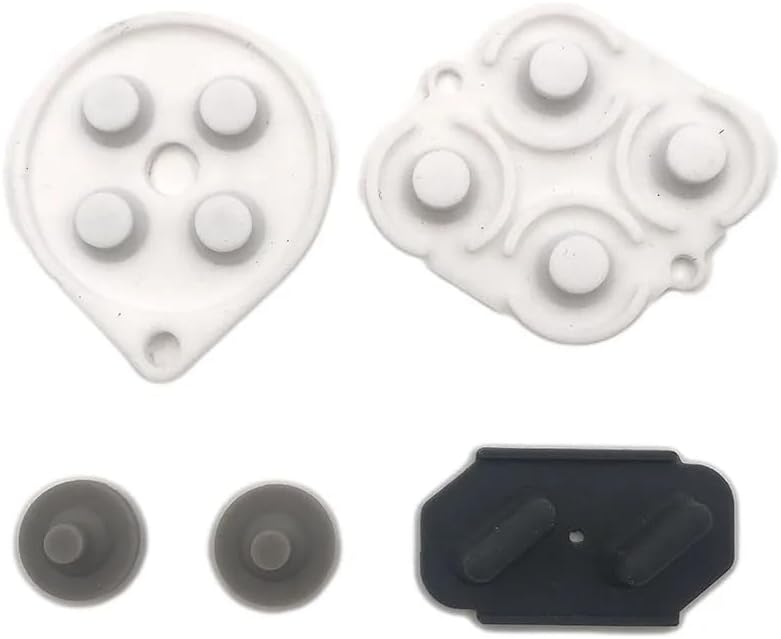
The GUANKE conductive rubber set is designed to restore contact beneath the buttons of an SNES controller. It is not a playable controller by itself, but it can be valuable when the original shell and electronics remain sound while individual or multiple buttons have become unresponsive.
We may earn a commission when you buy through this link, at no additional cost to you.
The package contains one set of conductive rubber button pads. The manufacturer describes it as suitable for SNES controllers and intended to make a worn controller look new again. Buyers are advised to compare the photographs, descriptions, and controller model before installation because internal replacement parts must closely match the device.
This repair requires opening the controller and positioning the membrane so that each conductive section touches the appropriate contact. It will not address a broken cable, damaged circuit board, defective power circuit, or missing plastic components. Incorrect placement can also lead to persistent or intermittent input issues.
Choose the GUANKE set when button failures point directly to worn conductive membranes and you are comfortable with careful controller repair. For a ready-to-play experience, a complete original-console controller or USB emulator pad is the safer and more convenient choice.
A membrane replacement can return a structurally sound controller to working order while retaining its original shell. It is best suited to clear cases where several buttons have lost reliable contact.
Internal pads are model-specific and must align with the correct buttons and contacts. Reviewing the supplied images and description carefully helps avoid a mismatch before the controller is opened.
We may earn a commission when you buy through this link, at no additional cost to you.
The right replacement depends primarily on the system you want to control, the cable or radio arrangement you prefer, and whether you need a complete gamepad or an internal repair membrane. Compatibility should be checked before features such as range, battery life, or turbo controls.
Start by identifying the device that must accept the controller. Original SNES and Super Famicom systems require a controller with the appropriate console connector or a correctly specified wireless adapter. Computer-based options use USB and may support Windows, Mac, Linux, Raspberry Pi, RetroPie, Recalbox, or particular emulators. The KIWITATA USB pad, for example, works on several computer platforms but explicitly does not connect to an original SNES console.
Wired controllers offer straightforward setup, consistent input, and no battery maintenance. Their primary disadvantage is the fixed distance imposed by the attached cable. Wireless controllers reduce cable clutter and permit more movement, but they introduce receiver pairing, battery charging, and possible signal or compatibility questions. Inspect whether the package includes the required receiver, console adapter, charging cable, or USB dongle rather than assuming those accessories are supplied.
A controller sold in a pair can make local multiplayer more convenient, but two controllers do not automatically guarantee two-player support. Some original-console wireless products are limited to one-player games, while emulator systems may require separate receiver connections and software configuration. Check the number of included controllers, the number of receivers or adapters, and any explicit restriction on simultaneous play before buying.
USB controllers generally connect without drivers, but emulators often still require users to assign buttons and directional axes manually. Some listings recommend a joystick-mapping utility, while others explain that a controller should be plugged in before the emulator starts. Look for the specific operating systems and emulator programs named in the product information, and allow time for first-time setup if the software does not automatically recognize the layout.
Battery specifications vary dramatically in this category, from roughly three hours on one wireless model to approximately 100 hours on another. More hours mean fewer interruptions, but runtime also depends on use, battery condition, and settings. Look for an included charging cable, a battery indicator, and clear pairing instructions. A wireless controller intended for marathon sessions should offer stronger endurance than one intended primarily for occasional use.
A useful SNES-style controller should provide a responsive directional pad, clearly separated face buttons, and accessible Start and Select controls. Concave and convex face buttons can reproduce the feel of an original pad, while an eight-way directional pad supports games requiring diagonal movement. Ergonomics are subjective, but the shape, button spacing, and grip should feel familiar rather than crowding the fingers.
Conductive silicone pads are internal repair parts rather than finished controllers. They can solve worn contact membranes in an otherwise healthy SNES controller, but they require disassembly and accurate placement. A complete controller is more convenient and better suited to most buyers. Consider a membrane only when the shell, cable, and electronics are sound, several buttons have failed, and you are comfortable with careful repair work.
Wireless range is normally stated as a maximum under favorable conditions, so the practical distance inside a home may be shorter. More important is whether the intended device is supported. Several listings exclude Nintendo Switch, Switch 2, Android TV boxes, Fire TV, Chromebook, SteamOS, or classic mini consoles. Review the exclusions carefully, because a product can use a familiar connector or USB receiver yet still lack the button configuration required by a particular system.
Begin by confirming the controller's intended connection method. For a wired original-console pad, shut down the console before connecting it and avoid forcing the plug. For USB models, connect the controller before opening the emulator so the software has time to detect it. Wireless console controllers require the specified adapter, while USB wireless controllers require their supplied receiver.
After connecting the hardware, open the emulator's input or controller settings and map the directional pad, face buttons, Start, and Select as needed. Test every input in a menu or training area before starting a full game. For the KIWITATA and miadore wired controllers, manual mapping is specifically expected in many emulator environments. ZAMPAM's PC model may also require joystick-mapping software for particular assignments.
Care for wired controllers by unplugging them from the console by the plug rather than the cable, and avoid sharp bends near the strain relief. Keep rechargeable wireless pads away from moisture, clean the shell with a lightly damp soft cloth, and follow the included charging instructions. For internal silicone pad repairs, power off and disconnect the controller before opening it, keep small screws organized, and confirm that each conductive section is aligned with its matching contact.
Usually not. USB controllers in this guide are designed for computers, Raspberry Pi systems, and emulators rather than the original controller port on an SNES console. For an original console, choose a product explicitly described as compatible with the Super Nintendo or one that includes the appropriate console adapter. Always check whether the listing excludes classic mini editions.
The original-console wireless options in this list specifically do not support the SNES Classic Edition or SNES Mini. Their connector and communication methods do not match those compact systems. The ZAMPAM multi-platform pair lists Nintendo Switch 1 compatibility but excludes Switch 2, so console generation matters even when the physical design appears similar.
Most of the wired USB options use standard plug-and-play connections and do not require drivers or dedicated setup software. Emulators may still need manual button mapping because the controller does not necessarily assign directions and face buttons automatically. Plug the controller in before launching the emulator and use the program's input settings to configure each control.
A complete controller is ready to connect and play, whereas a conductive silicone pad is an internal repair component. The pad is intended to restore electrical contact beneath buttons in a physically intact SNES controller. Installing one requires disassembly, whereas a complete replacement avoids that work and is more suitable for casual buyers.
Two controllers are generally sufficient for local multiplayer, but software and hardware restrictions still apply. Some wireless original-console models support only one-player games, and emulator configurations may require one receiver per controller. Confirm simultaneous-player support, included receivers, and the requirements of the specific game before purchasing a multiplayer set.
First rule out cable damage and confirm that the game or emulator recognizes the controller as a connected device. If multiple physical buttons work intermittently or fail together, the conductive membrane may be worn. A compatible silicone repair pad can restore contact, but the controller must be opened carefully and the replacement aligned precisely with the button and contact positions.
The wired KIWITATA and miadore two-packs explicitly list Raspberry Pi compatibility, as do several wireless models. A USB receiver or plug-in connection is generally straightforward, but the emulator still needs to recognize and map the controller. Check the exact Raspberry Pi generation and operating system listed for the model you are considering.
Compare the stated maximum range, connection type, and intended room size together. The listed 2.4GHz options range from about 10 meters to 30 feet, and real performance can vary because of walls, interference, positioning, and receiver placement. Range matters less than verified compatibility, battery life, and whether the required receiver or console adapter is included.
The strongest general choices depend on use: the Hyperkin Scout leads for a premium wired original-console replacement, the KIWITATA 2.4GHz pair is the leading option for freeing an original SNES from its cable, and the KIWITATA 2X Classic USB set offers an affordable two-controller computer solution. Each serves a distinct platform and avoids treating every similarly shaped gamepad as interchangeable.
Prioritize exact platform compatibility first, then choose between wired simplicity and wireless freedom. Computer users should verify operating system and emulator support, original-console buyers should confirm the proper adapter or connector, and repair buyers should ensure their controller model matches an internal silicone pad. Controller quantity and included receivers matter when local multiplayer is a goal.
Prices and product availability can change, so check the current listing before ordering and confirm the final contents of the package. That final check should include the controller or repair part, required adapters, receivers, charging cables, and compatibility details relevant to the intended console or computer.