
Cudy Gigabit Multi-WAN Router, OpenWRT, Load Balance, 5X GbE, R700
4.4Editor score
Five Gigabit Ethernet ports
Up to five ISP connections
OpenWrt-ready advanced control
Explore the best Dual Wan Router options, comparing failover, VPN support, Wi-Fi, port speed, security, and management for homes and businesses in 2026.
A dual WAN router connects a network to two internet services at once, allowing one connection to act as a backup when the primary becomes unavailable. The best models add load balancing, VPN support, firewall controls, and flexible LAN or WAN ports, making them useful for remote offices, small businesses, and connectivity-conscious homes.
The routers in this guide were compared using the supplied specifications and customer ratings, with particular attention to WAN flexibility, failover, throughput, wireless support, VPN capabilities, security, and remote management. The list covers wired business routers, OpenWrt-based models, cloud-managed systems, and a high-performance Wi-Fi 7 option for mixed networks.
Each review identifies the features that distinguish a particular router, along with honest limitations that may affect a purchase. The top selections highlight the strongest options for budget-conscious, general-purpose, and premium use, while the comparison table makes the major hardware differences easier to scan. Prices and availability can change, so verify current listings before ordering.
4.4Editor score

4.4Editor score

4.2Editor score
The table below compares the major connections, performance features, security tools, and management options across all ten routers, from basic business units to cloud-managed and Wi-Fi 7 systems.



The TP-Link ER605 is a wired Gigabit VPN router with a 4.4 customer rating and a configuration aimed at small offices that need more than one internet path. Its standout quality is flexible WAN handling: one dedicated Gigabit WAN port and two Gigabit WAN/LAN ports allow two or three broadband services to be connected without requiring a separate wireless access point.
We may earn a commission when you buy through this link, at no additional cost to you.
Security is another important strength. The ER605 provides SPI firewall protection, DoS defense, IP, MAC, and URL filtering, speed testing, and VPN pass-through. It also supports up to 20 LAN-to-LAN IPsec connections alongside 16 OpenVPN, 16 L2TP, and 16 PPTP connections, giving administrators several options for linking remote users and sites.
The principal trade-off is that it is a wired router with no listed wireless radio. It is also limited to Gigabit-class WAN interfaces rather than 2.5G or 10G, making it less appropriate for networks that need to aggregate multiple high-speed fiber links. Nevertheless, its breadth of ports, security controls, and VPN options make it unusually capable for a value-focused deployment.
Choose the ER605 when a small business wants redundant internet access, VPN services, and detailed firewall functions without paying for a wireless or cloud-managed system. It is particularly suitable when access points already handle Wi-Fi and Ethernet clients connect directly to the router. For those needs, it offers a balanced and economical foundation.
Two additional Gigabit WAN/LAN ports make it possible to combine multiple ISP services with failover or load balancing. This gives a small office more resilience than a single-WAN router without moving to higher-speed Multi-Gigabit hardware.
The broad VPN selection and layered filtering tools are well suited to remote workers and branch access. Administrators can choose among IPsec, OpenVPN, L2TP, and PPTP according to the devices and services they need to support.
We may earn a commission when you buy through this link, at no additional cost to you.
The Peplink B One is the most complete general-purpose choice in this guide, earning a 4.4 rating by combining dual Gigabit WAN connectivity, four Gigabit LAN ports, and dual-band Wi-Fi 6. It is explicitly designed for enterprise branch offices, and its SpeedFusion-based WAN smoothing is intended to preserve communication quality when a primary connection becomes unstable or fails.
We may earn a commission when you buy through this link, at no additional cost to you.
Its connectivity approach is unusually flexible. The two 1-Gigabit WAN ports can accommodate common broadband sources, while the USB WAN interface adds another way to bring in a connection. The B One also integrates with Starlink, including configurations that use Starlink as a backup or balance it with cable or fiber.
The limitation is that its Ethernet interfaces top out at Gigabit speeds and its dual-band 2×2 MIMO Wi-Fi is not aimed at demanding high-density wireless environments. Users needing 2.5G, 10G, or a current high-end Wi-Fi standard should look elsewhere. Even so, Peplink’s emphasis on smooth failover and reliable branch connectivity is well matched to the category.
This is the strongest recommendation for a branch office, distributed team, or home network that needs both wired and wireless service from one dual-WAN unit. It reduces the need to pair a separate business router with a wireless access point, while still offering the WAN smoothing and resilience that distinguish Peplink devices.
SpeedFusion works with existing internet services to smooth traffic and support automatic dual-WAN failover. The result is a router designed to keep calls, remote applications, and everyday browsing online through a connection change.
Dual-band Wi-Fi 6 and four Gigabit LAN ports let the B One serve laptops, phones, access points, and wired office equipment. That integration simplifies deployments that would otherwise require a separate wireless router.
We may earn a commission when you buy through this link, at no additional cost to you.
The NETGEAR PR60X is a 4.2-rated cloud-managed Pro router built for organizations that need more bandwidth than ordinary Gigabit hardware can provide. Its standout interface is a 10G/Multi-Gig configurable LAN/WAN port, supported by a 2.5G WAN port, three 2.5G LAN ports, and a 10G SFP+ port for long-distance backhaul.
We may earn a commission when you buy through this link, at no additional cost to you.
Dual WAN failover and load balancing provide continuity across internet services, while support for up to 32 VLANs helps separate departments, access points, cameras, and other systems. Its VPN selection is also broad, including IPSec site-to-site and client-to-site tunnels, OpenVPN, and WireGuard, with support for up to 100 client device connections and 30 VPN tunnels.
The trade-offs are the lack of integrated Wi-Fi and the management subscription structure. Administrators need compatible access points for wireless coverage, and the included Insight subscription is for one year, which makes long-term operating considerations relevant. For a wired professional network, however, these limitations are easy to plan around and are offset by excellent port speed and centralized management.
Buy the PR60X for a growing small or midsize business that needs 2.5G or 10G connectivity, VLAN segmentation, and centralized remote administration. It is particularly convincing for offices linking switches, access points, and multiple WAN services through a single managed platform.
A 10G SFP+ backhaul and several 2.5G interfaces remove the bottleneck associated with Gigabit-only office networks. The result is a better foundation for modern switches, workstations, and local file services.
NETGEAR Insight lets administrators monitor and manage the router away from the premises. Integration with compatible Pro Wi-Fi access points and Smart switches also makes it easier to operate a broader business network.
We may earn a commission when you buy through this link, at no additional cost to you.
The Cudy R700 combines a 4.4 rating with unusual multi-WAN flexibility, supporting connections to as many as five ISPs with automatic failover and load balancing. Its five Gigabit Ethernet ports make it easy for a home lab, small office, or technically inclined home user to combine broadband, fiber, and cellular services.
We may earn a commission when you buy through this link, at no additional cost to you.
OpenWrt support is the major attraction for buyers who want more control than a standard router interface usually provides. VLAN segmentation, advanced firewall rules, custom quality-of-service policies, and community-developed packages can turn the R700 into a flexible network platform. The built-in VPN suite includes WireGuard, OpenVPN, IPsec, PPTP, and L2TP in server and client roles.
The security package also includes a SPI firewall, denial-of-service protection, IP and MAC binding, domain filtering, and DMZ hosting. Web-based and app-based management, TR-069 support, ping, traceroute, NSLookup, and system logs help simplify monitoring. The compromises are the lack of Wi-Fi and a ceiling of Gigabit port speeds, so it is not a natural fit for a high-end wireless home or a network requiring Multi-Gigabit aggregation.
The R700 is a compelling choice for users who value configuration freedom and resilience more than a bundled access point. It is well suited to a home lab, technical small office, or managed home network where multiple ISP connections and VPN tunnels are the primary goals.
OpenWrt-ready operation gives experienced administrators deeper control over VLANs, firewall policy, and quality of service. At the same time, the web interface and Cudy app provide a more approachable route for standard configuration tasks.
Supporting up to five providers creates more redundancy than most routers in this list. Automatic failover and load balancing can keep traffic moving when one service fails or becomes congested.
We may earn a commission when you buy through this link, at no additional cost to you.
The Omada ER707-M2 is a 4.4-rated Multi-Gigabit VPN router designed for managed business networks. Its flexible port arrangement includes one dedicated 2.5Gigabit WAN port, one 2.5Gigabit WAN/LAN port, four Gigabit WAN/LAN ports, and one Gigabit SFP WAN/LAN port, creating several ways to combine WAN services and local connectivity.
We may earn a commission when you buy through this link, at no additional cost to you.
Capacity is a major strength. The router supports up to 500,000 concurrent sessions and more than 1,000 clients, figures that suit offices with many users or substantial connected-device populations. A USB 2.0 port supports storage and LTE backup with a compatible dongle, expanding the network beyond its wired interfaces.
Its trade-offs are the absence of wireless hardware and the value of the wider Omada management ecosystem. Centralized cloud access and the Omada app are convenient for distributed sites, but a business committed to a different management platform may find less appeal. Despite that, the port flexibility, 2.5G WAN capability, and extensive VPN support provide a strong managed foundation.
Choose the ER707-M2 for a business that needs Multi-Gigabit internet, cellular backup, centralized site management, and support for many concurrent users. It is especially attractive when the organization already uses or intends to standardize on Omada access points and switches.
The stated session and client capacity provides useful headroom for busy offices. This makes the ER707-M2 more relevant to organizations expecting substantial concurrent traffic than a basic home gateway.
Remote cloud access and the Omada app centralize control across different locations. Administrators can manage the network through one interface without needing to be physically present at each site.
We may earn a commission when you buy through this link, at no additional cost to you.
The ASUS RT-BE88U is a 4.3-rated Wi-Fi 7 router for users who need modern wireless performance alongside resilient internet connectivity. It can deliver up to 7.2 Gbps through Multi-Link Operation and 4096-QAM, while a quad-core 2.6GHz 64-bit CPU provides processing capacity for demanding local and online applications.
We may earn a commission when you buy through this link, at no additional cost to you.
Its high-speed wired design includes one 10G SFP+ port and one standard 10G WAN/LAN port, allowing wired capacity to scale beyond Gigabit. AI WAN detection and flexible WAN configuration help automate connection handling, while a USB port can be used with 4G LTE or 5G mobile tethering as an additional path to the internet.
The main trade-off is positioning. This is a high-end wireless platform rather than a conventional dual-WAN business router, and the supplied specifications do not list precise VPN tunnel capacities. Buyers whose priority is only simple dual-WAN failover may find the broader ASUS feature set unnecessary. For compatible clients, however, the combination of Wi-Fi 7, 10G networking, AiMesh expansion, and commercial-grade security is compelling.
The RT-BE88U is best for a modern home or creative office that wants high-speed wireless, multiple SSIDs, cellular backup, and room to grow through AiMesh. It is less suited to a purely wired small business seeking a straightforward firewall appliance with clearly stated enterprise VPN counts.
Combining Wi-Fi 7 with two 10G interfaces supports demanding phones, computers, and wired clients. It is a practical option for users who want both fast local networking and high-speed internet options.
Support for up to five SSIDs and Guest Network Pro helps separate visitors, IoT equipment, and primary users. VPN features, parental controls, and AiProtection Pro add further management and security tools.
We may earn a commission when you buy through this link, at no additional cost to you.
The ASUS ExpertWiFi EBG15 is a wired Gigabit VPN router for small offices that put security and segmented networking ahead of wireless convenience. It has a 3.8 customer rating and supports one Gigabit WAN port plus two Gigabit WAN/LAN ports, creating up to three Ethernet WAN connections.
We may earn a commission when you buy through this link, at no additional cost to you.
Its security tools include an intrusion prevention system, Layer 7 firewall capabilities, deep packet inspection, virtual patching, and a free-subscription AiProtection Pro package. Each Ethernet port can be assigned to one or more VLAN IDs, allowing administrators to isolate business systems, guest access, and other network groups with a more deliberate structure.
A phone connected to the USB port can provide backup WAN service, and a convenient mobile app with Bluetooth-assisted setup simplifies initial management. The trade-offs are the relatively modest 3.8 rating and the lack of a wireless radio. It also falls behind newer premium models in port speed, although its VLAN and security focus can outweigh that limitation for the right small office.
This router suits organizations that need several WAN paths and strong perimeter controls but already have separate access points. It is particularly relevant to a small professional office with sensitive systems, segmented departments, or a requirement for intrusion detection and flexible Ethernet-based WAN assignment.
IPS, deep packet inspection, virtual patching, and Layer 7 firewall functions provide multiple ways to examine and control traffic. These tools go beyond a basic port-forwarding setup and suit administrators who need more deliberate perimeter management.
Per-port VLAN assignment is valuable when departments, cameras, servers, and guest devices need different trust levels. The three WAN-capable ports also support load balancing and a mobile hotspot as a fallback.
We may earn a commission when you buy through this link, at no additional cost to you.
The D-Link DSR-250V2 is a 2.9-rated Gigabit VPN router whose distinguishing feature is its emphasis on encrypted remote access and regulatory alignment. It supports IPSec, PPTP, L2TP, OpenVPN, and SSL, with DES, 3DES, and AES encryption listed among its security options.
We may earn a commission when you buy through this link, at no additional cost to you.
The hardware provides one Gigabit WAN, three Gigabit LAN, and one configurable Gigabit LAN/WAN port. The fourth port can be assigned to a second WAN, providing dual-WAN failover and load balancing. With capacity for up to 75 VPN tunnels, 50 IPsec tunnels, 950 Mbps firewall throughput, 50,000 sessions, 300 policies, and 16 VLANs, it covers a substantial small-office feature set.
Its low rating is the most obvious concern and may reflect mixed customer experiences. It also lacks integrated Wi-Fi, and some buyers may prefer newer models with 2.5G interfaces or more modern remote-management tools. Its support for RIPv1, RIPv2, and OSPF does make it relevant to administrators who need dynamic routing rather than a simple consumer-style dual-WAN setup.
The DSR-250V2 is worth considering for agencies, regulated organizations, and small businesses that explicitly value TAA and NDAA considerations or need router-based and client-based VPN options. It is less appealing when customer feedback consistency and more modern port speeds matter most.
The router can act as a dedicated hardware VPN endpoint or support client-based connections for traveling users. This makes it adaptable to both permanent site-to-site tunnels and temporary remote access.
TAA and NDAA alignment may matter for government and regulated buyers. Dynamic routing support also gives the router more relevance in multi-site networks than simpler alternatives.
We may earn a commission when you buy through this link, at no additional cost to you.
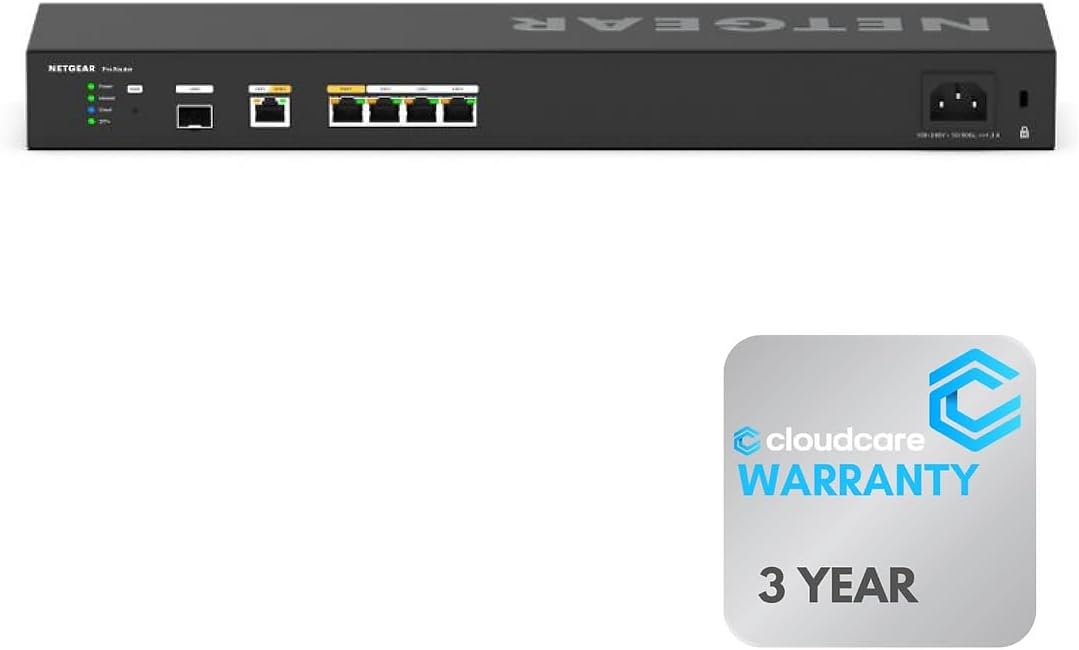
This Cloud Care listing for the NETGEAR PR60X has a 4.6 customer rating, the highest figure in the supplied product set. It is built around six 10G or Multi-Gigabit ports, offering a dense wired design for professional environments that need more port flexibility than a compact office router can provide.
We may earn a commission when you buy through this link, at no additional cost to you.
Two WAN ports support failover and load balancing, while the Insight cloud platform provides remote setup and monitoring. The router can also be rack mounted or wall mounted, making it easier to position it near organized network equipment. These physical options are more practical for an office than placing a business router behind a desk.
The main consideration is that this is a cloud-managed wired product without integrated Wi-Fi, so compatible access points are needed for wireless coverage. Buyers should also compare the exact listing carefully with the standard PR60X because the supplied descriptions emphasize different features. The hardware concept remains strong, but confirmation of included services and accessories is important before purchase.
Choose this version for an office seeking many multi-gigabit ports, remote management, and flexible mounting in a professional network. It is particularly attractive to administrators who value a high customer rating and want the PR60X platform without assembling a separate management and switching approach.
Six 10G or Multi-Gigabit ports reduce the need for additional switching hardware in smaller professional installations. The concentrated port layout also makes high-speed devices easier to connect.
Desktop, wall-mount, and rack-mount options let administrators place the router according to the room and cabinet layout. This is a practical improvement over choosing a consumer router whose only practical location is a shelf.
We may earn a commission when you buy through this link, at no additional cost to you.
The Linksys LRT224 is a straightforward business dual-WAN router with a 4.0 customer rating. It focuses on the essential needs of a small office: two internet connections, automatic failover, load balancing, and secure remote access rather than integrated wireless functionality.
We may earn a commission when you buy through this link, at no additional cost to you.
Its VPN capacity includes up to 50 IPsec tunnels for site-to-site and client-to-site use, along with five OpenVPN tunnels for iOS and Android users. The listed firewall throughput is 900 Mbps, while IPsec throughput is 110 Mbps, giving buyers a clearer view of the performance limits of encrypted traffic.
As an older-style business platform, it lacks the 2.5G and 10G interfaces, cloud management, VLAN depth, and wireless features found in newer models. It also has fewer OpenVPN tunnels than several competitors. Those limitations may be decisive for a growing network, but for a conventional small office with modest encrypted traffic, the core feature set remains understandable and focused.
The LRT224 is most appropriate for a small business seeking reliable WAN failover and established IPsec connectivity without a larger management platform. It is a practical option when a site-to-site tunnel is the priority and the included throughput is sufficient for the intended number of users.
Load balancing and automatic failover address the core reason to choose a dual-WAN router. The feature set is focused enough for administrators who want continuity without a complex cloud-managed ecosystem.
Fifty IPsec tunnels offer meaningful capacity for links between offices and remote client access. The five OpenVPN tunnels are more limited, so mobile users should be counted before deployment.
We may earn a commission when you buy through this link, at no additional cost to you.
A useful dual WAN router should match the number of internet services, available bandwidth, remote-access requirements, wireless needs, and management demands of the network. The most important decision is not simply the number of ports, but how those ports, VPN services, and failover controls work together after installation.
A true dual-WAN router should offer at least two usable WAN connections, ideally with enough flexibility to assign additional Ethernet ports as WANs. The ER605 and ASUS EBG15 support up to three Ethernet WAN ports, the Cudy R700 supports connections to as many as five ISPs, and the PR60X uses a configurable high-speed port alongside a dedicated WAN. Check whether the backup service uses Ethernet, USB tethering, or a cellular modem before deciding that a model meets your redundancy needs.
A Gigabit WAN may be sufficient for many homes and small offices, but it can restrict fiber, Multi-Gigabit, and 10G services. The ER707-M2, PR60X, and RT-BE88U offer higher-speed options such as 2.5G or 10G. Remember that local backhaul must also support the desired throughput, particularly when an SFP+ connection, switch, access point, or server is involved.
Failover keeps traffic moving when the primary connection fails, while load balancing can distribute traffic across active services. The Peplink B One adds WAN smoothing for smoother communication during unstable conditions, and the Omada and NETGEAR products support centralized management of these functions. Consider not only whether failover exists, but also how quickly it activates and how traffic is handled during the transition.
Remote access is a defining consideration for many businesses. The ER605 supports IPsec, OpenVPN, L2TP, and PPTP, while the Cudy R700 includes those protocols plus WireGuard and supports both server and client roles. The DSR-250V2 supports up to 75 tunnels, the ER707-M2 supports large numbers of IPsec, OpenVPN, L2TP, and PPTP connections, and the PR60X lists support for 30 VPN tunnels with IPSec, OpenVPN, and WireGuard.
Most products in this guide are wired business routers, meaning a separate access point is required for Wi-Fi. The Peplink B One includes dual-band Wi-Fi 6, and the ASUS RT-BE88U adds Wi-Fi 7 and two 10G connections. If the router will anchor a mixed home and office network, integrated wireless can reduce equipment and simplify management. If the business already has a carefully placed access-point system, a wired router may offer better segmentation and management.
Basic firewalling is common across the category, but advanced models add deeper inspection and segmentation. The ASUS EBG15 includes intrusion prevention, deep packet inspection, virtual patching, and per-port VLAN assignment. The Cudy R700 provides SPI firewalling, denial-of-service defense, IP and MAC binding, domain filtering, and DMZ hosting. The PR60X supports up to 32 VLANs, which can be valuable for separating departments and device types.
A local web interface is useful for small sites, while centralized or cloud management becomes important as networks grow. The PR60X uses NETGEAR Insight, the ER707-M2 supports Omada cloud access and an app, the EBG15 offers remote app management, and the Cudy R700 includes web, app, and TR-069 management. Consider how many sites you operate and who will diagnose problems after hours.
A high firewall rating does not guarantee equally fast encrypted traffic. The LRT224 lists 900 Mbps firewall throughput but only 110 Mbps IPsec throughput, illustrating why protocol-specific performance matters. The ER707-M2 supports up to 500,000 concurrent sessions and more than 1,000 clients, while the DSR-250V2 lists 50,000 sessions. Estimate expected concurrent users, remote sessions, and throughput before choosing a platform.
Begin by documenting the primary and backup internet services, including connection types, required modem or fiber terminal, and the devices that must remain online during an outage. Connect the router before moving its existing network equipment, then use the web interface or manufacturer app to apply a current firmware update and restore factory defaults if the unit was previously configured. Assign the primary and secondary WAN connections only after confirming that both services are active independently.
Configure failover with a test in mind. Identify the traffic or device that should reveal a switch, disable the primary service temporarily, and confirm that the backup takes over and that remote users can reconnect. Add load balancing only after basic failover works, because troubleshooting two functions simultaneously can make connectivity problems more difficult to diagnose. Create separate VLANs only after confirming that all required devices can reach essential services through the new segmentation.
For ongoing care, record the router's administration credentials, enable the available security tools, schedule firmware checks, and keep a local copy of the configuration where appropriate. Monitor logs and WAN status through the vendor's management platform, and periodically test the backup path rather than assuming it remains operational. Replace or update the router when its VPN throughput, port speeds, management subscription, or security features no longer match the network's needs.
A dual WAN router can connect to two internet services and use one as a backup when the other fails. Some models also distribute traffic across both connections through load balancing, while advanced systems may smooth traffic during brief service degradation. This makes the category especially useful for offices that depend on cloud applications, video calls, or remote access.
No. Most business routers in this category are wired and require separate access points for wireless coverage. The Peplink B One and ASUS RT-BE88U include wireless radios, while models such as the ER605, ER707-M2, and PR60X are designed to work with dedicated access points. Choose based on whether you want an all-in-one home-style system or a structured business network.
Several options can, although the required hardware differs. The ER605 supports a compatible 4G or 3G modem through its USB port, the ASUS EBG15 accepts a phone connection, the ER707-M2 supports LTE backup through a compatible dongle, and the RT-BE88U supports 4G LTE and 5G tethering. Check the supported adapters and carriers before relying on cellular service.
Failover sends traffic to a backup connection when the primary becomes unavailable. Load balancing divides active traffic between working WAN services to use more of their available capacity. A router may support one, both, or more advanced combinations, and some business platforms can assign particular devices or services to a particular WAN.
IPsec and OpenVPN are common requirements because they support encrypted site-to-site or client access. WireGuard is increasingly attractive for efficient modern tunneling, while L2TP and PPTP offer compatibility with some existing systems. The best router is the one that supports the protocols required by your employees, applications, and remote sites without exceeding its tunnel capacity.
They are not essential for every network, but they become important when the primary internet service, local server, or switching equipment exceeds Gigabit limits. The PR60X, ER707-M2, and RT-BE88U are better candidates for Multi-Gigabit or 10G networks. Ordinary cable, DSL, and modest fiber connections may work well with the Gigabit alternatives in the list.
They can be, particularly when remote monitoring and centralized control are valuable. The PR60X and ER707-M2 provide remote management for distributed networks, while the Cudy R700 and EBG15 offer more compact app-based options. Consider whether the organization needs centralized visibility or whether a local interface with straightforward diagnostics is sufficient.
Schedule a controlled test in which the primary connection is disabled and then restored. Confirm that active sessions survive or reconnect, remote users regain access, and the router reports the expected active WAN. Repeating this test periodically is important because backup paths can fail because of a damaged cable, outdated modem, cellular coverage issue, or configuration change.
The Cudy R700 stands out as the best budget-oriented option because it combines multi-ISP flexibility, OpenWrt-ready control, and a broad VPN suite in a compact five-port design. The Peplink B One is the most complete all-in-one selection, pairing resilient dual-WAN behavior with built-in Wi-Fi 6 and a USB WAN. For premium wired networks, the NETGEAR PR60X provides 10G and 2.5G options, extensive VPN support, VLANs, and remote management.
Prioritize the features your network will actually use. A home office may need only two working WAN paths and a simple backup, while a growing business may need Multi-Gigabit ports, VLAN segmentation, remote administration, and enough VPN capacity for every site. Avoid paying for advanced wireless or cloud management if dedicated access points and local administration better match the deployment.
Before placing an order, confirm the current listing details, compatibility of any modem or tethering device, required VPN protocols, and the total management cost. Router prices, promotions, and availability can change over time, so checking the current Amazon listing helps ensure the selected model still provides the required features and is being compared on the correct terms.