
Frigga 4G Cellular Temperature & Humidity Monitor with Email App Alerts
4.2Editor score
Flexible cellular and Wi-Fi
Multi-channel environmental alerts
Two years record storage
Remote Temperature Monitoring System for Home guide comparing 10 sensors for Wi-Fi, cellular, Bluetooth, accuracy, alerts, battery life, and data storage.
A remote temperature monitoring system helps you track temperature and humidity across a home, garage, basement, nursery, wine cellar, or secondary property without repeatedly checking conventional displays. The most useful models combine dependable sensors, accessible phone notifications, historical records, and connectivity that suits the spaces being monitored.
We compared these ten products based on remote-access capabilities, measurement accuracy, alert options, power-failure handling, data retention, installation requirements, and monitoring flexibility. The guide covers cellular systems for locations without Wi-Fi, Wi-Fi models for connected homes, and Bluetooth sensors for more localized monitoring where a phone can serve as the connection point.
Each review explains what the product is best suited to, where it stands out, and where its compromises may matter. The top recommendations range from a budget-friendly indoor sensor to cellular monitors designed for cabins, basements, and other remote spaces. Availability, features, and prices can change, so confirm the current listing details before purchasing.
4.2Editor score

4.7Editor score
4.4Editor score
The table below compares all ten monitoring systems across connectivity, accuracy, alert capabilities, power support, and remote-access considerations. It highlights the major differences between cellular, Wi-Fi, Bluetooth, and hybrid systems so you can select the right option for each monitored space.


The Necto Cellular Temperature Monitor, Power Outage Alarm & Humidity Sensor earns a 4.7 rating and stands out as the most complete option for monitoring a home, RV, vehicle, or pet environment where dependable remote access matters. It combines temperature, humidity, power-loss detection, cellular connectivity, rechargeable battery backup, and configurable notifications in one device.
We may earn a commission when you buy through this link, at no additional cost to you.
Two years of 4G LTE service are included with a built-in multi-network SIM, eliminating the need for Wi-Fi at the monitored location. The sensor reads conditions every 10 seconds and uploads the latest measurement to its online portal every 10 minutes. Users can define high and low temperature and humidity thresholds, add up to five contacts, and receive text and email notifications when readings become concerning.
Its three-day internal battery is especially important during outages. Rather than becoming blind when external power disappears, the sensor continues operating and can issue a power-loss alert, low-battery warning, or disconnection notice. The trade-offs are that cellular monitoring requires a continuing service arrangement after the included period, and this model does not offer the optional Wi-Fi route found in some competitors.
This is the strongest all-around recommendation for a home that needs independent remote monitoring, especially where the router may be unreachable or unreliable. Plug-in installation, app-based configuration, and a one-year downloadable record archive make it particularly practical for basements, detached garages, vacation homes, RVs, and other locations where immediate awareness could prevent damage.
The internal rechargeable battery gives the monitor up to three days of operation without wall power. That continuity allows the device to report an outage, remain available for environmental alerts, and notify you if its own battery becomes low or its cellular connection drops.
Cellular service removes Wi-Fi range and router availability from the setup. Multiple contacts can receive customizable text and email alerts, while the online portal preserves readings that can later be downloaded as a CSV file.
We may earn a commission when you buy through this link, at no additional cost to you.
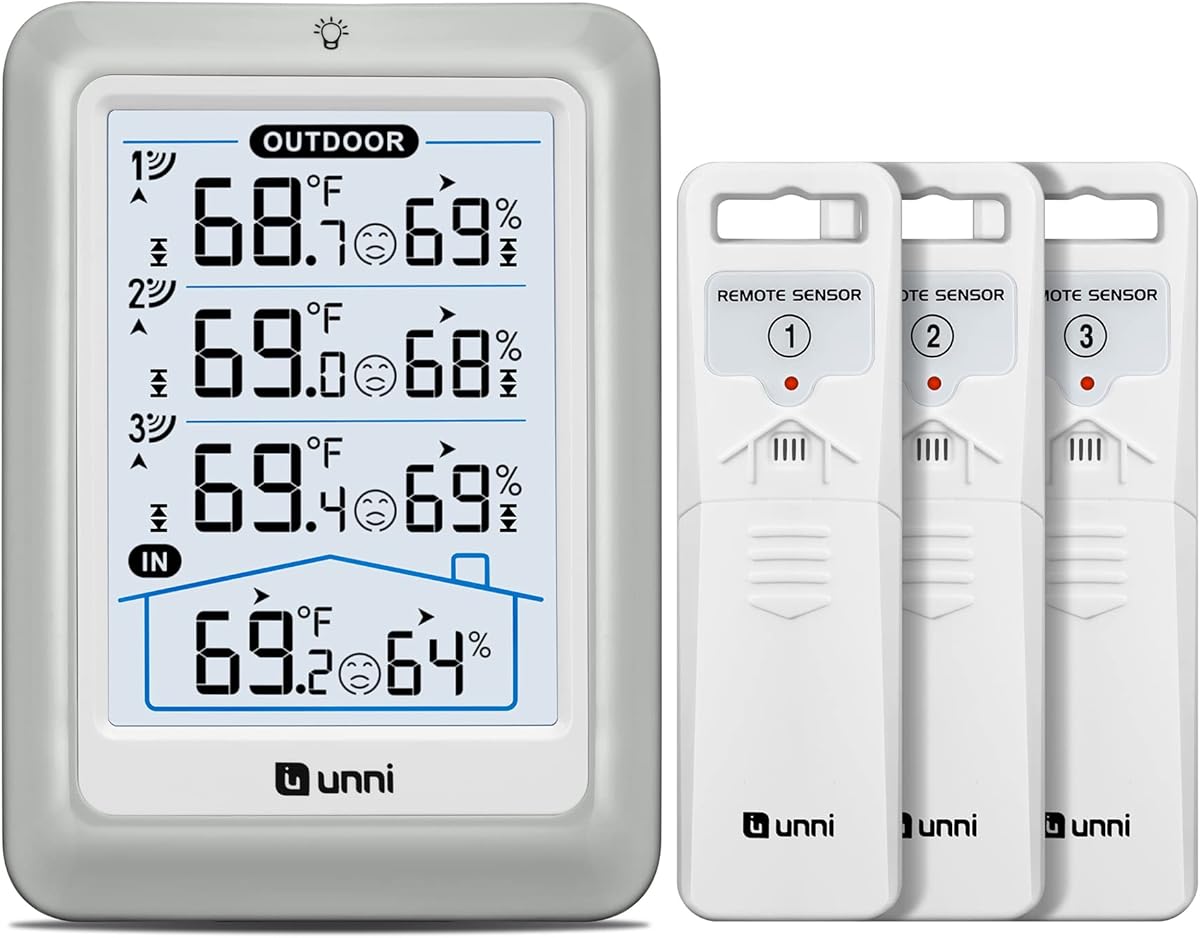
The Unni Indoor Outdoor Thermometer Wireless 4.5 Inch Display Digital Hygrometer has a 4.4 rating and offers a straightforward way to monitor several outdoor conditions around the home. It includes a console plus three outdoor sensors, providing a useful alternative for buyers who want immediate readings without configuring an app or depending on a phone.
We may earn a commission when you buy through this link, at no additional cost to you.
Its patented wireless technology transmits data across a radius of up to 330 feet, with updates approximately every 30 seconds. The display shows indoor and outdoor temperature and humidity, trends, maximum and minimum records, a comfort indicator, outdoor alerts, and switchable Fahrenheit and Celsius units. A bright 4.5-inch screen with bold figures is easy to check from across a room.
The main limitation is that this is a local display system rather than a true internet-connected remote monitor. It does not provide cloud history, phone notifications away from home, or access through a mobile application. Maximum and minimum records also reset every 24 hours, so it is better suited to immediate awareness than long-term analysis.
Choose this model when you want an inexpensive, dependable indoor-and-outdoor display with multiple remote probes. It works especially well for checking the patio, garage, greenhouse, or outdoor areas around a single floor plan. For true anywhere access, however, a Wi-Fi, Bluetooth, or cellular monitor would be more appropriate.
Three outdoor sensors let you compare conditions at different points around the property. This is useful for finding a cooler porch, warmer side of the house, or more humid location where localized climate differences matter.
The display supports continuous USB power, three backlight brightness levels, tabletop placement, and wall mounting. It prioritizes readable real-time information without requiring an account, app, or connected network.
We may earn a commission when you buy through this link, at no additional cost to you.
The Govee Indoor Hygrometer Thermometer 3Pack H5075 with Bluetooth App Control has a 4.5 rating and is well suited to households that want several indoor monitoring points. Three compact sensors can be placed in a bedroom, nursery, basement, wine cellar, garage, or other area without installing a hub or connecting each unit to a separate network.
We may earn a commission when you buy through this link, at no additional cost to you.
After downloading the Govee Home app, pairing takes about a minute. Each sensor has a bright 3-inch LCD, maximum and minimum records, and dry, comfort, or wet indicators. The Swiss-made sensor is stated to measure temperature within ±0.54°F and humidity within ±3% relative humidity, with a refresh speed as quick as two seconds. The app also supports range alerts and curve graphs.
Bluetooth is the central compromise. Its stated range is 196 feet, but the phone must be within communication distance to retrieve information. It does not provide the same background cloud monitoring and away-from-home notifications of a Wi-Fi or cellular product, although the app includes 20 days of online records and export of up to two years of data.
This three-pack is a practical choice for local whole-home awareness or keeping an eye on several sensitive spaces. It is particularly convenient for family members who want a simple phone-based check rather than a permanent console. Buyers needing alerts from work, travel, or another remote location should choose a network-connected alternative.
Three sensors eliminate the need to move one device from room to room. They can simultaneously provide a baseline for the main living area and additional readings in spaces where humidity or temperature fluctuations deserve closer attention.
The two-second refresh rate makes on-screen changes feel current, while app graphs reveal longer patterns. Maximum and minimum records and comfort icons help translate raw measurements into information that is easier to use at a glance.
We may earn a commission when you buy through this link, at no additional cost to you.
The Frigga 4G Cellular Temperature & Humidity Monitor with Email App Alerts has a 4.2 rating and distinguishes itself through flexible connectivity and broad alert options. It supports both 4G cellular monitoring and 2.4 GHz or 5 GHz Wi-Fi, allowing it to function in homes, cabins, basements, warehouses, crawlspaces, and RVs even when one connection method is unavailable.
We may earn a commission when you buy through this link, at no additional cost to you.
Two years of cellular service are included with a pre-installed global SIM. The screen refreshes every five seconds in constant-on mode, while readings are uploaded to the app every 10 or 30 minutes. The built-in battery supports up to seven days of portable operation, and the unit can remain plugged in for long-term use without compromising battery performance.
Its alert system is unusually versatile. App push notifications, email, and on-device voice alarms can report temperature changes, humidity issues, power failures, freeze risks, disconnections, or drops. Records remain in the app for up to two years and can be exported as CSV files. Family or team members can also be given access to monitor conditions together.
The Frigga model is the premium choice for users who want cellular resilience without giving up Wi-Fi convenience. It offers more flexibility than a cellular-only design and more alert channels than many standard Wi-Fi sensors. The tradeoff is greater complexity and the need to consider service renewal after the included cellular period.
Use Wi-Fi in a well-connected home or cellular service where reliable internet access is limited. Supporting both networks also provides a practical path for properties whose connectivity changes over time.
Push messages, email, and audible on-device alarms provide several ways to notice a problem. Threshold settings can cover temperature, humidity, pipe-freezing conditions, power failures, and device disconnections.
We may earn a commission when you buy through this link, at no additional cost to you.
The X-Sense Wi-Fi Thermometer Hygrometer with LCD, 3 Sensors & Base Station has a 4.5 rating and balances precision with family-friendly remote monitoring. Its base station connects to 2.4 GHz Wi-Fi and acts as a central hub for three sensors, making it a strong option for monitoring multiple rooms in a connected home.
We may earn a commission when you buy through this link, at no additional cost to you.
The Swiss-made sensor is stated to measure temperature within ±0.36°F between -4°F and 140°F and relative humidity within ±2%. When readings leave a user-defined range, the system can send a phone notification and activate an audible alarm on the base station. The alarm volume and sound are adjustable, while low-battery warnings appear in the app.
The app displays maximum, minimum, and average temperature and humidity information over time, along with graphs and switchable Fahrenheit and Celsius units. Comfort icons provide a quick indication of whether conditions feel suitable. Up to 12 users can monitor the system simultaneously, which is useful for shared households or small teams.
Its principal limitation is network compatibility: only 2.4 GHz Wi-Fi is supported, and 5 GHz networks will not work. Buyers must also accommodate the base station as a permanent installation. In return, they receive an accurate, easy-to-read system with both audible and digital notifications, strong multi-user sharing, and detailed trends.
The stated temperature and humidity tolerances are among the tightest in this group. Three sensor positions provide a more complete view of a home than a single unit, helping reveal isolated hot spots or overly dry rooms.
Phone notifications reach users away from home, while the base station's audible alarm alerts people who are nearby. Adjustable alarm settings help keep the warning noticeable without making it unnecessarily intrusive.
We may earn a commission when you buy through this link, at no additional cost to you.
The X-Sense Smart Wi-Fi Thermometer Hygrometer, 3 Sensors & Base Station has a 4.5 rating and is designed for users who want to expand monitoring beyond a few rooms. One base station can link as many as 50 devices, including a maximum of 10 thermo-hygrometers, across a stated coverage area of up to 1,700 feet.
We may earn a commission when you buy through this link, at no additional cost to you.
Its sensors retain the precise performance associated with the brand, measuring temperature within ±0.36°F and humidity within ±2% relative humidity. Beyond basic readings, the app calculates dew point and vapor pressure deficit. Those extra metrics are valuable for plant collections, wine storage, and other environments where moisture conditions matter beyond ordinary comfort.
Historical graphs can be reviewed by day, month, or year, and the data can be exported to identify patterns. Out-of-range conditions generate immediate phone notifications. Replaceable 1,200 mAh AAA batteries are stated to last up to one year, while low-battery warnings help prevent an unnoticed monitoring gap.
This system is best for larger homes, property managers, or plant enthusiasts who anticipate adding sensors over time. It supports only 2.4 GHz Wi-Fi, and the base station creates a permanent network dependency. Even so, the large device capacity, advanced calculations, and replaceable batteries make it a flexible long-term monitoring platform.
The large linking capacity allows a single installation to support numerous sensors and related compatible devices. This makes the system more practical for users who want one consistent app and base station across many rooms or properties.
Dew point and vapor pressure deficit reveal more about local moisture than relative humidity alone. These calculations can help plant owners and collectors evaluate conditions more precisely and recognize changes over time.
We may earn a commission when you buy through this link, at no additional cost to you.
The Govee WiFi Thermometer Hygrometer H5179 with App Notification Alert has a 4.3 rating and offers a flexible blend of Wi-Fi and Bluetooth connectivity. The sensor can remain connected to the Govee Home app over Wi-Fi for remote monitoring while also using Bluetooth for direct local access and configuration.
We may earn a commission when you buy through this link, at no additional cost to you.
Its Swiss-made sensor is stated to measure temperature within ±0.54°F and humidity within ±3% relative humidity. A two-second refresh interval keeps the displayed information current. Users can set temperature and humidity ranges, and the app sends a notification whenever conditions move outside those boundaries. The product also includes a lanyard loop for flexible placement.
When connected through Bluetooth or Wi-Fi, the sensor uploads readings to the app. Govee offers 20 days of online data viewing, historical trend graphs, and export of data seen over the previous two years. This gives the compact unit more analytical value than a basic standalone hygrometer.
The H5179 is best for a bedroom, baby room, basement, or similar area where both local and remote access are useful. Its main limitation is that 5 GHz Wi-Fi is unsupported, and certain settings can only be handled through Bluetooth. For most homes with a separate 2.4 GHz network, it is a simple, capable option.
Wi-Fi supports ongoing remote access, while Bluetooth provides a direct connection when the network is unavailable or when local setup is more convenient. This dual approach makes the sensor adaptable to different household routines.
The lanyard loop and simple form factor encourage placement in tighter spaces. Historical graphs and exportable records turn the sensor into more than a live display, helping users investigate recurring humidity or temperature patterns.
We may earn a commission when you buy through this link, at no additional cost to you.
The Govee WiFi Thermometer Hygrometer H5103 with Electronic Ink Display has a 4.2 rating and emphasizes readable information with long battery life. Its electronic ink screen provides a clear indoor display, while the stated battery life of about six months makes it suitable for locations where frequent battery changes would be inconvenient.
We may earn a commission when you buy through this link, at no additional cost to you.
The unit connects through the Govee Home app using 2.4 GHz Wi-Fi and Bluetooth. A Swiss-made sensor is stated to deliver temperature accuracy within ±0.54°F and humidity accuracy within ±3% relative humidity, with readings refreshing every two seconds. Users can establish high and low ranges and receive app notifications whenever conditions move beyond them.
The app includes 13 days of online data graphs and allows users to export information from the previous two years. It also supports remote viewing from different locations. The replaceable 1.5-volt AA alkaline battery is a practical feature, allowing maintenance without replacing the entire sensor.
This model is a good fit for a home office, wine cellar, basement, or display-oriented location where you want the current reading visible without opening an app. Its limitations are the lack of 5 GHz support and a shorter immediate online graph period than some competing systems. Overall, it combines appealing screen visibility with dependable remote access.
The electronic ink display keeps current conditions visible while supporting a battery life of about six months. It offers an attractive compromise between an always-readable screen and a sensor that does not need frequent charging.
A standard replaceable AA battery simplifies upkeep. Low maintenance is particularly helpful in basements, closets, and remote rooms where a sealed rechargeable battery might be inconvenient to service.
We may earn a commission when you buy through this link, at no additional cost to you.
The eMylo WiFi Thermometer Hygrometer, Smart Indoor Temperature Humidity Sensor has a 4.0 rating and stands out for its integration with the Smart Life and Tuya ecosystem. It connects directly to 2.4 GHz Wi-Fi without a hub and can act as a trigger for compatible fans, humidifiers, dehumidifiers, and other automated equipment.
We may earn a commission when you buy through this link, at no additional cost to you.
The sensor measures from 14.2°F to 140°F and from 0% to 99% relative humidity, with stated accuracies of ±1°C or ±1.8°F for temperature and ±5% relative humidity for humidity. Readings need approximately 30 minutes to stabilize after setup or relocation, an important consideration when interpreting early measurements.
The app provides free push alerts, low-battery reminders, one year of historical data, and export functions. Optional SMS and phone-call notifications are available through a separate paid subscription. Voice assistants can report current temperature and humidity, although settings, alerts, and automations must be managed through the Smart Life or Tuya Smart app.
The eMylo sensor is most valuable in a connected home that wants environmental readings to drive automated responses. For example, a dehumidifier could activate when measured humidity crosses a selected threshold. Its lower rating and paid options for advanced contact methods should be weighed against its broad automation capability and hub-free design.
Tuya scenes can use the sensor's measurements as triggers. Compatible heating, cooling, and moisture-control devices can respond without requiring a person to check the app and manually change the environment.
One year of history helps identify patterns, while Alexa and Google Assistant offer convenient spoken readings. Voice access is limited to checking conditions, so detailed configuration still takes place in the app.
We may earn a commission when you buy through this link, at no additional cost to you.
The Govee Indoor Hygrometer Thermometer H5075 with Bluetooth App Control has a 4.5 rating and offers an approachable way to monitor one indoor space. Its large 3-inch LCD, Swiss-made sensor, two-second refresh rate, and straightforward app setup make it convenient for a bedroom, nursery, basement, greenhouse, or wine cellar.
We may earn a commission when you buy through this link, at no additional cost to you.
Temperature accuracy is stated at ±0.54°F, while humidity accuracy is ±3% relative humidity. The display shows large numbers, maximum and minimum readings, and comfort indicators for dry, comfortable, or wet conditions. Bluetooth connectivity extends up to 164 feet, allowing the sensor to provide remote-style information while the connected phone remains within range.
Users can set temperature and humidity ranges in the app and receive notifications when conditions leave those limits. The app provides 20-day curve graphs and allows data from the past two years to be exported as a CSV file. These history features help users review patterns even though live connection depends on Bluetooth.
This single-unit version is best for one important room and buyers who do not need simultaneous multi-room monitoring. Its clear limitation is the lack of Wi-Fi or cellular connectivity, so it cannot maintain the same remote alerts as an internet-connected model. For focused local awareness, however, it remains compact, accurate, and easy to use.
Large digits, comfort indicators, and max/min records make the sensor useful even when the phone is not involved. It provides a quick visual baseline for a room that needs regular environmental attention.
The phone can notify users when readings leave preset ranges while remaining within the stated 164-foot connection distance. Historical graphs and CSV export add context without requiring a separate hub.
We may earn a commission when you buy through this link, at no additional cost to you.
The right remote temperature monitoring system depends on where it will be installed, how you want to receive alerts, and how much monitoring history you need. Connectivity, sensor accuracy, outage resilience, and ease of use should be considered together before choosing a model.
Wi-Fi models are convenient for homes with a reliable 2.4 GHz network and provide genuine away-from-home access through an app. Bluetooth sensors are simpler and work well for nearby monitoring, although the connected phone must remain within range. Cellular systems are ideal for cabins, basements, detached buildings, RVs, and other places where dependable Wi-Fi may be unavailable. The Frigga model offers the added flexibility of both cellular and Wi-Fi connectivity.
In short, choose Wi-Fi for easy connected-home access, Bluetooth for local convenience, and cellular for independent remote monitoring.
Measure the location that matters most: an indoor bedroom, nursery, wine cellar, garage, greenhouse, crawlspace, or an outdoor area around the property. The Unni system includes three outdoor sensors, while most other products in this guide focus primarily on indoor temperature and humidity. Consider sensor range, stated accuracy, refresh speed, and whether you need additional calculations such as dew point or vapor pressure deficit.
Summary: match sensor type, range, and accuracy to the environment rather than choosing solely on display design.
An alert is only useful if it reaches you promptly and through a channel you check regularly. Push notifications are common, while email, text messages, audible base-station alarms, and voice alarms provide additional options. Look for independently adjustable high and low temperature and humidity thresholds, power-failure warnings, low-battery notices, and disconnection alerts.
Summary: choose a device with threshold alerts and at least one notification channel that fits your routine.
A remote sensor loses much of its value if a power outage turns it into a static display. The Necto monitor includes a three-day internal battery, while the Frigga unit supports up to seven days of portable operation and can remain plugged in for long-term use. Other models may use replaceable batteries, so consider how frequently you want to service each device and what happens when external power is lost.
Summary: prioritize a rechargeable or replaceable-battery design with clear outage and low-battery warnings.
Instant readings help with immediate decisions, but history reveals recurring humidity spikes, temperature swings, and poorly controlled areas. Storage periods differ across this guide, ranging from 20 days of online viewing to two years, with several products supporting CSV or general data export. Consider whether you want only immediate alerts or also need to compare daily, monthly, or yearly patterns.
Summary: longer history is useful for troubleshooting, but exportability matters if you plan to analyze the readings yourself.
Large homes may need more than one sensor and may involve relatives, tenants, or colleagues who should receive the same alerts. The X-Sense three-sensor system supports up to 12 simultaneous users, while the larger X-Sense Smart system can link as many as 50 devices. Multi-packs and base-station systems also reduce the need to move one sensor between locations.
Summary: consider both the number of rooms and the number of people who need access before selecting a system.
Some devices need only a plug, a phone app, and a network connection. Others require a base station, placement near the router, or a clear cellular signal. Outdoor-capable sensors should be positioned where they can measure the intended area without direct exposure that could distort readings. Allow newly installed or relocated sensors to stabilize before judging accuracy.
Summary: confirm signal strength, network compatibility, power access, placement constraints, and sensor stabilization time.
Some cellular monitors include a defined initial service period, while Bluetooth and Wi-Fi systems may offer basic alerts without a subscription. Optional premium contact methods can introduce separate service charges. Check which features remain available without ongoing fees, what renewal terms apply to cellular products, and whether any advanced alerts are restricted.
Summary: compare included functionality and renewal terms, not just the initial product listing.
Begin by choosing a representative location and identifying what you want to detect. Basements, garages, nurseries, wine cellars, and outdoor areas have different temperature and humidity patterns, so set realistic thresholds based on the equipment, plants, pets, or building materials you are protecting. Avoid placing sensors next to direct sunlight, heating vents, kitchen appliances, damp exterior walls, or other direct heat and moisture sources.
Follow the manufacturer's app instructions to activate the sensor, connect it to the appropriate network, and establish account or sharing access. For Wi-Fi systems, confirm that the router provides the required band. For cellular systems, verify coverage at the monitored location and complete activation before leaving. After placement, wait for readings to stabilize, then adjust thresholds using the conditions observed during the first full day or two.
Maintain the device according to its power and environmental specifications. Recharge or replace batteries on schedule, keep the display and vents free of dust, and check that alerts still arrive through the selected channels. Review historical graphs periodically, update app settings when seasonal conditions change, and test the device or alert path after a long power interruption or change to your network.
Yes, if the monitor uses cellular connectivity. The Necto and Frigga systems use 4G LTE for remote access, making them suitable for cabins, basements, detached garages, RVs, and other places where a dependable internet connection may not be available. Bluetooth sensors have a more limited relationship with the phone and usually require the user to remain within the stated wireless range.
Only if the product includes multiple sensors or supports linking to other devices. The Govee H5075 three-pack provides three individual units, while both X-Sense base-station systems include three sensors and can be expanded to varying degrees. A single sensor can only measure the environment where it is physically placed, so additional probes are necessary for simultaneous room-by-room readings.
Choose ranges that reflect the purpose of the space and the sensitivity of the items or occupants inside it. Avoid ranges so narrow that ordinary daily changes trigger constant warnings, and avoid ranges so broad that genuine problems go unnoticed. Review the first few days of readings, adjust the thresholds to match real conditions, and reconsider seasonal settings as outdoor temperatures change.
That depends on the model and its power design. The Necto monitor has a three-day rechargeable internal battery, and the Frigga supports up to seven days on a full charge. Other products may continue briefly on replaceable batteries or shut down without external power. If outage monitoring is essential, select a model that explicitly specifies battery backup and power-failure alerts.
Bluetooth is sufficient when the goal is local or nearby monitoring. A compatible phone can retrieve readings and receive alerts within the sensor's stated range, which is useful for checking a nursery, basement, or nearby room. For notifications while traveling or working away from home, Wi-Fi or cellular connectivity provides more dependable background access.
Accuracy describes how close the displayed measurement is to the true environmental condition within the stated tolerance. Higher-stated precision is useful when monitoring sensitive spaces, but placement, airflow, direct heat, and sensor stabilization can affect real readings. For the best comparison, keep sensors in similar conditions and allow newly moved devices to stabilize before evaluating them.
Many smart-home sensors support only the 2.4 GHz band and cannot join a 5 GHz network. The X-Sense systems and several Govee and eMylo models list 2.4 GHz Wi-Fi compatibility, while the Frigga supports both 2.4 GHz and 5 GHz. Check your router settings before setup or install a separate compatible network if the required band is not enabled.
More history is useful for identifying recurring patterns, comparing rooms, and documenting changes over weeks or months. The guide includes products with 13-day, 20-day, one-year, and two-year storage or export options. If you mainly need immediate alerts, a shorter history may be sufficient; if you plan to troubleshoot recurring moisture or temperature issues, prioritize long retention and CSV export.
The Necto Cellular Monitor is the strongest all-around choice because it combines independent 4G access, temperature and humidity tracking, power-failure detection, three-day battery support, configurable alerts, and one year of stored readings. The Frigga 4G Monitor stands out as the premium flexible option with cellular and Wi-Fi support, multiple alert channels, and up to two years of records, while the Unni display is an effective budget choice for local indoor-and-outdoor monitoring.
For connected homes, prioritize the sensors that fit your network and alert routine. The X-Sense systems suit larger installations and detailed environmental analysis, Govee models offer approachable app-based monitoring with compact displays, and the eMylo sensor is especially useful when environmental readings should trigger smart-home automations. In areas without reliable internet, cellular monitoring is the more dependable choice.
Before purchasing, verify current availability, network compatibility, service terms, included accessories, and the latest listing details. Prices and promotions can change, so compare the complete feature set and ownership terms rather than relying on a temporary offer alone. The best system is the one that provides timely warnings, dependable connectivity, and records that match the spaces you need to monitor.