
MT-ViKI 4K HDMI Splitter
4.4Editor score
Distributes one input to four outputs
Includes dedicated external power adapter
Supports long-distance and cascading setups
Our HDMI splitters guide compares ten models for output count, 4K performance, audio support, EDID handling, setup ease, and multi-screen versatility today.
An HDMI splitter sends one source signal to multiple TVs, monitors, or projectors, making it useful for digital signage, presentations, retail displays, and synchronized home entertainment. A capable model should balance resolution, audio compatibility, power delivery, build quality, and dependable operation across every connected display.
We compared the ten products using their published specifications, port layouts, supported modes, included accessories, and stated limitations. The list covers dedicated one-to-two and one-to-four splitters, several 4K-capable models, and bidirectional HDMI switchers that can perform related routing tasks.
Each review identifies the setup that best fits the device and explains where its capabilities stand out. Product details and availability can change, so verify the current specifications, cable requirements, and compatibility notes before making a final purchasing decision.
4.4Editor score

4.5Editor score

4.3Editor score
The comparison below highlights each product's core routing configuration, maximum stated resolution, key compatibility features, and most important limitation. Remember that splitters duplicate one source across displays, while switchers select between sources or displays.




The UGREEN HDMI Switch 5 in 1 Out is technically a source selector rather than a conventional one-to-many splitter, but it is one of the most capable routing products in this guide. Its 4.3 rating reflects a strong combination of five-input flexibility, modern display support, remote control, and straightforward operation. It is especially appealing to households or offices that regularly alternate among game consoles, streaming devices, laptops, and disc players.
We may earn a commission when you buy through this link, at no additional cost to you.
The switch supports 4K at 60Hz and is also compatible with 4K at 30Hz, 2560 by 1440 at 120Hz, and 1920 by 1080 at 240Hz. Its feature set includes HDMI 2.0 and 1.4, HDCP 2.2 and 1.4, VRR, Dynamic HDR, chroma formats, and 3D. Every port supports HDR, 3D, and CEC, while USB power is designed to support stable transmission across the full set of connected sources.
There are important limitations to consider. To maintain 4K at 60Hz, both the input and output cables should remain within 9 feet, and the switch should be connected to its power source. Automatic switching is not supported, so changing devices requires the remote or the manual button. The product also does not support ARC or eARC, and a power adapter, batteries, and HDMI cables are not included.
Despite those caveats, this is an excellent choice when the central challenge is managing several HDMI sources on one television or monitor. The five-input count gives it more flexibility than most compact switchers, while the remote makes couch-side operation convenient. Choose it when source selection matters more than showing identical content on multiple screens, and verify your cable lengths before installation.
Five inputs reduce the need to reconnect cables whenever a game console, streaming stick, or laptop enters the rotation. The included remote and manual control provide two practical ways to change the active source, and the LEDs make the selected port easy to identify at a glance.
Support for 4K at 60Hz, VRR, HDR, and high-refresh 1080p modes makes this switch relevant to current gaming displays. Cable length and the connected source, television, and player must all align with the stated requirements to achieve the intended resolution and refresh rate.
We may earn a commission when you buy through this link, at no additional cost to you.
The MT-ViKI 4K HDMI Splitter provides a capable one-to-four distribution solution with a 4.4 rating. Its most attractive feature is the combination of four outputs, a supplied power adapter, long-distance signal support, and a durable metal housing. It is a logical choice for digital signage, classrooms, retail displays, security monitoring, or a multi-room home theater arrangement.
We may earn a commission when you buy through this link, at no additional cost to you.
This unit duplicates one source across four screens simultaneously, including the picture and audio carried over HDMI. Maximum resolution is 4K at 30Hz, with support for 1080p at 60Hz, 3D, deep color at 8, 10, or 12 bits, and HDCP 1.4. Its built-in amplifier supports a combined cable distance of up to 100 feet, calculated as 50 feet on the input side and 50 feet on the output side. Cascading is also supported when more screens are needed.
The major constraint is that it operates in mirror mode only. It cannot create separate extended desktops for a computer, and it is not an HDMI switch. It also has no built-in speaker, so audio must be played through the television or a monitor with integrated speakers. Although the supplied adapter promotes stable operation, the 30Hz maximum at 4K makes it less suitable for demanding gaming displays.
Overall, this splitter delivers excellent utility for buyers who need several synchronized screens rather than 4K gaming at 60Hz. Its combination of power, long cable support, and cascading makes it more versatile than a basic two-output box. It is best suited to commercial displays, presentation areas, and installations in which identical content should appear on every screen.
Four mirrored outputs and cascading support allow an installation to grow beyond a single four-screen array. The amplifier and supplied power adapter also make the unit better suited to cable runs and sustained multi-display use than a basic USB-powered splitter.
The 4K at 30Hz ceiling is suitable for many video and signage applications, but it cannot deliver 4K at 60Hz. Mirror-only operation and the lack of an integrated audio processor should be confirmed before purchase if your setup depends on extended computer desktops or separate audio extraction.
We may earn a commission when you buy through this link, at no additional cost to you.
The OREI 1×2 HDMI Splitter is a straightforward duplicator for anyone who wants one source on two displays. Its 4.4 rating reflects a simple, well-understood function, broad source compatibility, and a 4K-capable output. The device is designed to duplicate the same signal rather than divide a computer workspace or act as an input selector.
We may earn a commission when you buy through this link, at no additional cost to you.
Supported resolutions extend to 4K at 30Hz, 1080p, 720p, VGA, and WUXGA, with additional 3D and deep-color formats listed in the specifications. It works with computers, Xbox models, PlayStation systems, Fire Stick, Blu-ray and DVD players, satellite receivers, Chromecast devices, projectors, HD-ready televisions, and full-HD monitors. A heavy-duty metal enclosure helps with heat dissipation.
HDCP compatibility needs careful attention. The product is listed as compatible with HDCP 1.4 but will not bypass protected content, and it does not support HDCP 2.0 or 2.2. It is a duplicator, not an extender, so a computer cannot use it to place independent content on two monitors. The power supply includes a US plug and an international adapter, but HDMI cables are not included.
This splitter remains a sensible option for two televisions, a television and projector, or a pair of monitors that should display identical content. It is especially useful when the simpler one-to-two requirement and durable enclosure matter more than 4K at 60Hz or modern HDCP versions. Check protected-source requirements before connecting a cable box, game console, or streaming service.
The product focuses on the core splitter function: taking one HDMI source and duplicating it to two displays. Its metal housing, included power supply, and straightforward plug-in operation make it practical for fixed installations that do not require independent extended desktops.
Protected content may require an HDCP 1.4-compatible source and display, while newer HDCP 2.x systems are outside the stated support range. This limitation is most relevant when distributing premium video from modern streaming devices, consoles, or disc players.
We may earn a commission when you buy through this link, at no additional cost to you.
The OREI UltraHD 1×4 HDMI Splitter earns the Editor's Choice designation because it combines four simultaneous outputs, 4K at 60Hz support, modern HDCP, and a 4.5 rating. It is the most balanced dedicated splitter in the group for users who need synchronized content across several displays without settling for the lower 30Hz 4K ceiling found in simpler models.
We may earn a commission when you buy through this link, at no additional cost to you.
The splitter duplicates a single HDMI source across four screens, making it well suited to presentations, retail displays, classrooms, bars, and home entertainment installations. Its 18 Gbps bandwidth supports the full stated 4K at 60Hz capability. Audio compatibility is a major strength: the listed formats include LPCM, Dolby-AC3, DTS 7.1, DSD, Dolby TrueHD, and DTS-HD Master Audio.
Installation is uncomplicated because the device operates as a plug-and-play unit without drivers. Its metal enclosure supports heat dissipation and long-term durability. The important limitation is that it mirrors the source rather than extending a desktop, so all four displays show the same content. For stable performance, the manufacturer recommends HDMI cables no longer than 30 feet.
This is the most versatile dedicated splitter here for buyers who want a meaningful combination of resolution, audio, and four-screen distribution. It is appropriate for professional presentations, hospitality displays, and multi-monitor entertainment rooms. If your goal is to run a computer across multiple screens with separate windows, choose an actual display extender instead.
Many four-output splitters top out at 4K at 30Hz, but this model combines four mirrored outputs with a stated 60Hz maximum. That balance makes it a stronger choice for modern televisions, projectors, and presentation panels when the full installation is expected to handle high-bandwidth video.
Support for Dolby TrueHD, DTS-HD Master Audio, DSD, and several other formats broadens its usefulness for home theater and commercial installations. Each display must be able to decode the transmitted audio format for synchronized sound to work as intended.
We may earn a commission when you buy through this link, at no additional cost to you.
The Anker HDMI Switch is a clean four-source solution for a single television or monitor. Its 4.3 rating reflects a user-friendly design, 4K at 60Hz support, remote selection, and a straightforward one-output configuration. It serves a similar role to a four-port HDMI selector, so buyers should understand that it does not mirror content across several screens.
We may earn a commission when you buy through this link, at no additional cost to you.
Four source ports allow a console, streaming device, laptop, and another media component to remain connected at once. The included remote makes switching convenient, while the stated one-click operation and stable power delivery are useful for a streamlined entertainment center. The package includes a 5-foot USB-A to USB-C charging cable, remote control, safety guide, and user manual, along with an 18-month warranty.
CEC is not supported, which may matter if the user's television normally controls connected devices through a single remote. HDMI cables are also not included, and the supplied charging cable is for power rather than video. Because this is a switch rather than a splitter, all four sources feed one display, with the selected source appearing at a time.
The Anker is a good fit for a family room, office, or gaming setup that needs a simple way to move among four devices without reconnecting cables. It is less appropriate for digital signage, presentation rooms, or any task requiring duplicate content on multiple screens. Confirm that the television or display and all intended source devices are compatible with the resolution you plan to use.
Keeping four devices connected while using the remote to choose the active source reduces cable handling and improves convenience. The dedicated selector is especially helpful when sources include game consoles that are frequently started and stopped.
This device is best understood as a four-input HDMI switch, not a one-to-four distribution box. It cannot independently send content to multiple televisions or monitors, and users who need mirrored or extended displays should choose a dedicated splitter or extender.
We may earn a commission when you buy through this link, at no additional cost to you.
The avedio links 1×2 HDMI Splitter combines a 4K at 60Hz ceiling with automatic downscaling, giving it a useful feature for mixed-resolution installations. Its 4.1 rating places it slightly below the most highly rated models, but the device is a solid option when two screens need the same picture and sound and their capabilities differ.
We may earn a commission when you buy through this link, at no additional cost to you.
The splitter duplicates one HDMI source to two displays simultaneously. It supports 4K by 2K at 60Hz in RGB 4:4:4, 1080p at 60Hz and 120Hz, deep color at 30 and 36 bits, and a stated bandwidth of 18.5 Gbps. Automatic or forced downscaling allows a 4K source to work with a 1080p display, although the product does not support downscaling from 4K at 60Hz using 4:2:2 chroma.
Its limitations are extensive but clearly defined. It cannot extend a desktop, switch between two source devices, extract audio to a soundbar, or support ARC, eARC, and CEC. For stable 4K output, the included guidance recommends an HDMI 2.0 AWG 26 cable no longer than 16 feet. At 1080p, the recommended maximum is 32.8 feet.
The package contains the splitter, a USB cable with power adapter, and a four-foot HDMI 2.0 cable, which makes initial setup easier than models that provide no video cable. It suits home entertainment, presentations, education, events, and digital signage. It is less suitable for computer workstations, audio equipment integration, or users who require control over multiple source devices.
Automatic and forced downscaling can prevent a 4K source from causing compatibility problems on a 1080p panel. This makes the splitter practical when one side of a room has a newer television and the other has an older display.
The absence of switching, extended mode, CEC, ARC, eARC, and audio extraction narrows the device to basic synchronized display distribution. These limitations are reasonable for signage and presentations but may be decisive in a more advanced home theater installation.
We may earn a commission when you buy through this link, at no additional cost to you.
The GANA Bidirectional HDMI Switcher is a compact three-port device that can work in two different directions. It can select between two HDMI sources for one display, or select between two displays for one source. Its 4.3 rating reflects a simple, dependable design with broad compatibility and 4K at 60Hz support, though it is not a multi-output distribution device.
We may earn a commission when you buy through this link, at no additional cost to you.
In source-switching mode, two devices such as a game console and streaming stick connect to the switch, which feeds a single television or monitor. In display-switching mode, one source feeds the unit and the user toggles between two screens. Two LED indicators identify the active connection. The aluminum body provides a more substantial enclosure, and no external power supply is required.
The switch supports 4K at 60Hz as well as 2K and 1080p, 3D, and audio and video transmission. To maintain vivid 4K output, the total length of the HDMI cables should not exceed 3 meters, and a standard HDMI 2.0 cable is recommended. Cables are not included. Because only one of two displays can operate at a time, this is a selection tool rather than a way to show both simultaneously.
The GANA is a good choice for a compact desktop, two-display gaming setup, or simple media center where users want to avoid reconnecting cables. It can also help a source such as a laptop feed one of two televisions manually. It is not appropriate for digital signage or any setup requiring simultaneous mirrored or extended output, and its short recommended 4K cable run should be planned carefully.
Bidirectional operation gives the three-port switch more flexibility than a basic fixed selector. It can reduce cable changes when moving between two game systems or when choosing between a television and a nearby monitor, depending on how the ports are connected.
A physical button keeps operation straightforward, and the status LEDs show which route is active. There is no remote, automatic detection, or simultaneous dual-display output, so users who value quick source selection will still need to press the button.
We may earn a commission when you buy through this link, at no additional cost to you.
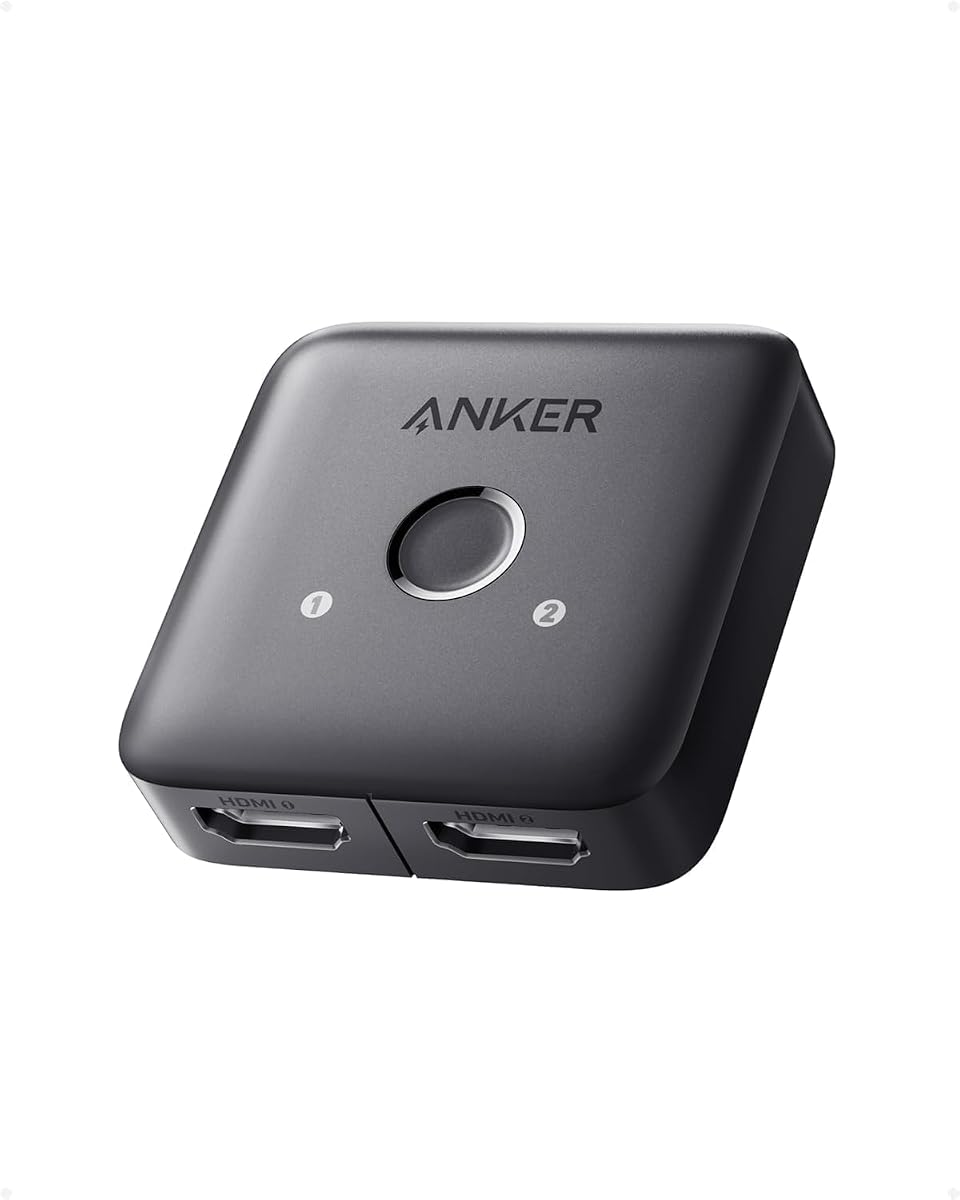
The Anker 2-in-1 HDMI Switch is built for one uncomplicated task: selecting between two HDMI sources and sending the chosen signal to one display. Its 4.4 rating indicates a well-regarded compact option, with 4K at 60Hz support and broad compatibility for laptops, game consoles, televisions, and virtual-reality headsets.
We may earn a commission when you buy through this link, at no additional cost to you.
A single button on the device changes the active source without requiring cables to be unplugged and reinserted. The design is intentionally minimal, which can be an advantage on a crowded entertainment center or compact workstation. The package includes a safety guide and user manual, and the product is covered by an 18-month warranty with customer support.
Manual selection is the only operating method; automatic signal detection is not supported. One display is active at a time, so simultaneous dual-display output is impossible. CEC is also unsupported, meaning the switch may not integrate with a television's broader control functions. To guarantee 4K at 60Hz, the guidance calls for 30 AWG input and output cables shorter than 3.3 feet, with a combined length no greater than 6.5 feet.
This switch is most useful for a two-source desktop or living-room setup where simplicity matters. It can keep a laptop and game console connected to one television, avoiding repeated cable changes. It is not suitable for users who want remote operation, automatic source recognition, simultaneous displays, or extended computer workspaces.
The switch concentrates on two inputs and one output, making it easy to understand and install. Its limited cable requirements for 4K60 can also suit compact gaming desks where short, high-quality connections are already in place.
Automatic detection is not part of the design, so users must press the button to change sources. Because the product is a switch rather than a splitter, it cannot show two screens simultaneously or provide independent content for a multi-monitor workstation.
We may earn a commission when you buy through this link, at no additional cost to you.
The WARRKY 2-in-1 HDMI Switch is a thin, bidirectional solution distinguished by its fixed 3.3-foot braided HDMI cable. Its 4.4 rating reflects a well-rounded feature set, modern gaming support, and a practical integrated-cable design. It can switch between two sources for one display or between two displays for one source.
We may earn a commission when you buy through this link, at no additional cost to you.
Video support extends to 4K at 60Hz, 2K at 144Hz, 1080p, 3D, HDR, and HDCP 2.2. The product also carries uncompressed digital audio in 7.1, 5.1, or two-channel configurations, with Dolby Atmos and DTS compliance noted. Its stated 10.2 Gbps bandwidth, AWG 26 HDMI 2.0 wiring, and gold-plated connector are intended to support stable signal transmission.
The fixed pigtail eliminates the need to find one HDMI cable for the switch, and the aluminum shell helps dissipate heat. Its 0.51-inch thickness makes it easy to position behind a television or beside a compact game console. The tradeoff is reduced placement flexibility, since the attached cable cannot easily be replaced with a different length.
This switch is well matched to gaming systems, streaming devices, laptops, televisions, projectors, and monitors. It is particularly convenient for a desk where a permanent short connection is useful. It does not support ARC or eARC, and only one of two displays is active at a time, so it is not a simultaneous multi-screen solution.
The fixed braided cable removes one loose accessory from the installation and provides a consistent connection for compact gaming setups. It can also reduce strain on the switch's female port because the attached cable is not repeatedly swapped between devices.
Support for 4K at 60Hz, 2K at 144Hz, HDR, and HDCP 2.2 makes the device appealing for modern consoles and gaming monitors. Users should still match the source, display, and selected refresh mode so the complete signal chain supports the intended output.
We may earn a commission when you buy through this link, at no additional cost to you.
The OREI UltraHD 1×4 HDMI Splitter is a capable four-screen distributor with a 4.2 rating. It combines 4K at 60Hz, HDR, full HDMI 2.0 bandwidth, EDID management, and a durable metal enclosure. The product is designed for real-time duplication rather than separate extended computer workspaces, making it suitable for digital displays and synchronized viewing.
We may earn a commission when you buy through this link, at no additional cost to you.
One HDMI source is distributed to four identical outputs. The device works with common sources including Fire Stick, Roku, PlayStation 5, Blu-ray players, Apple TV, laptops, and PCs. Its stated 18 Gbps transfer rate supports 4K at 60Hz, while the audio list includes Dolby TrueHD, DTS-HD, LPCM, and other formats for compatible connected displays.
EDID control is the feature that deserves particular attention. It lets users manage resolution compatibility so the source can negotiate a suitable display mode across the installation. The unit uses plug-and-play setup without drivers and includes a dual-voltage power supply with a US plug and international adapter. Its strong metal build is designed to improve heat dissipation during sustained operation.
This splitter is a good fit for gaming rooms, home theaters, offices, and digital signage requiring four synchronized screens. It is less suitable for users who need four independent windows or want each display to show a different source. As with any mirror-only splitter, the source, displays, cables, and content format must all support the desired 4K60 and audio configuration.
EDID management gives the installer a way to control the resolution information presented to the source. This can be useful in installations with mixed television and monitor types because it helps the system select a mode supported by the connected displays.
The one-to-four configuration is ideal for synchronized entertainment, presentations, and signage. It deliberately does not extend a computer desktop, so buyers needing separate applications, windows, or workspaces on each panel should consider an extender matrix instead.
We may earn a commission when you buy through this link, at no additional cost to you.
Choosing an HDMI splitter starts with defining the task: duplicating one source across several displays, selecting between multiple sources, or toggling between two screens. Resolution, bandwidth, audio, power, cable limitations, and control options then determine which model fits the installation.
An HDMI splitter takes one source and sends the same image to two or more displays simultaneously. An HDMI switch does the opposite: it accepts several source devices and sends the selected source to one display. A bidirectional switch may also let one source be toggled between two displays, but only one display normally operates at a time. Correctly identifying the required direction prevents a product that cannot perform the intended task.
In short, choose a splitter for synchronized screens and a switch for competing sources. Never assume a product marketed with both words can perform both functions; check its port layout, operating modes, and explicit limitations.
Resolution and refresh rate must be considered together. A splitter that supports 4K at 30Hz may suit standard-definition content, presentations, and signage, while a model supporting 4K at 60Hz is more appropriate for modern televisions, high-end projectors, and gaming displays. Some products also advertise high-refresh 1080p or 2K modes, which matter for fast-paced games.
Choose a model that meets the lowest capability in the entire chain. The source, splitter, display, and cable must all support the target mode, and any stated cable-length limits should guide the installation.
One-to-two splitters are sufficient for a television and projector or a pair of monitors displaying identical content. One-to-four models suit digital signage, retail displays, conference rooms, and synchronized home theater screens. More complex installations may require cascading, but compatibility and signal stability must be confirmed for every additional stage.
Match the output count to the actual number of displays rather than paying for unnecessary ports. Remember that mirror-only splitters cannot put separate content on each screen, and switches with two or more inputs do not automatically provide multiple outputs.
For home theater use, audio support can be as important as video resolution. A splitter that passes LPCM, Dolby TrueHD, DTS-HD Master Audio, Dolby Digital, and DTS can preserve high-quality surround formats, provided every connected display can decode the selected format. The splitter does not automatically turn built-in television speakers into a home theater system.
If audio must go to a soundbar, receiver, or other external device, verify ARC, eARC, or audio-extraction support separately. Several products in this guide explicitly lack these functions.
External power can improve stability in setups with several outputs, long cable runs, or continuous operation. A metal housing that dissipates heat effectively is also useful for distribution boxes that remain switched on throughout the day. USB-powered devices may be convenient, but the source and attached power supply must provide a stable connection.
Look for included power adapters, amplified transmission, and clearly stated cable-distance limits. Power is not a substitute for quality cables, so both should be considered when planning a multi-screen installation.
EDID helps a source determine the capabilities of the connected display, including supported resolution and refresh rate. EDID control or switching can be valuable when screens differ or when a source does not automatically negotiate a compatible mode. It is particularly useful in professional installations that require predictable behavior across several displays.
This feature is less critical for a single television but becomes more useful in conference rooms, retail spaces, and mixed-screen installations. Confirm that the splitter offers the type of EDID control needed rather than simply describing itself as EDID compatible.
High-resolution signals require suitable cable quality, sufficient bandwidth, and often shorter runs. Several products specify a maximum total cable length for 4K operation, while some splitters advertise amplified long-distance transmission or cascading. The stated limit is a system guideline, not a guarantee that every combination of source, cable, and display will behave identically.
Use high-quality HDMI cables that meet the version and bandwidth requirements of the installation. For long runs, verify the splitter's supported distance and consider powered or amplified distribution rather than extending the limit through unverified accessories.
Manual buttons work well for compact, two-source setups, while a remote selector is more convenient for a couch or across a room. Some switchers offer one-click operation, but most do not detect sources automatically. A useful package may include a power adapter, charging cable, remote, and even an HDMI cable, reducing the number of separate accessories required.
Choose the control method that matches the installation. For a frequently used living-room selector, remote access is valuable. For a fixed sign or presentation display, a simple manual switch may be entirely sufficient.
Begin by identifying the source, the displays, and the required operating mode. Connect the source to the splitters input, then attach each display to an available output. For switchers, connect the intended sources to the input ports and the television or monitor to the output. Power the device as directed, and use the supplied cable lengths within the manufacturer's recommended limits.
Select the desired source or verify that all mirrored displays are active. If the picture is missing, test the source directly with the main display, reseat every HDMI connection, and confirm that the television has selected the correct HDMI input. For resolution problems, review the source settings, EDID configuration, cable specification, and the maximum resolution supported by the least capable device in the chain.
Keep the splitter uncovered and away from enclosed spaces that trap heat, particularly during continuous operation. Use the included or specified power supply, avoid leaving the power cable tightly coiled, and do not exceed the stated bandwidth or cable-distance limits. Clean connectors gently with a dry cloth, secure the unit where cables will not be pulled, and check the power and HDMI connections periodically.
Most HDMI splitters can only mirror one source, meaning every connected display shows the same content. Sending separate content to multiple screens requires an HDMI extender, distribution matrix, or a more advanced KVM-style system. Check the product description for explicit extended-mode or multi-display computer support.
A splitter takes one source and duplicates it across two or more displays. A switch accepts multiple sources and routes the selected one to a single display. Some bidirectional switchers can also toggle one source between two displays, but only one display normally operates at a time.
Some models do, while others stop at 4K at 30Hz. The connected source, display, cable, and splitter all need to support the desired format. Cable length can also matter, so follow the manufacturer's specific guidance for high-resolution use.
A standard mirror-only splitter can show the same laptop image on both monitors, but it cannot create two independent desktop areas. For an extended workspace, use a laptop docking station, USB display adapter, or dedicated video distribution system designed for extended displays.
It generally passes the source audio along with the mirrored video, but the format must be supported by the splitter and understood by every connected display. If you need sound through a soundbar or receiver, verify ARC, eARC, or dedicated audio-extraction support before buying.
A black screen can result from an unsupported resolution, incompatible protected content, a loose cable, excessive cable length, or a display that cannot negotiate the same mode. Test the source directly, check EDID settings, use shorter or higher-quality cables, and confirm that the output display supports the selected resolution.
It depends on the model and installation. A dedicated power adapter can improve stability with four outputs, long cable runs, or continuous use, while some compact switchers operate without external power. Follow the included instructions, particularly when using high-bandwidth 4K modes.
Only models that explicitly support cascading can be chained reliably. You will need a second compatible splitter, additional displays, and cables that remain within the supported distance and bandwidth. Because every stage passes the same source signal, the final display count depends on the combined capabilities of the entire installation.
The OREI UltraHD 1×4 HDMI Splitter is the strongest overall dedicated choice, combining four mirrored outputs, 4K at 60Hz, HDCP 2.0, EDID control, and broad audio compatibility. The MT-ViKI 1×4 is a compelling four-screen option when long-distance support, cascading, and external power are priorities, while the OREI 1×2 covers simpler two-display duplication.
The remaining products serve more specialized roles. UGREEN and Anker provide convenient source selection, the GANA and WARRKY units offer compact bidirectional routing, and the avedio links splitter focuses on 4K60 mirroring with downscaling. Prioritize the actual direction of signal flow, supported resolution, and cable limitations before considering convenience features.
Before purchasing, verify the current specifications, source compatibility, included accessories, and requirements for the display or displays involved. Availability and product details can change, so the manufacturer's latest documentation remains the final authority for installation and compatibility.