
LAFVIN R3 Camera Smart Robot Car
4.5Editor score
Real-time Wi-Fi video
Five intelligent modes
ESP32-S3 controller
Open-source learning resources
Our expert guide compares 10 Arduino robot kits for beginners, teens, and makers, covering features, programming options, sensors, builds, and value today.
Arduino robot kits combine a microcontroller, motors, sensors, and mechanical parts with a project that can be assembled, programmed, and controlled. A satisfying kit should make electronics approachable while still providing enough depth for learners to experiment with autonomous navigation, remote control, wireless communication, sensors, and custom code.
We compared all ten kits by examining their stated components, control methods, sensor functions, supported programming environments, assembly guidance, expandability, and intended age ranges. The list includes wheeled cars, tracked vehicles, a self-balancing robot, a modular robotic arm, a multipurpose starter system, a large construction platform, and a six-legged hexapod.
Each review explains what makes the kit distinctive rather than simply repeating its specifications. Ratings reflect the supplied customer feedback, while practical trade-offs such as required batteries, assembly requirements, learning complexity, and included resources are considered. Availability and prices can change, so check the current listing before purchasing.
4.5Editor score

4.5Editor score

4.3Editor score
The comparison below highlights each kit's core controller, movement system, sensor or communication capabilities, and learning focus. These distinctions make it easier to compare straightforward beginner cars with advanced tracked robots, modular arm kits, and platforms designed for extensive experimentation.


The ELEGOO UNO R3 Smart Robot Car Kit V4 is a broad, polished entry point for families, classrooms, coding clubs, and beginner makers. Its 4.5 rating reflects a well-received package that combines the familiar UNO R3 controller with a camera, Wi-Fi, line tracking, obstacle avoidance, remote control, and a rechargeable battery. The result feels like a complete project rather than a bare collection of components.
We may earn a commission when you buy through this link, at no additional cost to you.
Its strongest feature is the range of ways to interact with the finished car. The ESP32-WROVER-based camera and Wi-Fi module support live FPV viewing, while the ultrasonic sensor enables obstacle avoidance and the line-tracking module provides a classic autonomous-driving exercise. A user can begin with the app or IR remote, study the example programs in Arduino IDE, and eventually alter motor commands, routes, sensor logic, and reactions. The keyed XH2.54 connections and illustrated tutorial reduce the chance that a first-time builder will connect a module incorrectly.
There are trade-offs. The camera hardware, rechargeable battery, sensors, motors, and controller make the package larger and more involved than a minimal coding robot. The app and wireless connection also add steps that may not be necessary for every learner. Nevertheless, these features make the kit more versatile than a simple line-following car, while the guided wiring and sample code provide a sensible route into the more advanced functions.
This is the strongest all-around choice for someone who wants a complete Arduino robot project with visible autonomous behavior, manual control, live video, and room for code customization. It works well for a weekend build followed by incremental programming exercises. Younger builders should use adult guidance during assembly, while older students can treat the included examples as a foundation for independent experiments.
The kit includes the UNO R3 board, camera and Wi-Fi module, line-tracking and ultrasonic sensors, motors, IR remote, and rechargeable battery. That all-in-one structure reduces the need to source separate components before a learner can assemble, power, and drive the car.
The supplied example programs make it possible to start with familiar driving behavior and then modify movement, sensor thresholds, and control logic. For learners ready to move beyond preset modes, that combination of immediate results and Arduino IDE access is particularly useful.
We may earn a commission when you buy through this link, at no additional cost to you.
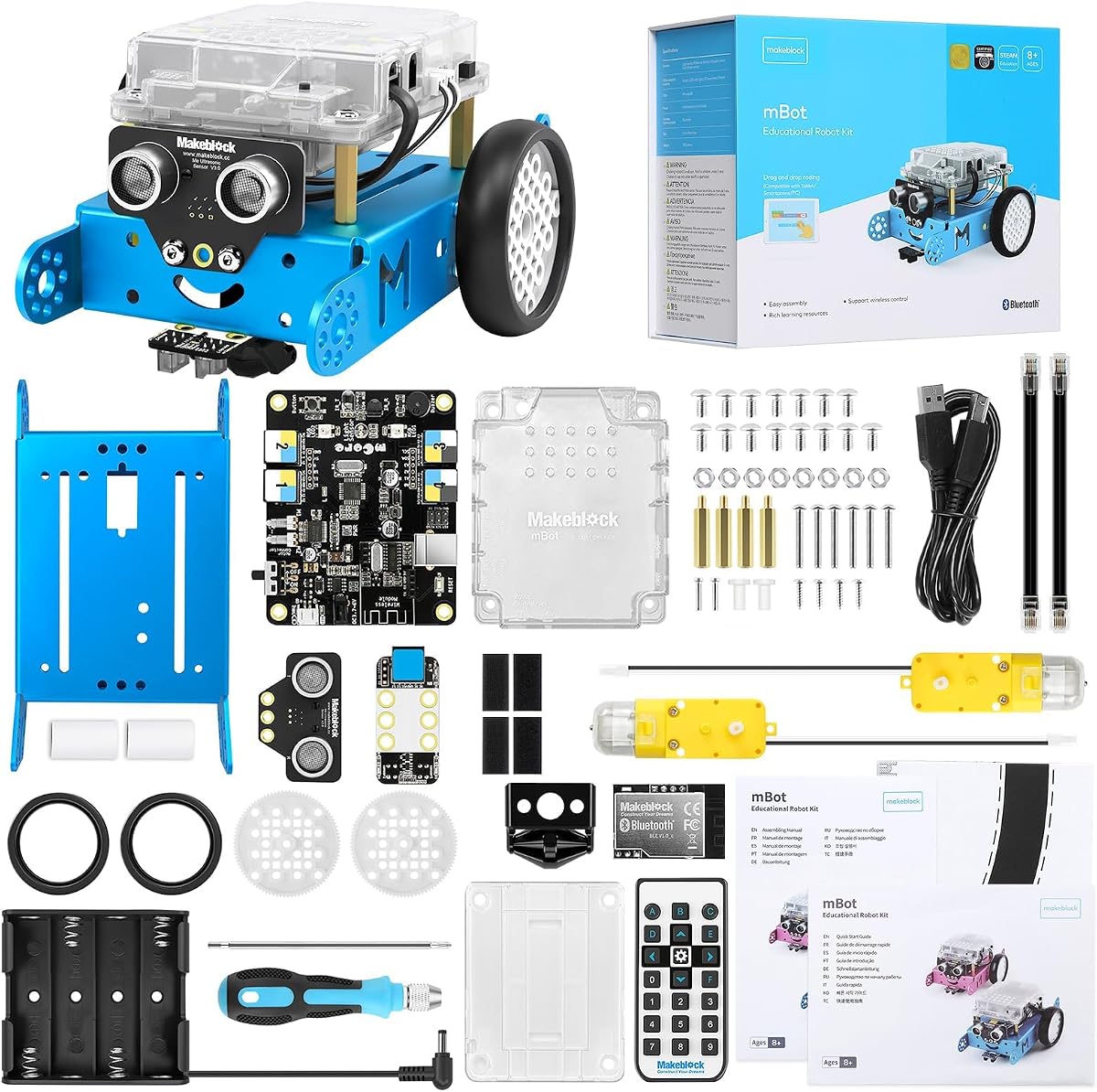
The Makeblock mBot is one of the most approachable robotics platforms in this roundup and earned the highest listed rating at 4.6. It is designed for children ages 8–12 and introduces electronics, machinery, computer programming, and autonomous behavior through a simple robot that can be assembled quickly. The package also supports progression from visual, drag-and-drop coding toward Arduino.
We may earn a commission when you buy through this link, at no additional cost to you.
Its appeal lies in a well-structured learning path. Coding cards and lessons, along with three Makeblock apps and mBlock software, give learners ways to control the robot, solve programming games, and create projects without beginning in a text-heavy environment. The physical robot supports line following, obstacle avoidance, and remote-control operation, giving each coding concept a visible result. Its open architecture is compatible with more than 100 electronic modules, more than 500 parts, and LEGO-compatible pieces, which makes it possible to grow beyond the original configuration.
The main drawback is that two battery requirements are not included: the remote needs a CR2025 battery, while the robot uses four AA batteries. That is an inconvenience for anyone hoping to use the kit immediately, though standard battery types are easy to obtain. It is also less specialized than a camera or self-balancing kit. The mBot's broad accessibility and add-on potential, however, make those limitations minor for its target audience.
Choose the mBot for a young learner who wants a manageable first robot, a guided introduction to programming, and a platform that can evolve over time. It is also a strong option for a classroom that values a consistent visual coding environment and broad accessory compatibility. An adult can help with initial assembly and battery installation, after which the learner can progress at an individual pace.
mBlock's block-based interface lets new coders create movement and sensor behaviors without immediately managing syntax. As confidence grows, the platform introduces Arduino concepts, giving the same physical robot a path toward more conventional text-based programming.
Compatibility with a large collection of Makeblock modules and parts means the base robot can support more elaborate mechanisms later. This makes the kit practical for a learner who may quickly exceed the standard line-following and obstacle-avoidance activities.
We may earn a commission when you buy through this link, at no additional cost to you.
The ELEGOO Conqueror Robot Tank is a more mechanically sophisticated Arduino project than a standard wheeled car. Its 4.4 rating reflects a kit that combines a stainless-steel chassis, tracks, suspension, sensors, a servo-mounted camera, and the UNO R3 controller. It is especially compelling for learners who want to build a recognizable tank rather than adapt a simple educational chassis.
We may earn a commission when you buy through this link, at no additional cost to you.
Five operating modes provide a varied starting point: FPV driving, infrared remote control, obstacle avoidance, line tracking, and auto-follow. The OV2640 camera and ESP32-WROVER Wi-Fi module deliver live video to a compatible phone, while the servo allows the viewing angle to be adjusted. The ElegooKit app introduces visual programming, and Arduino IDE opens the door to changing motor speed, sensor thresholds, servo movement, and navigation behavior.
Compared with a plastic wheeled robot, this kit requires more careful assembly and presents a larger physical footprint. The included tools and illustrated instructions help, and the no-solder approach is convenient. The 7.4-volt battery and substantial metal construction also mean this is not the simplest kit to move around or use in a confined classroom. In return, learners receive a durable platform capable of more serious-looking navigation experiments.
The Conqueror is a strong recommendation for ages 10 and up, especially for learners interested in tracked vehicles, cameras, autonomous navigation, and a transition from visual blocks to Arduino code. It suits home makers, homeschool projects, and coding clubs that can provide a safe assembly area and supervise the battery and motor installation.
The servo-mounted OV2640 camera can change its angle while the ESP32-WROVER module streams live video to a compatible phone. This turns obstacle inspection, line following, and maze navigation into more immersive projects than a sensor-only robot allows.
Metal tracks, suspension, and a wider chassis distinguish this build from lightweight toy-style cars. The structure is not merely decorative: it provides a stable base for the camera, sensors, battery, and control electronics while giving the finished robot a purposeful appearance.
We may earn a commission when you buy through this link, at no additional cost to you.
The ELEGOO Tumbller offers a more unusual challenge than a conventional robot car: building a two-wheel machine that uses motion sensing and real-time motor control to remain upright. Its 4.5 rating and broad mode selection make it a compelling option for students interested in feedback systems, control logic, and the relationship between code and physical motion.
We may earn a commission when you buy through this link, at no additional cost to you.
Six ways to interact with the robot include IR remote control, mobile app control, auto-follow, obstacle avoidance, bounce mode, and six LED effects. The balance mechanism is the educational centerpiece, while the ultrasonic sensor adds distance-aware behavior. Arduino IDE compatibility lets learners examine and modify the example code, and reserved I/O pins offer room to add compatible sensors. The rechargeable battery and included electronics make it possible to build, test, and customize one platform without immediately purchasing many extras.
Self-balancing behavior requires more patience than a standard line-following kit. Initial assembly, motor symmetry, and startup behavior all matter, and a small issue can affect how the robot responds. The two-wheel design is also best kept on a smooth, clear surface rather than taken outdoors. These demands make the kit less convenient for very young children, but they also create a more meaningful engineering lesson for older beginners.
Buy the Tumbller when the goal is to understand real-time feedback rather than simply build a remote-controlled vehicle. It is a strong fit for a curious teen, a classroom demonstration, or a maker who wants a robot whose behavior visibly depends on precise programming and careful mechanical setup.
Keeping the two-wheel robot upright requires the controller to react to motion as it happens. That makes the project a practical introduction to feedback loops, motor correction, sensor interpretation, and the consequences of small programming or assembly changes.
Remote control, app control, auto-follow, obstacle avoidance, bounce mode, and LED effects give the finished robot several uses. A learner can therefore study balancing while also practicing separate sensor and control exercises on the same chassis.
We may earn a commission when you buy through this link, at no additional cost to you.
The ACEBOTT Smart Robot Car is defined by its six-centimeter mecanum wheels, which enable movement forward, backward, sideways, diagonally, and through rotation. Its 4.2 rating reflects a capable ESP32-based platform with a strong focus on programmable motion, multi-direction obstacle avoidance, follow behavior, and a wide collection of expansion possibilities.
We may earn a commission when you buy through this link, at no additional cost to you.
Sixteen story-rich tutorials are designed to introduce programming and electronic hardware systematically. The robot can be controlled by an infrared remote or app, while multi-way cruise and multi-direction obstacle avoidance add autonomous behavior. The mecanum wheel arrangement also allows lateral movement, drifting, and precise positioning in confined spaces—abilities that are especially interesting for object manipulation, mapping exercises, and camera-based projects.
Expansion is unusually broad. Compatible packs are listed for a camera, robotic arm, tank chassis, and solar configuration, opening functions such as image capture, image or voice recognition, tracking, and multi-degree-of-freedom arm movement. A beginner may find that many possible directions makes the learning path difficult to narrow. Batteries are also not included, so the kit is not ready to run out of the box.
This is a compelling option for a motivated teen or adult who wants fast omnidirectional movement and a platform that can grow in several directions. It works well for makers interested in robotics mechanisms, sensor fusion, and advanced mobile configurations. For younger children, a simpler starter robot may be easier to manage.
Mecanum wheels let the chassis move sideways and diagonally while also supporting rotation and drifting. Those movement options make the platform useful for projects where precise positioning, tight-space navigation, or changing direction without turning matters.
Camera, arm, tank, and solar expansion options can turn the base car into substantially different machines. This is a major advantage for long-term makers, although learners benefit from completing the core programming lessons before adding every available module.
We may earn a commission when you buy through this link, at no additional cost to you.
The LAFVIN R3 Camera Smart Robot Car delivers a focused Arduino learning package with a 4.5 rating. Its defining feature is the ESP32-S3-based camera system, which streams real-time video over Wi-Fi and allows a phone to control both the robot's movement and the pan-tilt camera angle. That combination provides an immediate reason to experiment with visual feedback and wireless communication.
We may earn a commission when you buy through this link, at no additional cost to you.
The five stated modes cover obstacle avoidance, infrared remote control, line following, object following, and FPV video transmission. Each offers a different way to connect code with observable robot behavior. The kit also emphasizes open-source learning, with free tutorials, project resources, and code intended to help users move beyond the factory examples. The ESP32-S3 provides a modern platform for wireless projects while remaining compatible with the Arduino IDE.
Assembly is a significant part of the experience, and the product explicitly requires full self-assembly. The sensor interfaces are designed to simplify wiring, but the result is still more involved than a robot that arrives ready to drive. Users should also expect some care when connecting to the wireless feed and controlling the camera. These are reasonable requirements for a learner who wants to understand the hardware rather than only operate a finished toy.
The LAFVIN R3 is an excellent value for a teen, adult beginner, or maker who wants FPV capability without moving to a more elaborate tracked platform. It is particularly well suited to experimentation with streaming, remote vision, object following, and open-source code. A younger learner will work best with adult assistance during assembly.
The camera can stream the robot's perspective while its pan-tilt mechanism changes the viewing angle. This makes it possible to navigate around obstacles, observe a line, follow an object, or investigate a room from a moving platform.
Free learning resources, tutorials, and open-source code can help learners understand or modify the robot's behavior. That makes the kit more than a finished demonstration and gives users a practical path toward creating their own wireless robotics projects.
We may earn a commission when you buy through this link, at no additional cost to you.
The ACEBOTT 4 in 1 Smart Robot Arm is the most mechanically varied kit in the selection, with a base car, tank expansion, robotic arm expansion, and a combined arm-and-tank configuration. Its 3.9 rating is the lowest listed here, but that does not negate the kit's clear appeal for older learners who want to move beyond a single-purpose line-following car.
We may earn a commission when you buy through this link, at no additional cost to you.
The five-degree-of-freedom arm can grab, lift, and place objects, introducing practical manipulation alongside driving. The tracked base uses rubber treads intended for grass, gravel, slopes, and carpet, while the wheeled base provides another moving platform. An ESP32 controller supports Arduino and Scratch, and sixteen story-based tutorials plus assembly videos guide assembly and coding. The robot can also be operated by an infrared remote or a smartphone app for iOS and Android.
The module count can make the initial build daunting. A learner must understand how the arm, chassis, electronics, and control code interact, and some listing references to intended ages are inconsistent. The lower rating may also reflect the greater complexity of a kit with many moving assemblies. Still, none of the other products offers the same combination of car, tank, and manipulator configurations.
This kit is best for older students, teens, and adult makers seeking a substantial modular project. It fits science fairs, advanced STEM clubs, and home projects where learning mechanical assembly and programming is more important than a ready-to-play toy. Buyers should check the included hardware list carefully to understand which configurations are available in the package.
A programmable five-DOF arm lets the robot interact with objects rather than merely detect them. Learners can practice joint coordination, pickup positioning, lift-and-place sequences, and the relationship between motion commands and physical manipulation.
Using the car, tank, arm, and combined configurations allows a learner to reuse parts across different projects. That modular approach reduces the idea that each robot must be a one-time build and supports experimentation with drivetrains, grippers, and control strategies.
We may earn a commission when you buy through this link, at no additional cost to you.
The SunFounder Ultimate Starter Kit is best understood as a comprehensive Arduino learning system rather than a single robot kit. Its 4.5 rating, broad component inventory, and structured course covering basic circuits, IoT, smart cars, and sensor integration make it appealing to families and educators who want a broad introduction to physical computing.
We may earn a commission when you buy through this link, at no additional cost to you.
The kit includes an Arduino-compatible Uno, sensors, actuators, power supplies, and many supporting components. Its curriculum is organized around a progressive journey, beginning with simpler projects such as an LED and moving toward robot cars, internet-of-things applications, and more advanced sensor work. Online tutorials and video courses add structure to the large selection of parts, while community and technical support can help users move beyond the bundled material.
A potential drawback is focus. With 192 items and 87 projects, the package offers tremendous flexibility but may not produce a polished robot as quickly as a dedicated car or tank kit. Some beginners can become distracted by components and lesson choices. A teacher or parent can counter this by following the course sequence and selecting one project at a time rather than treating the entire box as an inventory to explore simultaneously.
Choose SunFounder when the objective is to build Arduino fluency across a range of electronic disciplines, not merely own one finished robot. It is an excellent first system for a child aged eight or older, a homeschool curriculum resource, or a class that needs a wide mix of sensors and actuators. Dedicated robot enthusiasts may prefer a vehicle-focused kit with a predefined chassis and autonomous modes.
The course sequence moves learners from basic electronics toward more integrated projects. That progression is important because it teaches how power, inputs, outputs, code, and mechanical components work together instead of presenting a finished robot without explaining the underlying ideas.
The large selection of sensors, actuators, and power components makes the kit useful for IoT experiments, environmental controls, input-output projects, and smart-car builds. It offers a broad electronics education for users who may later move into more specialized robotics hardware.
We may earn a commission when you buy through this link, at no additional cost to you.
The Makeblock mBot Ultimate 10 in 1 Robot Building Kit is the most extensive platform in this guide. Designed for teenagers and adults, it combines a MegaPi control board, high-strength aluminum components, and ten possible robot models into a serious STEM construction system. Its 4.3 rating reflects a capable kit aimed at users who want to develop technical skills over a long period.
We may earn a commission when you buy through this link, at no additional cost to you.
The ten models include a robotic arm and remote-controlled tank, among other configurations. The MegaPi can drive multiple motors and servos in coordination, making it possible to build machines that require several independently controlled mechanisms. Users can begin with drag-and-drop blocks in mBlock, advance to text-based Arduino IDE, or use Python with a Raspberry Pi. That progression is one of the kit's most valuable characteristics because the hardware can remain useful as coding skills become more sophisticated.
This is not a lightweight first robot. Mechanical parts are more substantial, the possible builds are more involved, and the platform demands greater attention to assembly and programming. Six AA batteries are required but not included. The premium scope may also be unnecessary for a young child interested only in line following, but for a teen or adult seeking long-term experimentation, it offers considerable room to grow.
The mBot Ultimate is ideal for a serious maker, advanced student, or family that wants one mechanical ecosystem supporting many robotics disciplines. It can support beginner coding and advanced projects involving sensor-driven vehicles, synchronized mechanisms, and machine-vision experiments. It is especially compelling when the goal is an ongoing learning platform rather than a single demonstration robot.
Reconfiguring the same motors, sensors, controllers, and structural parts into ten models teaches mechanical adaptation as well as programming. Learners encounter different drivetrains, arm systems, and vehicle types instead of treating the robot as a fixed appliance.
The MegaPi's ability to coordinate multiple motors and servos supports more complex behaviors than a simple sensor car. Combined with Arduino and Raspberry Pi options, it provides a credible progression toward autonomous navigation, robotics arms, and machine-vision projects.
We may earn a commission when you buy through this link, at no additional cost to you.
The Freenove Hexapod Robot Kit is mechanically unlike every other product here. Instead of wheels or tracks, it uses six legs with three motors per leg, and each motor can be controlled independently. Its 4.1 rating reflects an unusual project with substantial appeal for makers interested in walking, crawling, twisting, and coordinated multi-joint movement.
We may earn a commission when you buy through this link, at no additional cost to you.
The supplied code library allows users to control the hexapod with a small number of lines, while the example programs and step-by-step assembly guide reduce the initial learning burden. Control is available through the included remote, an Android phone or tablet, an iPhone through the Freenove app, and a computer running Windows, macOS, or Raspberry Pi OS. This broad compatibility lets learners choose the interface that best fits their learning environment.
The robot requires assembly, and the battery is not included. A paper tutorial is also not provided; the tutorial and code are available through the download link referenced on the product box. The 18 independently controlled motor channels create far more coordination than a standard two-wheel kit, so assembly accuracy and careful power connections are important. Those challenges are substantial for a first robotics project.
The Freenove Hexapod is best suited to a patient teen, adult beginner, or experienced maker with a clear interest in legged robotics. It offers an unusual and memorable final project for a course on servos, motion planning, sensor control, or biomechanics. Buyers should obtain a suitable battery and follow the digital tutorial closely before attempting complex gaits.
Three motors on each of six legs create a much larger control challenge than a standard wheeled robot. The kit offers an excellent opportunity to study how repeated joint movements produce walking, crawling, twisting, and stable body positioning.
Remote, Android, iPhone, Windows, macOS, and Raspberry Pi OS support provide flexible ways to operate and program the robot. The included code library also gives newcomers a functional starting point while preserving the ability to move toward custom motion sequences.
We may earn a commission when you buy through this link, at no additional cost to you.
The best Arduino robot kit depends on the learner, the type of movement desired, the available supervision, and the depth of programming instruction. Review these factors before choosing a complete robot or a general-purpose electronics system.
A younger learner may benefit most from a straightforward robot with visual coding, guided assembly, and obvious autonomous modes. A beginner who has already worked with basic electronics may prefer Arduino IDE examples and a complete vehicle. Teens and adult makers can handle more elaborate tracked chassis, multipoint motor control, robot arms, or Raspberry Pi integration. Age labels are useful starting points, but the learner's ability to follow wiring diagrams, troubleshoot connections, and sustain concentration is more important.
Dedicated robot kits provide a defined chassis, motors, controller, and often several sensors. They are easier to evaluate because the main project is already designed around a particular behavior. Component systems contain a wider assortment of electronics and offer more freedom, but users must decide what to build and may need to plan lessons. Decide whether the priority is a satisfying finished robot quickly or a broad Arduino education with many possible experiments.
Wheeled cars are straightforward to assemble, control, and use indoors. Mecanum wheels add sideways and diagonal movement, while tank tracks offer a more rugged-looking platform that can handle varied surfaces. A two-wheel self-balancing design introduces real-time motor feedback, and a six-legged hexapod requires much more coordinated joint control. The best mechanism is the one whose learning demands match the project goal.
Line-tracking sensors teach a robot to follow a marked route, while ultrasonic sensors support distance measurement and obstacle avoidance. Cameras add visual information but also introduce streaming, latency, programming complexity, and more demanding power requirements. Object-follow and auto-follow modes can make autonomous behavior easier to observe. Consider whether the learner needs simple, measurable inputs or is ready to work with richer sensor data.
Arduino IDE is essential when the goal is learning text-based embedded programming, reading examples, and modifying control logic. Visual block environments lower the barrier for younger children and provide an easier way to connect programming concepts with robot movement. Several kits support both, which creates a useful progression from blocks to text. Raspberry Pi and Python support are valuable when the project may later require more advanced computing or machine vision.
Assembly quality is only one part of a successful kit. Illustrated instructions, story-based lessons, coding cards, video courses, example code, and downloadable libraries determine how easily a learner can troubleshoot and progress. Check whether the instructions explain components as well as list them, and whether the code examples cover sensor input, motor output, and autonomous behavior. Clear resources are especially valuable when an adult is not an electronics expert.
Some products arrive ready for basic operation, while others require substantial assembly. No-solder projects and keyed connectors make the first build easier, and spare tools can be useful. Battery requirements deserve equal attention: some kits include a rechargeable pack, while others require AA batteries, a coin cell, or another power source that must be purchased separately. Verify exactly what is included before planning the first session.
Reserved input and output pins, compatible modules, and interchangeable chassis parts can extend the life of a kit. A camera expansion can add vision, an arm can add manipulation, and alternate drivetrains can change navigation. Expandability is valuable when the learner may want multiple projects, but it can create clutter and confusion. A focused kit with one excellent robot may be more motivating than a large collection of optional configurations.
Begin by inventorying the components and reading the complete assembly guide before connecting power. Build the chassis and mechanical parts first, then install the controller, motors, and sensors. Use the supplied connectors where available, double-check polarity, and avoid forcing plugs. For a tracked or legged robot, test the mechanism on a raised surface so the wheels or legs cannot damage the work surface while the motors are running.
Install the required batteries or charge the included rechargeable battery according to the manufacturer's instructions. Connect the controller and upload the basic example program before testing advanced modes. Place the robot on a flat, clear surface for line tracking, balancing, obstacle avoidance, and camera navigation. Learn one mode at a time, change a single variable or code block, and record the result so cause and effect are easier to understand.
After each session, disconnect power and remove the batteries if the kit uses removable cells. Brush loose dust from wheels, tracks, gears, and sensors with a soft, dry brush, and keep moisture away from the controller and camera electronics. Tighten loose fasteners, inspect exposed wires, and keep the chassis free of conductive debris. Store the kit in a dry location with removable batteries removed, and download any tutorial or code updates needed for future sessions.
The Makeblock mBot is generally the most beginner-oriented because it offers guided assembly, visual block coding, lessons, and simple autonomous modes. The ELEGOO Smart Robot Car V4 is also approachable, but its camera, Wi-Fi functions, and larger component count create more opportunities for assembly or connection issues. The right first choice depends on whether the learner prefers immediate guided interaction or deeper Arduino programming.
No. The ELEGOO Smart Robot Car V4 includes a rechargeable lithium-ion battery, and the Conqueror includes a 7.4-volt battery, but several other products require batteries that are not listed as included. The Makeblock mBot needs four AA batteries and a CR2025 battery for its remote, while the ACEBOTT Smart Robot Car and Freenove Hexapod also specify that batteries are not included. Check the current package contents before ordering.
Several options support block-based or visual programming. The ELEGOO Smart Robot Car V4 and Conqueror can be introduced through the ElegooKit app, the mBot uses mBlock, and the ACEBOTT 4 in 1 kit supports Scratch. Visual coding is useful for a first project, while Arduino IDE support allows learners to continue into text-based control as their skills improve.
The LAFVIN R3 Camera Smart Robot Car is the most directly focused on live first-person vision, with Wi-Fi streaming and a controllable pan-tilt camera. The ELEGOO Smart Robot Car V4 and Conqueror also include camera systems, while the Makeblock mBot Ultimate can support Raspberry Pi machine-vision projects. The LAFVIN is likely the simplest starting point for a camera-based mobile robot.
Tracked kits can handle uneven surfaces and small obstacles better than ordinary small wheels, but they are not automatically weatherproof. The ELEGOO Conqueror has a metal tracked chassis, and the ACEBOTT 4 in 1 kit includes a rubber-track expansion. Outdoor use still requires dry conditions, a clear test area, secure connections, and attention to the charging and battery guidance.
It can be. The Freenove Hexapod has three motors on each of six legs, so there are many more joints and connections than a two-wheel car. Its prewritten code library helps, but the project is best suited to a patient teen or adult who wants to study legged movement. A first-time learner with no electronics experience may prefer a wheeled or tracked kit.
Start with motor control, then work through digital and analog sensor input before attempting autonomous behavior. Line following is a useful first closed-loop project because it connects sensor readings to immediate motor corrections. From there, learners can add obstacle avoidance, remote control, wireless communication, cameras, state machines, and custom navigation routes. Keep each experiment small and change only a few code values at once.
The ELEGOO Conqueror is explicitly described as a no-solder project and includes tools and illustrated instructions. Other kits may use keyed plugs or prewired modules, but the supplied information does not state that every product is entirely solder-free. Check the listing and kit contents carefully, especially when selecting a camera, expansion, or power configuration.
The ELEGOO UNO R3 Smart Robot Car V4 is the most balanced overall choice because it combines a beginner-friendly build with camera streaming, autonomous modes, remote control, and Arduino IDE access. The Makeblock mBot offers the gentlest educational introduction, while the LAFVIN R3 provides strong value for users who specifically want mobile camera vision. The Makeblock mBot Ultimate stands apart as the most extensive platform for long-term, advanced experimentation.
Prioritize the kind of learner and project you actually intend to support. A simple car is best for visual coding and first sensor projects, a tracked robot suits navigation and camera experiments, a self-balancing kit teaches feedback control, and a hexapod or modular arm platform supports advanced mechanics. Also check the included instructions, battery requirements, age guidance, and expansion ecosystem before committing to a build.
Arduino robot kits can develop coding, electronics, mechanical reasoning, and problem-solving, but the most satisfying choice is one whose complexity remains motivating rather than discouraging. Product listings, included accessories, ratings, and prices may change, so review the current Amazon page and package contents before making a final purchase.