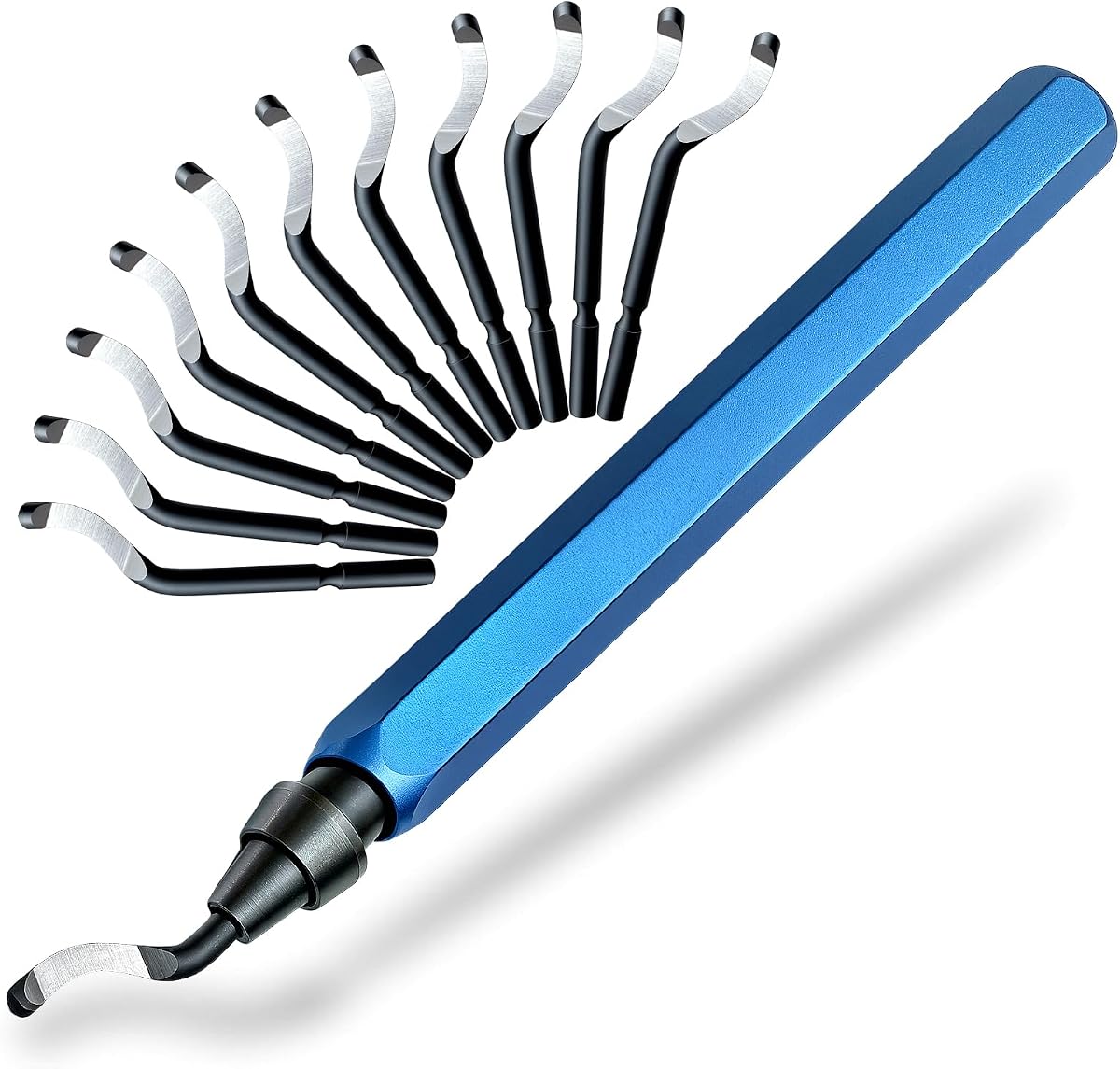
13-Piece Deburring Tool for 3D Printing
4.7Editor score
Twelve M2 HSS blades
Non-slip aluminum handle
Tool-free spring blade release
Works with resin and metals
This Deburring Tool for 3D Printing guide compares 10 options for blade quality, handles, versatility, and print-finishing control.
A deburring tool for 3D printing removes the small ridges, rough edges, support marks, and leftover burrs left behind after a part is printed or trimmed. The right instrument helps clean PLA, PETG, ABS, and resin models without damaging delicate details, while also handling PVC, copper, aluminum, and other workshop materials.
The products in this guide were compared using their published specifications, included accessories, blade construction, handle design, rotation mechanisms, material compatibility, and customer ratings. The list covers compact hand deburrers, aluminum-handled kits, metal-handled models, expanded finishing sets, and tools designed for both 3D prints and general workshop tasks.
Each review explains where a particular deburring tool stands out, where its included components may be unnecessary, and which type of maker is most likely to benefit. Product ratings and availability can change over time, and current prices should always be checked on the linked listing before making a purchase.
4.7Editor score

4.8Editor score

4.7Editor score
The comparison below highlights blade materials, handle construction, included accessories, and practical applications so you can choose the most suitable deburring tool for your prints and workshop.


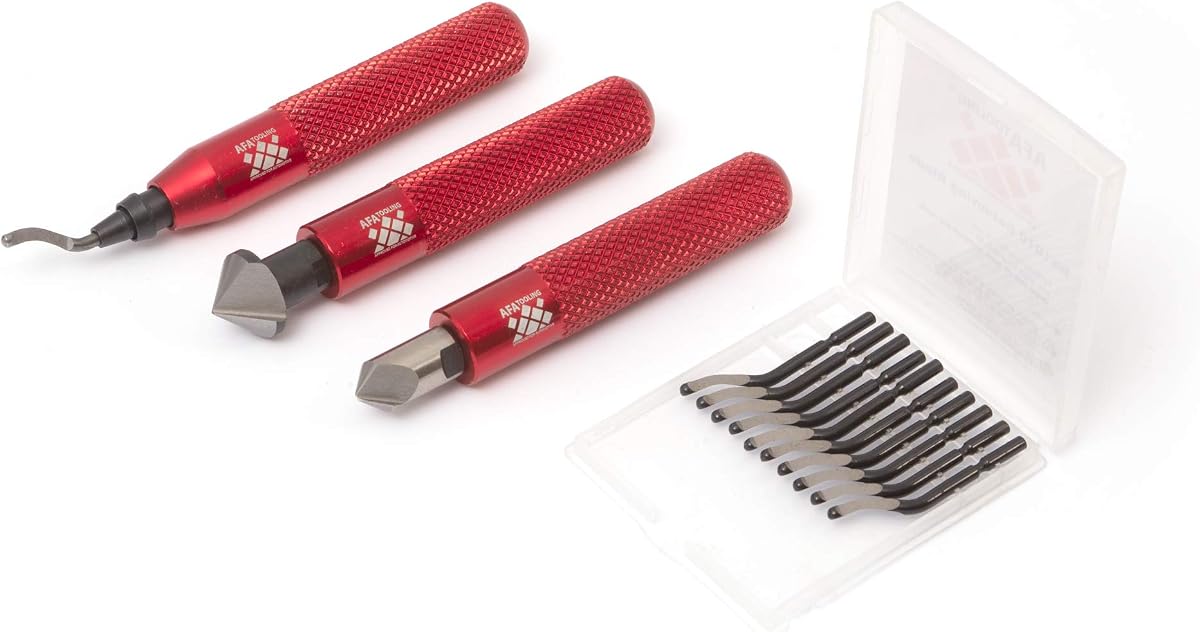

This AFA Tooling deburring tool earns a 4.7 customer rating by combining sharp M2 high-speed steel blades with a rigid CNC-machined aluminum handle. The eleven-blade configuration gives makers replacements for repetitive cleanup, while the blade tempering and wear resistance make the tool suitable beyond delicate plastic prints.
We may earn a commission when you buy through this link, at no additional cost to you.
Its main strength is controlled edge work. The aluminum housing provides a steady platform for guiding the blade along brims, sharp corners, holes, and lightly trimmed supports. Because the blades are made from M2 HSS rather than basic carbon steel, they are intended to retain a working edge when moving between materials such as resin, aluminum, stainless steel, and harder metals.
The trade-off is that this is a focused metal-handled deburring tool rather than a complete finishing kit. It does not advertise pliers, cutters, files, or countersink reamers, so users wanting an all-in-one post-processing set may need separate accessories. Its hard aluminum body also provides less forgiving tactile feedback than a thick grip designed specifically to reduce hand fatigue.
This is a strong general-purpose choice for makers who alternate between 3D printing and light metal or pipe work. It suits users who value blade longevity, precise handling, and a compact manual deburring instrument without wanting a large collection of unrelated hand tools.
The sharp cutting edge is suited to trimming seam lines, removing small support residues, and softening sharp corners after printing. A light, consistent pass is more appropriate for detailed resin models than aggressive scraping, which can damage flat surfaces.
M2 HSS blades offer a useful margin of versatility for PVC, aluminum, copper, and harder workshop materials. This makes the tool more useful than a plastic-only print-finishing implement while remaining compact enough for a dedicated hand-tool kit.
We may earn a commission when you buy through this link, at no additional cost to you.
This 12-blade deburring tool receives a 4.5 rating and is designed for makers who want a straightforward, durable hand tool for resin, plastic, PVC, copper, and metal. Its full-metal handle, rotating cutter, and quick-change mechanism cover the core requirements of a useful 3D print finishing instrument.
We may earn a commission when you buy through this link, at no additional cost to you.
The spring-loaded release allows a dull blade to be exchanged in seconds without reaching for a driver or other tool. That convenience matters during a batch of prints, particularly when switching between a sharp general blade and another edge for a specific material. The 360-degree rotating head also helps the cutter follow curved, contoured, and irregular edges.
A metal body supports durability and gives the tool a firm feel, but users with long finishing sessions may find a knurled or thicker handle more comfortable. The product information identifies the blades as HSS but does not provide the same detailed M2 grade, temper rating, or specialized geometry found in some competing kits. It also does not include files or cutting pliers.
Choose this option when quick blade changes, broad material use, and a rotating head matter most. It is particularly suitable for hobbyists and workshop users who want to clean plastic prints and perform occasional metal or pipe finishing with one compact manual tool.
The tool-free spring release reduces interruptions when a blade becomes dull or when a different edge is better suited to a new workpiece. A larger replacement set also provides a useful buffer for frequent 3D printing cleanup.
The freely rotating cutter head is useful on rounded housings, cylindrical parts, and irregular supports. It reduces the need to change the tool angle constantly, although careful light pressure remains important around fragile details.
We may earn a commission when you buy through this link, at no additional cost to you.
The 13-piece deburring tool earns a 4.7 rating and stands out as a value-oriented combination of M2 HSS blades, an aluminum handle, and a simple quick-release mechanism. The package includes one handle and twelve BS1010 blades, giving users a healthy replacement supply without expanding into unrelated tools.
We may earn a commission when you buy through this link, at no additional cost to you.
The non-slip aluminum surface supports steady control, while the spring-loaded release allows blades to be changed without extra tools. According to the product information, the blades are premium M2 high-speed steel with a sharp swivel head, making the set appropriate for resin models, copper, PVC, aluminum, and other metals as well as common printed plastics.
Its limitation is specialization. This package does not include diamond files, snips, pliers, or reamers, so it addresses edge cleanup rather than every stage of 3D print post-processing. The swivel head can also follow a contour quickly, but a careful operator still needs to avoid forcing the blade into a tight internal corner.
This is the best budget pick for a maker who primarily needs a dependable manual deburring tool and values extra blades over a broad accessory bundle. It is compact enough for a toolbox or portable kit and should serve casual and moderately frequent 3D printing workflows well.
A generous replacement set helps prevent work delays when a cutting edge dulls. It also makes the tool practical for makers who use it across both printed models and metal parts rather than reserving it for occasional touch-ups.
The compact handle and simple release make the tool easy to keep near a printer or place in a shared toolbox. Its modest size supports controlled movements on small models while retaining enough metal weight to feel stable.
We may earn a commission when you buy through this link, at no additional cost to you.
This 11-blade HSS tool holds a 4.6 rating and presents a practical choice for print finishing, pipe preparation, and general edge cleanup. Its anodized aluminum handle is described as ergonomic, while the blade set provides multiple replacements for regular use across different materials.
We may earn a commission when you buy through this link, at no additional cost to you.
The product is positioned for more than one operation. In addition to deburring, the tool can be used for reaming and chamfering on materials including metal, resin, epoxy, PVC, and copper. That broader scope may appeal to makers who maintain equipment, assemble models, and perform household or workshop tasks in addition to producing prints.
Compared with more specialized premium kits, the specifications provide less detail about the exact steel grade, blade geometry, and retention mechanism. The absence of a storage case is another minor drawback if spare blades are transported often. Nevertheless, the anodized handle and eleven-blade package cover the essential requirements.
This tool is best for users who need a versatile manual edge-finishing instrument for both printed parts and conventional materials. Choose it when broad compatibility and straightforward task coverage are more important than specialized blade selection or a comprehensive post-processing bundle.
Compatibility with resin, epoxy, PVC, copper, and metals reduces the need to keep separate finishing tools for each material. The caution is to select an appropriate blade geometry and use light passes on softer or more delicate surfaces.
Reaming and chamfering capabilities make this a more versatile workshop implement. These related functions are useful when a printed hole or cut edge needs a cleaner transition before assembly.
We may earn a commission when you buy through this link, at no additional cost to you.
This AFA Tooling model receives a 4.8 rating, the highest among the listed products, and stands out through its combination of tempered M2 HSS blades, a precision-machined aluminum handle, and a refined internal swivel mechanism. It is built to address the cleanup tasks most often encountered after 3D printing.
We may earn a commission when you buy through this link, at no additional cost to you.
The handle measures 148mm, or 5.8 inches, and uses a 12mm hexagonal grip that resists rolling. The internal swivel tracks contours and irregular edges with fluid movement, while a spring-loaded collar retains the blade and supports rapid replacement. The eleven-blade kit also includes a case for the ten spare blades, making it easier to keep replacements organized.
The trade-off is weight and focus. A metal housing feels substantial and controlled but is less ultralight than a small plastic deburring tool. This is still a deburring package rather than a complete finishing kit, so it does not include the diamond files and cutting pliers found in an expanded accessory set. Users should still keep light pressure to avoid gouging resin or thin printed walls.
This is the editor's choice because it balances the features that matter most for high-quality print cleanup: sharp blades, stable handling, smooth movement, quick replacement, and organized storage. It is an excellent general pick for serious makers who print frequently and occasionally work with sheet metal, pipe, or other hard materials.
The balanced aluminum body allows delicate pressure without forcing the blade into the workpiece. That control is especially valuable when cleaning seam lines, support marks, or sharp corners on resin and thin-walled plastic parts.
The high-precision internal movement allows the blade to follow curves and irregular contours more naturally. This is useful for cylindrical enclosures, rounded housings, brackets, and printed parts with complex external profiles.
The dedicated case keeps ten spare blades organized and portable. It is a practical addition for users who move between a home bench, shared workspace, and maker event where loose small components would be inconvenient.
We may earn a commission when you buy through this link, at no additional cost to you.
This red-handled AFA Tooling deburring tool has a 4.7 rating and emphasizes a secure grip with its thick, knurled aluminum body. The five-and-a-half-inch handle gives makers a substantial, controlled platform for smoothing printed edges and finishing freshly cut metal or plastic parts.
We may earn a commission when you buy through this link, at no additional cost to you.
The eleven M2 HSS blades are tempered to 62–64 HRC, combining sharp cutting edges with resistance to wear. A high-precision swivel mechanism helps the cutter follow curves, holes, edges, and inside diameters, and the spring-loaded collar permits quick blade changes. A storage case for the ten spare blades adds useful organization.
Some users may prefer a smaller or lighter tool for long mobile sessions, and the concentrated weight may feel unnecessary for light plastic cleanup. The package is also dedicated to deburring, without the additional files, cutters, and pliers supplied by a multi-tool kit. Despite these limits, the grip and blade specification are compelling for detailed, controlled work.
Choose this model for makers who value a secure knurled hold, consistent blade performance, and a durable tool capable of crossing from PLA and resin to PVC, copper, brass, aluminum, and sheet metal. It is particularly well suited to repeated trimming tasks that benefit from a firm, steady hand.
The textured grip is useful when working with resin, which can leave fingerprints or residue on a smoother handle. A knurled surface provides a more secure purchase and helps maintain a consistent blade angle during small corrective passes.
The specified materials range from common printed polymers to copper, brass, aluminum, PVC, and sheet metal. That makes this a practical bridge between a 3D printing accessory and a general manual finishing tool.
We may earn a commission when you buy through this link, at no additional cost to you.
The 19-piece post-processing kit carries a 4.3 rating and distinguishes itself with the broadest selection of finishing accessories in the list. It combines eleven M2 HSS deburring blades, five diamond files, flush cutters, and needle-nose pliers in a package designed for resin, metal, plastic, PVC, and copper.
We may earn a commission when you buy through this link, at no additional cost to you.
Two deburring blade geometries are intended for curved and flat surfaces, and the 360-degree swivel head helps follow contours. The thick knurled aluminum handle is 5.12 inches long and 0.71 inches in diameter, spreading pressure across the hand. Flush cutters and pliers address support structures, skirts, and rafts that are outside the normal scope of a deburring blade.
The larger accessory set is less convenient for someone who only wants a compact hand deburring instrument. Some products may be irrelevant to a particular workflow, and the 4.3 rating is lower than the ratings of the highly focused deburring tools. Users should still consider whether a coarse diamond file is appropriate for a particular resin surface, as aggressive abrasion can still scratch it.
This is the strongest choice for a maker who wants a broad post-processing station rather than one instrument. It is especially useful for resin prints with supports and intricate cleanup, as well as projects that need both edge removal and surface smoothing. Users who mainly deburr filament-based prints may prefer a simpler dedicated tool.
Flush cutters and needle-nose pliers can remove supports, skirts, and rafts before the blade reaches the final edge. This sequence helps reduce the force needed from the deburring head and lowers the chance of damaging nearby model surfaces.
Five files with different grits and shapes offer options beyond cutting-edge cleanup. They can reach narrow recesses and refine transitions that a rotating blade cannot access as easily, making them valuable for detailed resin work.
The thick grip is designed to disperse pressure and reduce fatigue during extended finishing. Its larger diameter and knurling should feel more secure than a slim handle, especially when wet resin residue makes fingertips slippery.
We may earn a commission when you buy through this link, at no additional cost to you.
This AFA Tooling set earns a 4.7 rating by combining an eleven-blade swivel deburring tool with two countersink hand reamers. It is a more specialized package than most entries here, particularly attractive to users who finish drilled or printed holes in wood, plastic, and metal.
We may earn a commission when you buy through this link, at no additional cost to you.
The main deburring head uses tempered HSS blades, and the swivel is designed to follow uneven surfaces. The two 90-degree HRC 62–64 reamers are intended to countersink and enlarge circular openings, covering a task that basic deburring blades do not address. A knurled aluminum handle supplies a secure grip, and a protective case stores the extra blades.
The reamers make the package less convenient for users who only clean print edges, and they add weight that is not helpful for simple plastic deburring. They also cover two specific sizes, so broader hole work may require additional tools. Nevertheless, the combination is compelling for makers who assemble printed parts with fasteners or need clean transitions around openings.
This is the right selection for workshop users who need both edge cleanup and controlled hole finishing. It is less compelling for casual filament printers, but for a maker working with drilled plastic, wood, or metal components, the added reamers can eliminate the need for a separate finishing implement.
Countersink reamers create a controlled chamfer around a hole, which can help a screw head sit more evenly. This is valuable for functional printed enclosures, mounting blocks, and prototypes assembled with hardware.
The swiveling deburring head and countersink reamers cover adjacent stages of edge preparation. Keeping both together is convenient for work that involves both exposed edges and circular openings.
We may earn a commission when you buy through this link, at no additional cost to you.
The ruthex deburring tool has a 4.3 rating and focuses on convenient storage as much as edge finishing. It comes with eleven HSS blades, a metal box, and a handle compartment designed to hold two extra blades, reducing the likelihood of losing small components.
We may earn a commission when you buy through this link, at no additional cost to you.
The quick-release mechanism secures the active blade while allowing it to be removed without additional tools. A 360-degree rotating tip helps the cutter work from different angles on holes, straight edges, curved surfaces, and harder materials. The listed compatibility includes resin, plastic, PVC, copper, aluminum, stainless steel, and wood.
The self-storage feature is convenient but limited to two spare blades, so the metal box remains important for transporting the rest of the set. Its 4.3 rating is also lower than that of several focused competitors. The product information does not specify an M2 grade or detailed temper treatment, so buyers seeking documented premium metallurgy should examine the current listing carefully.
This model makes sense for users who frequently move between work locations and want spare blades immediately accessible inside the handle. It is a versatile manual choice for 3D printing, pipe preparation, light fabrication, and general shop cleanup, particularly for left- and right-handed operation across the supplied blade set.
Keeping two extra blades inside the handle prevents a common workshop problem: a dull blade interrupting a job while the replacement is elsewhere. The integrated compartment adds convenience without requiring a separate loose pouch.
The included metal box provides a more durable home for the complete blade collection and tool. It is useful for transport, though the handle itself is the more convenient storage point during active work.
We may earn a commission when you buy through this link, at no additional cost to you.
This 16-blade mixed-set tool earns a 4.7 rating and is the most specialized premium option in the guide. Rather than supplying a single blade type, it divides sixteen blades among BS1010 M2 HSS, BS1018 M35 cobalt HSS, and BK3010 M2 HSS geometries for general edges, hard metals, and small holes.
We may earn a commission when you buy through this link, at no additional cost to you.
The M35 cobalt blades are tempered to 65–67 HRC, while the M2 blades are tempered to 62–64 HRC. The small-hole blade is intended for openings down to 1.5 millimeters. For 3D printing, the 360-degree rotating head supports trimming rough edges, small overhangs, and sharp corners in PLA, ABS, PETG, and resin.
Its thick 0.72-inch knurled aluminum handle offers stability and is intended to reduce fatigue during heavy work. The trade-off is complexity: users must learn which blade geometry suits each task, and makers who only trim plastic may not need the advanced small-hole or hard-metal options. Its larger construction also takes up more space than a basic hand deburrer.
Choose this premium model for advanced workshops, small-batch manufacturing, or frequent work across both printed parts and hard metals. The specialized blades justify the additional complexity when precision, hole access, and material-specific cutting performance are priorities.
A mixed set is more useful than a large number of identical blades when work varies. General-purpose blades handle common edges, cobalt steel addresses harder metals, and the small-hole geometry provides access where a full-size blade cannot reach.
Triple quenching and tempering are cited as part of the blade treatment, supporting consistent sharpness in demanding materials. This is particularly relevant for users who occasionally deburr machine-cut parts rather than limiting the tool to plastic prints.
The BK3010 blade is intended for holes as small as 1.5 millimeters, expanding the tool's usefulness for functional printed parts with miniature openings. It should be selected carefully, with light rotational pressure, to avoid enlarging holes unintentionally.
We may earn a commission when you buy through this link, at no additional cost to you.
The best choice depends on the materials you print, the complexity of your post-processing, and how much control and accessory support you need. Blade material, handle design, rotation, and included tools all affect the final workflow.
Blade material is one of the most important considerations because it determines how cleanly a tool cuts and how long the edge remains sharp. M2 high-speed steel is a versatile choice for printed polymers, resin, PVC, aluminum, copper, and other common materials. M35 cobalt high-speed steel offers additional specialization for stainless steel and hard metals, while the listed temper ratings provide a more concrete indication of expected wear resistance.
A larger blade count is useful because the cutting edge will eventually dull, but quantity alone does not guarantee versatility. Mixed geometries may be better than many identical blades when a workshop handles flat edges, curved surfaces, holes, and hard metals. Products that specify separate blade types can help you match the cutter to the geometry and material of the workpiece.
The handle affects control, fatigue, and the feel of the tool. Aluminum provides rigidity and a stable feel, while knurling or a thick shape improves security in wet, dusty, or slippery conditions. Hexagonal and thicker grips resist rolling, which is helpful on a busy workbench. A lightweight plastic handle may be sufficient for occasional plastic cleanup but can transmit more vibration.
A 360-degree rotating head allows the blade to follow curved or irregular edges with fewer awkward wrist movements. This is especially helpful for cylindrical models, rounded enclosures, drilled openings, and complex printed supports. Smooth internal movement is desirable because a stiff or uneven mechanism can drag against the workpiece and produce an inconsistent finish.
A deburring blade cannot remove every type of support, skirt, or surface defect. Flush cutters and needle-nose pliers help detach supports and clean hard-to-reach areas, while diamond files can refine flat surfaces, recesses, and transitions. A complete kit can reduce the number of separate hand tools needed, although it may include accessories that a focused user never touches.
If your prints are functional parts with screws, pegs, shafts, or cable pass-throughs, countersink and reaming tools may be as important as the deburring head. A dedicated reamer enlarges and chamfers holes consistently, while a small-hole blade can clean burrs inside openings. Check the stated hole range and avoid forcing a blade that is too large for the geometry.
A spring-loaded or quick-release mechanism makes changing a dull blade faster and reduces the chance of damaging the holder while removing it. Integrated handle storage is convenient for one or two spares, while a dedicated case is better for a larger collection. Organized storage matters because small steel blades are easy to lose and can become damaged when mixed with other tools.
Check the materials the manufacturer lists, but also consider the intended use of your setup. PLA, PETG, ABS, and resin prints need sharp, controlled edges, while PVC and metals demand more robust HSS construction. A tool designed for both can save space in a shared workshop, but specialized hard-metal options may offer a longer service life in that environment.
Begin by removing supports, skirts, and rafts with the appropriate cutters or pliers before reaching for the deburring head. Work on a clean, stable surface and inspect the printed part for fragile areas. Hold the tool with a relaxed but secure grip, place the blade lightly against the edge, and use short strokes rather than pressing the blade deep into the material.
For a printed part, follow the direction of the contour and keep the tool moving to avoid concentrating pressure at one point. Work from less visible areas toward exposed edges when practical. On resin, use a light touch because the blade can scratch a cured surface, and on thin PLA or PETG walls, remove only the raised material rather than cutting deeply into the nominal layer.
After each use, remove debris from the blade and handle, especially if you have worked with resin. Replace the blade when it tears rather than cuts, and store spare blades in their case or integrated compartment. Keep the mechanism clean, avoid striking the cutter, and inspect the handle and retention collar for looseness before the next finishing session.
A manual tool with a sharp, freely rotating HSS blade works well for resin prints because it can remove raised edges and support marks with controlled pressure. A kit that also includes flush cutters, pliers, and diamond files is more useful for complex resin models because removing supports and refining surfaces requires more than deburring alone. Light pressure is essential to avoid scratching cured resin.
A deburring tool can soften or remove raised support marks, but it cannot replace every preparation step. Supports often need to be cut away first, and flat sanding or filing may be required where a substantial layer remains. A combined deburring and file kit gives you the most flexibility for cleaning a detailed model without forcing a blade into the surface.
Yes. HSS blades are sharp enough for common 3D printing polymers such as PLA and PETG when used with light pressure. The main concern is technique rather than compatibility: pushing too hard can gouge the wall or remove too much material. ABS and resin can also be trimmed, although ABS generally benefits from a firmer, steadier pass.
M2 HSS is a versatile general-purpose blade material that suits many printed polymers and common metals. M35 cobalt HSS includes more alloying elements and is intended to retain hardness and wear resistance in harder materials such as stainless steel. A mixed set is useful when one tool must handle both general 3D print cleanup and demanding metal edges.
Replacement depends on material, sharpness, technique, and the amount of work being performed. Replace a blade when it begins tearing, leaving a rough edge, or requiring noticeably greater pressure. Frequent metal use will dull a blade faster than light cleanup on plastic. Keeping several spares is useful, but a blade that remains sharp with minimal pressure should continue in service.
A deburring tool is most useful when parts need clean assembly, fit with hardware, or have sharp edges that could irritate skin or damage a nearby component. It is less essential for display models with smooth, intentionally rounded edges, but even those can benefit from a quick cleanup after support removal. A compact tool remains worthwhile for most active makers.
A countersink reamer is helpful when a screw head should sit flush or slightly below the surface. It produces a more controlled opening than trying to enlarge a hole with a deburring blade. Printed holes can vary slightly in shape, so work gradually and check fit frequently to avoid removing too much material or weakening the surrounding wall.
Use a clean, sharp blade, support the workpiece securely, and apply only enough pressure to remove the burr. Move the tool continuously along the edge and avoid twisting the rotating head against the surface. For delicate resin details, test on an inconspicuous edge and consider using a file or abrasive method when a blade would naturally scratch the surface.
The 13-piece M2 HSS deburring tool is the best budget option because it combines a well-rated compact design with a substantial replacement blade supply. The AFA Tooling CNC 11-Blade model is the editor's choice for its detailed M2 specification, balanced aluminum handle, smooth swivel, and organized storage. For advanced users, the AFA Tooling 16-Blade mixed set offers the strongest specialization across hard metals, general edges, and small holes.
Most makers should prioritize a sharp blade, controlled handle, and smooth rotating head before paying for a large accessory collection. Resin users with complex supports may receive more value from a kit with cutters, pliers, and diamond files, while functional-part builders may want countersink reamers. The best tool is the one that matches the actual materials, shapes, and cleanup frequency in your workshop.
Ratings, product details, and current prices can change, so check the latest listing and included components before ordering. Confirm the material compatibility, blade quantity, handle design, and storage solution, then select the option that supports the post-processing tasks you actually perform.