
Wacom MovinkPad 11
4.4Editor score
Battery-free Pro Pen 3
8,192 pressure levels
Matte etched glass surface
An iPad can be an excellent digital art tool, but it is not the only option for artists who want a pressure-sensitive canvas. The strongest alternatives pair a responsive stylus with a larger screen, useful drawing software, and either a self-contained Android system or a direct connection to a computer.
This guide compares ten drawing-focused tablets across pen sensitivity, display quality, portability, included software, and practical workflow. Standalone devices offer freedom away from a desk, while computer-dependent pen displays provide access to professional applications such as Photoshop, Clip Studio Paint, SAI, and Blender.
Each pick highlights a different use case, from compact travel tools to expansive studio displays. Ratings and product details reflect the supplied listings, but availability, software compatibility, accessories, and prices can change, so readers should verify the current listing before purchasing.
4.4Editor score

4.5Editor score
4.4Editor score
As an Amazon Associate we earn from qualifying purchases.
The comparison covers standalone Android tablets and computer-connected pen displays, with attention to screen size, stylus sensitivity, portability, included applications, and the degree of creative freedom each device provides.


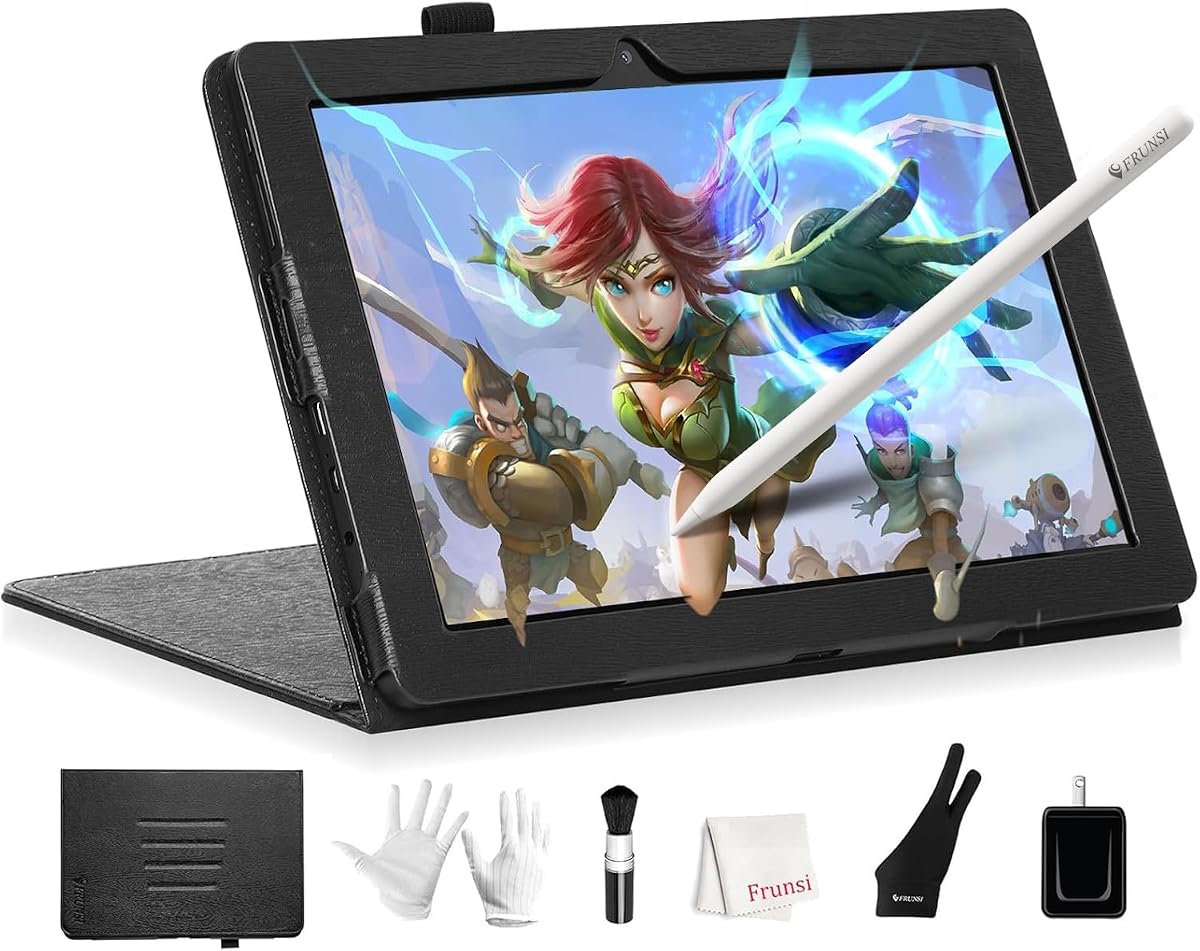
The RubensTab T11 Pro is a self-contained drawing tablet with a 4.4 rating and a practical balance of portability, display quality, and creative features. Its 10.1-inch Full HD IPS screen provides enough room for sketches, illustrations, notes, and light photo editing without recreating the scale of a desktop pen display. Because it operates without a separate computer, artists can start drawing almost anywhere.
We may earn a commission when you buy through this link, at no additional cost to you.
Pressure sensitivity and multi-touch give the included battery-free pen a natural role in line work, shading, zooming, panning, and scrolling. The device arrives with drawing applications already installed, reducing the setup required for a first-time digital artist. Its adjustable stand case also allows the screen to be positioned at a comfortable angle for desk work or travel, while Wi-Fi support provides access to tutorials, online resources, and cloud storage.
The main compromise is its stated battery life of up to five hours of continuous use. That makes it best suited to focused sessions rather than an entire workday away from an outlet, although USB-C charging and compatibility with a mobile power bank provide practical ways to extend working time. As with many Android drawing tablets, performance and software behavior can vary by application, so artists with demanding professional requirements should verify that their preferred tools run as expected.
This is a strong recommendation for students, commuters, casual artists, and anyone who wants an iPad-like portable drawing experience without relying on an iPad or another computer. It handles illustration, sketching, notes, and classroom tasks particularly well. Users who need a much larger canvas, desktop-class color performance, or extended all-day battery life should move up to one of the larger alternatives in this guide.
The T11 Pro is genuinely independent, allowing the included pen and preinstalled creative applications to be used without a laptop or desktop. That makes it useful for travel, classrooms, meetings, and brainstorming sessions where carrying a computer would be inconvenient.
Its 1920-by-1200 Full HD screen offers sharp detail, while adjustable pressure sensitivity and multi-touch support cover the core actions required for sketching, illustration, navigation, and photo editing.
We may earn a commission when you buy through this link, at no additional cost to you.
The HUION Kamvas Pro 16 earns a 4.5 rating and stands out as a large pen display for artists who prefer working directly on a dedicated screen. Its 15.6-inch full-laminated panel and anti-glare glass create an expansive, comfortable workspace, while the slightly textured surface is designed to improve the feel of pen contact. This is not a portable tablet replacement; it is a desk-based alternative to drawing on an iPad.
We may earn a commission when you buy through this link, at no additional cost to you.
Color performance is one of its defining features. The display covers 120% sRGB, which equates to 92% AdobeRGB volume according to the supplied information, and offers a 1000:1 contrast ratio for visible shadow detail. Six customizable express keys and a touch bar reduce reliance on menus and keyboard shortcuts. The battery-free pen recognizes 60 degrees of tilt, includes two programmable side buttons, and is tracked with virtually lag-free performance.
The included ST200 stand moves from 20 to 60 degrees, helping artists find a comfortable drawing and viewing position. A three-in-one USB-C cable handles signal and power connections while reducing cable clutter. Compatibility includes Windows, macOS, and Linux, along with major creative applications such as Photoshop, Clip Studio Paint, SAI, and Lightroom. The essential trade-off is that a computer or laptop is required for operation.
Choose the Kamvas Pro 16 when your priority is a large, color-focused studio canvas rather than portability. It is particularly convincing for illustration, photo editing, concept work, and detailed digital painting in a fixed workspace. If working away from a desk is essential, the standalone models in this list provide a better fit.
The wide color coverage and high-contrast panel provide a strong foundation for digital illustration, photo editing, and detailed studies. Artists should still calibrate their workflow and display environment before undertaking color-critical production work.
Express keys, a touch bar, an adjustable stand, and a single-cable setup reduce friction in a desktop workflow. These features are most useful when the tablet remains connected to a capable workstation.
We may earn a commission when you buy through this link, at no additional cost to you.
The RubensTab T14 provides a larger standalone alternative to the T11 Pro, with a 14.1-inch Full HD IPS display and a 4.4 rating. Its expanded canvas is attractive for illustrators, students, and anyone who wants more working space without carrying a laptop. Since the tablet operates independently, it can also serve meetings, lectures, note-taking, and other everyday tasks.
We may earn a commission when you buy through this link, at no additional cost to you.
Drawing is supported by a high-sensitivity, battery-free pressure-sensitive pen and a responsive multi-touch screen. Preinstalled professional-grade applications and tutorials help new users begin quickly, while the octa-core processor and 10000mAh battery provide the device's core performance foundation. The included adjustable stand case is designed to support both desk use and travel, although the larger proportions make it more of a portable studio tablet than an ultra-compact sketch device.
The stated maximum continuous battery life is up to five hours, which is reasonable for focused drawing sessions and shorter creative outings. USB-C charging and mobile power bank support help users extend that time. As with other standalone Android devices, artists should check application compatibility before committing if their workflow depends on advanced desktop-only software.
The T14 is a strong fit for artists who prioritize canvas area and freedom from a host computer. It is particularly compelling for classroom work, travel sketches, and full-screen illustration. Buyers wanting maximum portability should consider the T8 or A10 instead, while desktop-focused artists may prefer a computer-connected pen display.
The 14.1-inch display gives line art, comic pages, presentation boards, and landscape sketches more room than a compact tablet. Full HD resolution preserves enough detail for a broad range of digital tasks.
Preinstalled drawing tools, note-taking functions, Wi-Fi access, and an included stand allow the same device to support creative sessions, classes, meetings, and tutorials without a separate computer.
We may earn a commission when you buy through this link, at no additional cost to you.
The Wacom MovinkPad 11 combines Wacom's drawing-focused design with an 11.45-inch Android 14 tablet, and it holds a 4.4 rating. It is the premium mobile pick in this guide because the experience extends beyond generic tablet hardware. A slim battery-free Pro Pen 3, a matte etched surface, fast launch behavior, and a lightweight body make it feel purpose-built for sketching and note-taking.
We may earn a commission when you buy through this link, at no additional cost to you.
The Pro Pen 3 delivers 8,192 pressure levels, includes three buttons, and stores replacement nibs in its back end. The etched glass creates subtle texture that feels closer to paper while reducing glare and fingerprints. Wacom Canvas can be launched by pressing and holding the pen against the screen, allowing artists to begin drawing without navigating through menus. The tablet includes 8GB of memory, 128GB of storage, and two years of CLIP STUDIO PAINT DEBUT.
At 1.3 pounds, the device is designed to fit into a bag as easily as a sketchbook. It also supports popular digital pens such as Dr. Grip, LAMY, and STAEDTLER, which broadens its usefulness for people who prefer an alternative stylus. The main constraint is the Android software environment: artists whose essential tools are desktop-only should not assume that every familiar application will be available.
This is an excellent recommendation for mobile illustrators, sketchbook users, students, and professionals who value a specialized pen and low-friction canvas launch. It is less suitable for color-critical studio work or users who need desktop-level application compatibility. Those priorities are better served by the Kamvas Pro 16 or XPPen Artist 13.3 Pro V2.
The dedicated Pro Pen 3 includes pressure sensitivity, three buttons, and convenient stored replacement nibs. Press-and-hold launching removes most navigation between an idea and the first mark.
At only 1.3 pounds, the MovinkPad offers a compelling balance of screen area and portability. Its etched glass and matte finish help maintain a paper-like drawing experience away from a desk.
We may earn a commission when you buy through this link, at no additional cost to you.
The PicassoTab A10 is a compact standalone tablet designed to lower the barrier to digital art. Its 4.2 rating reflects a generally approachable package built around a ten-inch laminated screen, a pressure-sensitive active pen, and preloaded creative applications. It also includes lifetime upgrades for Concepts and Artixo, making the learning materials a notable part of the package.
We may earn a commission when you buy through this link, at no additional cost to you.
The active pen provides 4,096 pressure levels, while the laminated surface is intended to reduce glare and parallax for a smoother drawing feel. Five preloaded apps support drawing, painting, animation, tutorials, and guided lessons. The included case, drawing glove, universal power adapter, and screen protector add practical value for a buyer setting up a first portable art station.
An octa-core processor, 6GB of RAM, and 64GB of expandable storage support drawing applications and everyday multitasking. Storage can expand to 1TB. Its portability comes from operating as a standalone device with no need for a separate computer, although this same design means artists must work with the available Android software environment.
The A10 is a practical choice for beginners, students, and casual artists who value tutorials and accessories as much as raw specifications. It is less compelling for a professional who already owns mature drawing software and expects extensive desktop compatibility. Those users should compare a higher-end standalone tablet or a pen display instead.
Lifetime Artixo VIP access, the Xplore guide, and preinstalled creative applications create a structured way to begin. That focus is particularly helpful for users unfamiliar with pressure sensitivity, layers, brushes, and other digital fundamentals.
The laminated display, active pen, protective case, glove, adapter, and screen protector cover the essential physical needs of a portable setup. The result is a more complete package than a bare tablet and stylus.
We may earn a commission when you buy through this link, at no additional cost to you.
The XPPen Artist 13.3 Pro V2 is an editor's choice because it balances detailed pen performance, a compact desktop display, and broad software compatibility. Its 4.5 rating reflects a particularly complete package for illustrators who already work in established desktop applications. The 13.3-inch fully laminated FHD screen combines the glass and panel to minimize parallax, supporting a more direct drawing experience.
We may earn a commission when you buy through this link, at no additional cost to you.
Its battery-free stylus provides 16,384 pressure levels, 60-degree tilt recognition, a low initial activation force, and a stated tracking rate of 220 RPS. That sensitivity range is useful for artists who need fine transitions between light and heavy marks. The Red Dial gives direct access to zooming, brush sizing, and canvas flipping, while eight customizable shortcut keys streamline repeated actions.
Color specifications include 88% NTSC, Adobe RGB of at least 91%, and sRGB of at least 123%, along with a 178-degree viewing angle. Compatibility extends to Windows, macOS, Chrome OS, and Linux, and the tablet works with Photoshop, Illustrator, SAI, and Blender 3D. The included multifunctional pen case doubles as a stand and holder, and eight replacement nibs support long-term use.
The important limitation is explicit: this tablet must be connected to a computer or laptop, and a three-in-one cable is included. For artists who want a professional desktop workflow without giving up pen accuracy, that arrangement is a feature rather than a drawback. It is less appropriate for travel, spontaneous sketching, or users who specifically want a fully independent tablet.
The 16,384-level pressure range, tilt support, and low activation force make the stylus suitable for delicate line work, broad brush strokes, shading, and detailed illustration. The included nibs allow artists to adjust the feel as their technique evolves.
Full-laminated construction, broad operating-system support, and compatibility with major creative applications make this a practical bridge between traditional drawing habits and professional desktop software.
We may earn a commission when you buy through this link, at no additional cost to you.
The PicassoTab X14 is the largest model in the PicassoTab range and offers a spacious 14-inch canvas for drawing, design, and learning. Its 4.2 rating places it behind the strongest-rated devices, but the combination of a laminated screen, a pressure-sensitive pen, and independent operation remains compelling for users who want an iPad alternative without a host computer.
We may earn a commission when you buy through this link, at no additional cost to you.
The display reduces parallax and glare, while the active pen supplies 4,096 pressure levels for expressive sketching and illustration. Five preinstalled applications address drawing, painting, animation, tutorials, and guides. Lifetime PRO access for Concepts and lifetime VIP access for Artixo support structured learning, and the accessories include a premium case, drawing glove, universal power adapter, and installed screen protector.
An octa-core CPU, 6GB of RAM, and 128GB of storage provide a reasonable foundation for creative apps, schoolwork, streaming, and multitasking. Storage can expand to 1TB. GMS, FCC, and CE certification, along with a one-year warranty, add reassurance for buyers who intend to use the tablet for both school and creative work.
The X14 makes most sense for learners and hobbyists who want a large screen, guided instruction, and freedom from a connected computer. Experienced professionals may prefer higher pen sensitivity, richer displays, or desktop software compatibility. The larger body also reduces the convenience advantage that smaller standalone tablets offer for everyday carry.
The 14-inch laminated canvas is useful for tutorials, practice exercises, comic layouts, and broad illustrations. Its larger workspace can reduce the need to zoom frequently while learning new tools.
Preloaded applications, upgraded learning services, and physical accessories provide a straightforward starting point. This makes the X14 approachable for students and families seeking an all-in-one creative tablet.
We may earn a commission when you buy through this link, at no additional cost to you.
The HUION Kamvas Pad 12 2K+ is a feature-rich standalone drawing tablet with a 4.5 rating. It combines a detailed 12.2-inch 2K+ screen, 16,384 levels of pressure sensitivity, a 90Hz refresh rate, and independent Android operation. For artists who want an iPad-style workflow without a separate computer, it is one of the most technically complete options here.
We may earn a commission when you buy through this link, at no additional cost to you.
The 3:2 aspect ratio provides more vertical space than a conventional 16:9 display, and the 236 PPI resolution renders fine lines clearly. PenTech 4.0 supports 60-degree tilt, a light 2g initial activation force, 0.35mm retraction, and tilt auto-alignment. Color accuracy is handled through 99% sRGB coverage, factory calibration to a stated Delta E below 1.8, and a preset sRGB mode.
The device runs Android 16 and comes with HiPaint, Clip Studio Paint, ibisPaint X, MediBang Paint, and Huion Note. An eight-core processor, 8GB of RAM, and 256GB expandable storage provide solid standalone resources. Additional features include an 8000mAh battery with a stated full-day use claim, front and rear cameras, split-screen multitasking, and built-in speakers.
This is a strong choice for illustrators, students, and mobile creators who want high pen precision and a polished display in a thin, light form factor. It weighs 1.47 pounds and measures 0.31 inches thick. The main caution is software verification: because this listing specifies Android 16, artists should confirm that their required drawing applications and accessories support that environment.
The 2K+ panel, 236-pixel-per-inch density, and 3:2 format offer a useful balance of resolution and vertical working space. The 90Hz refresh rate helps keep strokes visually fluid.
Eight cores, 8GB of RAM, 256GB of storage, and an 8000mAh battery support an ambitious mobile feature set. Split-screen mode and preloaded painting applications add value beyond drawing alone.
We may earn a commission when you buy through this link, at no additional cost to you.
The T8 Standalone Drawing Tablet is the best budget choice in this guide, offering a compact Android canvas at a 4.4 rating. Its eight-inch display may not suit professional page layouts, but that limitation becomes an advantage for portability. Artists can carry it in a small bag, use it for quick sketches, and take advantage of standalone operation without managing a laptop, cables, or a separate drawing surface.
We may earn a commission when you buy through this link, at no additional cost to you.
The 1200-by-800 screen renders artwork and notes at a practical resolution, while the MTK quad-core processor, 4GB of RAM, and 64GB of expandable storage handle drawing applications and basic multitasking. Storage can grow to 256GB. Android 13 provides access to applications such as SketchBook, ArtFlow, and ibis Paint X, with preinstalled drawing apps and tutorials helping new users get started.
Its 4000mAh battery is stated to deliver up to 20 hours of drawing, a substantial advantage over many of the larger standalone alternatives. The honest limitation is the small physical canvas. Detailed illustration may require frequent zooming and panning, and users who draw full comic pages or broad concept compositions may prefer at least a ten-inch screen.
The T8 is well suited to beginners, students, note-takers, and travelers who want a dedicated digital sketch surface at an approachable entry point. It is less appropriate for professional studio illustration, detailed retouching, or color-critical display work. Within those limits, it provides a compelling combination of independence, battery life, and portability.
The eight-inch format keeps the tablet manageable in a bag and suitable for quick studies, diagrams, and handwritten notes. It prioritizes access to drawing over large-screen immersion.
The stated 20-hour drawing battery, expandable storage, and preinstalled applications make the T8 practical for frequent, shorter sessions. Compatibility with popular Android art apps broadens its usefulness beyond the bundled software.
We may earn a commission when you buy through this link, at no additional cost to you.
The Callsky-Tab Ctab 12 is a general-purpose Android drawing tablet with a 4.2 rating, a 12-inch 2K display, and a rechargeable stylus. It is best understood as a versatile creative tablet rather than a specialist pen display. Drawing, sketching, 3D work, animation, online teaching, and video meetings are all listed among its intended uses.
We may earn a commission when you buy through this link, at no additional cost to you.
Its T616 octa-core processor, 16GB of RAM, and 256GB of ROM provide more memory than most alternatives in this guide, while storage can expand to 2TB. The IPS panel offers wide viewing angles and anti-glare treatment. The included pen supplies 4,096 pressure levels with tilt support, and its magnetic attachment helps reduce the chance of leaving it behind. A drawing glove is also included.
The three-folding flip case supports several viewing angles and protects the tablet during transport. An 8000mAh battery is stated to provide up to six hours of video playback or creative work, and the reinforced Type-C port supports convenient charging. These features make it appealing for artists who also need communication, teaching, or productivity functions.
The T8 or A10 for maximum portability, the RubensTab T11 Pro for a more established standalone bundle, or the Wacom MovinkPad 11 for a specialized premium mobile pen experience.
The combination of 16GB RAM and 256GB internal storage is generous for a compact creative tablet. It provides room for applications, project files, and multitasking beyond basic sketching.
The 12-inch 2K screen, wide viewing angles, folding case, and long battery claim suit teaching, meetings, and entertainment. A digital artist gets a broader productivity device rather than a single-purpose canvas.
We may earn a commission when you buy through this link, at no additional cost to you.
The most useful alternative depends on whether you value independence, screen size, pen precision, color accuracy, or access to established desktop software. Use the following factors to narrow the field before choosing a device.
Choose standalone operation when mobility and immediate access matter most. Choose a computer-connected display when your established workflow depends on Photoshop, Illustrator, Clip Studio Paint, SAI, Blender, or other desktop applications.
Choose the smallest screen that comfortably supports your usual artwork. Portability improves as size decreases, but detailed work becomes easier when the canvas is larger.
For expressive digital painting, favor high pressure sensitivity and tilt support. For basic note-taking or line art, 4,096 levels may be sufficient, but a more sensitive pen can provide greater control.
Prioritize resolution and color accuracy for illustration, retouching, and print-oriented work. For monochrome sketches and notes, the decisive factors may instead be pen feel and portability.
Try the pen whenever possible and consider the types of marks you make. Textured surfaces and tilt may help illustrators, while finger-friendly touch and a lightweight body may matter more to note-takers.
Verify your required applications, plug-ins, brushes, and export tools before purchasing. A capable operating system cannot compensate for missing software that your creative workflow depends upon.
For daily commuting, choose a tablet you can comfortably carry and charge easily. For long remote sessions, prioritize battery life and low-latency wireless workflow over maximum screen area.
Check the box contents before buying another stylus, case, or screen protector. Beginners may value structured tutorials more, while experienced artists may prioritize spare nibs and an ergonomic stand.
Begin by charging the tablet or connecting the pen display to a fully configured computer. Update the operating system and creative applications, then calibrate the display if accurate color is important. Choose a drawing app suited to your experience, adjust pen pressure and tilt settings, and use short test strokes to learn how the hardware responds before beginning a complex illustration.
For standalone devices, download the applications and brush packs you need while connected to reliable Wi-Fi, and confirm that your files can be stored locally or synchronized to a compatible cloud service. For computer-connected models, test the supplied cable with a simple graphics application before configuring custom shortcuts. Avoid changing too many express keys or on-screen controls at once; learning a stable layout is faster than constantly rebuilding one.
Protect the screen and pen with a padded case, keep the stylus secured when not in use, and avoid placing the tablet face-down on rough surfaces. Clean the display with a soft microfiber cloth and follow the manufacturer's guidance for cleaning. Replace worn nibs gradually so the drawing feel remains consistent, and keep the device away from excessive heat, moisture, and prolonged direct sunlight. Regular backups protect completed artwork regardless of which device created it.
It depends on the artist and the software involved. An iPad offers a polished portable experience and a strong app ecosystem, while many drawing tablets provide more sensitive pressure levels, tilt support, larger displays, or direct access to desktop creative software. The better choice depends on whether portability, pen performance, screen size, or application compatibility matters most.
A standalone tablet includes an operating system and runs drawing apps independently. A pen display contains a screen and stylus but normally needs a computer to provide processing and applications. Standalone tablets are more convenient for travel, while pen displays are often better for professional desktop workflows.
Pressure sensitivity is valuable for most illustration, lettering, sketching, and shading because it varies stroke width and opacity. Tilt support is especially useful for textured brushes and broad shading. Beginners can start without tilt, but artists who want natural mark variation may find both features worth prioritizing.
Eight to ten inches is convenient for portable sketches, while 12 to 14 inches offers a better balance for detailed work and portability. A 15.6-inch pen display is more appropriate for a fixed desk. The best size also depends on your hand size, posture, preferred gesture use, and the dimensions of your typical artwork.
Standalone models can support many complete creative workflows, particularly sketching, illustration, notes, and mobile editing. However, a computer-connected pen display may be necessary for desktop-only applications, intricate color grading, advanced 3D work, plug-ins, or specialized production software. Check application requirements before making a full replacement.
Full lamination bonds the cover glass to the display layer, reducing parallax between the pen tip and the visible line. This can make placement more direct and the surface feel more consistent. It is particularly helpful for detailed line work, though screen resolution, pen tracking, and software response also influence the overall drawing experience.
Use a fitted sleeve or folio, keep the tablet away from keys and hard objects, and avoid placing the drawing surface against rough fabric. A soft microfiber cloth can remove fingerprints, while a screen protector offers added protection but may alter the feel of the surface. Follow the manufacturer's guidance for compatible accessories.
A higher pressure-level count provides finer theoretical control, but it does not guarantee that every drawing app or workflow will use the full range. Pen quality, app support, calibration, line stability, and personal technique also matter. For most artists, pressure behavior and display quality are more meaningful than the headline number alone.
The Wacom MovinkPad 11 is the strongest premium mobile choice for its purpose-built Pro Pen 3, paper-like etched surface, and immediate canvas launch. The XPPen Artist 13.3 Pro V2 earns the editor's choice for detailed desktop illustration, while the T8 Standalone Drawing Tablet is the budget pick for its compact size, independence, and stated 20-hour drawing battery.
Before choosing, decide whether you need a computer-free tablet or a desktop pen display. Standalone models offer the closest alternative to the convenience of an iPad, while pen displays are generally better when professional desktop software is central to your process. Screen size, pen pressure, tilt, color accuracy, surface texture, and battery life should be prioritized according to the kind of art you make.
Ratings, software availability, accessories, and prices can change, and current compatibility may differ from the supplied listing information. Review the latest product page and verify that your required applications work on the selected operating system before buying, especially if your artwork depends on specialized brushes, plug-ins, or professional color tools.
