
Wireless Presenter Remote with Hyperlink and Volume Control
4.6Editor score
Broad platform compatibility
Bright red pointer
Multifunction slide controls
This Office Presentation Remotes guide compares ten wireless clickers for range, controls, pointer visibility, compatibility, battery design, and use in 2026.
Office presentation remotes make it easier to advance slides, highlight information, control volume, and move confidently away from a computer. A useful clicker should feel intuitive in one hand, connect without complicated setup, and remain reliable throughout a meeting, lecture, training session, or keynote.
The ten models in this guide were compared using their stated control options, wireless range, pointer visibility, receiver design, power source, portability, and supported systems. The list includes basic one-button devices, multifunction remotes, premium models with timers, and a rechargeable air mouse for presenters who need cursor control.
Each pick below explains the product's strongest use case, practical advantages, and trade-offs based on the available product information. Ratings and product details can change over time, and prices fluctuate, so readers should confirm the current listing, compatibility, and included accessories before purchasing.
4.6Editor score

4.6Editor score

4.6Editor score
The comparison below highlights the principal differences among all ten remotes, including receiver connections, control methods, pointer color, wireless reach, and power design.


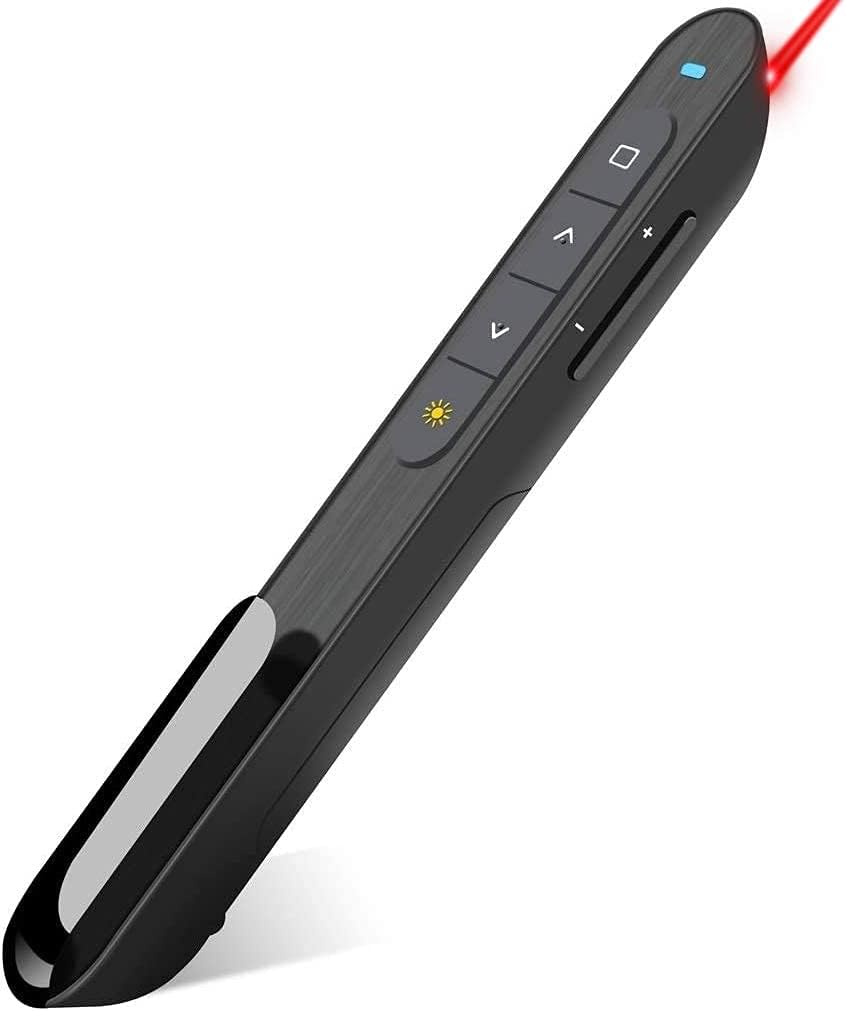


This wireless presenter combines basic slide navigation with hyperlink, window switching, full-screen, black-screen, and volume functions. It holds a 4.6 rating and stands out as a capable, economical option for office presentations, teaching, and meetings. Its plug-and-play receiver makes it particularly attractive to users who want to begin presenting quickly.
We may earn a commission when you buy through this link, at no additional cost to you.
The remote supports Windows, Mac OS, Linux, and Android, with stated compatibility for PowerPoint, Keynote, Prezi, Word, Excel, ACD See, and iWork. Its control range is listed at 100 feet, while the red pointer is said to reach farther. A bright laser makes it possible to call attention to a chart, quotation, or image without returning to the computer.
The main compromise is that its pointer uses red light, which can be difficult to distinguish on some bright screens or LCD displays. Mac users may also need to complete a simple setup rather than relying entirely on automatic recognition. Despite those limitations, the generous control set and included AAA battery make this a well-rounded option for routine presentations.
Choose this model if you want many functions, broad compatibility, and dependable everyday performance without moving to a premium device. It is particularly suitable for teachers, trainers, office presenters, and meeting leaders who need more than simple forward-and-back controls.
Hyperlink activation, window switching, screen modes, page navigation, and volume adjustment cover the most frequently used presentation functions. That combination reduces the need to return to the keyboard during a live session.
The stated 100-foot control range gives presenters more freedom than a wired mouse, while the red pointer can emphasize a specific detail from different positions in the room.
We may earn a commission when you buy through this link, at no additional cost to you.
This 2.4GHz presenter distinguishes itself with a receiver that combines USB-A and USB-C connectors. That single design can suit newer USB-C laptops as well as traditional USB-A PCs, reducing the need to carry an adapter. It receives a 4.4 rating and supports slide navigation, full-screen and black-screen modes, volume adjustment, and window switching.
We may earn a commission when you buy through this link, at no additional cost to you.
The remote works with Mac OS, Windows, and Linux and supports PowerPoint, Keynote, Google Slides, and Prezi without driver or software installation. Its wireless control distance is listed at up to 100 feet, while the red pointer is stated to reach up to 100 meters. A soft-touch, contoured body and large controls are designed for comfortable use during long sessions.
Two AAA batteries are required but not included. A magnetic receiver slot is a thoughtful addition that helps prevent the dongle from being left behind, and auto-sleep technology is intended to extend standby time. The red pointer remains the primary drawback for brightly lit spaces or modern displays where green is easier to see.
This is a strong pick for hybrid office environments where presenters switch between different computers. It suits users who value connector compatibility, straightforward setup, and a broad set of presentation functions more than a rechargeable battery or timer.
The built-in USB-A and USB-C interfaces reduce port-specific shopping and make it easier to move between a modern laptop and a legacy desktop. The receiver also stores magnetically in the remote.
Connecting the receiver and starting the presentation requires no dedicated software or driver. That simplicity is valuable for guest presenters, traveling professionals, and anyone who cannot rely on IT support.
We may earn a commission when you buy through this link, at no additional cost to you.
The DINOSTRIKE combines conventional presentation controls with an air mouse, allowing the user to move a cursor around the screen without a physical mouse. It has a 4.4 rating and supports page navigation, full-screen and black-screen modes, volume, hyperlinks, window switching, and mouse functions across Windows, Mac OS, Linux, and Android.
We may earn a commission when you buy through this link, at no additional cost to you.
Its standout benefit is the sensitive wireless cursor control. Entering mouse mode allows a presenter to select text, open applications, or interact with on-screen elements that ordinary page buttons cannot reach. The remote also has a bright red pointer, a 164-foot control range, and stated light range of 656 feet.
The built-in 300mAh battery charges in approximately three hours and is described as providing weeks of use, depending on activity. Sleep mode turns the device off when it is not being used. A potential drawback is that the additional mouse controls make the remote less minimal than a straightforward slide advancer and may take a little more practice.
Buy this model when your presentation includes live software demonstrations, interactive documents, or video playback that may require cursor movement. It is a strong choice for technical trainers, teachers, and presenters who want the functions of a clicker and compact mouse in one rechargeable device.
The air mouse mode provides access to a conventional cursor, making the remote useful when you need to highlight a browser tab, select an item in a menu, or interact with content outside slideshow mode.
The internal receiver can be stored in the rear housing, while the clip can attach the remote to a pocket or notebook. Its rechargeable battery removes the recurring need to carry spare disposable cells.
We may earn a commission when you buy through this link, at no additional cost to you.
The Logitech Wireless Presenter R800 combines a green laser, a presentation timer, and intuitive slideshow controls in a well-established premium remote. It carries a 4.6 rating and is designed for presenters who want to manage both content and timing without repeatedly looking toward the laptop.
We may earn a commission when you buy through this link, at no additional cost to you.
The green pointer is described as bright and easy to see on LCD and plasma displays and in illuminated rooms. An LCD shows elapsed time and provides silent vibrating alerts. The stated 100-foot range allows movement around the room, and a reception-level indicator helps the user avoid wandering beyond effective coverage.
Its touch-friendly controls and smooth contours make it easy to operate without visual attention, which is useful when addressing an audience. The receiver is plug-and-play and stores inside the presenter for convenient packing. The trade-off is that this feature set places it above basic clickers in cost, and the supplied information does not identify a rechargeable battery.
This is the strongest choice for high-stakes presentations, long seminars, and speakers who need a visible pointer and discreet time alerts. It is especially appropriate for boardrooms, classrooms, and venues where a faint red dot could be difficult for attendees to see.
Green light is easier for many audiences to identify against projection screens, whiteboards, and bright displays. The pointer is built for presenters who need to direct attention precisely without stepping back to the computer.
The timer and silent vibrating alerts let a speaker monitor time without creating the distraction of an audible alarm. A reception indicator provides useful awareness of how close the remote is to its operating limit.
We may earn a commission when you buy through this link, at no additional cost to you.
This compact RF 2.4GHz presenter provides page navigation, volume control, hyperlink activation, window switching, and full- or black-screen functions. Its 4.4 rating reflects a practical combination of features for everyday office presentations, and the plug-and-play design avoids driver installation.
We may earn a commission when you buy through this link, at no additional cost to you.
The remote includes a bright red pointer and a stated control range of up to 100 feet. Its one-piece magnetic USB storage helps keep the receiver attached to the device. Soft rubber buttons, a raised button layout, and a compact shape are intended to make the controls easy to locate by touch and comfortable to hold.
The product information specifically notes that the red pointer is not recommended for LCD, LED, or television screens, which is an important limitation for modern display-heavy offices. It uses one AAA battery that is not included, although an auto-sleep function is designed to conserve power and extend battery life.
Choose this remote for compact offices and presenters who need hyperlink and volume buttons but do not want a large premium device. It is a practical training or meeting accessory, although people presenting to digital screens should consider a green pointer instead.
Hyperlink activation is valuable for non-linear presentations, while volume and screen-mode buttons reduce the need to use the keyboard. The raised, rubberized controls are designed to remain easy to identify in low-light conditions.
The magnetic USB storage system addresses a common problem with wireless presenters: leaving a small dongle behind after a meeting. The receiver can remain secured to the remote until the next use.
We may earn a commission when you buy through this link, at no additional cost to you.
The QUI Presentation Clicker is built for presenters who need to move through large rooms, lecture halls, or training spaces. It has a 4.2 rating and lists a control distance of up to 328 feet, making range its most prominent feature. Hyperlink navigation, volume, power, and screen controls are also included.
We may earn a commission when you buy through this link, at no additional cost to you.
Its plug-and-play USB receiver requires no software or driver, and the remote supports Mac OS and Windows. Stated compatibility includes PowerPoint, Keynote, Google Slides, Excel, ACDSee, and Prezi. A red pointer light is included to mark key areas of the screen, while a pocket or notebook clip makes the remote easy to carry.
The most important caveat is that the AAA battery is not included. Also, a long stated range does not guarantee useful response in every environment, particularly when walls, furnishings, or other wireless equipment interfere. The red light may be less effective on brightly lit digital displays.
This model is worth considering for auditorium teaching, large meetings, and events where the presenter regularly walks far from the computer. It is a simple, portable option for users who prioritize mobility and broad software support over premium timing features.
A stated 328-foot control range is suited to large halls and rooms where a presenter needs to engage people near the back of the venue. It also gives speakers freedom to interact with audiences rather than remaining at a lectern.
The clip can attach the remote to a pocket, notebook, or bag, reducing the chance of setting it down and forgetting it. The simple button layout and broad platform support make it approachable for occasional presenters.
We may earn a commission when you buy through this link, at no additional cost to you.
This wireless presenter is a straightforward option for travel, teaching, and routine office presentations. It receives a 4.6 rating, includes two AAA batteries, and offers a lightweight 58-gram design. The remote supports page navigation, a red laser pointer, and standard presentation functions without requiring installation.
We may earn a commission when you buy through this link, at no additional cost to you.
Its ergonomic soft-touch body and generously sized buttons are intended to reduce accidental presses. It works with desktop and laptop computers across Windows, Mac OS, and Linux, with stated support for Google Slides, Microsoft Word, Excel, and PowerPoint. A side power switch can conserve battery life when the remote is not being used.
The control distance is listed at 98 feet and the laser range at 328 feet, offering enough freedom for most classrooms and meeting rooms. The trade-off is that the red pointer may be difficult to see in bright spaces, and there is no built-in timer, air mouse, or premium timing alert.
This is a good match for presenters who prioritize straightforward controls, portability, and included batteries. It works especially well for traveling professionals and teachers who want a dependable remote that can be packed without planning around a charger.
Two AAA batteries are included, so the remote can be used without an immediate trip to find cells. The side power switch provides another simple way to reduce unnecessary battery use between engagements.
The curved, soft-touch body supports a relaxed grip, while the raised and large buttons make common actions easier to perform by feel. Its low weight also helps reduce fatigue when carried throughout the day.
We may earn a commission when you buy through this link, at no additional cost to you.
This teacher-focused presenter combines a 532nm green pointer with a rechargeable USB-C design and an intuitive set of slide controls. Its 4.6 rating reflects a strong balance of visibility, portability, and everyday convenience. It is a particularly compelling option for educators who present several times each week.
We may earn a commission when you buy through this link, at no additional cost to you.
The green light is designed to remain visible on projection screens and whiteboards, including in ambient light. A one-hour USB-C charge is stated to power weeks of daily classroom presentations, reducing battery waste and last-minute searches for disposable cells. The charging cable is included according to the product information.
The receiver offers genuine plug-and-play operation without drivers, pairing, or software. It is listed for Mac, Windows, and Chromebook computers and works with PowerPoint, Keynote, and Google Slides. The magnetic receiver storage helps prevent loss, while dedicated hyperlink, window-switch, screen-mode, and volume buttons provide comprehensive control.
This model is best for teachers, lecturers, and meeting facilitators who want a bright pointer and rechargeable convenience. The trade-off is its premium positioning, and people sensitive to a green laser may prefer red. Within classroom and training use, however, the visibility and charging design offer meaningful advantages.
The 532nm green light is intended to remain distinct against projected images and whiteboards. It is especially useful in classrooms where red laser dots can become difficult for students to locate.
The internal rechargeable battery and included charging cable remove the routine inconvenience of replacing batteries. A stated one-hour charge supports the repeated daily presentation schedule common to teachers and trainers.
We may earn a commission when you buy through this link, at no additional cost to you.
This presentation clicker combines a 4.5 rating with a 2-in-1 receiver that supports both USB-A and USB-C. It offers standard presentation navigation, a red laser pointer, and plug-and-play operation for Windows, Mac OS, and Linux systems, making it a balanced option for offices with varied hardware.
We may earn a commission when you buy through this link, at no additional cost to you.
The ergonomic body is designed for a comfortable grip, and the large buttons are intended to minimize accidental selections. Its stated control range is 98 feet, while the laser pointer can cover 328 feet. The product supports Google Slides, Microsoft Word, Excel, and PowerPoint, among other commonly used applications.
Two AAA batteries are included, and a side on/off switch helps preserve their charge between uses. The receiver is also straightforward to carry. As with most red-pointer models, visibility may decrease on bright digital displays, and the disposable battery design is less convenient for frequent users than a rechargeable option.
This is a versatile pick for office professionals who need both USB-A and USB-C compatibility without paying for a premium model. It works well for routine meetings, internal presentations, and classroom sessions where simplicity and port flexibility matter most.
The combined USB-A and USB-C receiver removes uncertainty about which computer you will be asked to present from. It is particularly convenient in shared meeting rooms where the available hardware can change.
A soft-touch ergonomic body and large buttons make the remote approachable for new users. The side power switch provides a clear way to conserve power whenever the presenter is not on stage.
We may earn a commission when you buy through this link, at no additional cost to you.
This compact presenter is designed for users who want the smallest practical remote in the group. It has a 4.5 rating, weighs 38 grams with the battery included, and measures 109 millimeters long. Its understated black-and-gray design suits office, conference, speech, and classroom use.
We may earn a commission when you buy through this link, at no additional cost to you.
The remote supports page navigation and standard presentation functions for PowerPoint, Keynote, Google Slides, Word, Excel, websites, and PDF viewing. Its 98-foot control range is adequate for most rooms, while the red laser has a stated 328-foot range. The USB dongle stores inside the battery compartment for convenient transport.
A single AAA battery powers the device, and the information states that it can last about two months. The battery is not included, and users should remove its protective film before first use. The red pointer can be difficult to locate on some bright or modern displays, so it is not the best choice for every venue.
This model is a sensible pick for minimalists, travelers, and anyone who prefers a small remote with no unnecessary features. It is best used with standard slide decks and conventional projection setups where portability matters more than a green laser, timer, or air mouse.
The 38-gram body and compact dimensions fit easily into a pocket, pencil case, or laptop sleeve. It is a practical choice for presenters who carry minimal equipment and need a remote that does not add bulk.
A standard AAA cell is widely available and the stated battery life is designed for extended use. Keeping a spare cell in a laptop bag also provides a simple recovery plan if the remote stops responding.
We may earn a commission when you buy through this link, at no additional cost to you.
The right presentation remote depends on your venue, software, presentation style, and tolerance for charging or carrying accessories. These factors help narrow the field before you compare range, pointer visibility, and controls.
Choose a receiver that fits your most common computer and verify the connection details before buying. For mixed-device use, a combined USB-A and USB-C receiver provides the broadest convenience.
Test pointer visibility in the actual room when possible. Choose green for bright or digital displays and red for darker conventional projection settings.
Match the range to the largest room where you regularly present. Avoid paying for excess range if you only need a nearby desk, but favor a long-range option for auditoriums.
Choose controls that match your actual slides. Avoid paying for an air mouse or timer unless live interaction or strict timing will improve your presentation.
For occasional use, standard batteries can be the simplest choice. For daily presenting, a rechargeable model with clear charging guidance is usually more convenient.
Look for tactile, well-separated controls and a grip that suits the length of your sessions. Familiarity with the layout is often more important than extra buttons.
Favor secure receiver storage and a body that fits easily into a laptop bag. Include charging accessories in your travel checklist if the model is rechargeable.
Before your first presentation, install any required batteries, remove insulating film, and charge the remote if it uses a rechargeable battery. Connect the receiver to the presentation computer, then switch on the remote and test forward, backward, full-screen, and pointer functions. Repeating this check a few minutes before you begin reduces the chance of discovering a problem while an audience is waiting.
Position the receiver away from direct interference where possible and keep the remote within the device's stated operating range. Use the pointer to identify details rather than sweeping it constantly, and practice the specific buttons you will need. If the remote includes an air mouse, test cursor sensitivity in a nonessential part of the screen before using it during a live demonstration.
After the presentation, switch the remote off when applicable and return the receiver to its storage slot. Remove disposable batteries if the remote will sit unused for an extended period, and clean the buttons and surface with a dry or lightly dampened cloth. Rechargeable models should be kept away from moisture and given regular charge cycles according to the manufacturer's instructions.
A standard presentation clicker primarily advances and reverses slides, changes screen modes, and may control hyperlinks or volume. An air mouse presenter adds a movable on-screen cursor, allowing you to select menus, highlight content, or interact with software outside standard slideshow controls. An air mouse is useful for live demonstrations but is more complex than a basic slide advancer.
Most of the models listed support both Mac OS and Windows, although users should confirm the exact operating-system list on the current product listing. Compatibility also depends on the receiver and available USB port. Models with combined USB-A and USB-C receivers offer greater flexibility when moving between different computers.
A green pointer is generally easier to see on projection screens, whiteboards, and brightly lit digital displays because of its strong visual contrast. Red pointers can work well in dim rooms with conventional screens. The best choice depends on your venue, audience position, and the appearance of the content being displayed.
Every product in this guide is described as plug-and-play, with no dedicated software or driver installation required. You generally need to connect the receiver and press the remote's connection or power button. Mac systems may occasionally need an extra setting, so it is still wise to test the remote with the actual presentation computer before an important event.
You can use a compatible remote with different computers that accept its receiver and support the associated operating system. A dual USB-A and USB-C model is especially convenient for modern laptops and legacy PCs. Reconnecting the receiver is usually straightforward, but you should confirm that the venue computer permits the required USB connection.
Battery life depends on the model, frequency of use, and whether features such as a laser pointer or timer remain active. The product information for the compact CLIKBUTM remote states that one AAA battery can last about two months, while the rechargeable green-light model is described as providing weeks of daily use after a one-hour charge. Carry a spare battery or confirm your charge before critical presentations.
The best choice depends on screen visibility and room dimensions. A long-range model with a green pointer may be most appropriate for a bright hall with a large display, while a model with a timer can help teachers monitor lesson pacing. The Logitech R800 and the rechargeable green-light presenter both offer visibility advantages over basic red-pointer designs.
Choose a model with magnetic or internal receiver storage and establish a routine of returning the dongle immediately after presenting. Several options in this guide include a storage slot, magnetic compartment, or clip-style design. Keeping the entire remote and receiver together in a labeled laptop-bag pocket adds another layer of protection.
The wireless presenter with hyperlink and volume control offers the strongest general value in this group, combining broad compatibility, a 100-foot range, and useful presentation functions. The Logitech R800 is the most feature-rich traditional premium option because of its green laser, timer, vibrating alerts, and reception indicator, while the rechargeable green-light presenter is especially attractive to teachers who present every day.
Prioritize the features your setting actually requires. Match USB-A or USB-C to your computer, choose a green pointer for bright digital displays, consider a timer for time-sensitive speaking, and select an air mouse only when interactive cursor movement is important. Battery preferences and receiver storage are equally practical considerations for frequent travelers.
Ratings, package contents, availability, and prices can change, so check the current product listing before ordering. Confirm compatibility, battery requirements, and included accessories, then test the remote with the actual presentation computer and room whenever possible.