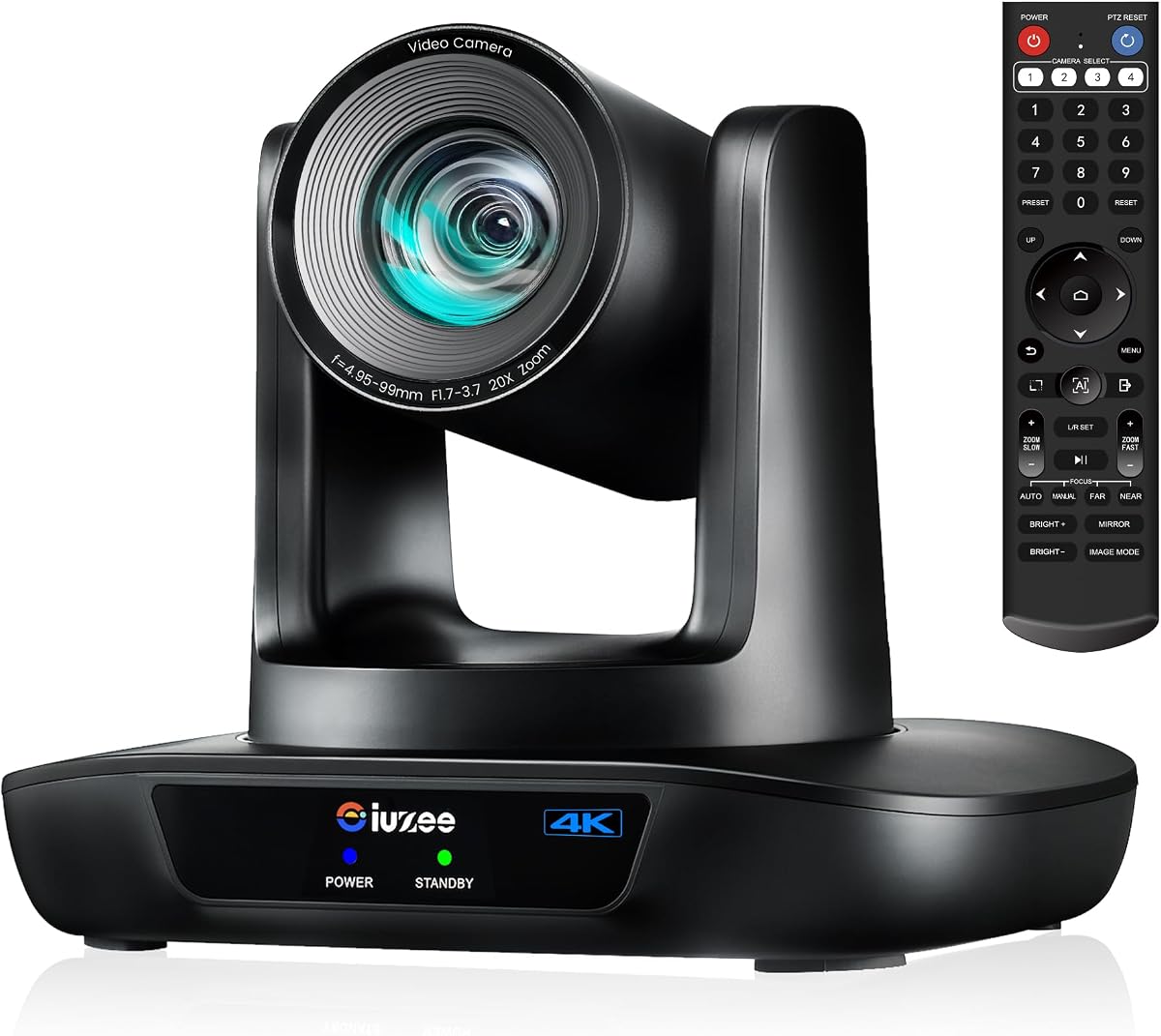
iuZee 4K AI PTZ Camera
4.7Editor score
4K at 30 frames
20X optical zoom
AI face and figure tracking
USB, HDMI, and LAN
PoE network support
Our PTZ camera for church guide compares ten options for AI tracking, 4K or 1080P video, zoom, NDI, streaming, and multi-camera control.
A church PTZ camera helps production teams capture clear, moving shots without placing a dedicated operator beside every camera. The best models combine dependable pan, tilt, and zoom movement with useful tracking, strong optical zoom, and outputs suited to OBS, video conferencing, recording, and NDI production workflows.
We compared the ten cameras by resolution, frame rate, optical zoom, tracking behavior, connectivity, control options, installation flexibility, and suitability for sanctuary and multi-camera use. The list covers wired and wireless models, single-camera units, complete production bundles, and premium systems with dedicated controllers.
Each numbered review explains who should consider that model and where its compromises matter. Product configurations and availability can change, so verify current specifications and current pricing before purchasing. Ratings reflect the supplied customer feedback and do not represent hands-on testing by this guide.
4.7Editor score

4.5Editor score

4.3Editor score
The table below compares all ten options across the factors that most strongly affect church production, including image quality, tracking, optical zoom, connectivity, and control. The three bundle-oriented systems include additional hardware, while the standalone cameras offer greater flexibility for simpler installations.


The iuZee 4K AI PTZ Camera is the strongest all-around standalone choice in this guide, combining 4K output, 20X optical zoom, AI tracking, and several production-friendly connections. Its supplied 4.7 rating is the highest among the ten selections, making it a notable option for churches seeking capable video without a large multi-camera package.
We may earn a commission when you buy through this link, at no additional cost to you.
The camera uses a 1/2.8-inch 8.29-megapixel CMOS sensor to provide 4K at 30 frames, while its 63-degree wide-angle lens and 20X zoom cover both congregation views and distant speakers. Facial and human-body recognition support Presenter Mode and Auto Framing Mode. Its 2D and 3D noise-reduction functions are also useful for maintaining a clean image under less-than-ideal sanctuary lighting.
Three simultaneous outputs—USB 3.0, HDMI, and LAN—give the camera broader compatibility than a basic USB webcam. It supports MJPEG, YUY2, H.264, and H.265 encoding, plus PoE, RTMP, RTSP, and SRT. A PoE switch is required for PoE operation, and the lack of an included production controller makes it most suitable for a single-camera setup or a team already operating compatible software.
This is an excellent recommendation for a small church, community worship room, or ministry beginning a structured livestream. It can be mounted on a desk, tripod, wall, or ceiling and configured through a web browser. Preset recall can handle recurring angles, while AI tracking reduces the need for continuous manual reframing when a pastor or worship leader changes position.
AI face and figure tracking can follow a presenter and resume tracking after a brief obstruction. The two operating modes let operators choose a tighter presenter view or wider automatic framing depending on the service.
Simultaneous USB, HDMI, and LAN outputs make the camera practical for OBS, recording systems, and network streaming. PoE can reduce desktop clutter when the sanctuary already has suitable network infrastructure.
We may earn a commission when you buy through this link, at no additional cost to you.
The TONGVEO 4K NDI PTZ Camera is the most production-oriented standalone model here, combining official NDI, 4K wired output, SDI, 20X optical zoom, and AI tracking. Its 4.5 rating reflects a solid balance between capability and customer satisfaction, while the broad connection set suits churches with a serious broadcast workflow.
We may earn a commission when you buy through this link, at no additional cost to you.
HDMI and USB provide 4K at 30 frames, while IP and NDI streaming support up to 1080p. SDI output can handle long cable runs of up to 300 feet using reliable locking connectors. This makes the camera appealing for installations that need professional video connections, remote control, and a structured network rather than a temporary USB-only arrangement.
Its tracking system combines facial and human-body recognition, with Presenter Tracking and Auto-Framing modes. Tracking can resume when a face reappears after being obstructed. The explicit limitation is important: it tracks one person at a time and is not intended for high-speed motion, so it is better for a pastor on stage than for rapid action in a crowded room.
Churches using OBS, vMix, ProPresenter, Wirecast, Zoom, or other NDI-compatible tools should give this model serious consideration. Browser-based management and included camera-management software simplify setup, while the included remote, mount, power adapter, and USB cable cover basic installation. A separate joystick is still advisable for complex multi-camera operation.
SDI is especially useful for long runs into switchers and production equipment, while HDMI and USB provide convenient local and computer connections. The included NDI license removes the need to source a separate NDI upgrade for compatible software.
Presenter Tracking is well suited to a sermon or worship leader, while Auto-Framing can adjust the composition as a person moves. The restriction to one target keeps the behavior predictable during typical speaking scenes.
We may earn a commission when you buy through this link, at no additional cost to you.
The TONGVEO 1080P AI PTZ Camera prioritizes smooth motion and simple computer-based production over 4K resolution. It records 1080p at 60 frames, making it a sensible choice when fluid movement and responsive pan, tilt, and zoom matter more than the highest pixel count.
We may earn a commission when you buy through this link, at no additional cost to you.
Its 20X optical zoom keeps distant subjects crisp without relying on digital magnification. AI tracking supports single-person tracking and multi-person auto-framing, adjusting pan, tilt, and zoom to maintain composition. The camera also supports up to 350 degrees of pan and 180 degrees of tilt, with 255 preset positions for dependable recurring shots.
HDMI and USB 3.0 provide plug-and-play connectivity without stated driver requirements, and the camera is listed for OBS, vMix, Zoom, Microsoft Teams, and YouTube. The limitation is that it does not advertise NDI, SDI, or the same network-production feature set as the TONGVEO model in second place. It is therefore easier to integrate but less flexible for complex studios.
This camera is a good match for a small production team that wants automated framing, numerous presets, and a responsive 60fps feed without building a larger bundle. It is less appropriate for a church that has standardized its entire workflow around NDI or needs professional SDI connectivity. As a straightforward single-camera solution, it remains practical and easy to control.
The 60fps output provides a smoother look for livestreams, online meetings, and recorded sermons. This can be especially helpful when the camera pans quickly between a pulpit and another part of the stage.
With support for 255 presets, an operator can store consistent views for the stage, lectern, musicians, and other recurring locations. The included remote simplifies changes during a live service.
We may earn a commission when you buy through this link, at no additional cost to you.
The Tenveo Two-Camera NDI Bundle is an unusually complete starting package for churches that want more than one automated sanctuary camera. It combines two 4K 20X optical-zoom cameras with a 7-inch quad-screen NDI PTZ joystick controller, and its supplied 4.4 rating is among the strongest in the guide.
We may earn a commission when you buy through this link, at no additional cost to you.
Each camera provides simultaneous HDMI, USB 3.0, and LAN/NDI outputs. HDMI and USB support 4K, while IP/NDI streaming supports 1080p. PoE is available, although a PoE switch must be supplied separately. The controller allows real-time monitoring of up to four camera feeds, with controls for pan, tilt, zoom, focus, iris, backlight, presets, speed, and camera selection.
AI features include face and humanoid tracking, Presenter Mode, Auto Framing, and gesture control. Documented gestures can toggle AI mode, enter or exit Presenter Mode, and adjust zoom in that mode. Gestures should be performed directly toward the camera from at least 30 centimeters away, with an effective range of approximately 5 to 8 meters.
The bundle is ideal for churches that want stage coverage, a congregation angle, and smooth switching without assembling each component separately. It is less attractive for a sanctuary needing only one camera because the controller and second camera add complexity. It also does not include the PoE switch found in the more extensive three-camera kit, so network planning remains essential.
The seven-inch controller displays up to four real-time feeds, reducing the need to rely only on software windows. That visibility helps an operator confirm framing and select cameras without interrupting the service.
Gesture control can reduce the need to interact with menus or the controller during a service. The gestures provide shortcuts rather than a complete replacement for professional camera operation.
We may earn a commission when you buy through this link, at no additional cost to you.
The Tenveo Three-Camera NDI Kit is the most complete package in the guide. It includes three 4K 20X optical-zoom PTZ cameras, a 7-inch quad-screen NDI joystick controller, and an eight-port full-gigabit PoE switch, giving a church a ready foundation for a multi-camera sanctuary workflow.
We may earn a commission when you buy through this link, at no additional cost to you.
The cameras support HDMI, USB 3.0, and LAN/NDI output, along with RTSP, RTMP, ONVIF, GB28181, VISCA over IP, and multicast. Each camera also includes face and humanoid tracking, Presenter Mode, Auto Framing, and gesture controls. The controller provides four real-time camera previews and direct control over major PTZ and imaging functions.
Including the PoE switch is the kit's most important practical distinction from the two-camera bundle. It allows the cameras and controller to be connected through a coordinated network plan, reducing the need for a separate infrastructure purchase. The complexity remains significant, however, and a church with limited technical experience may need help with addressing and software configuration.
This kit is best for established ministries that need distinct views of a stage, congregation, choir, or secondary platform. It also suits churches preparing for simultaneous in-person and online attendance. For a smaller congregation or a temporary streaming arrangement, one of the standalone cameras will usually be easier to deploy and maintain.
Three cameras provide enough coverage for more deliberate production than a single automated unit. Consistent tracking and preset behavior make it easier to create a repeatable worship-service shot list.
The included eight-port PoE switch simplifies network-centered deployment. Because IP configuration still matters, administrators should assign addresses carefully and document each camera's location and function.
We may earn a commission when you buy through this link, at no additional cost to you.
The Tenveo 4K NDI PTZ Camera is a feature-rich standalone option for churches that want high-resolution capture, AI automation, and professional network workflows without purchasing a full camera bundle. It records 4K at 30 frames and 1080p at 60 frames through a 1/2.8-inch CMOS sensor with 20X optical zoom.
We may earn a commission when you buy through this link, at no additional cost to you.
Its advanced AI system uses both face and humanoid recognition, supports Presenter Mode and Auto Framing, and can maintain a lock through brief obstruction. Gesture controls add an alternative to menu-based operation. The camera can also be controlled remotely across 350 degrees horizontally and 180 degrees vertically, with ten remote presets and as many as 255 through RS232 or RS485.
Simultaneous HDMI, USB 3.0, and LAN/NDI outputs make it versatile. HDMI and USB carry 4K, while IP/NDI supports 1080p. RTMP, RTSP, and SRT are listed for direct streaming, and the camera is compatible with common services and software including OBS, Zoom, Teams, YouTube, and Google Meet. PoE requires an appropriate switch.
This model suits a church that already has a video mixer, control software, and network infrastructure but wants another high-quality PTZ source. It is less convenient than the Tenveo bundles because a controller is not included. Still, its 4K output, NDI support, tracking, and gesture functions offer a compelling feature set for a single installed camera.
Churches can select 4K for local capture or 1080p at 60 frames for smoother network-oriented output. This flexibility is useful when different parts of the production chain have different requirements.
Remote, web-based, RS232, and RS485 control support basic and more advanced operation. Churches operating several cameras may eventually want a dedicated joystick, but this standalone model does not require one for its core functions.
We may earn a commission when you buy through this link, at no additional cost to you.
The TONGVEO 4K AI PTZ Camera is a straightforward wired solution for churches that want 4K imagery, meaningful optical zoom, and automated speaker tracking. Its 4.2 rating is solid, and its broad control options make it approachable for both basic and more experienced operators.
We may earn a commission when you buy through this link, at no additional cost to you.
AI tracking uses facial and body recognition to follow speakers and maintain a professional frame. Presets can be stored for the pulpit, a wide view, or group shots, while pan, tilt, and zoom can be managed through the remote, software, or an optional joystick. This makes the camera useful for a church that does not yet need a permanent multi-camera control room.
HDMI, USB 3.0, LAN, and PoE provide several ways to connect the camera to a computer, network, or production system. The stated compatibility includes OBS, Zoom, Teams, and Facebook Live, and the plug-and-play approach can simplify setup. The main limitation is the absence of advertised NDI or SDI support, which narrows its appeal for advanced broadcast pipelines.
The camera is a good recommendation for small and medium worship teams seeking a dependable 4K upgrade over a fixed webcam. It can also serve education, meetings, and live events. One configuration note is worth remembering: the factory default is 4K at 30Hz, and some 2K displays without an image may require changing the output to 1080p at 60Hz.
Face and body recognition can follow a pastor, teacher, or presenter without continuous joystick work. Preset shots provide a dependable visual anchor for less dynamic portions of a service.
USB and HDMI suit local computer connections, while LAN and PoE suit more permanent installations. The model is therefore a practical middle ground between a conference-room webcam and a dedicated broadcast camera.
We may earn a commission when you buy through this link, at no additional cost to you.
The TONGVEO Wireless AI PTZ Camera is the most convenient option for temporary or minimally cabled church setups. It uses a 5.8GHz wireless connection with a USB receiver, allowing a computer to receive video without running a long HDMI or USB cable from the sanctuary to the production position.
We may earn a commission when you buy through this link, at no additional cost to you.
The camera delivers 1080p at 60 frames and includes AI human detection that can follow a speaker. Its 3X optical zoom is much lower than the 20X found on most wired models, so it is better suited to closer stage views than to picking out distant details. The supplied description lists the connection as reliable up to 50 feet, while another compatibility note states a range up to 33 feet.
Setup is intentionally simple: the USB dongle is connected to the computer, the camera is powered, and the TONGVEO device is selected in the chosen application. Windows, macOS, Zoom, OBS, WebEx, and Teams are listed as compatible. A status-light sequence indicates power, searching, connecting, connected, and normal operating states.
This model is ideal for a portable worship setup, small fellowship room, or temporary hybrid meeting where pulling cables across walkways is inconvenient. It is less appropriate for permanent sanctuary broadcasting, long-distance detail shots, or NDI-based multi-camera work. Quiet PTZ movement and wall, tripod, desk, or ceiling mounting help it fit unobtrusively into a room.
Wireless transmission can keep production computers away from sanctuary traffic and avoid exposed cables across aisles. The USB receiver makes the connection familiar to standard video-conferencing and streaming software.
Automatic human detection and centering are valuable when the camera cannot remain on a fixed close shot. Its lower zoom means churches should carefully position it rather than expect distant framing.
We may earn a commission when you buy through this link, at no additional cost to you.
The Tenveo Camera Controller Bundle pairs a 1080p 60fps 20X optical-zoom PTZ camera with a dedicated five-inch LCD NDI joystick controller. Its 4.4 rating makes it one of the better-rated options here, while the included controller gives operators more precise feedback than a basic infrared remote.
We may earn a commission when you buy through this link, at no additional cost to you.
The camera supports HDMI, USB 3.0, LAN, PoE, RTSP, RTMP, ONVIF, GB28181, VISCA over IP, and multicast. Face and humanoid AI tracking supports Presenter Mode and Auto Framing, and the same gesture commands advertised by other Tenveo models are included. The camera has no built-in microphone, so external audio remains necessary.
The controller provides real-time preview and a 4D joystick with controls for pan, tilt, zoom, focus, iris, backlight, presets, PTZ speed, camera selection, and AI tracking. It can record a camera movement sequence, including position, speed, and dwell time, then replay the saved route. This is particularly useful for repeatable movement that would be tedious to perform manually.
This bundle is well suited to churches that want a single high-quality camera plus professional tactile control without moving to 4K. Its smaller five-inch screen is less suited to extensive multiview monitoring than the seven-inch controller in the larger kits, but it is still useful for confirming composition. It is a balanced choice for one-camera live production.
Trajectory recording can store a full pan, tilt, and zoom path and replay it on demand. The feature reduces repetitive joystick work during services or recurring online events.
The five-inch display gives the operator immediate visual feedback while using the joystick. That combination makes fine framing and lens adjustments more intuitive than remote-only operation.
We may earn a commission when you buy through this link, at no additional cost to you.
The Tenveo 1080P AI PTZ Camera delivers the core features many churches need in a more compact standalone package: 20X optical zoom, 1080p at 60 frames, AI tracking, gesture control, and three simultaneous outputs. Its 4.3 rating places it comfortably within the guide's better-reviewed group.
We may earn a commission when you buy through this link, at no additional cost to you.
The camera combines a 1/2.8-inch CMOS sensor with 2.07 effective megapixels and advanced image processing. Dual face and humanoid recognition supports Presenter Mode and Auto Framing, while gesture control can toggle AI mode, change tracking modes, and adjust zoom in Presenter Mode. It also supports remote PTZ movement across 350 degrees horizontally and 180 degrees vertically.
USB 3.0, HDMI, and LAN outputs run simultaneously, with recommended distances of 15 meters for USB and 30 meters for HDMI. PoE follows IEEE 802.3af and requires a suitable switch. RTMP and RTSP are supported, and the camera is listed for OBS, Zoom, Teams, YouTube, Facebook Messenger, Google Meet, and other common tools.
This is a compelling choice for a church that values smooth 1080p video and optical reach but does not need 4K or NDI. Its 20X lens can isolate a speaker or musician from the back of a sanctuary, while tracking reduces the work required for moving presenters. It can be mounted on a desk, monitor, wall, or ceiling, although a dedicated controller would improve multi-camera operation.
A 20X lens provides much greater framing flexibility than a typical conference webcam. It can alternate between a wide stage view and a close shot without relying on digital cropping.
LAN streaming and PoE support suit a more permanent installation, while USB makes initial setup more approachable. Common conferencing and streaming applications are explicitly listed for compatibility.
We may earn a commission when you buy through this link, at no additional cost to you.
The right church PTZ camera depends on room size, production complexity, operator experience, networking, and the importance placed on resolution. Consider the complete workflow rather than focusing on a single headline specification.
Choose at least 20X for a large sanctuary, then confirm that the camera can physically reach the desired position.
Favor face-and-body recognition for sermons and stage movement, but always test tracking in the actual room.
Prioritize 1080p 60fps for motion and 4K for detail, based on the actual production chain.
Match NDI, SDI, USB, and HDMI to the church's switcher, software, and cabling before buying.
Use PoE for cleaner permanent cabling, but confirm switch compatibility and network capacity first.
Add a multiview controller when several cameras must be operated quickly and accurately.
Choose wireless for portability and simpler rooms; choose wired for permanent and advanced production.
Budget for external audio and verify included mounting and control accessories.
Plan mounting and cable routes before connecting the camera. A rear-of-room position may provide useful 20X reach, while a front or side placement can produce a more natural view of the stage. Use the included wall mount or another secure support, keep ventilation openings unobstructed, and check that pan, tilt, and zoom movement will not hit walls, lighting fixtures, or decorative structures.
Set the output resolution and frame rate to match the recorder, switcher, streaming software, and display rather than simply selecting the highest available mode. Configure the tracking mode for the scene, save repeatable presets for important angles, and test how the camera behaves when a presenter is briefly blocked. For networked models, assign clear static addresses, confirm PoE requirements, and use the supplied web interface or camera-management software to verify the video path.
Run a complete rehearsal before the service. Check framing, focus, exposure, white balance, audio levels, tracking, network stability, and preset recall while people are moving as they will during the actual event. During operation, avoid repeated rapid zoom commands, keep the lens clean, and do not move a powered camera between unusual angles. Periodically check mounts, cables, firmware, controller batteries, and network connections while following the manufacturer's cleaning and maintenance guidance.
A PTZ camera can pan, tilt, and zoom remotely, allowing one installed unit to cover multiple positions. AI tracking is especially useful for a moving pastor, worship leader, or speaker. For a full sanctuary production, additional fixed cameras may still be needed to cover the congregation, choir, and multiple stage areas simultaneously.
It depends on the delivery and recording workflow. 4K preserves more detail and can be useful for local recordings, cropping, and large displays, while 1080p is often easier to stream over limited internet connections. A 4K camera recording at 30 frames may also look less fluid than a 1080p camera recording at 60 frames, so motion should be part of the decision.
The supplied information specifically states that the Tenveo cameras have no built-in microphone, and no complete church audio solution is listed for the other models. Production teams should assume they need external microphones, a mixer or audio interface, and a way to route that audio into the recording and streaming system.
HDMI is a physical video connection commonly used for local displays, capture devices, and production equipment. NDI carries video and control over IP, allowing cameras to integrate with compatible software and network workflows. A church choosing NDI should verify that its switcher or streaming software supports it and that the network is configured for stable operation.
One PTZ camera can replace several fixed positions when it has sufficient optical zoom, tracking, and reliable presets. It cannot cover every angle at once, so a multi-camera sanctuary may still need separate views for the stage, congregation, choir, and instruments. The two- and three-camera bundles are better suited to that broader requirement.
PoE is optional on models that support it but can make a permanent installation cleaner by carrying power and data over one network cable. It requires compatible network hardware, such as a PoE switch or suitable injector. A church without that infrastructure can still operate these cameras through their other supported power and connection methods.
Several models in this guide state that they can resume tracking after the subject is briefly obstructed, using face and body recognition. Results can still vary with lighting, distance, motion, and how many people enter the frame. Testing the exact camera in the church's real environment is the best way to validate the behavior.
A single camera can often be managed with its remote, presets, and software. A dedicated joystick controller becomes more important for multi-camera operation because it offers faster camera selection, tactile movement, and real-time multiview feedback. The Tenveo bundles include controllers, while the standalone camera selections generally do not.
The iuZee 4K AI PTZ Camera is the strongest all-around standalone recommendation, combining 4K, 20X optical zoom, tracking, and flexible wired outputs. The TONGVEO 4K NDI PTZ Camera stands out for official NDI and professional SDI connectivity, while the Tenveo Three-Camera NDI Kit is the strongest ready-made option for a multi-camera sanctuary production.
For a small church or portable setup, prioritize ease of use, adequate zoom, and the connection type already used by the production team. Larger ministries should account for multiview control, PoE infrastructure, network stability, preset workflows, and the number of angles that must be covered. AI tracking is useful, but it should be tested with realistic movement and lighting rather than treated as a substitute for operator planning.
Specifications and product configurations can change, so verify the current camera, controller, cable, mount, and network requirements before ordering. Current prices also fluctuate, so compare the complete configuration rather than focusing on a single component. Use the ratings in this guide as one purchasing signal while paying close attention to compatibility with the church's existing equipment.