
Rocketbook Core Reusable Smart Notebook, Letter Size
4.5Editor score
Reusable erasable paper
Cloud platform organization
Included Frixion pen
Our guide compares the 10 best smart notebooks with cloud sync, covering reusable pages, live digitization, OCR, apps, exports, privacy, and portability.
Smart notebooks with cloud sync combine the tactile experience of writing on paper with the convenience of digital storage. The strongest models capture handwriting, drawings, audio, and searchable text while offering reusable pages or automatic synchronization to phones, tablets, and popular cloud services.
We compared the ten featured products by examining their writing systems, synchronization methods, app features, organization tools, export formats, offline behavior, page formats, and included accessories. The guide covers both scanning-based notebooks and pen-based systems that digitize handwriting as it is created.
Each numbered review identifies the product's most useful qualities, practical trade-offs, and ideal user. Ratings reflect the supplied customer feedback, while product details are based on manufacturer information, and current prices can change at any time.
4.5Editor score

4.3Editor score

3.3Editor score
The comparison covers three main approaches: reusable paper scanned through an app, smart pens that capture strokes while writing, and hybrid writing sets that pair digital features with traditional stationery. Ratings, page formats, offline support, OCR, audio, and export options help distinguish the options.




The Noteorius Smart Pen and Reusable Digital Notebook takes a relatively minimalist approach to cloud-connected writing. Uncapping the smartpen powers it on, after which it captures strokes and stores them until they synchronize with the Noteorius app. Its customer rating of 3.5 makes it important to consider individual priorities carefully, particularly if seamless automation is the main attraction.
We may earn a commission when you buy through this link, at no additional cost to you.
Its strongest feature is the reduction of friction between writing and storage. Users do not need to photograph pages or manually upload files. Notes are kept in a dedicated application and can also be sent to Google Drive, OneNote, Evernote, or Dropbox. The notepad is reusable, and the pen is designed to provide weeks of writing on a single charge according to the supplied product information.
The main compromise is that Noteorius depends on its proprietary smart writing surface rather than working as a conventional pen on any sheet of paper. It also lacks some of the more specialized search, export, and audio functions advertised by competing systems. Furthermore, the 3.5 rating suggests that the experience may not be equally polished or satisfying for every user.
This is a compelling choice for someone who values automatic startup, a conventional writing feel, broad cloud choices, and freedom from a subscription. It is less suitable for buyers who need advanced OCR, flexible file formats, or the ability to write on standard paper without specialized accessories. For those priorities, the Ophaya or SyncPen systems offer more explicit digital productivity tools.
Uncapping the pen starts the digital process, allowing users to write without stopping to photograph or upload a page. Captured strokes remain stored securely until the app is ready to synchronize them.
The app keeps notes in one library while supporting transfer to Google Drive, OneNote, Evernote, and Dropbox. No subscription is required for the included writing ecosystem, according to the supplied information.
We may earn a commission when you buy through this link, at no additional cost to you.
The Ophaya Smart Digital Notebook and Smart Pen stands out as the most complete all-around system in this guide. It writes on paper, digitizes notes and drawings in real time, and synchronizes them across smartphones and iPads. Its 4.3 rating reflects a generally favorable customer response, while the extensive app toolkit gives it an edge over basic scanning notebooks.
We may earn a commission when you buy through this link, at no additional cost to you.
The smartpen records handwriting without requiring users to take photographs or upload scans. Notes can be searched by keyword, tag, or timestamp, and integrated OCR converts handwriting into editable Word text. Exports are available as PDF, Word, PNG, GIF, or MP4, while multiple pages can be combined for collaboration. Audio-linked notes add another layer by allowing a recording to be replayed alongside the relevant writing.
Offline reliability is another meaningful advantage. The system permits users to save notes without connectivity and then upload them automatically when a connection returns. The package also includes five A5 notebooks, four replacement ballpoint refills, a USB cable, and a manual, which makes it a comparatively complete starting kit.
The main limitation is that this is a more involved product than a simple reusable-paper notebook. It requires the supplied smartpen and compatible paper, and users must set up the app before enjoying live digitization. Nevertheless, Ophaya is an excellent recommendation for students, meeting participants, and professionals who want searchable text, audio context, flexible exports, and genuine real-time synchronization in one package.
Integrated OCR turns handwritten material into editable Word text, while keyword, tag, and timestamp searches make archived notes easier to locate. This is particularly useful when information must move from a meeting into a later document.
A synchronized recording can be tied to written passages and replayed later. For lectures, interviews, and brainstorming sessions, hearing the original discussion can restore context that a page of text alone may not preserve.
We may earn a commission when you buy through this link, at no additional cost to you.
The Rocketbook Core Reusable Smart Notebook in Letter size offers one of the most approachable ways to combine traditional note-taking with cloud storage. Its 4.5 rating is the highest among the featured models, making it a strong budget pick for students, office workers, and anyone who wants a reusable notebook without a dedicated digital pen.
We may earn a commission when you buy through this link, at no additional cost to you.
The Core uses premium reusable paper designed to feel closer to ordinary stationery. Users write with the included Pilot Frixion pen, scan their pages through the Rocketbook app, and save the resulting digital files to services such as Google Drive, Dropbox, or OneNote. Smart Titles and Smart Tags help give scanned content names and categories, making files easier to retrieve later.
Its limitations reflect the scanning-based design. Users must photograph or scan each page rather than receiving a continuously synchronized digital page. Audio recording, real-time OCR, and automatic stroke capture are not the central focus. Nevertheless, the simplicity can be an advantage for people who want control over when pages enter their digital workflow.
This Core model is especially attractive for letter-size writing, coursework, meeting notes, and sketches that benefit from generous page space. The reusable format can also reduce paper consumption over time. It is a better fit for a straightforward paper-first approach than for someone who needs a live electronic duplicate appearing beside the physical page.
The Core preserves a recognizable pen-and-paper routine while allowing pages to be wiped clean with a damp cloth. It therefore appeals to users who find dedicated tablets distracting and prefer writing on reusable paper.
Smart Titles and Smart Tags give scanned pages a basic digital filing system. Connecting the app to a preferred cloud service then makes organized notes available across devices without forcing a particular storage platform.
We may earn a commission when you buy through this link, at no additional cost to you.
The Rocketbook Flex Reusable Planner is built for people who want their handwritten schedules digitized without giving up structured calendar templates. Its 4.3 rating indicates a solid overall reception, and its 48 pages cover daily, weekly, monthly, and annual planning formats as well as lined and dotted space for less structured ideas.
We may earn a commission when you buy through this link, at no additional cost to you.
The workflow is familiar: plan on the reusable page with the included Pilot Frixion pen, scan through the Rocketbook app, and store the plans in a preferred cloud destination. Smart Title Bars, Tags, and the QuickTracking Key provide additional organization. The latter can be used to log recurring monthly events without rewriting them each time priorities change.
This is not a general-purpose digital notebook with live pen capture. It requires manual scanning and is optimized around reusable planning layouts. The fixed template collection may also feel restrictive to users who draw elaborate diagrams or need large uninterrupted pages for technical work.
The Flex is a good recommendation for project managers, students, caregivers, and anyone trying to combine a tactile paper planner with digital task access. It offers less open-ended writing space than a standard Core notebook, but adds recurring-event and goal-tracking features that make it a more purposeful planning solution.
Daily, weekly, monthly, and annual views help turn a blank notebook into an actionable planning system. The variety of formats supports both detailed schedules and quick idea capture without changing products.
The QuickTracking Key is designed to record repeating monthly events without rewriting the same information. It is a small physical feature with the potential to make frequently used schedules faster to maintain.
We may earn a commission when you buy through this link, at no additional cost to you.
The YUAN Smart Pen and A4 Notebook set pairs a digital pen with specialized coded paper, producing a 4.5 rating among the strongest customer results in this roundup. It synchronizes strokes to a mobile app while users write, but it also supports offline creation and automatic uploading after connectivity returns.
We may earn a commission when you buy through this link, at no additional cost to you.
A major differentiator is the server-free local storage mode. According to the supplied information, digital paper data can be saved directly to a personal phone or tablet, giving privacy-conscious users a way to avoid relying on a remote server. The business app supports iOS and Android and provides import and export, sharing, printing, handwriting replay, and file classification.
The package includes one smart pen, three A4 notebooks with 63 pages each, four ballpoint refills, a USB cable, and a manual. The soft covers and approximately 8.3-by-11.2-inch pages provide generous writing space, though the pen only works with the specially coded notebooks. Users should also complete the recommended initial overnight charge before their first writing session.
This set is a strong fit for users who want real-time capture, large pages, and local storage without tying handwritten notes exclusively to a cloud workflow. It is less convenient for people who want to erase pages, write on ordinary stationery, or avoid device-specific setup. Subject to those constraints, it combines an attractive feature set with one of the guide's highest ratings.
The server-free local mode saves digital notebook data directly to a personal mobile device. This can appeal to users who want cloud-style convenience while retaining greater control over where their files are stored.
Three large notebooks, each with 63 acid-free college-ruled pages, offer a practical format for notes, diagrams, and brainstorming. The coded paper ensures that the pen can recognize the writing surface during synchronization.
We may earn a commission when you buy through this link, at no additional cost to you.
The Rocketbook Pro Smart Reusable Notebook delivers a more refined and portable take on the reusable-paper format. Its 7-by-9-inch executive size fits comfortably into a bag while preserving more writing area than a small pocket book. With a 4.3 customer rating, it is well suited to professionals and students who want a polished notebook with app-based cloud organization.
We may earn a commission when you buy through this link, at no additional cost to you.
The Pro 2.0 includes a 40-page lined and dot-grid pack, while planner and goal-tracker packs can be purchased separately. This interchangeable system makes the notebook adaptable to different projects without replacing the outer shell. An embedded NFC chip helps open the Rocketbook app, streamlining the move from a physical page to a digital file.
As with the other Rocketbook models, scanning is a deliberate user action rather than a live pen-to-screen process. The included towel and water make erasing pages convenient, and the scratch-resistant vegan leather cover provides a more professional appearance than a typical school notebook.
The Pro is a good choice for interviews, consulting work, travel, and daily note-taking where portability and appearance matter. It is less appropriate for people who require real-time handwriting capture or want all specialized page formats included from the start. Its expandable design gives long-term users flexibility while keeping the core package focused.
Interchangeable page packs allow lined, dot-grid, planner, and goal-tracking formats to be added as needs change. The outer notebook remains in place, reducing the need to buy a completely different model for each type of project.
The executive format balances portability with useful writing space, while the embedded NFC chip simplifies app access. Once a page is scanned, it can be stored in the user's preferred cloud destination.
We may earn a commission when you buy through this link, at no additional cost to you.
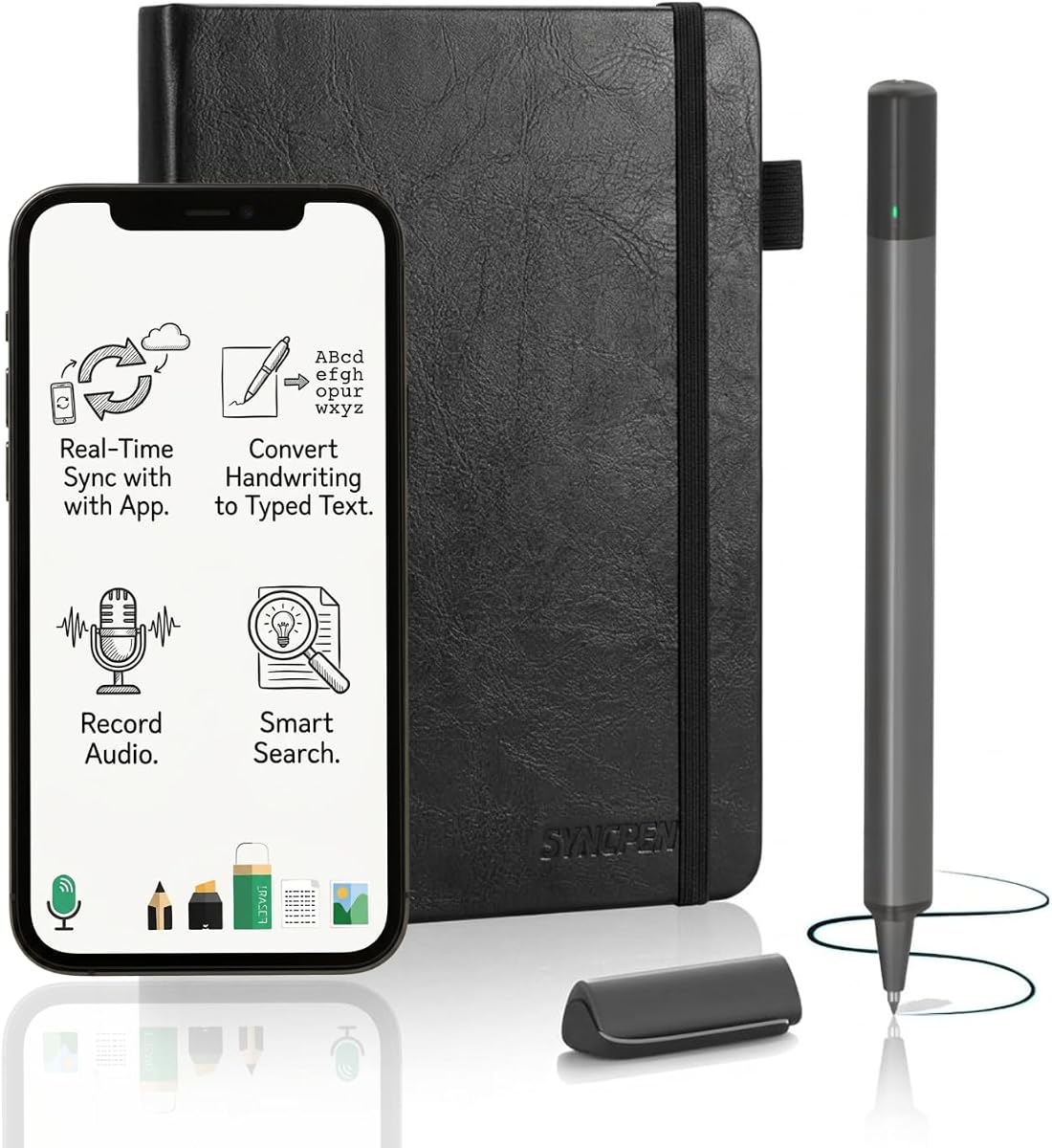
The SyncPen Digital Notebook Set focuses on turning handwritten material into structured digital content. Its smart pen captures real ink on a refined 8.5-by-6-inch, 128-page notebook and synchronizes pages to the app in real time. The 3.7 rating is respectable but trails several simpler products, so buyers should consider how the advanced feature set fits their workflow.
We may earn a commission when you buy through this link, at no additional cost to you.
Its most impressive capability is AI handwriting recognition across more than 71 languages, including support for complex mathematics and music notation. Searchable text, tags, and recognized content make notes much easier to navigate. The app offers lifetime access without recurring subscriptions, unlimited cloud storage, and AES 256 encryption for stored notes.
SyncPen also records audio synchronized with written strokes, allowing users to replay the surrounding meeting, lecture, or discussion. Offline notes are saved locally and synchronized after reconnection. Exports include PDF, DOCX, JPEG, and MP4, giving users more flexibility than many basic smart notebooks.
This product is a strong option for creators, students, and professionals who want to convert handwriting into editable documents and search a growing archive. The trade-off is complexity and a lower customer rating than the leaders. It is most attractive when automatic recognition, offline capture, audio, and multiple export formats are all genuinely important.
The AI engine can interpret handwriting in more than 71 languages and handle specialized notation such as mathematics and music. It is a notable advantage for users who plan to edit or repurpose their notes rather than merely archive them.
The included app provides lifetime access, unlimited cloud storage, and AES 256 encryption. This combination offers long-term capacity without a recurring charge, although buyers should confirm the service terms at the time of purchase.
PDF and DOCX support document-oriented workflows, while JPEG and MP4 accommodate visual or recorded content. Combined with real-time page capture, these formats make the system useful beyond a simple archival notebook.
We may earn a commission when you buy through this link, at no additional cost to you.
The teal Rocketbook Core combines a high 4.5 customer rating with the straightforward appeal of reusable paper and app-based organization. This letter-size version is especially suitable for students and professionals who want enough room for dense notes, outlines, diagrams, or handwritten project plans.
We may earn a commission when you buy through this link, at no additional cost to you.
Its college-ruled pages use Smart Titles and Smart Tags to make scanned documents easier to name and organize. The Rocketbook app can upload pages to major cloud platforms, including Google Drive, Dropbox, and OneNote. Users write with the included Pilot Frixion pen, then wipe the page clean with a damp cloth when the digital copy has been saved.
Compared with pen-based systems, the Core does not create a live digital page while the user writes. It also does not emphasize OCR or synchronized audio. That makes it less suited to automated transcription, but also easier to understand and use without learning an extensive digital ecosystem.
The teal finish gives the notebook a distinctive appearance while retaining a spiral-bound, paper-like design. It is an excellent recommendation for anyone who wants a polished, reusable, letter-format notebook with dependable cloud organization. Choose it over a dedicated smart pen when physical simplicity and user-controlled scanning matter more than automated digitization.
College rules, a spiral binding, and a scratch-resistant cover make the Core resemble a standard notebook. The Frixion pen and damp-cloth cleaning process preserve a familiar paper routine while extending page life.
Naming and tagging scanned notes helps prevent a digital archive from becoming difficult to navigate. The feature is especially valuable for students managing multiple classes or professionals handling several concurrent projects.
We may earn a commission when you buy through this link, at no additional cost to you.
The blue Rocketbook Core Executive brings the core reusable-notebook concept to a compact 6-by-8.8-inch format. Its 4.4 rating is among the higher results in the guide, while the smaller size makes it easier to carry than a full letter notebook. It is a practical option for commuting, travel, and quick-reference work.
We may earn a commission when you buy through this link, at no additional cost to you.
The grid layout provides more visual structure than plain ruled paper, making it useful for diagrams, mind maps, calculations, and bullet-based notes. As with other Core models, Smart Titles and Smart Tags help users name and categorize files after scanning them through the Rocketbook app. Google Drive, Dropbox, OneNote, and other supported cloud destinations can receive the digitized pages.
Users write with the included Pilot Frixion pen and erase completed pages with a damp cloth once the notes have been stored digitally. The process is deliberately manual, and it lacks the automatic live capture, audio, and OCR found in dedicated smart-pen products.
This Core is an excellent fit for people who want a smaller reusable notebook without giving up cloud organization. It may be less suitable for technical drawings, dense meeting notes, or large spreadsheets because of the reduced page dimensions. For those who prioritize portability and grid-based creativity, it offers a particularly balanced package.
The executive format is small enough for a handbag, backpack, or briefcase without becoming a pocket-sized memo pad. It offers more room for structured writing than a small notebook while remaining easier to carry than letter size.
The grid format makes it easier to align lists, sketch layouts, or divide a page into sections. It pairs well with a reusable-paper workflow because the physical page can be erased and used again after scanning.
We may earn a commission when you buy through this link, at no additional cost to you.
The Moleskine Smart Writing Set is a polished option for users who value the physical writing experience and want a digital duplicate without taking photographs. Its 3.3 customer rating is the lowest in the guide, which makes hands-on evaluation and attention to current customer feedback especially important.
We may earn a commission when you buy through this link, at no additional cost to you.
The smart pen uses Ncoded technology to capture handwriting and transfer it to a phone or tablet in real time. Users can then edit, search, share, and organize the resulting content. The set works with both Android and Apple devices, and the package includes a USB charging cable, an ink refill, and a user manual.
Its multimedia function records audio in sync with the written page, adding context to lectures, meetings, and personal notes. Content can be saved as a PDF and uploaded to Google Drive or Evernote. The primary strengths are therefore live digital transfer, audio context, broad device compatibility, and Moleskine's established notebook presentation.
The cloud ecosystem is less expansive than those offered by several competitors, which may be an important consideration for users who need many export formats or multiple destination choices. It is best for someone who prioritizes brand, physical design, and streamlined real-time transfer over extensive OCR and file-format controls. Buyers should account for its lower rating and confirm that the app experience meets their needs.
Ncoded technology transfers handwritten content to a connected device as it is created. This removes the separate scanning step and allows users to begin organizing or sharing the note soon after writing it.
Synchronized recordings can preserve explanations, decisions, and conversations associated with the page. The feature adds value in teaching, interviewing, and meeting environments where context matters as much as the final written words.
The set combines a smart pen with a physical notebook and supports both major mobile platforms. It is a sensible premium pick for buyers who value a familiar stationery experience along with digital transfer.
We may earn a commission when you buy through this link, at no additional cost to you.
The right smart notebook depends on whether you prioritize automatic capture, reusable paper, audio context, handwriting recognition, or straightforward cloud scanning. These factors determine how much setup is required and how closely the digital experience resembles writing on paper.
Live-capture systems record strokes through a smart pen while the user writes, creating a digital page in the app without photographs. Scanning systems require the user to open the app and scan completed pages. Live capture is more fluid for active meetings and lectures, while manual scanning provides more control over when information enters the cloud and generally involves a simpler interaction.
Choose live capture for automatic notes and rapid organization. Choose scanning when a paper-first routine, deliberate page uploads, and reusable physical pages are the priority.
OCR turns handwriting into editable text, but the quality and language coverage can differ significantly. The SyncPen supports recognition across more than 71 languages, while Ophaya provides handwriting-to-Word conversion. Moleskine emphasizes editing and searching without the same level of stated language coverage. Buyers should consider whether their writing is neat enough for recognition, which languages they use, and whether math, music, or diagrams need special support.
Prioritize robust OCR when notes will be revised or reused. For simple archival notes, scanning and manual search may be sufficient.
Cloud sync is useful only when it sends files to the services already used by the buyer. Rocketbook models support destinations such as Google Drive, Dropbox, and OneNote. Noteorius adds Evernote, while Moleskine supports Google Drive and Evernote. The YUAN system emphasizes direct local storage on a phone or tablet and also provides import and export tools. Confirm both the destination options and the intended import path before buying.
Look for direct support for your primary cloud platform. Favor systems with broad import and export if you regularly move between ecosystems.
A smart notebook should remain useful when a signal is weak or unavailable. Ophaya saves without connectivity and syncs automatically later. SyncPen uses an offline-first model, and YUAN uploads offline notes after reconnection. Rocketbook's manual scanning workflow avoids a continuous connection requirement entirely. Offline behavior matters most for students traveling, field workers, and professionals who regularly take notes in meeting rooms with unreliable service.
For uninterrupted work, choose a product that saves locally and resynchronizes automatically. Verify how synchronization is triggered and what happens to notes that remain pending.
Letter-size pages offer more space for equations, diagrams, and detailed outlines. Executive formats are easier to carry and work well for short meetings, daily journals, and travel. A5 notebooks and the YUAN A4-coded pages provide alternatives for different writing habits. Grid paper supports visual planning, college rules favor conventional prose, and planner templates help with recurring schedules. The correct format depends on the work being written, not only on device portability.
Choose larger pages for technical or detailed work. Choose compact or structured formats for portability, calendars, and quick reference.
Advanced workflows often depend on more than a page image. Audio recording can preserve meeting context, while PDF and editable document exports make notes easier to share. Tags, titles, timestamps, and file classification improve retrieval. Ophaya offers audio-linked notes and several export formats, SyncPen adds OCR and MP4 export, and Moleskine includes synchronized audio. Users who simply archive notes can prioritize a simpler workflow instead.
Prioritize audio and export features for professional collaboration. Prioritize tags and titles when a growing archive must remain easy to search.
Digital notes can contain sensitive personal, academic, or business information. SyncPen states that notes use AES 256 encryption and unlimited cloud storage, while YUAN offers a server-free local storage mode. Subscription policies are also relevant: Noteorius and SyncPen advertise app access without a recurring fee according to the supplied information. Buyers should review current terms, device support, export rights, and account portability before committing.
Choose local storage when control over file location matters. Review subscriptions and data terms before storing sensitive records.
Begin by fully charging a smart pen and installing the corresponding app on the correct phone or tablet platform. Pair the devices, complete any permission requests, and test a short page before beginning an important meeting or lecture. For systems that require coded or special paper, verify that the notebook is compatible and that the writing surface has been registered correctly.
Write normally, but keep pages flat when possible and avoid pressing hard enough to damage the surface. After taking a live-capture note, confirm that it appears in the app, apply a useful title and tags, and add any necessary audio context. For scanning notebooks, name and tag the file immediately after scanning it, then verify that the upload reached the intended cloud destination before erasing the physical page.
Clean reusable pages only after the digital copy is safely stored. Follow the manufacturer's cleaning instructions, using a damp cloth or the included towel with water where specified. Let the page dry fully before writing again, keep the pen and charging cable dry, and store the notebook away from excessive heat. Periodically export an important archive in a separate format to reduce reliance on a single app or cloud account.
A reusable smart notebook uses erasable paper that is scanned through an app to create a digital copy. A smart pen notebook uses a digital pen and compatible paper to capture strokes as they are written, often providing real-time synchronization. The first approach is simpler and more familiar, while the second offers more automatic capture and advanced digital tools.
Several featured systems support offline use. Ophaya saves notes without connectivity, SyncPen follows an offline-first approach, and YUAN stores notes locally before uploading them after reconnection. Rocketbook scanning also does not require a live connection for writing. Users should still confirm the current offline behavior and synchronization settings of the specific model they buy.
It depends on the product. The Ophaya, YUAN, and SyncPen systems are designed to work with compatible notebooks, and YUAN specifically states that its pen only works with special coded paper. Other digital pens may support ordinary paper, but the listed systems should be used with their documented notebooks for reliable capture and recognition.
Google Drive, Dropbox, and OneNote are repeatedly identified as supported destinations. Noteorius also lists Evernote, while Moleskine identifies Google Drive and Evernote. YUAN emphasizes local device storage with import and export capabilities. Buyers should confirm the latest service list because compatible applications and account requirements can change.
Ophaya includes OCR conversion into editable Word text, and SyncPen offers advanced AI handwriting recognition across more than 71 languages. Other products focus more on capturing, searching, and organizing handwritten pages. If editable conversion is essential, choose a model that explicitly documents OCR rather than assuming every smart notebook includes it.
Wait until the digital file has been scanned, named, and confirmed in the cloud destination. Then use a damp cloth or the included cleaning material as directed by the manufacturer. Do not use harsh chemicals, and allow the page to dry before writing again. YUAN's coded paper cannot be erased, so its pages should be preserved after digitizing.
Not all products require one. Noteorius and SyncPen specifically advertise access without recurring subscription fees, while other products may rely on third-party cloud accounts that have their own subscription options. Check the current app and service terms before purchase, especially if you plan to store extensive archives or use premium OCR and export functions.
Live capture is generally better when notes must be available immediately, searched automatically, or combined with audio. Scanning is often preferable for users who want a traditional paper workflow, control over upload timing, and a straightforward reusable-notebook experience. The best choice depends on how frequently you write and how deeply you integrate the digital archive into your work.
The Rocketbook Core Letter is the best budget and overall value option for buyers who want reusable paper, dependable ratings, and straightforward access to major cloud services. Ophaya is the most versatile all-round system, with real-time capture, OCR, audio-linked notes, offline work, and multiple exports. Moleskine offers a refined premium writing experience, although its lower rating and more limited ecosystem deserve careful consideration.
Before purchasing, prioritize the workflow you will actually use. Choose a scanning notebook for deliberate, paper-first organization; choose live capture for automatic note archives; and select OCR or audio features only when they solve a recurring problem. Page size, reusability, offline behavior, app compatibility, and preferred cloud destination can matter more than the number of advertised features.
Current prices, app availability, and cloud-service terms may change, so check the latest listing and manufacturer information before buying. The supplied customer ratings provide a useful starting point, but they should be considered alongside the type of writing, device setup, and digital workflow that best suits your needs.


