
Maoershan Hard Travel Protective Case
4.7Editor score
Hard EVA shell protection
Five-point-two-inch fit
Dedicated cable storage
Our Storage Case for Mini PC guide compares ten protective cases and compact enclosures, covering fit, storage, portability, durability, and hardware support.
A storage case for a mini PC should do more than hold the computer. It should limit scratches, absorb bumps, organize the power adapter and cables, and make the device easier to move between a home desk, office, classroom, or travel setting. The best choice depends heavily on the exact mini PC model and how much protection the owner needs.
This guide compares ten cases and compact computer enclosures using the specifications and product details provided by each manufacturer. It examines device fit, shell materials, internal organization, carrying options, cooling provisions, storage support, front connectivity, and compatibility with standard PC components. The list includes dedicated travel cases as well as smaller enclosures intended for building compact systems.
Each review explains the strongest reason to consider the product, along with limitations that may affect compatibility or convenience. Ratings are included for quick reference, but the practical fit, layout, and intended use matter more than a single score. Product listings and prices can change, so readers should verify the latest dimensions and current availability before purchasing.
4.7Editor score

4.7Editor score

4.8Editor score
The comparison includes dedicated mini PC travel cases, Mac mini organizers, and compact PC enclosures. The key differences are device fit, protection level, accessory organization, portability, cooling, and the hardware supported inside each chassis.



The RLSOCO Computer Case is a versatile protective carrier designed for numerous GMKtec, Beelink, and GEEKOM mini PC systems. With a 4.7 rating, its standout quality is the unusually broad compatibility list paired with a molded layout for both the computer and its accessories. It is sold as an empty case, so the mini PC, adapter, and cables are not included.
We may earn a commission when you buy through this link, at no additional cost to you.
The case combines high-density EVA with 1680D material to create a structured exterior around the device area. Two molded grooves help position the mini PC and accessories, while separate lower and mesh-storage areas keep the power adapter away from the computer and hold HDMI cables or smaller items. A soft pad and adhesive strap add retention, reducing movement and helping protect against bumps and shocks.
The YKK zipper is another meaningful detail because a carrying case opens and closes frequently, often in less controlled environments than a desk. The zipper is described as smooth and durable, while the hard shell and qualified materials add confidence for routine transport. The product also carries a two-year assurance, which separates it from cases offering only a basic protective shell.
This is the strongest all-around choice for someone who owns one of the explicitly listed mini PCs and wants the adapter and cables stored with it. Buyers should compare the model names in the listing carefully, especially if they own a similarly named variant. The case is most appropriate for organized transport and storage rather than for housing a fully assembled desktop system.
The molded grooves, soft pad, and adhesive strap work together to keep the mini PC stable inside the case. This arrangement is more useful than simply placing the computer in a loose compartment because it limits shifting during carrying and helps isolate the device from accessories.
A molded bottom tray and half-open mesh pocket separate the mini PC, power adapter, and cables. That organization reduces the chance of leaving a needed adapter behind and keeps small accessories from shifting around the computer.
We may earn a commission when you buy through this link, at no additional cost to you.
The Zalman CUBIX-G is a compact Micro-ATX and MATX tower enclosure rather than a padded carrier for a finished mini PC. It carries a 4.4 rating and stands out for a polished black design, three preinstalled FRGB fans, and support for relatively substantial desktop hardware. It is intended for people building a small gaming or productivity system around standard PC components.
We may earn a commission when you buy through this link, at no additional cost to you.
Its three 3-pin DC fans provide immediate airflow and lighting without requiring the builder to install basic cooling hardware. The case supports GPUs up to 280mm, ATX power supplies up to 140mm, and CPU air coolers up to 155mm. Storage flexibility includes space for three 2.5-inch hard drives, with two dedicated positions and one combination arrangement that also accepts a 3.5-inch drive.
The main limitation is that this is a computer enclosure, not a portable organizer for a compact desktop. Its fixed RGB lighting relies on 3-pin DC control rather than a more flexible digital lighting solution, and buyers who do not want illuminated fans may find that feature distracting. It also cannot provide the soft, molded isolation offered by a dedicated travel case.
The CUBIX-G is a good choice for a builder who wants a visually complete compact PC case with cooling already installed and modern front I/O. It is less relevant to someone who only needs a protective sleeve for a palm-sized mini PC. Confirm the dimensions of the graphics card, power supply, and cooler before ordering.
Three preinstalled FRGB fans give the enclosure an immediately finished appearance and provide cooling positions without a separate installation step. The fixed 3-pin DC lighting keeps the design straightforward, though it offers less customization than addressable or software-controlled systems.
Support for a 280mm graphics card and 140mm ATX power supply allows this small tower to serve more than light office tasks. The drive positions also give builders some flexibility for conventional 2.5-inch and 3.5-inch storage.
We may earn a commission when you buy through this link, at no additional cost to you.
The Maoershan Hard Travel Protective Case offers a simple way to protect an Apple 2024 Mac mini with M4 chip or the listed KAMRUI mini PC. Its 4.7 rating reflects a well-received balance of hard-shell protection and focused device fit. The product includes only the case, leaving the computer and accessories to be supplied separately.
We may earn a commission when you buy through this link, at no additional cost to you.
Constructed from EVA, the case provides a rigid exterior intended to protect against bumps, dents, and scratches. Its stated internal dimensions are 5.23 by 2.36 by 5.23 inches in length, height, and width. That relatively compact format makes it practical for moving a supported computer between locations without turning the device into a loosely protected item in a larger bag.
Unlike cases with several layered accessory areas, this model focuses on the essentials. That makes it easier to pack and carry but less convenient for owners who want a mouse, charger, cables, and a full desktop setup organized in one place. It is also important to check the internal size against the exact computer and any protruding components before use.
This is a practical choice for someone who primarily needs a hard protective shell and does not require elaborate accessory storage. It offers strong value within the dedicated travel-case category and works for either of the named device families. Buyers seeking a handle, shoulder strap, or several accessory compartments should consider one of the more organizer-focused alternatives.
The EVA exterior creates a rigid barrier around the computer and helps reduce the effect of accidental knocks. Its simple construction also avoids adding unnecessary bulk when the mini PC is being carried between nearby rooms, desks, offices, or presentation spaces.
The stated compatibility covers the 2024 M4 Mac mini and a specific KAMRUI configuration. That targeted approach can produce a neater fit than a universal pouch, provided the buyer owns one of the intended models.
We may earn a commission when you buy through this link, at no additional cost to you.
The Mini PC Computer Hard Protective Case is one of the broadest universal options in this guide. Its 4.3 rating reflects a generally useful combination of rigid construction, a substantial accessory area, and compatibility with many devices from Apple, KAMRUI, GMKtec, Beelink, ACEMAGIC, AWOW, Bmax, and GEEKOM. The wording around included items is inconsistent, so buyers should treat it as a case purchase and check the listing carefully.
We may earn a commission when you buy through this link, at no additional cost to you.
Nylon wraps around a sturdy hard EVA structure intended to protect the computer from shock, scratches, drops, bumps, splashes, and dust. The compatibility list includes specific KAMRUI, GMKtec, Beelink, ACEMAGIC, AWOW, Bmax, and GEEKOM models. Internal dimensions are listed as 8.85 by 5.11 by 1.96 inches, with a host area of 5.5 by 5.1 inches.
Storage is one of this case's strongest attributes. A mesh pocket can hold cables, cords, and smaller accessories, while the expanded side area is intended to accommodate a mouse, charger, and other items. A handle makes the larger format easier to carry. That extra room improves organization but also means the case may feel less compact than a single-device sleeve.
The product is a strong candidate for owners of one of the many listed mini PCs who want more than basic protection. The most important precaution is to compare both the host size and full internal measurements with the device and accessories. Users should also verify what is actually included because the supplied description contains a contradictory note about keyboard case terminology.
The mesh pocket and expanded side section separate cords, a charger, and a mouse from the computer. This makes the case more useful for a complete portable workspace than a simple shell that only accommodates the device.
Combining nylon with hard EVA creates a structured outer layer designed to resist impact, dirt, and splashes. The case is particularly relevant for commuters and shared workspaces where the computer may be moved frequently.
We may earn a commission when you buy through this link, at no additional cost to you.
The Three-Layer Mac Mini Organizer is the most complete carrying solution for an Apple 2026 or 2024 Mac mini setup. It earns a 4.8 rating and distinguishes itself with organized accessory storage, two carrying methods, a hard EVA exterior, and a soft-lined interior. It is a case-only product, and neither the computer nor its accessories are included.
We may earn a commission when you buy through this link, at no additional cost to you.
The exterior measures 12.2 by 6.3 by 3.54 inches, while the Mac mini compartment measures 5.12 by 5.12 by 2.36 inches. Inside, three layers divide the setup into functional groups. A zippered mesh pocket can hold a power cord or selected keyboard, three small pockets accommodate a hard drive, memory card, or earphones, and another mesh pocket stores a mouse or power adapter.
The rigid shell helps shield the computer during everyday storage and transport, while the soft lining helps reduce scratches against the device surfaces. A top handle supports quick lifting, and an adjustable shoulder strap offers hands-free carrying. A double-zipper opening improves access and allows the case to open wider without forcing the contents into a narrow opening.
This organizer is ideal for a Mac mini owner who regularly moves between a home office and a workplace or carries a substantial accessory kit. It is less suitable for a small Windows mini PC with a different shape, and its expanded dimensions may be excessive for someone who only carries the computer. Confirm the fit and selected accessory layout before buying.
Three separate storage levels prevent cables, a mouse, a drive, and the computer from mixing together. This arrangement makes it easier to pack consistently and quickly identify a missing accessory before leaving.
The top handle is convenient for short trips and desk-to-desk movement, while the adjustable shoulder strap supports longer journeys. The double-zipper design also makes the organized interior easier to access.
We may earn a commission when you buy through this link, at no additional cost to you.
The Apple M4 Mini PC Case is a highly rated, model-specific protective shell with a 5.0 rating. It is designed around the 2024 Mac mini M4 chip and emphasizes durability, simple handling, and a small amount of accessory organization. The device and accessories are sold separately, making this strictly a case-only purchase.
We may earn a commission when you buy through this link, at no additional cost to you.
High-density EVA and 1680D material form the exterior. The case is described as semi-waterproof, antistatic, and shockproof, with protection against accidental bumps, drops, and scratches. A comfortable hand grip supports easy portability, and a special mesh pocket gives cables or other small essentials a dedicated place away from the computer.
A smooth, strong double zipper allows the case to open and close without the snag that can occur with basic closures. Its close focus on the M4 model should provide a more exact arrangement than a loose universal sleeve. However, buyers with a different Mac mini generation should not assume compatibility based only on the general product family name.
This case is a compelling choice for an owner of the specified M4 Mac mini who values a small, protective, uncomplicated carrier. It is especially useful for commuting, office storage, and keeping the computer together with a small collection of cables. Those wanting broader accessory storage or alternate carrying methods should look at the larger organizer-style cases.
Designing the case for the M4 configuration helps keep the computer positioned correctly within the EVA structure. The dedicated mesh pocket adds a little utility without turning the case into a large, multi-device bag.
The semi-waterproof and antistatic outer material adds resilience beyond basic scratch protection. Strong double zippers help maintain closure during transport while keeping the interior accessible.
We may earn a commission when you buy through this link, at no additional cost to you.
The Mac Mini M4 Pro Case is a simple hard travel case for the 2024 Apple Mac mini with either M4 or M4 Pro chip. Its 4.6 rating indicates a favorable reception for owners seeking basic protection without a large organizer system. Only the case is included, so the desktop and any accessories must be purchased or supplied separately.
We may earn a commission when you buy through this link, at no additional cost to you.
The case is made from a synthetic material described as tough and durable, with EVA listed as its material. Its internal size is 9 by 5.7 by 2.36 inches, offering enough room for the intended computer while retaining a relatively low-profile shape. The principal protection comes from the hard exterior against bumps, dents, and scratches.
This product does not describe the same level of cable organization as the multi-compartment organizers. That can be an advantage for buyers who want fewer parts and a simpler packing routine, but it leaves less room for accessories. Its long internal dimension also should be compared carefully with the actual Mac mini and any accessories intended to travel alongside it.
The case is best suited to a Mac mini M4 or M4 Pro owner who needs dependable daily storage and occasional transport. It is a less compelling choice for users who regularly move a mouse, keyboard, charger, and several cables as one complete setup. Confirm the internal measurements and included items before ordering.
Supporting both M4 and M4 Pro configurations gives owners of either specified model a relevant option. The dedicated cavity is intended to hold the computer securely while keeping the overall case easy to carry.
The synthetic EVA construction focuses on the essentials: resisting bumps, dents, and scratches. Buyers who value a pared-back design may appreciate the lack of complicated internal organization.
We may earn a commission when you buy through this link, at no additional cost to you.
The Carrying Handle Micro-ATX Case is a compact tower enclosure for builders who want to assemble a powerful desktop in a smaller footprint. Its 3.7 rating is the lowest among the listed products, but the underlying specifications are broad for the category. The chassis measures 380 by 188 by 308 millimeters and accepts both Micro-ATX and Mini-ITX motherboards.
We may earn a commission when you buy through this link, at no additional cost to you.
Hardware support extends to standard ATX power supplies, graphics cards up to 350mm, and CPU air coolers up to 160mm. Cooling can be configured with up to five 120mm fan positions: two at the top, two at the bottom, and one at the rear. The top also supports a 240mm radiator, enabling either air or liquid cooling layouts, although neither fans nor a radiator are included.
The storage system is adjustable. Graphics card clearance ranges from 270mm to 350mm depending on the combination of installed drives, and the chassis can support up to two 3.5-inch hard drives and one 2.5-inch SSD. A reinforced metal-and-rubber top handle makes it easier to move the completed computer between setups, while top, front, and bottom dust filters help limit buildup.
Front I/O includes USB-C at 5Gbps, USB 3.0, and audio connections. Despite the carrying handle, this remains a desktop enclosure rather than a padded travel case, and the handle is not a substitute for a shipping-grade protective container. It is best for a builder who values flexibility, component clearance, and portability between fixed locations.
Five possible 120mm fan positions and top radiator support give the builder several thermal layouts. This flexibility is useful for a compact system expected to handle sustained desktop workloads.
The reinforced top handle makes a finished tower easier to move between desks or rooms. It should still be handled carefully, especially when the system contains heavy graphics hardware or storage.
We may earn a commission when you buy through this link, at no additional cost to you.
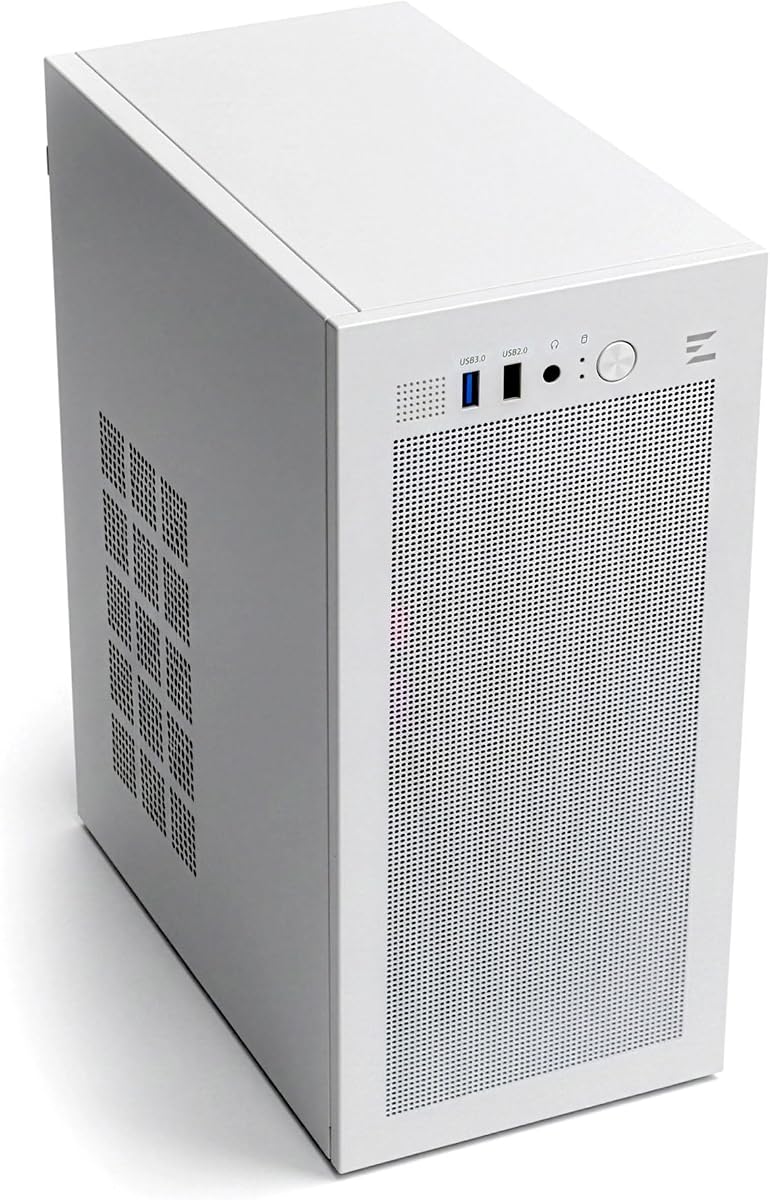
The Zalman CUBIX Micro-ATX Case combines a 17.1-liter volume with durable 0.8mm steel construction. Its 4.5 rating reflects a generally positive balance of compact dimensions, airflow, hardware support, and understated styling. It is a small desktop chassis for Micro-ATX, MATX, and Mini-ITX builds, not a carry case for a ready-made mini PC.
We may earn a commission when you buy through this link, at no additional cost to you.
The perforated front panel draws air through a preinstalled 80mm fan, providing basic cooling without requiring the builder to install a fan immediately. Hardware support includes standard ATX power supplies, graphics cards up to 260mm, and CPU coolers up to 137mm tall. These limits make it important to measure components before selecting a larger graphics card or tower cooler.
Front connectivity includes one USB 3.0 port, one USB 2.0 port, and a 3.5mm stereo auxiliary jack. Although the description mentions a family of ports, only the listed connectors should be expected for this specific model. The white finish and compact steel body make it suitable for a clean office, entertainment center, or space-conscious workstation where appearance and footprint both matter.
This enclosure is a good match for builders creating a small general-purpose system with modest component dimensions. It is less suitable for a high-end gaming build needing maximum GPU length, elaborate cooling, or many front ports. It also does not provide the padded device isolation needed for carrying a small mini PC through travel environments.
The 0.8mm steel body gives the enclosure a more substantial feel than many similarly sized plastic cases. At 17.1 liters, it preserves desk space while accommodating standard motherboards and power supplies.
A perforated front panel and included 80mm fan create an immediate path for incoming air. Additional fan and radiator options depend on the available mounting positions, which should be checked for the exact build.
We may earn a commission when you buy through this link, at no additional cost to you.
The RUIX OV502 Pro is a compact Micro-ATX gaming enclosure with a 4.9 rating. Its main appeal is a modern appearance combined with flexible cooling and generous GPU clearance. Dual panoramic tempered glass panels are designed to showcase the components, while the upgraded internal layout aims to provide more useful space than the original OV502 design.
We may earn a commission when you buy through this link, at no additional cost to you.
The case supports 240mm liquid coolers, allowing builders to install a 240mm AIO radiator while retaining a compact footprint. Graphics cards can measure up to 340mm, offering more room than most mini tower designs. These specifications make it relevant to creator systems and gaming builds that combine modern components with limited desk space.
Its panoramic tempered glass panels create a clean, display-like appearance and provide durability while keeping the internal hardware visible. The optimized airflow and expanded internal arrangement are intended to balance component clearance with cooling performance. A USB 3.0 front connection supports convenient peripheral access.
The OV502 Pro is best for someone building a compact but visually distinctive system rather than transporting a miniature computer in a padded shell. It should fit many Micro-ATX gaming and creator configurations, but buyers should still verify motherboard, power supply, cooler, and radiator dimensions before ordering. The case is offered in black and provides no listed carrying handle.
Dual panoramic tempered glass panels turn the enclosure into part of the desk display. This is especially appealing for builds with coordinated lighting or visually interesting cooling hardware.
A 240mm AIO and a graphics card up to 340mm provide ample room for current compact-build components. The combination helps separate the case from smaller enclosures limited to basic air cooling and short cards.
We may earn a commission when you buy through this link, at no additional cost to you.
The right choice starts with distinguishing between a padded travel case and a compact PC enclosure. From there, device dimensions, protection, organization, cooling, and the hardware you intend to carry or install should guide the decision.
A storage case for a mini PC is normally a fitted, padded carrier intended to hold a complete computer between locations. It emphasizes impact absorption, dust resistance, accessory organization, and convenient carrying. A compact PC chassis has a different purpose: it houses motherboard, graphics card, power supply, cooling, and storage components during operation. Several listings in this guide use the broader phrase of a PC case, so readers must decide whether they need protection for an existing mini PC or an enclosure for a new build.
Choose a travel case if the computer is already assembled and must fit into a bag, vehicle, office drawer, or checked luggage. Choose a micro-ATX or Mini-ITX chassis if you are assembling standard desktop components. These two product types should not be compared solely by appearance, because their protection methods and hardware requirements are fundamentally different.
Compatibility claims are most useful when they identify the precise mini PC model or chip generation. Names such as M4, M4 Pro, S12 Pro, SER5 Pro, IT13, or G3 Plus refer to particular devices with defined dimensions. A case made for one model may not accommodate another model in the same product family, particularly when ports, feet, brackets, or power adapters extend beyond the main chassis.
Compare the manufacturer's dimensions with the device and any accessories that need to remain attached. Check the case's internal or host-area measurements against the computer rather than relying on the broad brand name. If a model is not listed, contact the seller or measure the unit rather than assuming that similar-looking devices share the same fit.
Hard EVA and rigid exterior shells help resist crushing, bumps, and impacts, while nylon can add toughness and abrasion resistance. A soft inner lining reduces the chance that the computer's finish will be scratched when it contacts the case. Dense woven fabrics can improve grip and conceal scuffs, but they generally provide less structural protection than a molded shell.
Look for a hard outer structure, a cushioned device cavity, and a closure that will not open unexpectedly. The material description is only useful when paired with a secure fit. A case with a rigid exterior but no device retention may allow the computer to move internally during transport.
A dedicated computer compartment protects the most important item, but a useful case should also accommodate the power adapter, essential cables, and any peripherals that must travel with it. Separate mesh pockets and molded trays reduce cable clutter and prevent small pieces from settling against vents or ports. Larger organizer cases may additionally provide room for a mouse, compact keyboard, memory card, earphones, or portable drive.
Choose a larger multi-compartment design when the complete setup moves regularly. Choose a compact fitted shell when only the computer and a small cable set need protection. Extra storage increases bulk, so the most elaborate layout is not automatically the most convenient choice for light travel.
A handle makes a case easier to lift from a shelf or move across a room, while an adjustable shoulder strap supports hands-free transport over longer distances. A full zipper opening exposes the interior more readily than a narrow flap and makes it easier to check whether every accessory is present before departure. Smooth zippers are particularly valuable when the case is opened in a hurry or in an awkward location.
For infrequent movement, a simple handle or zipper closure may be enough. For regular travel, prioritize a balanced handle, a robust strap attachment, and an opening that reveals the entire layout. Also consider whether the case fits comfortably inside the bag or vehicle compartment you already use.
For a compact computer enclosure, cooling begins with the case's fan and radiator positions, front panel openings, and dust filtration. A preinstalled fan provides a convenient starting point, while support for a 240mm radiator enables a more capable liquid-cooling arrangement. Graphics card clearance, CPU cooler height, and power supply dimensions must all be checked independently because a compact volume alone does not guarantee component compatibility.
Do not assume a larger advertised radiator support means every fitting is available. Verify the exact mounting locations and the components' dimensions. Dust filters are also useful in long-term installations because they help reduce debris accumulation around heatsinks and intake openings.
The smallest fitted cases offer excellent portability and focused protection for a single device. Multi-layer organizers take up more space but reduce the need for separate accessory bags. Compact PC enclosures are larger still because they need to accommodate standard desktop hardware, yet they provide a permanent structure for a system rather than soft isolation for an existing mini PC.
Choose the least complicated format that meets your actual needs. Carrying a large organizer for a computer with no accessories creates unnecessary bulk, while a tiny sleeve may be inadequate for a full desktop kit. The best balance is usually a case whose compartments correspond to the equipment actually carried.
Customer ratings can reveal recurring satisfaction or frustration, but they should complement rather than replace a compatibility check. A highly rated model-specific case is usually more reassuring than a broadly advertised universal option, while a well-reviewed chassis may still be unsuitable if its dimensions cannot hold the selected hardware.
Read the supplied feature details and confirm the included contents. Several listings explicitly sell the case only, and one contains inconsistent wording about accessories. Clear expectations reduce disappointment, especially when the purchase is intended to protect a valuable computer or complete a custom desktop.
Before placing a computer in a fitted case, compare the device model with the compatibility list and measure any protruding accessories. Let the computer cool down before closing the case, especially after a demanding desktop task. Place the computer in its shaped cavity with any included pad or strap positioned correctly, then arrange the power adapter and cables in their assigned compartments without forcing zippers or mesh pockets.
Open the case fully when possible and check that no cable is trapped in the closure. Keep vents and ports clear, and do not place loose objects against the computer's intake or exhaust openings. For a compact PC chassis, install the power supply, motherboard, graphics card, storage, and cooling hardware with the system powered off, following component manufacturers' handling guidance.
For maintenance, wipe the exterior with a soft, slightly damp cloth and avoid soaking the lining or pushing moisture into seams. Let the case dry completely before storing a device inside it. Remove loose dust from mesh pockets and storage areas, inspect the zipper and handle attachments, and keep the case away from excessive heat, direct sunlight, and moisture. Periodic checks help catch a damaged closure or shifting pocket before the case is needed for travel.
Some cases are designed with broad compatibility, while others fit only a particular model or chip generation. Check the exact supported model names and compare the case's internal or host-area dimensions with the computer. Similar-looking devices can differ in size, feet, ports, and included brackets, so uncertain buyers should measure or contact the seller.
The dedicated carrying cases reviewed here are generally sold as case-only products. The computer, power adapter, cables, mouse, and other accessories must be supplied separately. Always read the current item details because package contents can vary between listings and product revisions.
A travel case stores and transports a complete mini PC with soft or molded protection for the device and accessories. A compact PC case is a chassis used to install and operate standard motherboard, graphics card, power supply, cooling, and storage components. The former prioritizes portability and organization; the latter prioritizes airflow, clearance, and desktop functionality.
A hard EVA shell is well suited to protecting against everyday bumps, dents, pressure, and scratches when the computer is held in its shaped cavity. It does not replace a proper shipping container for severe impacts or checked baggage. Use internal retention, keep accessories separated from the computer, and follow airline and carrier guidance when traveling.
Choose a simple sleeve when you carry only the computer and perhaps one short cable. Choose a multi-layer organizer when you regularly transport a power adapter, mouse, keyboard, storage drive, or several cables. The organizer offers better organization but generally occupies more space and weighs more than a fitted shell.
No. A padded storage case is intended to hold an existing computer during transport or storage and is not designed to house a running desktop system. A compact PC chassis has mounting points, airflow openings, power connections, and expansion support for assembled components. These product types serve different purposes.
Check the motherboard form factor, power supply dimensions, graphics card length, CPU cooler height, and available cooling positions. Product pages may advertise a maximum radiator or GPU size, but several restrictions can apply at once. Measure every large component and compare it with the chassis dimensions before ordering.
Shut the computer down, disconnect unnecessary cables, let it cool, and place it in the fitted cavity with all supports properly positioned. Keep the case in a dry, dust-free location away from direct sunlight and excessive heat. Periodically inspect the closure and lining, particularly if the case is stored under furniture or in a vehicle.
The RLSOCO Multi-Model Mini PC Case is the strongest general pick because it combines broad supported-model compatibility, molded storage, firm retention, and a YKK zipper. The Maoershan Hard Travel Protective Case is a compelling budget-oriented option for the named Mac mini M4 and KAMRUI configurations, while the Three-Layer Mac Mini Organizer is the premium choice for owners who want to carry a complete, neatly separated Mac mini setup.
Prioritize the fit first, then choose the amount of protection and organization that matches the equipment you actually carry. A model-specific fitted case is often cleaner and easier to use than an uncertain universal fit. For custom desktop builds, the Zalman, RUIX, and other compact chassis options should instead be judged by motherboard support, GPU clearance, cooling positions, drive layout, and front connectivity.
Customer ratings provide useful context, but they cannot replace checking the current dimensions, model list, and included contents. Product designs and availability can change, and retailer pricing also varies over time. Review the latest listing and confirm the current cost and compatibility immediately before making a purchase.